
FOREVER MATB-100
FOREVER MATB-100 Wireless Power Bank User Manual
Model: MATB-100
1. Įvadas
Thank you for choosing the FOREVER MATB-100 Wireless Power Bank. This device is designed to provide convenient and efficient charging for your mobile devices, featuring both wired and wireless charging capabilities. Please read this manual carefully before using the product to ensure safe and optimal performance.
2. Pagrindinės savybės
- Universalus įkrovimas: Supports simultaneous charging of three devices via wireless induction, USB-A, and USB-C ports.
- LED indikatorius: A practical LED display accurately shows the current battery level of the power bank.
- Smart Magnetic Grip: Features a special magnetic grip to stabilize your phone with the power bank, allowing hands-free use during charging.
- Didelė talpa: Equipped with a 10,000 mAh battery, providing multiple recharges for your devices.
- Greitas įkrovimas: Supports Power Delivery (PD) and Quick Charge (QC) technologies for rapid charging.
- Integruota atraminė kojelė: Allows the power bank to function as a stand for your phone while charging.
3. Produktas baigtasview
Familiarize yourself with the components of your FOREVER MATB-100 Wireless Power Bank.

3.1 vaizdas: Priekyje ir gale view of the FOREVER MATB-100 Wireless Power Bank, highlighting the wireless charging pad and the integrated kickstand.

3.2 vaizdas: Šoninė view of the power bank, illustrating the USB-A output port, USB-C input/output port, and the LED battery level indicators.

3.3 vaizdas: The power bank magnetically attached to the back of a smartphone, demonstrating the secure magnetic grip feature.

3.4 vaizdas: Diagram showing the dimensions of the power bank: approximately 10.8 cm in length and 6.8 cm in width.
Komponentai:
- Wireless Charging Pad (with magnetic alignment)
- LED akumuliatoriaus įkrovos indikatorius
- Maitinimo mygtukas
- USB-A išvesties prievadas
- USB-C įvesties / išvesties prievadas
- Integruotas stovas
4. Sąranka ir pradinis įkrovimas
4.1 Išorinės baterijos įkrovimas
Before first use, fully charge your FOREVER MATB-100 Power Bank.
- Prijunkite pridėtą USB-C laidą prie išorinės baterijos USB-C prievado.
- Connect the other end of the USB-C cable to a compatible USB wall adapter (not included). For optimal charging speed, use a Power Delivery (PD) compatible adapter.
- The LED indicators will illuminate to show the charging progress. When all LEDs are solid, the power bank is fully charged.
Pastaba: The power bank can be charged using the USB-C port. It is recommended to fully charge the power bank every three months if not in regular use to maintain battery health.
5. Naudojimo instrukcijos
5.1 Baterijos lygio tikrinimas
Press the power button once to check the remaining battery level. The LED indicators will light up, with each LED representing approximately 25% of the battery capacity.
5.2 Belaidis įkrovimas
The MATB-100 supports wireless charging for compatible devices, including MagSafe-enabled iPhones and other Qi-compatible smartphones.
- Įsitikinkite, kad išorinė baterija yra pakankamai įkrauta.
- Place your wireless charging compatible device onto the wireless charging pad of the power bank. For MagSafe-enabled devices, the power bank will magnetically align.
- The device should begin charging automatically. If not, press the power button on the power bank to activate wireless charging.
- The LED indicators on the power bank may show charging status.
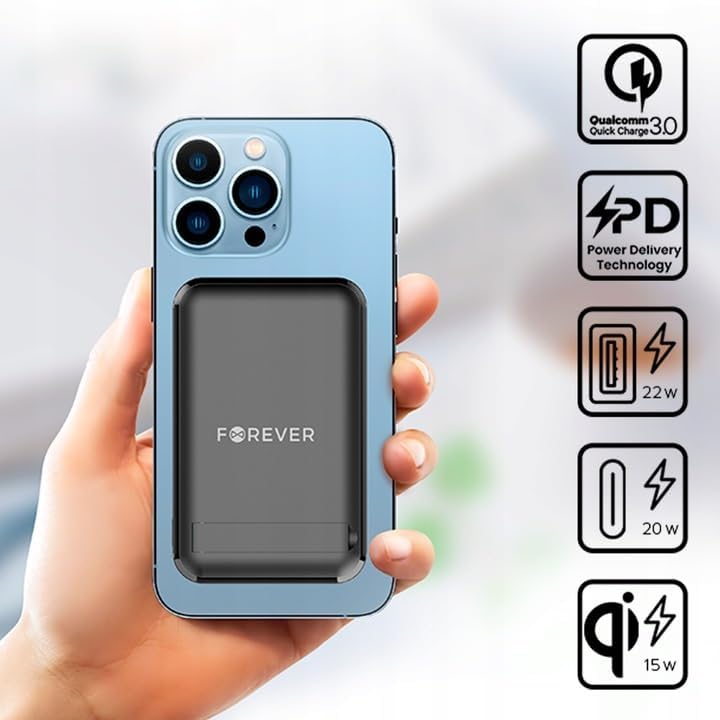
5.1 vaizdas: A smartphone attached to the power bank, illustrating wireless charging in progress and icons representing Quick Charge, Power Delivery, and various wattage išėjimai.
Patarimas: Use the integrated kickstand to prop up your phone while it charges wirelessly, allowing for comfortable viewing.
5.3 Wired Charging (USB-A and USB-C)
The power bank can charge devices via its USB-A and USB-C ports.
- Įsitikinkite, kad išorinė baterija yra pakankamai įkrauta.
- Connect one end of a compatible charging cable to your device and the other end to either the USB-A or USB-C output port on the power bank.
- The device should begin charging automatically. If not, press the power button on the power bank.

5.2 vaizdas: A smartphone connected to the power bank via a USB-C cable, demonstrating wired charging.
Pastaba: The USB-C port functions as both an input for charging the power bank and an output for charging other devices. The USB-A port is an output only.
5.4 Vienalaikis įkrovimas
The FOREVER MATB-100 can charge up to three devices simultaneously (one wirelessly, one via USB-A, and one via USB-C). The total output power will be distributed among the connected devices.
6. Priežiūra ir priežiūra
- Keep the power bank dry. Moisture can damage the internal circuitry.
- Nelaikykite ekstremalių temperatūrų (karšta ar šalta).
- Saugokitės, kad maitinimo blokas nenukristų arba nepaveiktų stipraus smūgio.
- Paviršių valykite minkšta, sausa šluoste. Nenaudokite stiprių cheminių medžiagų ar abrazyvinių valiklių.
- Laikyti vėsioje, sausoje vietoje, apsaugotoje nuo tiesioginių saulės spindulių.
- If not used for extended periods, charge the power bank at least once every three months to prolong battery life.
7. Problemų sprendimas
7.1 Nesikrauna išorinė baterija
- Įsitikinkite, kad USB-C laidas yra tvirtai prijungtas prie išorinės baterijos ir sieninio adapterio.
- Patikrinkite, ar sieninis adapteris veikia tinkamai ir yra įjungtas į veikiantį maitinimo lizdą.
- Pabandykite naudoti kitą USB-C laidą ir (arba) sieninį adapterį.
7.2 Įrenginys neįkraunamas iš išorinės baterijos
- Check the power bank's battery level. If it's low, recharge the power bank.
- Norėdami įjungti įkrovimą, paspauskite išorinės baterijos maitinimo mygtuką.
- For wired charging, ensure the cable is securely connected to both the power bank and your device. Try a different cable or port.
- Norėdami įkrauti belaidžiu būdu, įsitikinkite, kad jūsų įrenginys tinkamai padėtas ant įkrovimo padėklo ir yra suderinamas su belaidžiu įkrovimu. Nuimkite visus storus dėklus, kurie gali trukdyti.
- Ensure there are no metallic objects between the power bank and your device during wireless charging.
7.3 Lėtas įkrovimas
- Įsitikinkite, kad naudojate aukštos kokybės, suderinamą įkrovimo laidą.
- For wired charging, ensure your device supports Quick Charge (QC) or Power Delivery (PD) if you expect fast charging speeds.
- For wireless charging, ensure your device supports fast wireless charging and is correctly aligned.
- Vienu metu įkraunant kelis įrenginius, gali sumažėti kiekvieno atskiro įrenginio įkrovimo greitis.
8. Specifikacijos
| Modelio pavadinimas | MATB-100 |
| Prekės ženklas | AMŽAI |
| Baterijos talpa | 10000 mAh (milijonaiampprieš valandą) |
| Baterijos sudėtis | Ličio jonų |
| Jungties tipas | USB tipas A, USB tipas C |
| Ypatinga funkcija | Wireless Charging, Magnetic Grip, Integrated Kickstand |
| ttage | 5 voltų (išvestis) |
| Prievadų skaičius | 2 (USB-A, USB-C) + Wireless Charging |
| Suderinami įrenginiai | Smartphones (including MagSafe compatible), Tablets, Headphones, Smartwatches |
| Matmenys (I x P x A) | 10.8 cm x 6.8 cm x 2 cm (apytiksliai) |
| Maksimali belaidė galia | 15W |
| Maksimali USB-A išvestis | 22.5 W (greitas įkrovimas) |
| Max USB-C Output | 20W (Power Delivery) |
9. Saugos informacija
- Neardykite, neatidarykite ir neplėšykite akumuliatorių bloko.
- Nelaikykite išorinės baterijos karštyje ar ugnies vietoje. Venkite laikyti tiesioginiuose saulės spinduliuose.
- Do not short-circuit the power bank. Do not store battery packs haphazardly in a box or drawer where they may short-circuit each other or be short-circuited by conductive materials.
- Saugokite maitinimo bloką nuo mechaninio smūgio.
- Patekus į bateriją, saugokite, kad skystis nepatektų ant odos ar į akis. Patekus į akis, pažeistą vietą gausiai nuplaukite vandeniu ir kreipkitės į gydytoją.
- Laikykite maitinimo bloką vaikams nepasiekiamoje vietoje.
- Prižiūrėkite vaikus, kai jie naudojasi išorine baterija.
- Nenaudokite kitokio įkroviklio, išskyrus specialiai numatytą naudoti su įranga.
- Dispose of the power bank properly according to local regulations. Do not dispose of with household waste.
10. Garantija ir palaikymas
For warranty information and technical support, please refer to the documentation provided with your purchase or contact the FOREVER customer service department. Keep your proof of purchase for warranty claims.
For further assistance, you may visit the official FOREVER websvetainėje arba susisiekite su savo pardavėju.
Ask a question about this manual
Ask about setup, troubleshooting, compatibility, parts, safety, or missing instructions. Manuals+ will review the question and use this page’s manual context to help answer it.