
1. Įvadas
Welcome to the user manual for your new HP Victus 16.1" Gaming Notebook. This document provides essential information to help you set up, operate, maintain, and troubleshoot your device. Please read this manual thoroughly to ensure optimal performance and longevity of your notebook.
The HP Victus 16.1" Gaming Notebook is designed for high-performance computing and gaming, featuring an AMD Ryzen 5 7640HS processor, NVIDIA GeForce RTX 3050 graphics, 16GB of RAM, and a 512GB SSD, all complemented by a 144Hz Full HD display.
2. Saugos informacija
Observe the following safety guidelines to prevent damage to your device or personal injury:
- Use only the power adapter supplied with your notebook.
- Do not expose the notebook to extreme temperatures, humidity, or direct sunlight.
- Avoid placing heavy objects on the notebook.
- Keep liquids away from the device. In case of accidental spills, disconnect power immediately and contact support.
- Do not attempt to disassemble or repair the notebook yourself. Refer to qualified service personnel.
- Užtikrinkite tinkamą vėdinimą, kad išvengtumėte perkaitimo. Neužblokuokite ventiliacijos angų.
3. Pakuotės turinys
Patikrinkite, ar jūsų prekės pakuotėje yra visi šie daiktai:
- HP Victus 16.1" Gaming Notebook
- Maitinimo adapteris ir maitinimo laidas
- Greito paleidimo vadovas (jei pridėtas)
- Garantijos informacija (jei yra)
If any items are missing or damaged, contact your retailer or HP support.
4. Produktas baigtasview
Familiarize yourself with the components and features of your HP Victus Gaming Notebook.

4.1 paveikslas: Priekyje view of the HP Victus 16.1" Gaming Notebook with the lid open, showcasing the display running Windows 11.

4.2 paveikslas: Kampuotas view of the HP Victus 16.1" Gaming Notebook, illustrating the keyboard, touchpad, and the vibrant display.
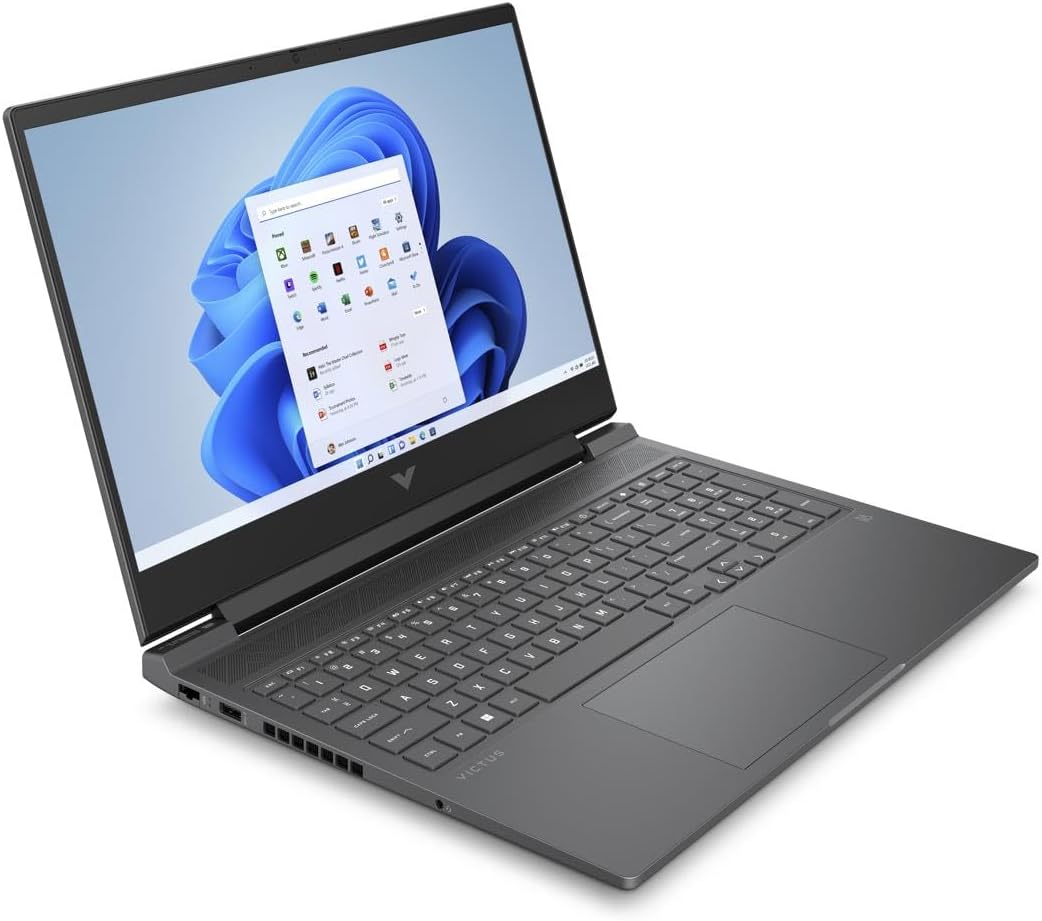
4.3 paveikslas: Another angled perspective of the HP Victus 16.1" Gaming Notebook, highlighting its sleek design and screen clarity.
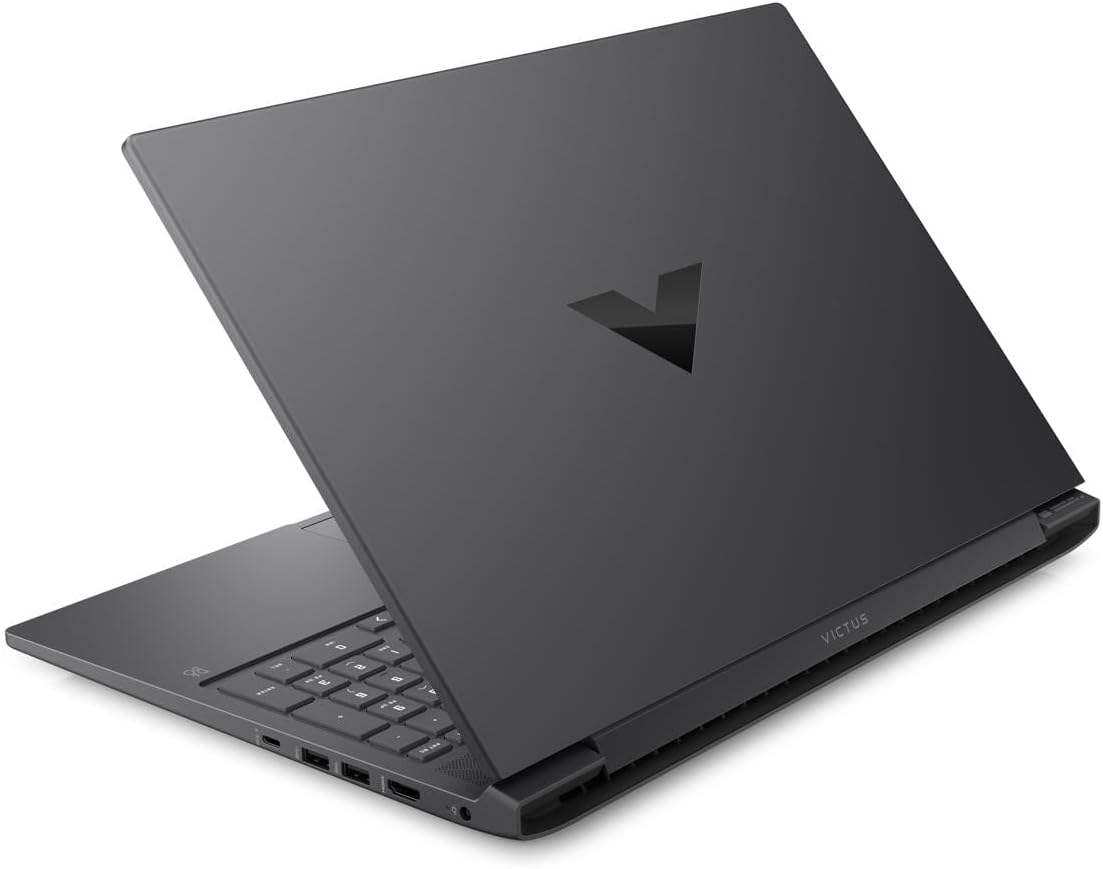
4.4 paveikslas: Galinis view of the HP Victus 16.1" Gaming Notebook with the lid closed, featuring the distinct Victus logo on the cover.

4.5 paveikslas: Šoninis profesionalasfiles of the HP Victus 16.1" Gaming Notebook, detailing the placement of various input/output ports and ventilation grilles.
Pagrindiniai komponentai:
- Ekranas: 16.1-inch Full HD (1920 x 1080) 144Hz Anti-glare panel.
- Klaviatūra: Viso dydžio klaviatūra su skaitmenine klaviatūra.
- Jutiklinė dalis: Multi-touch gesture enabled touchpad.
- Prievadai: USB Type-A, USB Type-C, HDMI, Ethernet, Audio Jack, Power connector.
- Webkumštelis: Integruota webcam for video communication.
- Garsiakalbiai: Integruoti stereo garsiakalbiai.
5. Sąranka
Follow these steps for the initial setup of your HP Victus Gaming Notebook:
- Unpack the Notebook: Carefully remove the notebook and all accessories from the packaging.
- Prijunkite maitinimą: Plug the power adapter into the notebook's power port and then into a wall outlet. Ensure the power indicator light illuminates.
- Pradinis įjungimas: Open the lid and press the power button, typically located on the keyboard deck.
- "Windows" sąranka: Follow the on-screen instructions to complete the Windows 11 setup process. This includes selecting your region, connecting to a Wi-Fi network, creating a user account, and accepting terms and conditions.
- Atnaujinimai: After initial setup, it is recommended to check for and install all available Windows updates and HP driver updates to ensure optimal performance and security.
6. Naudojimo instrukcijos
Galios valdymas:
- Maitinimas: Paspauskite maitinimo mygtuką.
- Išjungti: Spustelėkite mygtuką Pradėti, tada Maitinimas > Išjungti.
- Miegojimo rezimas: Uždarykite dangtelį arba spustelėkite mygtuką „Pradėti“, tada „Maitinimas“ > „Miego režimas“.
- Paleisti iš naujo: Spustelėkite mygtuką „Pradėti“, tada „Maitinimas“ > „Paleisti iš naujo“.
Klaviatūros ir jutiklinės dalies naudojimas:
- The keyboard functions like a standard PC keyboard. Use the Fn key in combination with function keys (F1-F12) for special features like volume control, brightness adjustment, and Wi-Fi toggle.
- The touchpad supports multi-touch gestures for scrolling, zooming, and switching applications. Refer to Windows settings for customization.
Išorinių įrenginių prijungimas:
Your notebook features various ports for connecting external devices:
- USB prievadai: Prijunkite USB įrenginius, tokius kaip išoriniai standieji diskai, pelės ar klaviatūros.
- HDMI prievadas: Prijunkite išorinį monitorių arba televizorių, kad galėtumėte ilgiau žiūrėti.
- Garso lizdas: Prijunkite ausines arba išorinius garsiakalbius.
- Ethernet prievadas: Prisijunkite prie laidinio tinklo, kad gautumėte stabilų interneto ryšį.
Ekrano nustatymai:
To utilize the 144Hz refresh rate for smoother visuals, especially in gaming:
- Dešiniuoju pelės mygtuku spustelėkite darbalaukį ir pasirinkite „Ekrano nustatymai“.
- Scroll down and click 'Advanced display settings'.
- Under 'Choose a refresh rate', select '144 Hz'.
7. Priežiūra
Proper maintenance ensures the longevity and performance of your notebook:
- Valymas: Ekraną ir korpusą valykite minkštu, nepūkuotu audiniu. Jei dėmės sunkiai įveikiamos,ampŠluostę lengvai sudrėkinkite vandeniu arba ekrano valikliu. Venkite stiprių cheminių medžiagų.
- Programinės įrangos atnaujinimai: Regularly check for and install operating system updates (Windows Update) and driver updates (HP Support Assistant or HP website) to ensure security and optimal performance.
- Akumuliatoriaus priežiūra: To maximize battery lifespan, avoid fully discharging the battery frequently. If storing the notebook for an extended period, charge it to about 50-70%.
- Vėdinimas: Ensure the ventilation grilles are clear of dust and debris. Use the notebook on a hard, flat surface to allow for proper airflow.
- Duomenų atsarginė kopija: Reguliariai kurkite svarbių duomenų atsargines kopijas išoriniame diske arba debesies saugykloje, kad išvengtumėte duomenų praradimo.
8. Problemų sprendimas
This section addresses common issues you might encounter with your HP Victus Gaming Notebook.
No Power / Not Turning On:
- Ensure the power adapter is securely connected to both the notebook and a working wall outlet.
- Patikrinkite, ar maitinimo lizdas veikia, prijungdami prie jo kitą įrenginį.
- Jei akumuliatorius visiškai išsikrovęs, prieš bandydami įjungti, leiskite jam įkrauti bent 15–30 minučių.
Rodymo problemos:
- Tuščias ekranas: Try connecting an external monitor to see if there is output. If so, the internal display might have an issue.
- Mirgantis / iškreiptas vaizdas: Atnaujinkite grafikos tvarkykles. Jei naudojate išorinį monitorių, patikrinkite ekrano kabelio jungtis.
- Neteisinga raiška / atnaujinimo dažnis: Adjust settings in Windows Display settings as described in Section 6.
Našumo problemos:
- Lėtas našumas: Uždarykite nereikalingas programas. Patikrinkite užduočių tvarkytuvę, ar nėra procesų, naudojančių daug procesoriaus arba RAM. Įsitikinkite, kad SSD diske yra pakankamai laisvos vietos.
- Perkaitimas: Ensure ventilation vents are clear. Use the notebook on a hard, flat surface. Consider using a cooling pad if issues persist.
- Žaidimų našumas: Ensure graphics drivers are up to date. Adjust in-game graphics settings to match your system's capabilities.
Ryšio problemos:
- „Wi-Fi“ problemos: Restart your router and modem. Check if Wi-Fi is enabled on the notebook (Fn + F12 or similar key combination). Update wireless drivers.
- „Bluetooth“ problemos: Ensure Bluetooth is enabled in Windows settings. Try re-pairing the device.
If you cannot resolve an issue using these steps, please refer to the HP support websvetainėje arba susisiekite su klientų aptarnavimo tarnyba.
9. Specifikacijos
Detailed technical specifications for the HP Victus 16.1" Gaming Notebook (Model 16-s0001nr).
| Funkcija | Specifikacija |
|---|---|
| Modelio pavadinimas | 16-s0001nr (823F0UA#ABA) |
| Procesorius | AMD Ryzen 5 7640HS (Hexa-core) |
| Grafika | NVIDIA GeForce RTX 3050 (6 GB GDDR6 skirta) |
| Ekranas | 16.1-inch FHD (1920 x 1080) 144Hz, Anti-glare |
| RAM | 16 GB DDR5 SDRAM |
| Sandėliavimas | 512 GB SSD |
| Operacinė sistema | Windows 11 Home |
| Belaidis ryšys | 802.11ax (Wi-Fi 6), „Bluetooth“ |
| Uostai | USB Type-A, USB Type-C, HDMI, Ethernet, Audio Jack |
| Matmenys (IxPxH) | 23.5 x 13.7 x 2.8 colio |
| Svoris | 10 svaro |
| Spalva | Žėrutis Sidabrinė |
| Išleidimo metai | 2024 |
10. Garantija ir palaikymas
Your HP Victus Gaming Notebook comes with a standard manufacturer's warranty. Please refer to the warranty documentation included with your product for specific terms and conditions, including coverage period and service options.
For technical support, driver downloads, and additional resources, please visit the official HP support websvetainė:
When contacting support, please have your product model number (16-s0001nr or 823F0UA#ABA) and serial number ready.