
BULIST UD01S
BULIST UD01S Smart Lock User Manual
Model: UD01S | Brand: BULIST
Įvadas
This manual provides comprehensive instructions for the installation, operation, and maintenance of your BULIST UD01S Smart Lock. Please read this manual thoroughly before installation and use to ensure proper function and safety. Keep this manual for future reference.
Svarbi saugos informacija
- Nebandykite patys ardyti ar taisyti spynos. Pagalbos kreipkitės į klientų aptarnavimo tarnybą.
- Use only the specified battery type (4 AA Alkaline batteries). Do not mix old and new batteries or different types of batteries.
- Ensure the lock is installed correctly and securely to prevent unauthorized access.
- Regularly check battery levels and replace batteries promptly when the low voltage reminder activates.
- Keep your master code and fingerprints secure and do not share them with unauthorized individuals.
Pakuotės turinys
Prieš pradėdami montavimą, patikrinkite, ar yra visi komponentai.

Vaizdas: Viršview of the BULIST UD01S Smart Lock package contents, showing the exterior keypad, interior lock unit, a set of AA batteries, the Wi-Fi gateway, and branding.
- Išorinis klaviatūros mazgas
- Interior Lock Unit
- Montavimo plokštė
- Deadbolt Skląstis
- Streiko plokštė
- Varžtai ir tvirtinimo detalės
- 4 x AA šarminės baterijos
- „Wi-Fi“ šliuzas
- Avariniai klavišai (2)
- Vartotojo vadovas (šis dokumentas)
Produktas baigtasview ir Savybės
The BULIST UD01S Smart Lock offers multiple convenient and secure entry methods for your home or office.
- Keli atrakinimo režimai: Fingerprint, Passcode, Tuya App, and Physical Key.
- Pirštų atspaudų atpažinimas: Fast 0.3-second recognition with 99.9% accuracy. Stores up to 50 fingerprints.
- Apšviesta klaviatūra: Ensures visibility and ease of use in low-light conditions. Stores up to 50 passcodes.
- „Tuya“ programėlės valdymas: Remote unlock/lock, temporary code generation, member management, and activity logs via Wi-Fi gateway.
- Avarinis maitinimas: USB Type-C port for emergency power supply if batteries are depleted.
- Ilgas baterijos veikimo laikas: Approximately 10-12 months of battery life with a low voltage priminimas.
- Patvari konstrukcija: Tested for keypad life, intensity, temperature resistance, and impact.
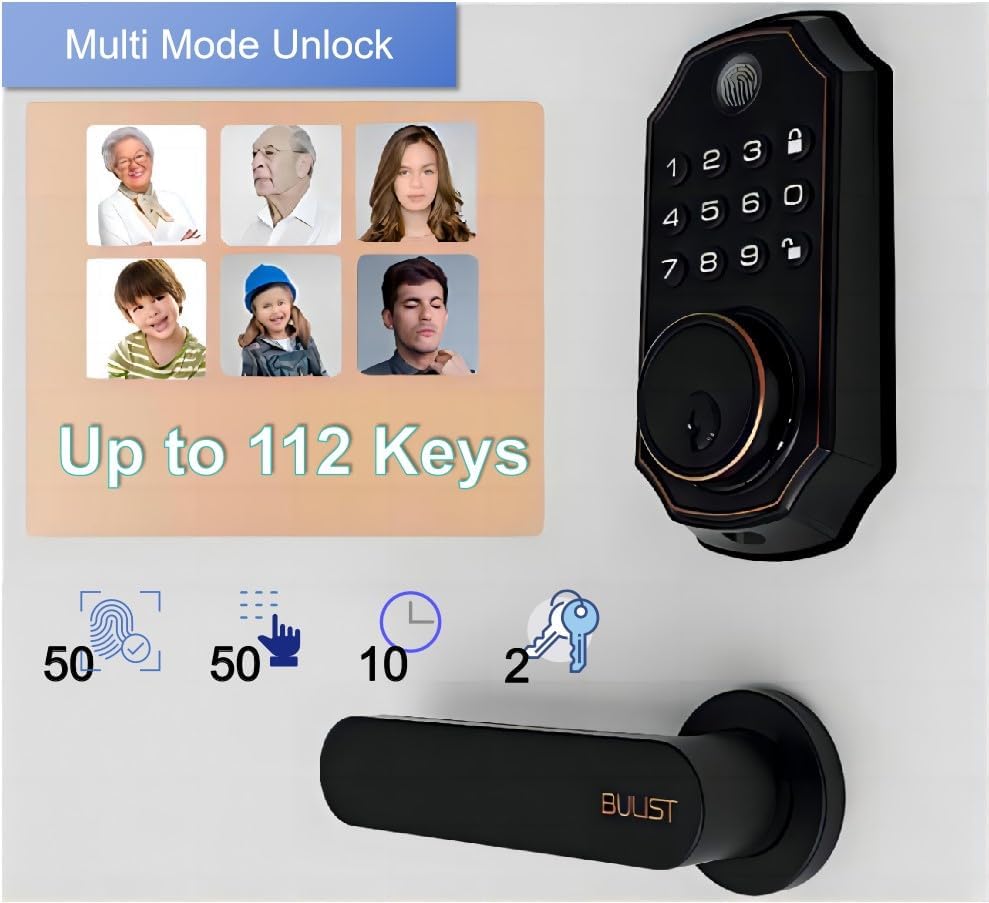
Image: The BULIST UD01S Smart Lock highlighting its multi-mode unlock capabilities, including fingerprint, keypad codes, and traditional keys. It indicates support for up to 50 fingerprints, 50 passcodes, and 2 physical keys.

Image: A child using the fingerprint sensor on the BULIST UD01S Smart Lock, illustrating the ease and speed of fingerprint recognition. Text overlays indicate a 0.3-second recognition time and 99.9% accuracy.

Vaizdas: Stambus planas view of the BULIST UD01S Smart Lock's backlit keypad, demonstrating its visibility and usability in low-light conditions. A finger is shown interacting with the keypad.
Sąranka ir diegimas
Installation of the BULIST UD01S Smart Lock is designed to be straightforward. A single screwdriver is typically sufficient for the process.
Reikalingi įrankiai:
- „Phillips“ atsuktuvas
Diegimo žingsniai:
- Paruoškite duris: Ensure your door is properly prepped for a standard deadbolt installation. Remove any existing deadbolt hardware.
- Įdiekite spynos skląstį: Įkiškite spynos skląstį į durų kraštą. Įsitikinkite, kad skląsčio rodyklė „AUKŠTYN“ yra nukreipta į viršų. Pritvirtinkite varžtais.
- Install the Exterior Keypad Assembly: Feed the cable from the exterior keypad through the door hole and under the deadbolt latch. Position the exterior keypad flush against the door.
- Sumontuokite montavimo plokštę: Route the cable through the mounting plate. Secure the mounting plate to the door using screws, ensuring it aligns with the exterior keypad.
- Prijunkite laidus: Connect the cable from the exterior keypad to the corresponding port on the interior lock unit.
- Install the Interior Lock Unit: Align the interior lock unit with the mounting plate and the deadbolt tailpiece. Secure it with screws.
- Įdėkite baterijas: Open the battery cover on the interior unit and insert the 4 AA alkaline batteries, observing polarity.
- Patikrinkite užraktą: Manually operate the deadbolt to ensure smooth movement. Test with the physical key.
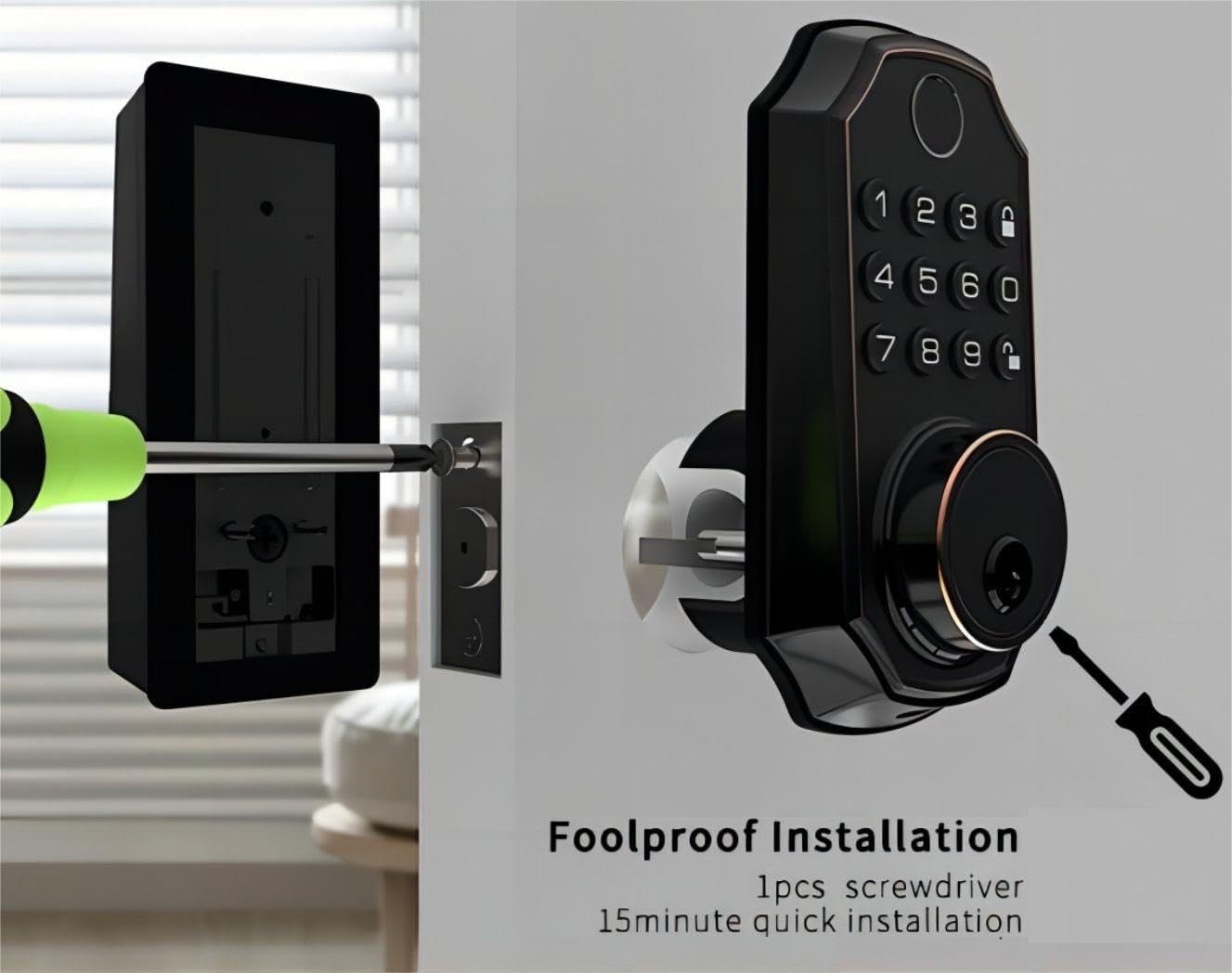
Image: An illustration of the BULIST UD01S Smart Lock installation, depicting a screwdriver being used to secure the exterior keypad assembly to the door. This highlights the "foolproof installation" claim.
Naudojimo instrukcijos
Initial Setup and Master Code Programming:
Upon first power-up, the lock uses a default master code. It is crucial to change this immediately.
- Įeikite į programavimo režimą:
- Enter the default code: 123456
- Paspauskite Atrakinti button (keypad icon).
- Paspauskite numerį 1.
- Paspauskite Atrakinti button again. The lock should indicate it is in "add user mode" or similar.
- Set New Master Code:
- Enter your desired new master code (6-8 digits).
- Paspauskite Atrakinti mygtuką.
- Re-enter your new master code.
- Paspauskite Atrakinti button. The lock will confirm the new master code.
Svarbu: Remember your new master code. It is required for all subsequent programming.
Adding User Passcodes:
You can add up to 50 user passcodes.
- Įveskite savo Pagrindinis kodas.
- Paspauskite Atrakinti mygtuką.
- Paspauskite numerį 1.
- Paspauskite Atrakinti button. The lock will indicate "add user mode".
- Enter the new user passcode (6-8 digits).
- Paspauskite Atrakinti mygtuką.
- Re-enter the new user passcode.
- Paspauskite Atrakinti button. The lock will confirm the addition.
Adding User Fingerprints:
You can add up to 50 user fingerprints. This can also be done via the app (see App Integration).
- Įveskite savo Pagrindinis kodas.
- Paspauskite Atrakinti mygtuką.
- Paspauskite numerį 2.
- Paspauskite Atrakinti button. The lock will prompt for fingerprint scanning.
- Place your finger on the fingerprint sensor. Lift and repeat 5 times, rotating your finger slightly each time for better recognition.
- The lock will confirm successful fingerprint registration.
Durų atrakinimas:
- Pagal piršto atspaudą: Place your registered finger on the sensor. The lock will unlock if recognized.
- By Passcode: Enter your 6-8 digit passcode, then press the Atrakinti mygtuką.
- By Physical Key: Insert the emergency key into the keyhole and turn to unlock.
- Via Tuya App: Use the app's remote unlock function (requires Wi-Fi gateway).
Durų užrakinimas:
- Automatinis užraktas: The lock will automatically engage after a set period (configurable in the app).
- Rankinis užraktas: Paspauskite ir palaikykite Užraktas button (padlock icon) on the keypad for 2 seconds.
- Via Tuya App: Use the app's remote lock function.
Tuya App Integration
The BULIST UD01S Smart Lock integrates with the Tuya Smart app for enhanced control and monitoring. A Wi-Fi gateway is required for remote functionality.
1. Install the Tuya Smart App:
- Download "Tuya Smart" from your smartphone's app store (iOS or Android).
- Registruokitės paskyrai arba prisijunkite, jei ją jau turite.
2. Set up the Wi-Fi Gateway:
The gateway acts as a bridge between your lock (Bluetooth) and your home Wi-Fi network.
- Plug in the Wi-Fi gateway within 20 feet (approximately 6 meters) of your smart lock.
- In the Tuya Smart app, tap "+" to add a new device.
- Select "Gateway" or "Bridge" from the device list and follow the in-app instructions to connect it to your 2.4GHz Wi-Fi network.
3. Pair the Smart Lock with the Gateway:
- On the smart lock keypad, enter your Pagrindinis kodas.
- Paspauskite Atrakinti mygtuką.
- Paspauskite numerį 3.
- Paspauskite Atrakinti button. The lock will enter Bluetooth pairing mode (e.g., "distributing network").
- In the Tuya Smart app, navigate to your connected gateway. Select "Add Device" or "Ieškokite Sub-devices".
- The app should discover your UD01S Smart Lock. Follow the prompts to complete pairing.

Image: A person approaching a door equipped with the BULIST UD01S Smart Lock, while a smartphone screen displays the Tuya app interface, illustrating the "App Full Control" feature for remote management.
4. App Functions:
- Nuotolinis atrakinimas/užrakinimas: Valdykite savo duris iš bet kurios vietos.
- Laikini kodai: Generate one-time or time-limited passcodes for guests or service providers. These codes are automatically deleted after use.
- Narių valdymas: Add, edit, or delete user passcodes and fingerprints. You can also grant remote access to other users.
- Veiklos žurnalai: View a history of lock/unlock events.
- Nustatymai: Configure auto-lock duration, enable/disable remote unlock, and other preferences.

Image: A woman with groceries looking at her smartphone, which displays the Tuya app interface showing a temporary passcode "159357" for the BULIST UD01S Smart Lock. This illustrates the temporary code sharing feature.
Priežiūra
Baterijos keitimas:
The lock will provide a low voltage reminder when batteries are running low. Replace all four AA batteries promptly to ensure continuous operation.
- Remove the battery cover on the interior lock unit.
- Išimkite senas baterijas.
- Įdėkite 4 naujas AA šarmines baterijas, užtikrindami teisingą poliškumą (+/-).
- Uždėkite akumuliatoriaus dangtelį.
Pastaba: If batteries are completely depleted, you can use a USB Type-C power bank to temporarily power the lock via the emergency power port on the exterior unit.

Image: The BULIST UD01S Smart Lock illustrating its battery features, including 10-12 months of battery life, a low voltage reminder, and the emergency power supply option via a USB Type-C port.
Valymas:
Wipe the lock's surface with a soft, dry cloth. Avoid using abrasive cleaners or solvents, which can damage the finish or electronic components.
Trikčių šalinimas
| Problema | Galima priežastis | Sprendimas |
|---|---|---|
| Užraktas nereaguoja. | Išsikrovusios baterijos. | Replace batteries. Use emergency USB Type-C power if needed. |
| Piršto atspaudas neatpažintas. | Finger not placed correctly; sensor dirty; fingerprint not registered. | Ensure finger is clean and covers the sensor. Try different angles. Re-register fingerprint if necessary. |
| Slaptažodis neveikia. | Incorrect passcode entered; passcode not registered. | Verify the passcode. Ensure it is 6-8 digits. Re-register passcode if necessary. |
| Nepavyksta prisijungti prie „Tuya“ programėlės. | Gateway not powered; gateway too far from lock; incorrect Wi-Fi password; 5GHz Wi-Fi network. | Ensure gateway is powered and within 20 feet of the lock. Verify Wi-Fi credentials. Ensure you are connecting to a 2.4GHz Wi-Fi network. Re-pair the lock with the gateway. |
| Lock jams or does not fully extend/retract. | Misalignment during installation; obstruction in door frame. | Check for obstructions. Re-check installation alignment. Ensure deadbolt moves freely. |
Specifikacijos
| Modelio numeris | UD01S |
| Prekės ženklas | BULISTAS |
| Medžiaga | Cinkas |
| Spalva | Aliejumi trinama bronza |
| Maitinimo šaltinis | 4 x AA šarminės baterijos (pridedamos) |
| Avarinė galia | C tipo USB |
| Ryšys | Bluetooth (via Wi-Fi Gateway for remote access) |
| Atrakinimo metodai | Fingerprint, Passcode, Tuya App, Physical Key |
| Pirštų atspaudų talpa | Iki 50 |
| Slaptažodžio talpa | Iki 50 |
| Darbinė temperatūra | -30°F to 151°F (-34°C to 66°C) (based on test data) |
| Pakuotės matmenys | 22.7 x 18.4 x 8.5 cm |
| Prekės svoris | 1.21 kg |

Image: The BULIST UD01S Smart Lock with text indicating various durability tests it has undergone, such as 200,000 keypad life test, 4400N intensity test, -30°F to 151°F temperature test, and 100J impact test.
Garantija ir palaikymas
For warranty information and technical support, please refer to the warranty card included with your product or contact BULIST customer service directly. Contact details can typically be found on the manufacturer's official websvetainėje arba pirkimo kvite.
Ask a question about this manual
Ask about setup, troubleshooting, compatibility, parts, safety, or missing instructions. Manuals+ will review the question and use this page’s manual context to help answer it.