
1. Įvadas
The ALLmeter FS899L is a USB rechargeable digital smart multimeter designed for accurate measurement and testing of various electrical parameters. It features auto-ranging capabilities and a large, backlit color display for clear readings in diverse environments. This manual provides essential information for the safe and effective operation, maintenance, and troubleshooting of your device.
2. Pagrindinės savybės
- Daugiafunkcinis matavimas: Supports AC/DC voltage and current, resistance, capacitance, diode, continuity, NCV (Non-Contact Voltage) detection, and Live Check.
- Didelis ekranas: 4.8-inch, 6000-count high-definition color display with backlight for visibility in low-light conditions.
- Integruotas žibintuvėlis: Įmontuotas žibintuvėlis darbo zonoms apšviesti.
- Patogus vartotojui dizainas: Automatic shutdown feature to conserve battery life and an analog bar display for quick readings.
- Nešiojamas ir įkraunamas: Compact size with a built-in USB rechargeable lithium battery.
- Environmental Temperature Display: Shows real-time environmental temperature in Celsius.

Figure 2.1: Multimeter display with icons indicating various measurement capabilities.
3. Gaminio komponentai
The ALLmeter FS899L package includes:
- ALLmeter FS899L Digital Smart Multimeter
- Bandymo laidai (1 pora)
- Įkrovimo laidas (USB)
- Apsauginis krepšys
- Vartotojo vadovas
- Small Alligator Clips (for convenient test lead connections)
4. Sąranka
4.1 Pradinis įkrovimas
Before first use, fully charge the multimeter using the provided USB cable. Connect the micro USB end to the multimeter's charging port (located at the top) and the standard USB end to a compatible USB power adapter or computer port.

Figure 4.1: Charging the multimeter via USB. The device features a built-in rechargeable battery, eliminating the need for frequent battery replacements.
4.2 Bandymo laidų prijungimas
Insert the red test lead into the 'VΩHz' jack and the black test lead into the 'COM' jack for most measurements. For current measurements (Amperage), refer to the troubleshooting section regarding manual inaccuracies.
5. Naudojimo instrukcijos
5.1 Power On/Off and Auto-Ranging
Press and hold the power button (located on the right side) to turn the device on or off. The multimeter defaults to 'Auto' mode, which automatically selects the appropriate measurement range for voltage, resistance, and capacitance.
5.2 Matavimo režimai
The power button also functions as a mode selector. Short press the power button to cycle through different measurement functions such as capacitance, resistance, and diode testing. The display will indicate the active mode.

Figure 5.1: Measuring AC and DC Voltage. The multimeter automatically detects and displays the voltage type and frequency (for AC) or temperature (for DC).
5.3 NCV (bekontaktis tūrinistage) aptikimas
To activate NCV mode, press the NCV/Flashlight button (top right side). The device will indicate the presence of AC voltage without direct contact, providing an audible and visual alarm. This feature is useful for quickly checking if an outlet or wire is live.

5.2 pav.: NCV funkcijos naudojimas tiesioginiam tūriui aptiktitage be fizinio kontakto.
5.4 Žibintuvėlis ir foninis apšvietimas
Press and hold the NCV/Flashlight button to turn the built-in flashlight on or off. The display backlight is automatically activated when the device is on, ensuring readability in various lighting conditions.
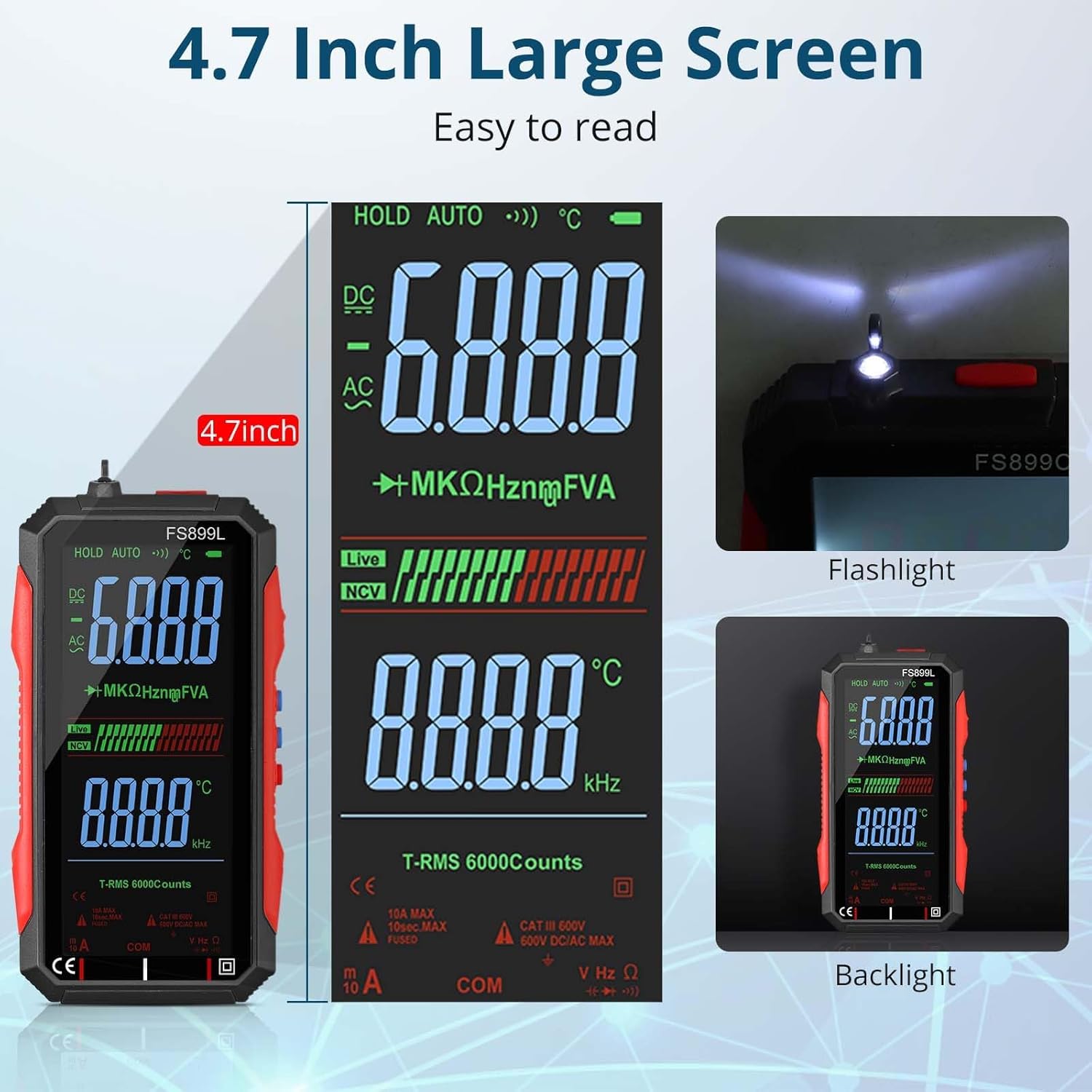
Figure 5.3: The large display and integrated flashlight for enhanced usability.
5.5 Duomenų sulaikymas
Short press the 'Hold' button (middle button on the right side) to freeze the current reading on the display. Press it again to release the hold function.
5.6 Video Demonstration of Features
Video 5.1: This video demonstrates the ALLmeter FS899L multimeter's compact form factor, button functions including NCV and Hold, and its auto-switching/ranging capabilities for various measurements like resistance and capacitance. It also highlights the use of standard test leads and alligator clips, and discusses the temperature display in Celsius and the continuity beeper.
6. Priežiūra
6.1 Įkrovimas
The multimeter is equipped with a built-in USB rechargeable lithium battery. Recharge the device when the battery indicator shows low power. Use the provided USB cable for charging.
6.2 Valymas ir laikymas
Clean the device with a soft, dry cloth. Do not use abrasive cleaners or solvents. Store the multimeter in its protective bag in a cool, dry place away from direct sunlight and extreme temperatures when not in use.
7. Problemų sprendimas
- Ekrano įskaitomumas saulės šviesoje: The display may be difficult to read in direct sunlight. Adjust the angle of the device for better visibility.
- Temperatūros vienetas: The device displays temperature in Celsius only. There is no option to change this to Fahrenheit.
- Current Measurement Ports: The included manual may contain inaccuracies regarding the correct ports for current measurement. Always use the dedicated Amperage (A) port for current measurements, not the VΩHz port, to avoid damage to the device or inaccurate readings.
- Tęstinumo pyptelėjimas: The continuity test features an audible beeper. There is no function to disable this beeper.
- Tikslumas: Readings may show slight variations compared to higher-end or calibrated testers. For critical applications, verify readings with a known accurate device.
- Ekrano išjungimo režimas: The 'screen off' function only turns off the display backlight to save battery, the device remains operational.
8. Specifikacijos
| Specifikacija | Vertė |
|---|---|
| Prekės ženklas | ALLmeter |
| Modelis | ALLWT325A |
| Maitinimo šaltinis | Maitinamas su baterijomis (įkraunamas USB) |
| Stilius | 6000 Counts Smart Multimeter |
| Spalva | Raudona / juoda |
| Prekės svoris | 1 svaro |
| Matavimo tipas | Multimeter, Voltmeter |
| Specifikacija atitiko | MSDS Certified (Battery) |
| Gamintojas | ALLmeter |
9. Garantija ir palaikymas
For warranty information, technical support, or service inquiries, please refer to the contact information provided with your purchase documentation or visit the official ALLmeter websvetainėje. Išsaugokite pirkimo kvitą kaip pirkimo įrodymą.