
1. Saugos informacija
Please read this manual thoroughly before installation, operation, or maintenance of the CNweiken WK-9600 VFD. Failure to follow these instructions may result in personal injury or equipment damage. Keep this manual for future reference.
- Elektros pavojus: Ensure power is disconnected before any wiring or maintenance. Only qualified personnel should perform electrical work.
- Įžeminimas: The VFD and motor must be properly grounded to prevent electric shock.
- Aplinka: Install the VFD in a clean, dry, well-ventilated area, away from direct sunlight, corrosive gases, flammable materials, and excessive vibration.
- Apsauga nuo perkrovos: Do not exceed the rated current or power of the VFD and connected motor.
- Avarinis sustojimas: Ensure an accessible emergency stop mechanism is in place for the entire system.
2. Produktas baigtasview
The CNweiken WK-9600 Variable Frequency Drive is designed to convert single-phase 220V input into three-phase 0-220V output, enabling precise speed regulation for three-phase AC motors, including spindle motors. This model (2.2KW variant) offers high torque and precision control.
2.1. Pagrindinės savybės
- Single-phase 220V input, three-phase 0-220V output.
- Integrated braking function.
- High torque and precision control capabilities.
- Protection features: Over-current, over-heat, over-voltage, short-circuit.
- User-friendly control panel with digital display.
2.2. Dimensions and Components
The following image illustrates the physical dimensions of the WK-9600 VFD and its main components.

Figure 1: WK-9600 VFD with dimensions (155mm x 82mm x 135mm).
The VFD package typically includes the frequency converter unit, a product manual, certification, an external keyboard, and external wiring. The external cable length is 2 meters (78.74 inches).

Figure 2: CNweiken WK-9600 Variable Frequency Drive unit.
3. Specifikacijos
Detailed specifications for the WK-9600 VFD (2.2KW model) are provided below:
| Funkcija | Specifikacija (2.2 kW modelis) |
|---|---|
| Modelio numeris | WK-9600 |
| Įvesties tomastage | Single phase 220V ±10% 50Hz/60Hz |
| Išėjimas ttage | Three phase 0-220V 0-650Hz |
| Galia | 2.2KW / 3AG |
| Nominali srovė | 10A |
| Gaminio matmenys (I x P x A) | 155 mm x 82 mm x 145 mm (6.10 x 3.22 x 5.71 colio) |
| Pakuotės dydis (I x P x A) | 220 mm x 150 mm x 130 mm |
| Prekės svoris | 1.2 kg (2.64 svarų) |
4. Montavimas
Proper wiring is crucial for safe and effective operation. Refer to the wiring diagrams below for connecting the VFD to the power supply, motor, and control components.
4.1. Basic Wiring Diagram
This diagram shows the connections for a single-phase 220V power grid, a three-phase AC motor, brake resistance, an external potentiometer for speed control, and a button switch for operation.

Figure 3: Basic Wiring Diagram.
4.2. Detailed Terminal Connections
For advanced control, the VFD offers programmable input terminals (X1-X6), analog inputs (AI1, AI2), and analog outputs (AM, ACOM). Ensure correct connections for forward/reverse operation and external potentiometer control.
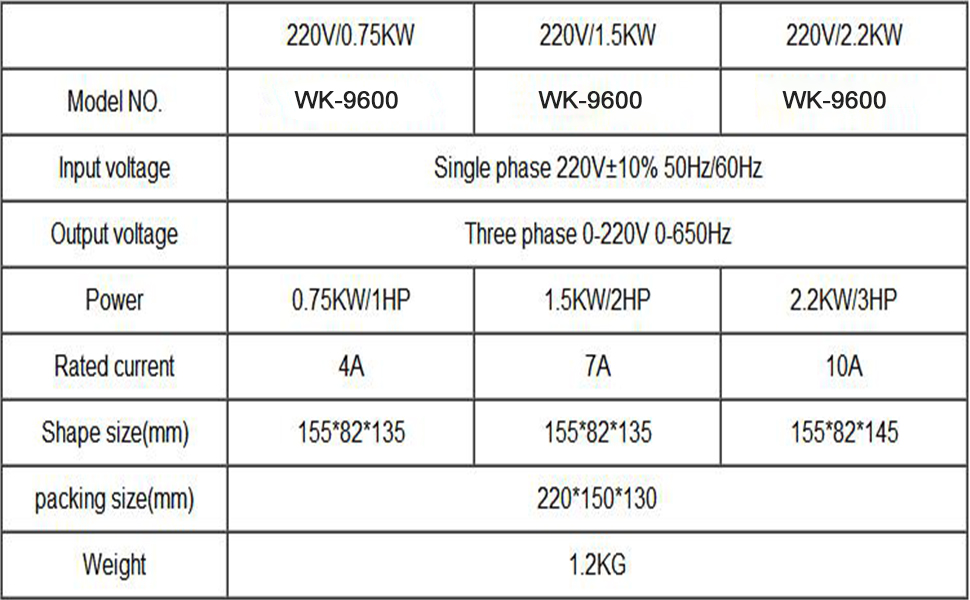
Figure 4: Detailed Terminal Connections.
4.3. Control Wiring for External Devices
This diagram illustrates how to connect an external potentiometer for speed control and a forward/reverse start-stop switch. Parameter P7.02 should be set to '2' for this configuration.
- Forward/Reverse Switch Wiring: Forward connection to X5, Reverse connection to X6. Zero wire connection to DOCM.
- External Potentiometer Wiring: Intermediate connection to AI1. Other connections to 10V and ACOM. Jump J9 selects the upper part for external potentiometer control.

Figure 5: External Control Wiring Diagram.
5. Operacija
The WK-9600 VFD features a user-friendly control panel for direct operation and parameter adjustment.
5.1. Valdymo skydelio išdėstymas
Familiarize yourself with the buttons and indicators on the VFD's control panel:

Figure 6: VFD Control Panel.
- VYKDYTI: Paleidžia variklį.
- STOP/ATSTATYTI: Stops the motor or resets alarms.
- PRG/ESC: Enters/exits program mode or cancels current operation.
- FWD/REV (Shift key): Changes display parameters or shifts digits during parameter setting.
- MF.K/REV (Multi-function button/Reverse): Activates multi-function or reverse direction (refer to P7-01 for settings).
- RD/WT (Confirm key): Confirms parameter settings.
- Up/Down Arrows (Increment/Decrement): Reguliuoja dažnį arba parametrų vertes.
- Panel Potentiometer: Adjusts output frequency/speed.
5.2. Pagrindiniai veikimo žingsniai
- Įsitikinkite, kad visi laidai yra teisingi ir tvirti.
- Connect the VFD to a single-phase 220V power supply.
- Use the panel potentiometer or external control (if configured) to set the desired frequency.
- Paspauskite BĖGTI mygtuką varikliui užvesti.
- Adjust the panel potentiometer to increase or decrease motor speed.
- Norėdami sustabdyti variklį, paspauskite STOP/ATSTATYTI mygtuką.
5.3. Veikimo demonstravimas
Watch this video for a practical demonstration of connecting and operating the VFD, including motor startup, speed adjustment, and current waveform analysis.
Video 1: Demonstration of WK-9600 VFD operation, including wiring, motor control, and waveform analysis.
6. Parametrų nustatymai
The VFD has various parameters that can be adjusted to customize its operation. Access parameter settings by pressing the PRG/ESC button. Use the up/down arrows to navigate and the RD/WT mygtuką, kad patvirtintumėte pakeitimus.
- P0.03: Frequency source selection. Set to '2' for external potentiometer control.
- P7.01: Multi-function input terminal settings.
- P7.02: Control mode selection for external start/stop switches. Set to '2' for forward/reverse switch control.
Refer to the full product manual for a complete list and detailed descriptions of all parameters.
7. Priežiūra
Regular maintenance ensures optimal performance and extends the lifespan of your VFD.
- Valymas: Keep the VFD clean and free from dust and debris. Use a soft, dry cloth. Do not use liquid cleaners.
- Vėdinimas: Ensure cooling fans and ventilation openings are clear and unobstructed. Periodically check fan operation.
- Jungtys: Regularly inspect all wiring connections for tightness and signs of corrosion or damage.
- Aplinkosaugos patikrinimai: Stebėkite darbo aplinką, kad užtikrintumėte, jog ji neviršytų nurodytų temperatūros ir drėgmės diapazonų.
- Kondensatoriaus tarnavimo laikas: Power capacitors have a finite lifespan. Consider professional inspection and replacement after several years of continuous operation.
8. Problemų sprendimas
Šiame skyriuje pateikiamos dažniausiai pasitaikančių problemų sprendimo gairės. Sudėtingesnėms problemoms spręsti kreipkitės į techninę pagalbą.
| Problema | Galima priežastis | Sprendimas |
|---|---|---|
| Variklis neužsiveda | No power, incorrect wiring, emergency stop active, parameter error. | Check power supply, verify wiring, release emergency stop, check P0.03/P7.02 settings. |
| VFD rodo klaidos kodą | Viršsrovė, perteklinė srovėtage, pagal ttage, over-heat, motor overload. | Refer to the full manual for specific error code meanings and solutions. Reset VFD after addressing the cause. |
| Motor speed is unstable | Poor grounding, motor load fluctuations, incorrect parameter settings. | Ensure proper grounding, check motor load, verify frequency control parameters. |
| VFD makes unusual noise | Loose components, fan malfunction, internal fault. | Inspect for loose parts, check cooling fan, contact technical support if noise persists. |
9. Garantija ir palaikymas
CNweiken products are manufactured to high-quality standards. For warranty information, technical assistance, or service inquiries, please contact your retailer or visit the official CNweiken websvetainę. Išsaugokite pirkimo čekį garantiniams reikalavimams.