
1. Produktas baigtasview
The CNweiken WK-9600 series Variable Frequency Drive (VFD) is designed for precise speed regulation of three-phase AC spindle motors. This inverter converts single-phase 220V input power into three-phase 0-220V output, allowing for variable frequency control from 0-650Hz. It is suitable for various industrial applications requiring adjustable motor speeds.

1 pav. Baigtaview of CNweiken WK-9600 Series Variable Frequency Drives.
2. Techninės specifikacijos
The following table details the specifications for the WK-9600 series VFD models:
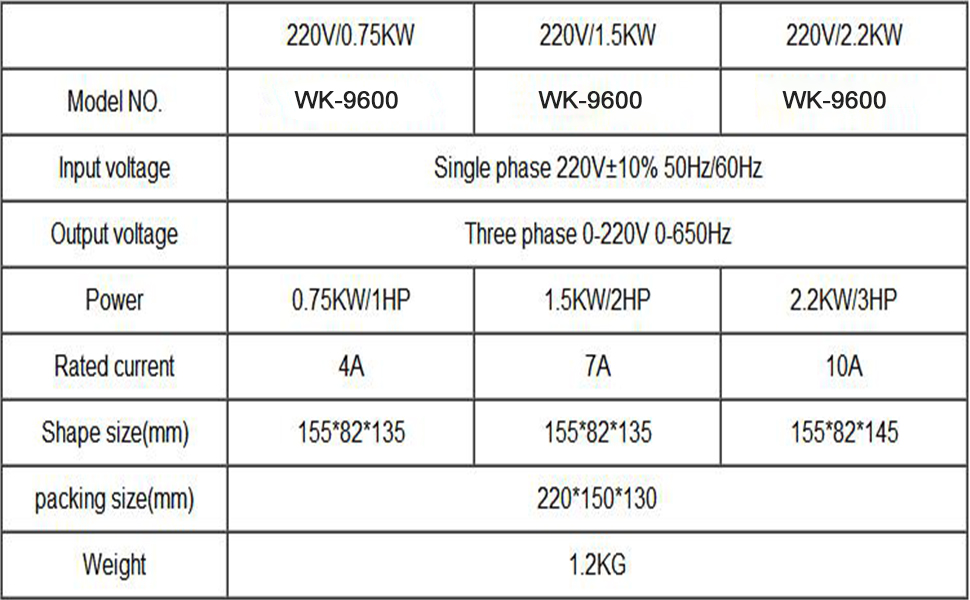
Figure 2: Detailed specifications for various WK-9600 VFD models.
2.1 Gaminio matmenys

Figure 3: Physical dimensions of the VFD unit.
3. Pakuotės turinys
Atidarius pakuotę, patikrinkite, ar yra visos sudedamosios dalys ir ar jos nepažeistos:

Figure 4: Items included in the product package. Note: The external cable length is 2M (78.74 inches).
- Frequency Converter Unit
- Produkto vadovas (šis dokumentas)
- Sertifikavimo kortelė
- External Keyboard (optional, depending on model)
- External Wiring (2M length)
4. Valdymo skydelis baigtasview
The VFD features an intuitive control panel for operation and parameter settings. Familiarize yourself with the buttons and indicators:

Figure 5: VFD Control Panel and Button Functions.
- PRG/ESC: Program/Escape button. Used to enter/exit menu and return to previous level.
- RD/WT: Read/Write button. Used to confirm selections and save parameters.
- MF.K/REV: Multifunctional Key/Reverse. Function varies based on programming.
- Shift (>>): Used to shift cursor position during parameter editing.
- Up/Down Arrows (▲ ▼): Modify keys for incrementing or decrementing values.
- VYKDYTI: Paleidžia variklį.
- STOP/ATSTATYTI: Sustabdo variklį arba atstato gedimo sąlygas.
- Potenciometras: Used for manual speed adjustment.
5. Sąrankos ir laidų prijungimo instrukcijos
Proper wiring is crucial for safe and correct operation. Refer to the diagrams and instructions below for connecting the VFD to your motor and power supply.
5.1 Main Power and Motor Connections
Connect the single-phase 220V power grid to the VFD's input terminals (S and T). Connect the three-phase AC motor to the VFD's output terminals (U, V, W).
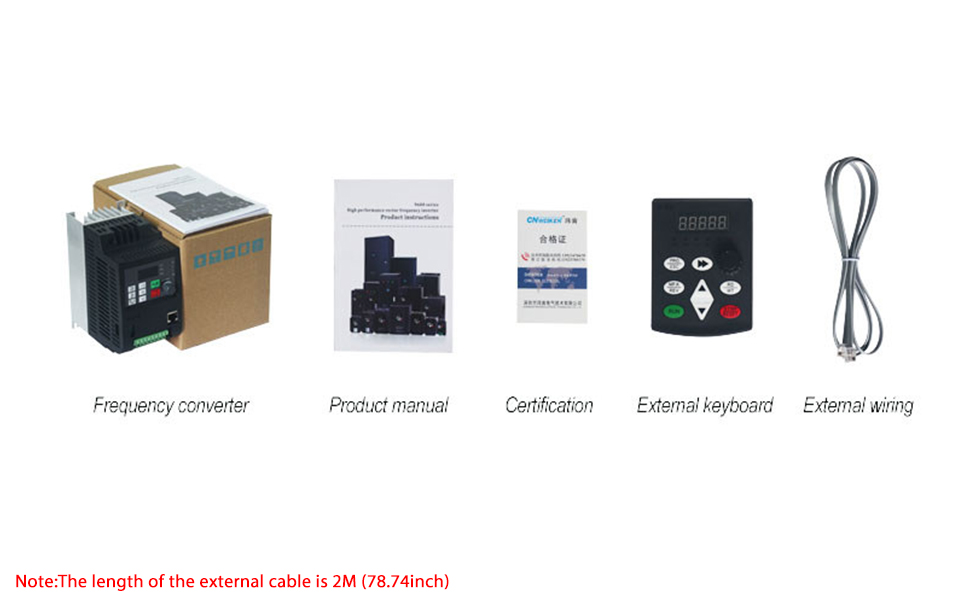
Figure 6: Main wiring diagram for the VFD, motor, and external controls.
5.2 External Control Wiring
The VFD supports external control for start/stop and speed adjustment using switches and potentiometers.

Figure 7: Detailed circuit diagram for VFD connections.
- Forward/Reverse Start-Stop Switch Wiring:
Connect the forward connection to terminal X5. Connect the reverse connection to terminal X6. Connect the zero wire to terminal DOCM. Parameter setting: P7.02=2. - External Potentiometer Wiring:
Connect the intermediate terminal of the potentiometer to AI1. Connect the other two terminals to 10V and ACOM respectively. Ensure jumper J9 is set to select the upper part for external potentiometer control.
6. Pagrindinė operacija
This section covers the fundamental steps to operate your CNweiken VFD.
6.1 Initial Startup and Speed Adjustment
After ensuring all wiring is correct and secure, power on the VFD. You can adjust the motor speed using the panel potentiometer or an external potentiometer if configured.
Video 1: Demonstration of simple use for the WK600 Series Mini Frequency Converter, including motor connection, power connection, starting the motor, adjusting speed via panel potentiometer, measuring output current, and observing frequency output waveforms during operation and shutdown. This video also shows practical operation with external potentiometer and start/stop switch.
- Maitinimas: Connect the VFD to a 220V single-phase power source. The display will light up.
- Variklio užvedimas: Paspauskite BĖGTI button on the control panel. The motor will start and accelerate to the set frequency.
- Sureguliuokite greitį: Rotate the potentiometer knob on the control panel (or external potentiometer) to increase or decrease the output frequency, thereby adjusting the motor speed.
- Variklio sustabdymas: Paspauskite STOP/ATSTATYTI mygtuką varikliui sustabdyti.
6.2 Parametrų nustatymai
The VFD has various parameters that can be adjusted to customize its operation. Refer to the detailed parameter list in the full manual for specific settings. Use the PRG/ESC button to enter the programming menu, arrow keys to navigate, and RD/WT kad patvirtintumėte pakeitimus.
7. Priežiūra
Reguliarus techninis aptarnavimas užtikrina jūsų dažnio keitiklio ilgaamžiškumą ir optimalų veikimą.
- Valymas: Laikykite dažnio keitiklių įrenginį švarų, be dulkių ir šiukšlių. Valymui naudokite minkštą, sausą šluostę. Nenaudokite skystų valiklių.
- Vėdinimas: Užtikrinkite tinkamą ventiliaciją aplink dažnio keitiklį, kad jis neperkaistų. Laikykite aušinimo briaunas švarias.
- Jungtys: Periodiškai tikrinkite visas laidų jungtis, ar jos nėra sandarios ir ar nėra susidėvėjimo ar korozijos požymių.
- Aplinka: Operate the VFD within its specified environmental conditions (temperature, humidity, vibration).
8. Problemų sprendimas
If you encounter issues with your VFD, refer to the following common problems and solutions. For complex issues, contact technical support.
- Variklis neužsiveda:
Galima priežastis: Incorrect wiring, emergency stop engaged, parameter settings incorrect.
Sprendimas: Verify all connections, check emergency stop, review start/stop parameters. - Motor Not Reaching Desired Speed:
Galima priežastis: Potentiometer setting incorrect, maximum frequency limit set too low, motor overload.
Sprendimas: Adjust potentiometer, check P0.03 (Max Output Frequency) parameter, reduce motor load. - VFD Displays Error Code:
Galima priežastis: Viršsrovė, viršįtampistage, nesuprantamatage, overheating.
Sprendimas: Refer to the full manual's error code section for specific remedies. Often requires pressing STOP/ATSTATYTI after addressing the cause. - Neįprastas triukšmas arba vibracija:
Galima priežastis: Motor imbalance, loose connections, VFD parameter settings.
Sprendimas: Check motor mounting, tighten connections, adjust carrier frequency (P0.04) or other motor parameters.
9. Garantija ir palaikymas
CNweiken products are covered by a standard manufacturer's warranty. Please retain your proof of purchase for warranty claims. For technical assistance, troubleshooting beyond this manual, or warranty service, please contact CNweiken customer support through your retailer or the official CNweiken websvetainę.
Dėl papildomos apsaugos apsvarstykite galimybę įsigytiasing an extended protection plan if available.