
FOREVER SB-315
FOREVER SB-315 „Fitband“ išmaniojo laikrodžio naudotojo vadovas
Modelis: SB-315
1. Įvadas
The FOREVER SB-315 Fitband Smartwatch is a versatile activity tracker designed to help you monitor your fitness and stay connected. Featuring a heart rate sensor, step counter, distance tracker, and sleep monitor, it provides comprehensive insights into your daily activity. Its discreet and lightweight design, coupled with a long-lasting battery, ensures maximum comfort and convenience.
This manual provides detailed instructions on how to set up, operate, and maintain your SB-315 smartwatch to ensure optimal performance and longevity.

1.1 pav.: priekis view of the FOREVER SB-315 Fitband Smartwatch.
2. Sąranka
2.1 Išpakavimas ir pradinis įkrovimas
Carefully remove all components from the packaging. The box should contain the SB-315 smartwatch and its charging cable. Before first use, fully charge the device.
- Prijunkite įkrovimo laidą prie įkrovimo kontaktų išmaniojo laikrodžio gale.
- Prijunkite laido USB galą prie standartinio USB maitinimo adapterio (nepridedamas) arba kompiuterio USB prievado.
- The watch display will indicate charging status. A full charge typically takes 2-3 hours.
- The 155 mAh battery provides up to 10 days of standby time on a single charge.

Figure 2.1: The SB-315 Smartwatch and its retail packaging.
2.2 Programėlės diegimas ir susiejimas
To unlock the full potential of your SB-315 smartwatch, you need to install the companion application on your smartphone and pair the devices via Bluetooth.
- Atsisiųskite programą: Ieškokite the "Forever Smart" or "Forever Fit" app (refer to the packaging or quick start guide for the exact app name) on the Apple App Store (for iOS 10.0 and above) or Google Play Store (for Android 5.0 and above).
- Įjungti Bluetooth: Įsitikinkite, kad jūsų išmaniajame telefone įjungtas „Bluetooth“.
- Atidarykite programą: Launch the installed application on your smartphone.
- Suporuokite įrenginį: Follow the in-app instructions to add a new device. Select "SB-315" from the list of available devices. The app will guide you through the pairing process.
- Suteikti leidimus: Suteikite reikiamus leidimus (pvz., pranešimų, vietos, sveikatos duomenų), kad programa veiktų tinkamai.
Sėkmingai suporavus, laikrodis sinchronizuos laiką ir duomenis su jūsų išmaniuoju telefonu.
3. Išmaniojo laikrodžio valdymas
3.1 Pagrindinė navigacija
The SB-315 features a bright 0.96-inch (or 1.3-inch, depending on specific model variant) display. Navigate through menus by swiping across the screen and tapping to select options.
- Braukite aukštyn/žemyn: Scroll through different functions and menus.
- Braukite kairėn/dešinėn: Access quick views like daily activity, heart rate, or notifications.
- Bakstelėkite: Pasirinkite parinktį arba įveskite submeniu.
- Press Side Button (if applicable): Grįžkite į pradinį ekraną arba įjunkite / išjunkite maitinimą.
3.2 Pagrindinės funkcijos
The SB-315 is equipped with several features to help you monitor your health and fitness.
- Širdies ritmo stebėjimas: The integrated heart rate sensor continuously monitors your heart rate. View realaus laiko duomenys laikrodyje arba išsamios tendencijos programėlėje.
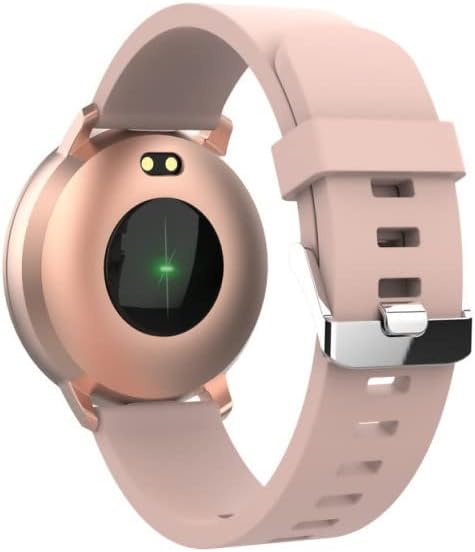
3.1 pav.: galinis view of the SB-315, highlighting the heart rate sensor.
- Veiklos stebėjimas: Tracks steps taken, distance covered, and calories burned throughout the day.
- Miego stebėjimas: Automatically monitors your sleep patterns, including deep sleep, light sleep, and awake times. Access detailed sleep analysis in the companion app.
- Sporto režimai: Select from various sports modes such as running, cycling, climbing, and walking to track specific workout data.
- Drėkinimo priminimas: Set reminders to ensure you drink enough water throughout the day.
3.3 Išmaniosios funkcijos
- Pranešimai: Receive instant notifications for incoming calls, SMS messages, and alerts from social media applications directly on your wrist.
- Nuotolinis fotoaparato valdymas: Naudokite savo išmanųjį laikrodį kaip nuotolinį užraktą savo išmaniojo telefono kamerai.
- Muzikos valdymas: Valdykite muzikos atkūrimą išmaniajame telefone (paleiskite, pristabdykite, praleiskite takelius) tiesiai iš laikrodžio.
- Laikrodžio ciferblato pritaikymas: Personalize your watch by choosing from various watch faces available through the companion app.
- Žadintuvas: Set silent vibrating alarms to wake you up or remind you of important events.
4. Priežiūra
4.1 Valymas ir priežiūra
To ensure the longevity and proper functioning of your SB-315 smartwatch, follow these cleaning and care guidelines:
- Valymas: Reguliariai valykite laikrodžio ekraną ir dirželį minkšta,amp, lint-free cloth. Avoid using harsh chemicals, abrasive cleaners, or solvents.
- Džiovinimas: Prieš įkraudami ar dėvėdami, įsitikinkite, kad laikrodis yra visiškai sausas, ypač po sąlyčio su vandeniu.
- Dirželių priežiūra: If the strap is removable, clean it separately. Allow it to air dry completely before reattaching.
4.2 Atsparumas vandeniui (IP67)
The SB-315 smartwatch is rated IP67, meaning it is protected from dust and can withstand immersion in water up to 1 meter for up to 30 minutes. While it is water-resistant, it is not waterproof for prolonged submersion or high-pressure water activities.
- Do not wear the watch while showering with hot water, in saunas, or steam rooms.
- Venkite spausti mygtukus po vandeniu.
- If the watch gets wet, wipe it dry thoroughly before charging.
4.3 Akumuliatoriaus priežiūra
Norėdami maksimaliai padidinti akumuliatoriaus veikimo laiką ir našumą:
- Prieš pirmą kartą naudodami laikrodį, jį visiškai įkraukite.
- Venkite dažnai visiškai iškrauti akumuliatorių.
- Laikykite laikrodį vėsioje, sausoje vietoje, kai ilgesnį laiką jo nenaudojate.
- Naudokite tik pateiktą įkrovimo laidą.
5. Problemų sprendimas
If you encounter issues with your SB-315 smartwatch, refer to the following common problems and solutions:
| Problema | Galima priežastis | Sprendimas |
|---|---|---|
| Laikrodis neįsijungia | Išsikrovęs akumuliatorius; įrenginys užstrigo | Charge the watch for at least 30 minutes. If still unresponsive, try a soft reset (refer to app or manufacturer's websvetainėje, kur rasite konkrečias instrukcijas). |
| Nepavyksta susieti su išmaniuoju telefonu | Bluetooth off; app not running; watch not discoverable; interference | Ensure Bluetooth is on for both devices. Restart both the watch and phone. Make sure the app is open and searching. Forget previous pairings on phone. |
| Pranešimai negauti | App permissions not granted; notification settings off; app not running in background | Check app permissions in phone settings. Verify notification settings within the companion app. Ensure the app is running in the background. |
| Inaccurate heart rate/step count | Improper fit; sensor obstruction; software glitch | Ensure the watch is worn snugly on the wrist, about one finger's width above the wrist bone. Clean the sensor on the back of the watch. Restart the watch. |
| Trumpas baterijos veikimo laikas | Frequent use of features; high brightness; constant notifications | Reduce screen brightness. Limit continuous heart rate monitoring. Turn off unnecessary notifications. Ensure background app refresh is optimized. |
If the problem persists, please contact FOREVER customer support for further assistance.
6. Specifikacijos
Key technical specifications for the FOREVER SB-315 Fitband Smartwatch:
| Funkcija | Detalė |
|---|---|
| Modelio pavadinimas | SB-315 |
| Prekės ženklas | AMŽAI |
| Spalva | Rožinė |
| Ryšio technologija | Bluetooth 5.0 |
| Ekrano dydis | 0.96" (or 1.3", depending on specific model variant) - 240 x 240 pixels |
| Baterijos talpa | 155 mAh ličio polimeras |
| Maksimalus budėjimo laikas | Iki 10 dienų |
| Atsparumo vandeniui įvertinimas | IP67 |
| Suderinami įrenginiai | Smartphones (iOS ≥ 10.0, Android ≥ 5.0) |
| Ypatingos savybės | Heart Rate Monitor, Sleep Monitor, Notification, Alarm Clock, Activity Tracker, Remote Camera/Music Control |
| Grynasis svoris | 57g |
7. Garantija ir palaikymas
For warranty information, please refer to the warranty card included in your product packaging or contact your point of purchase. Warranty terms and conditions may vary by region and retailer.
For technical support, troubleshooting assistance beyond this manual, or inquiries about spare parts, please visit the official FOREVER websvetainėje arba susisiekite su jų klientų aptarnavimo skyriumi. Kontaktiniai duomenys paprastai pateikiami gamintojo websvetainėje arba produkto pakuotėje.
Manufacturer: TelForceOne
Ask a question about this manual
Ask about setup, troubleshooting, compatibility, parts, safety, or missing instructions. Manuals+ will review the question and use this page’s manual context to help answer it.