1. Įvadas
Ačiū, kad pirkoteasing the Kimiso-E92 (KMS-206) Portable Bluetooth Speaker. This manual provides essential information for the safe and efficient operation of your device. Please read it thoroughly before use and retain it for future reference.
The Kimiso-E92 (KMS-206) is a portable speaker designed for convenience and quality audio. It features wireless Bluetooth connectivity, support for USB and SD card playback, and an FM radio function. Its compact design includes a carrying strap for easy transport.
2. Saugos informacija
- Saugokite garsiakalbį nuo vandens, drėgmės ar ekstremalių temperatūrų.
- Stenkitės, kad garsiakalbis nenumestų ar nepatirtų stipraus smūgio.
- Nebandykite patys ardyti ar taisyti garsiakalbio. Kreipkitės į kvalifikuotus techninės priežiūros darbuotojus.
- Laikykite garsiakalbį atokiau nuo šilumos šaltinių ir tiesioginių saulės spindulių.
- Use only the provided charging cable or a certified 5V USB charger.
- Garsiakalbį valykite minkšta, sausa šluoste. Nenaudokite abrazyvinių valiklių.
3. Pakuotės turinys
Patikrinkite pakuotę, ar joje yra šie daiktai:
- 1 x Kimiso-E92 (KMS-206) Portable Bluetooth Speaker
- 1 x nešiojimo dirželis
- 1x USB įkrovimo laidas
4. Produktas baigtasview
Susipažinkite su garsiakalbio komponentais ir valdikliais.
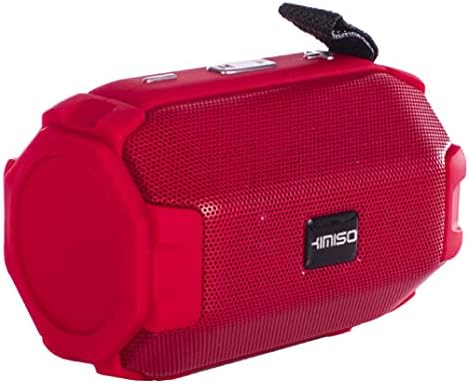
Figure 1: Kimiso-E92 (KMS-206) Portable Bluetooth Speaker (Red)
This image displays the red version of the Kimiso-E92 (KMS-206) portable speaker. It features a cylindrical shape with a mesh grille covering the front speaker, control buttons located on the top panel, and a black carrying strap attached to one end.

Figure 2: Kimiso-E92 (KMS-206) Portable Bluetooth Speaker (Black, Front View)
Šiame paveikslėlyje pavaizduotas tiesioginis frontas view of the Kimiso-E92 (KMS-206) portable speaker in black. The prominent feature is the speaker grille with the 'KIMISO' brand logo centrally placed. The textured surface of the speaker is also visible.
5. Sąranka
5.1. Įkraukite garsiakalbį
- Connect the small end of the provided USB charging cable to the charging port on the speaker.
- Connect the larger end of the USB cable to a 5V USB power adapter (not included) or a computer's USB port.
- Įkrovimo metu šviečia įkrovimo indikatoriaus lemputė, paprastai raudona.
- Once fully charged (approximately 2 hours), the indicator light may change color or turn off.
- Atjunkite įkrovimo laidą.
5.2. Maitinimo įjungimas/išjungimas
- Norėdami įjungti, paspauskite ir palaikykite maitinimo mygtuką kelias sekundes, kol išgirsite garsinį signalą arba pamatysite indikatoriaus lemputę.
- Norėdami išjungti, dar kartą paspauskite ir palaikykite nuspaudę maitinimo mygtuką, kol garsiakalbis išsijungs.
6. Naudojimo instrukcijos
6.1. „Bluetooth“ poravimas
- Ensure the speaker is powered on and in Bluetooth mode (it usually defaults to Bluetooth mode upon power-on). An indicator light will typically flash, indicating it's ready for pairing.
- Mobiliajame įrenginyje (išmaniajame telefone, planšetiniame kompiuteryje, nešiojamajame kompiuteryje) įjunkite „Bluetooth“ ir ieškokite galimų įrenginių.
- Select "KMS-206" or a similar name from the list of found devices.
- Once paired, the speaker will emit an audible confirmation, and the indicator light will typically stop flashing and remain solid.
- You can now play audio from your device through the speaker. The effective range for Bluetooth connection is approximately 10 meters.
6.2. USB atkūrimas
- Įdėkite USB atmintinę, kurioje yra MP3 garso įrašų fileį garsiakalbio USB prievadą.
- The speaker should automatically switch to USB mode and begin playing the audio files.
- Use the speaker's control buttons to navigate tracks (next/previous) and adjust volume.
6.3. SD kortelės atkūrimas
- Insert a Secure Digital (SD) card containing MP3 audio files into the SD card slot on the speaker.
- The speaker should automatically switch to SD card mode and begin playing the audio files.
- Use the speaker's control buttons to navigate tracks (next/previous) and adjust volume.
6.4. FM radijas
- Norėdami perjungti į FM radijo režimą, paspauskite režimo mygtuką (jei yra).
- In FM mode, press the Play/Pause button to automatically scan and save available radio stations.
- Use the Next/Previous track buttons to switch between saved stations.
6.5. Valdikliai
The speaker features intuitive button controls for various functions:
- Maitinimo mygtukas: Paspauskite ir palaikykite, kad įjungtumėte/išjungtumėte.
- Režimo mygtukas: Short press to switch between Bluetooth, USB, SD Card, and FM Radio modes.
- Atkūrimo / pristabdymo mygtukas: Short press to play or pause audio. In FM mode, press to auto-scan stations.
- Garsumo mažinimo / ankstesnio takelio mygtukas: Trumpas paspaudimas, norint pereiti į ankstesnį takelį / stotį. Ilgas paspaudimas, norint sumažinti garsumą.
- Garsumo didinimo / kito takelio mygtukas: Trumpas paspaudimas, norint pereiti į kitą takelį / stotį. Ilgas paspaudimas, norint padidinti garsumą.
7. Priežiūra
- Laikykite garsiakalbį švarų, nuvalydami jį minkšta, sausa šluoste.
- Venkite naudoti skystus valiklius ar tirpiklius.
- Kai garsiakalbio ilgesnį laiką nenaudojate, laikykite jį vėsioje, sausoje vietoje.
- Reguliariai įkraukite akumuliatorių, net jei juo nesinaudojate dažnai, kad palaikytumėte jo būklę.
8. Problemų sprendimas
| Problema | Galima priežastis | Sprendimas |
|---|---|---|
| Garsiakalbis neįsijungia. | Baterija išsikrovusi. | Kraukite garsiakalbį bent 2 valandas. |
| Iš garsiakalbio nėra garso. | Volume is too low; device not paired; incorrect mode. | Increase volume; re-pair Bluetooth; switch to correct mode (BT, USB, SD). |
| „Bluetooth“ įrenginys neranda garsiakalbio. | Speaker not in pairing mode; device too far. | Ensure speaker is on and in Bluetooth mode; move device closer (within 10m). |
| USB / SD kortelė neveikia. | Neteisinga file formatavimas; kortelė / diskas netinkamai įdėtas; sugadintas files. | Užtikrinti files are MP3; re-insert card/drive; try another card/drive. |
| Prastas FM radijo priėmimas. | Silpnas signalas. | Move speaker to a different location; re-scan stations. |
9. Specifikacijos
| Modelis: | KMS-206 |
| Bluetooth versija: | 5.1 + EDR (A2DP) |
| Belaidžio ryšio atstumas: | Iki 10 metrų |
| Garso kanalas: | stereo 2.0 |
| Išėjimo galia: | 10W |
| Dažnio atsakas: | 20Hz - 20KHz |
| Baterijos talpa: | 1500 mAh |
| Įvesties tomastage: | 5V USB |
| Veikimo laikas: | 4-6 valandas |
| Įkrovimo laikas: | Maždaug 2 val |
| Palaikomi režimai: | USB, TF (SD Card), Bluetooth, FM Radio |
| Kontrolės metodas: | Mygtukas |
| Suderinami įrenginiai: | Notebook, Smartphone, Tablet |
| Garsiakalbio tipas: | Žemųjų dažnių garsiakalbis |
| Žemųjų dažnių garsiakalbio skersmuo: | 5.25 colių |
| Vattage (pikas): | 20 vatų |
10. Garantija ir palaikymas
Dėl garantijos informacijos ar techninės pagalbos žr. pirkimo metu pateiktus dokumentus arba susisiekite su pardavėju. Išsaugokite pirkimo įrodymą, jei prireiktų pateikti garantinį prašymą.