
Įvadas
Thank you for choosing the Opal Selfie Stick OP-Sel-BT-01. This manual provides essential information for the safe and effective use of your device. Please read it thoroughly before operation and retain it for future reference.
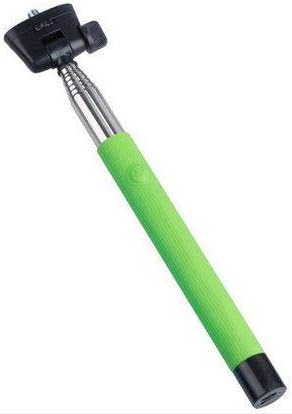
1 paveikslas: The Opal Selfie Stick OP-Sel-BT-01 in green, showing its extendable arm, phone holder, and comfortable grip.
Produkto savybės
- Spalva: Žalia
- Pagrindinė medžiaga: Plienas
- Maksimali apkrova: 500 g
- Ryšys: Belaidis ryšys („Bluetooth“)
- Suderinamos sistemos: Android 3.0 ir naujesnė versija, iOS 4.0 ir naujesnė versija
Sąranka
- Išskleiskite asmenukių lazdelę: Gently pull the phone holder section upwards to extend the stick.
- Adjust Phone Holder: Atidarykite telefono klamp and securely place your smartphone within it. Ensure the phone is centered and stable. The clamp is designed to hold various phone sizes.
- Maitinimas: Locate the power button (if applicable, usually on the handle) and press it to turn on the selfie stick. An indicator light may illuminate.
Naudojimo instrukcijos
"Bluetooth" poravimas
- Ensure the selfie stick is powered on and in pairing mode (indicator light may flash rapidly).
- Išmaniajame telefone eikite į Nustatymai > Bluetooth.
- Įjunkite „Bluetooth“ ir ieškokite galimų įrenginių.
- Select "Opal OP-Sel-BT-01" or a similar name from the list of devices.
- Once paired, the indicator light on the selfie stick may turn solid or turn off, indicating a successful connection.
Fotografavimas/vaizdo įrašymas
- Atidarykite savo išmaniojo telefono kameros programėlę.
- Išplėskite asmenukės lazdelę iki norimo ilgio.
- Position your phone for the desired shot.
- Press the shutter button on the selfie stick handle to capture a photo or start/stop video recording.
Priežiūra
- Valymas: Asmenukių lazdelę nuvalykite minkšta, sausa šluoste. Nenaudokite abrazyvinių valiklių ar tirpiklių.
- Saugykla: Store the device in a cool, dry place away from direct sunlight and extreme temperatures. Retract the stick fully before storage.
- Akumuliatoriaus priežiūra: If the selfie stick has a rechargeable battery, ensure it is charged periodically even when not in use to maintain battery health.
Trikčių šalinimas
| Problema | Galima priežastis | Sprendimas |
|---|---|---|
| Nepavyksta susieti su telefonu | Selfie stick not in pairing mode; Bluetooth off on phone; battery low. | Ensure stick is on and in pairing mode. Turn phone's Bluetooth off/on. Charge the selfie stick. |
| Shutter button not working | Not paired; camera app settings. | Verify successful Bluetooth pairing. Check camera app settings for volume button shutter control. |
| Phone not stable in clamp | Phone not centered; clamp nėra visiškai apsaugotas. | Re-position phone to be centered. Ensure clamp is firmly gripping the phone. |
Specifikacijos
- Modelis: OP-Sel-BT-01
- Prekinis ženklas: Opalas
- Spalva: Žalia
- Pagrindinė medžiaga: Plienas
- Maksimali apkrova: 500 g
- Ryšys: Belaidis ryšys („Bluetooth“)
- Palaikomos operacinės sistemos: „Android 3.0+“, „iOS 4.0+“
- ASIN: B091DBB122
- Pirmoji prieinama data: 30 Kovo 2021 d
Garantija ir palaikymas
For information regarding warranty coverage or technical support, please refer to the documentation included with your purchase or visit the official Opal websvetainėje. Konkrečios garantijos sąlygos gali skirtis priklausomai nuo regiono ir mažmenininko.
Saugos informacija
- Do not expose the device to extreme temperatures, moisture, or direct sunlight for prolonged periods.
- Laikyti vaikams nepasiekiamoje vietoje.
- Nebandykite ardyti ar modifikuoti įrenginio. Tai gali panaikinti garantiją ir sukelti gedimų.
- Ensure your phone is securely fastened in the clamp before extending the stick.