
1. Įvadas
The ZEBRONICS ZEB-DB250JP is a versatile Bluetooth wireless gamepad designed for an enhanced gaming experience across multiple platforms. It features 17 buttons, dual analog sticks, dual vibration motors, and quad front triggers for precise control. This gamepad is compatible with Android smartphones, tablets, Android TV boxes, Android TVs, and PCs running Windows 98 / 2000 / ME / XP / NT / VISTA / 7 / 8 / 10. It also supports PS3 consoles. The ergonomic design ensures comfortable use, and a phone mount is included for mobile gaming.
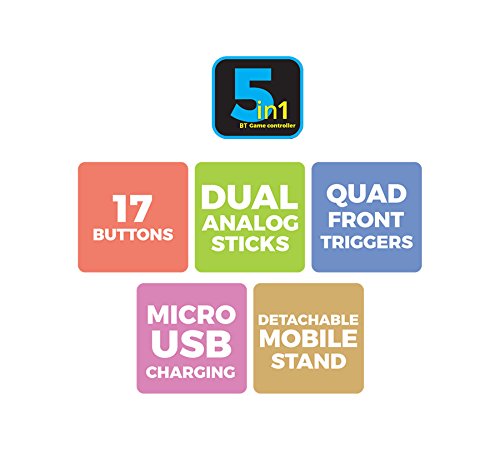
1 vaizdas: Baigtaview of ZEB-DB250JP key features including 17 buttons, dual analog sticks, quad front triggers, micro USB charging, and a detachable mobile stand.
2. Kas yra dėžutėje
- 1 x ZEB-DB250JP Joypad
- 1 x Micro USB įkrovimo laidas
- 1 x Detachable Phone Mount
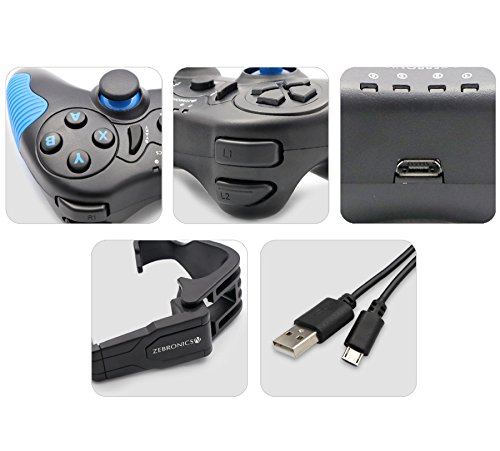
Image 2: A collage showing the ZEB-DB250JP gamepad, its triggers, micro USB port, detachable phone mount, and charging cable.
3. Sąranka
3.1 Žaidimų pulto įkrovimas
Before initial use, fully charge the gamepad. Connect the provided Micro USB cable to the gamepad's charging port and the other end to a USB power source (e.g., computer USB port, USB wall adapter). The built-in 300mAh battery provides extended playtime.

3 pav.: Viršus view of the ZEB-DB250JP gamepad, highlighting the Micro USB charging port located between the L1/R1 and L2/R2 triggers.
3.2 Bluetooth Pairing (Android Devices & PS3)
- Įsitikinkite, kad žaidimų pultas yra įkrautas.
- Paspauskite ir palaikykite NAMAI mygtuką kartu su X button simultaneously until the indicator lights on the gamepad begin to flash, indicating it is in pairing mode.
- On your Android smartphone, tablet, Android TV box, or Android TV, navigate to the Bluetooth settings.
- Ieškokite available devices and select "ZEB-DB250JP" (or similar name) from the list.
- Once connected, the indicator light on the gamepad will become solid. The Bluetooth range is approximately 8 meters.
- For PS3, connect the gamepad via USB cable first, then follow the console's instructions for pairing a new controller.
3.3 PC prijungimas
For PC gaming, the ZEB-DB250JP can be connected via the provided USB cable. Simply plug the Micro USB end into the gamepad and the USB-A end into an available USB port on your computer. The gamepad is compatible with Windows 98 / 2000 / ME / XP / NT / VISTA / 7 / 8 / 10 and should be recognized automatically.
3.4 Attaching the Phone Mount
To use the gamepad with your smartphone, attach the included phone mount to the designated slot on the gamepad. Secure your smartphone firmly into the mount.
4. Naudojimo instrukcijos
4.1 Mygtukų išdėstymas
The ZEB-DB250JP features a standard gamepad layout with 17 buttons, including:
- Dvigubos analoginės vairalazdės: Tiksliam judesiui ir kameros valdymui.
- D-Pad: Directional pad for menu navigation and specific game inputs.
- Veiksmų mygtukai (A, B, X, Y): Dėl veiksmų žaidime.
- Quad Front Triggers (L1, L2, R1, R2): For additional actions, often used for shooting or accelerating.
- HOME mygtukas: For power on/off and system functions.
- SELECT/BACK and START/MENU Buttons: For game menus and options.


Image 4: Left side of the ZEB-DB250JP gamepad showing the D-pad and left analog stick. Image 5: Right side of the ZEB-DB250JP gamepad showing the action buttons (A, B, X, Y) and right analog stick.
4.2 Maitinimo įjungimas/išjungimas
- Norėdami įjungti, paspauskite NAMAI mygtuką.
- Norėdami išjungti, paspauskite ir palaikykite NAMAI button for a few seconds until the gamepad shuts down.
4.3 Žaidimai
Once connected, the gamepad should be recognized by compatible games. Refer to your game's settings for controller configuration and button mapping. The dual vibration motors provide haptic feedback for an immersive gaming experience.
5. Priežiūra
- Valymas: Žaidimų pultą valykite minkšta, sausa šluoste. Venkite naudoti stiprias chemines medžiagas ar abrazyvines medžiagas.
- Saugykla: Žaidimų planšetę laikykite vėsioje, sausoje vietoje, toliau nuo tiesioginių saulės spindulių ir ekstremalių temperatūrų.
- Akumuliatoriaus priežiūra: Norėdami pailginti baterijos veikimo laiką, venkite jos dažnai visiškai iškrauti. Reguliariai įkraukite žaidimų planšetę, net jei jos nenaudojate ilgą laiką.
6. Problemų sprendimas
- Žaidimų pultas neprisijungia per „Bluetooth“:
- Ensure the gamepad is charged.
- Make sure the gamepad is in pairing mode (HOME + X).
– Išjunkite ir įjunkite „Bluetooth“ savo įrenginyje.
- Forget the device from your Bluetooth settings and try pairing again.
- Ensure your device is within the 8-meter Bluetooth range. - Buttons unresponsive or delayed input:
- Check battery level and charge if low.
- Ensure there are no obstructions between the gamepad and the connected device.
- For PC, try connecting via USB cable to rule out wireless interference.
- Restart the gamepad and the connected device. - Žaidimų planšetė neįkraunama:
- Verify the Micro USB cable is securely connected to both the gamepad and the power source.
- Try a different Micro USB cable or power adapter.
- Ensure the power source is functional. - Vibracija neveikia:
- Check if the game supports vibration feedback.
- Ensure vibration settings are enabled in the game or device settings.
7. Specifikacijos
| Prekės ženklas | ZEBRONIKA |
| Modelio pavadinimas | analoginė lazda |
| Suderinami įrenginiai | Android, PC, PS3 |
| Valdiklio tipas | Žaidimų pultelis |
| Ryšio technologija | „Bluetooth“ (v3.0) |
| Produkto savybės | Wireless, Dual Vibration Motors |
| Mygtukų kiekis | 17 |
| Maitinimo šaltinio tipas | Maitinamas baterijomis |
| Baterija | Built-in 300mAH |
| Bluetooth diapazonas | 8m |
| Prekės svoris | 370 gramų |
| Prekės matmenys | 17x12x6 cm |
| Spalva | Red (as per product details, though main image shows black/red) |
| Modelio numeris | DB250JP |
8. Garantija ir palaikymas
The ZEBRONICS ZEB-DB250JP Bluetooth Gamepad Joystick comes with a 1 metų garantija. For any warranty claims or service, please carry the product to an authorized ZEBRONICS Service Center. For a list of service centers, refer to the product information provided at the time of purchase or visit the official ZEBRONICS websvetainę.
For further assistance or technical support, please contact ZEBRONICS customer service.