
allsun ETP110
ALLOSUN skaitmeninis termometras-higrometras ETP110 naudotojo vadovas
1. Įvadas
The ALLOSUN ETP110 is a multifunctional digital thermo-hygrometer designed for monitoring temperature, relative humidity, and dew point. This instrument is suitable for various environments including laboratories, workshops, warehouses, greenhouses, and residential settings. It features a large LCD display for clear readings and includes a humidity alarm function.
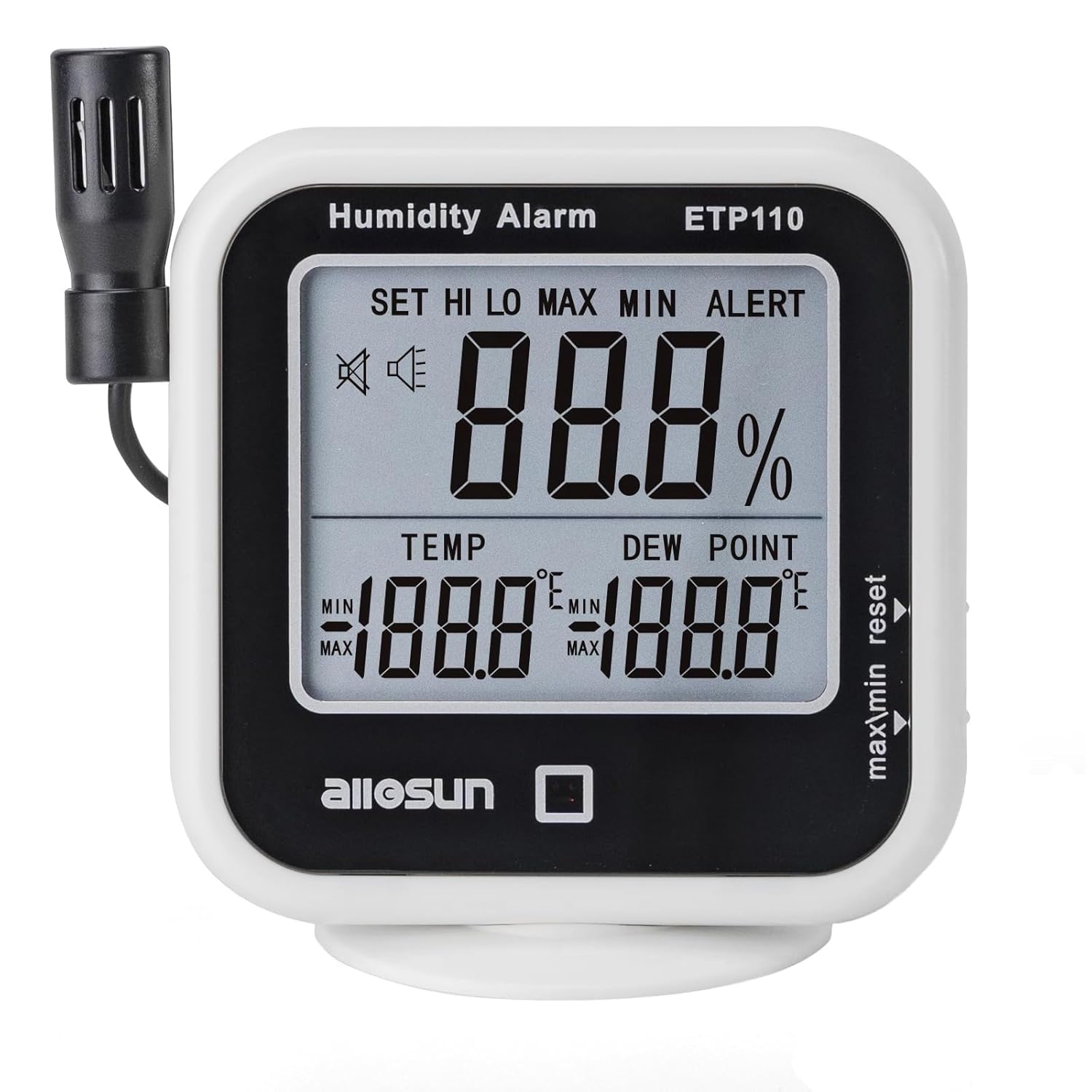
Image 1.1: The ALLOSUN ETP110 Digital Thermometer Hygrometer, displaying temperature, humidity, and dew point readings on its LCD screen.
2. Saugos informacija
Please read and understand all safety instructions before operating the device. Retain this manual for future reference.
- Baterijos sauga: Use only 1.5V AAA batteries. Ensure correct polarity when inserting batteries. Do not mix old and new batteries or different types of batteries. Remove batteries if the device will not be used for an extended period to prevent leakage.
- Aplinkos sąlygos: Do not expose the device to extreme temperatures, direct sunlight, high humidity, or corrosive environments.
- Zondo tvarkymas: Handle the sensor probe carefully. Avoid bending or damaging the cable.
- Valymas: Clean the device with a soft, dry cloth. Do not use abrasive cleaners or immerse the device in water.
3. Pakuotės turinys
Išpakuodami patikrinkite, ar yra visi daiktai:
- ALLOSUN Digital Thermometer Hygrometer (Model ETP110)
- Integrated/Detachable Sensor Probe
- Vartotojo vadovas (šis dokumentas)
Pastaba: 2 x 1.5V AAA batteries are required and are not included in the package.
4. Produktas baigtasview
Familiarize yourself with the components of the ETP110 device:

Image 4.1: Labeled diagram of the ALLOSUN ETP110, indicating the Temperature-Humidity Sensor, Humidity Display, Temperature Display, Dew Point Display, Alarm LED, "reset" Button, "max/min" Button, and Holder.
- Temperatūros ir drėgmės jutiklis: Measures ambient temperature and humidity. Can be mounted on the meter or extended via its cable.
- Drėgmės ekranas: Shows the current relative humidity percentage.
- Temperatūros rodymas: Shows the current temperature in Celsius or Fahrenheit.
- Dew Point Display: Shows the current dew point temperature.
- Signalizacijos šviesos diodas: Illuminates when humidity alarm limits are exceeded.
- "reset" Button: Used to clear maximum/minimum recorded values and for setting alarm parameters.
- "max/min" Button: Toggles between current, maximum, and minimum recorded values for temperature and humidity. Also used for unit conversion.
- Laikiklis: Provides a stand for placing the device on a flat surface. The base is detachable.
5. Specifikacijos

Image 5.1: The ALLOSUN ETP110 device illustrating its temperature, humidity, and dew point measurement ranges.
| Parametras | Vertė |
|---|---|
| Temperatūros matavimo diapazonas | -10 ℃ ~ 60 ℃ / 14 ℉ ~ 140 ℉ |
| Temperatūros raiška | 0.1 ℃ / 0.2 ℉ |
| Temperatūros tikslumas | ±1.0℃ / ±1.8℉ |
| Relative Humidity Measurement Range | 20 % RH ~ 95 % RH |
| Drėgmės skiriamoji geba | 1% |
| Drėgmės tikslumas | ±5%RH (within 25% to 85%RH and 0℃ to 50℃) |
| Rasos taško matavimo diapazonas | -29 ℃ ~ 59 ℃ / -20.2 ℉ ~ 138.2 ℉ |
| Rasos taško raiška | 0.1 ℃ / 0.2 ℉ |
| Dew Point Precision | ±2℃ @ 20℃ / ±3.6℉ @ 68℉ |
| Samplingo norma | Approximately 1 time per 3 seconds |
| Setting Range of Humidity Alarm Limit | 20 % ~ 95 % |
| Operating Temperature (Main Body) | 0℃ ~ +50℃ |
| Operating Temperature (Sensor) | -10 ℃ ~ +60 ℃ |
| Laikymo temperatūra | -20 ℃ ~ +50 ℃ |
| Baterija | 2 x 1.5V AAA batteries (not provided) |
| Dydis | 115mm × 114mm × 66mm (4.53"W x 2.6"H) |
| Svoris | Maždaug 145 g (5.29 uncijos) |
| Jutiklio zondo ilgis | Approximately 1.64 feet (50cm) |

Image 5.2: Diagram illustrating the dimensions of the ALLOSUN ETP110 device.
6. Sąranka
6.1 Akumuliatoriaus įdėjimas
- Suraskite baterijų skyriaus dangtelį įrenginio gale.
- Norėdami atidaryti skyrių, pastumkite arba atkabinkite dangtelį.
- Insert two (2) 1.5V AAA batteries, ensuring the correct polarity (+/-) as indicated inside the compartment.
- Saugiai uždėkite akumuliatoriaus skyriaus dangtelį.
6.2 Jutiklio zondo išdėstymas
The temperature-humidity sensor can be used in two configurations:
- Attached to the Meter: The sensor can remain connected to the left side of the main unit for integrated measurements.
- Extended Placement: For measurements in a different location (e.g., inside a greenhouse, refrigerator, or another room), extend the sensor probe using its cable. Ensure the cable is not pinched or damaged.
6.3 Montavimo parinktys
The device offers flexible placement options:
- Plokščias paviršius: Use the integrated holder to place the device on a desk, shelf, or any flat surface. The holder base is detachable.
- Montavimas ant sienos: The device can be mounted on a wall using a suitable screw (not included) through the designated mounting hole on the back.
7. Naudojimo instrukcijos
7.1 Maitinimo įjungimas/išjungimas
The device powers on automatically once batteries are installed. There is no manual power on/off button. To turn off, remove the batteries.
7.2 Matavimų skaitymas
Upon power-on, the LCD will display the current temperature, relative humidity, and dew point. Readings update approximately every 3 seconds.
7.3 Switching Temperature Units (℃/℉)
To switch between Celsius (℃) and Fahrenheit (℉):
- Press and hold the "max/min" button for approximately 3 seconds. The temperature unit will change, and all related temperature readings (temperature, dew point) will adjust accordingly.
7.4 Viewing Maximum/Minimum Values
The device records the maximum and minimum temperature and humidity values since the last reset.
- Press the "max/min" button once to display the maximum recorded values (MAX indicator will appear).
- Press the "max/min" button a second time to display the minimum recorded values (MIN indicator will appear).
- Press the "max/min" button a third time to return to current readings.
7.5 Resetting Maximum/Minimum Values
Norėdami išvalyti užfiksuotas maksimalias ir minimalias vertes:
- Nors viewing either MAX or MIN values, press the "reset" button. The recorded values will reset to the current readings.
7.6 Setting Humidity Alarm
The device can alert you when humidity levels go above a preset upper limit or below a preset lower limit.
- Press and hold the "reset" button for approximately 3 seconds until the "SET" indicator appears and the upper humidity limit (HI) starts flashing.
- Use the "max/min" button to adjust the desired upper humidity limit.
- Press the "reset" button again to confirm the HI limit and proceed to set the lower humidity limit (LO), which will start flashing.
- Use the "max/min" button to adjust the desired lower humidity limit.
- Press the "reset" button a third time to confirm the LO limit and exit the alarm setting mode.
When the humidity exceeds the set HI limit or falls below the set LO limit, the Alarm LED will flash, and an audible alarm will sound. To silence the alarm, press any button. To disable the alarm function, repeat the setting process and set the HI and LO limits to their default or desired off state (refer to specific device behavior if an 'OFF' option is available, otherwise set limits outside expected range).
8. Priežiūra
8.1 Valymas
Nuvalykite įrenginį casing with a soft, dry cloth. Do not use liquid cleaners, solvents, or abrasive materials, as these can damage the display or internal components.
8.2 Akumuliatoriaus keitimas
When the display becomes dim or the device functions erratically, replace the batteries. Follow the battery installation steps in Section 6.1.
8.3 Saugykla
If the device will not be used for an extended period, remove the batteries to prevent potential leakage and damage. Store the device in a cool, dry place, away from direct sunlight and extreme temperatures.
9. Problemų sprendimas
| Problema | Galima priežastis | Sprendimas |
|---|---|---|
| Nėra ekrano arba ekranas yra pritemdytas | Žemas arba išsikrovusios baterijos; neteisingas baterijų įdėjimas. | Pakeiskite baterijas naujomis 1.5 V AAA baterijomis, užtikrindami teisingą poliškumą. |
| Netikslūs rodmenys | Sensor probe obstructed or damaged; device placed in an unsuitable environment (e.g., near heat source, direct airflow). | Ensure the sensor probe is clean and unobstructed. Relocate the device to a stable environment away from direct influences. Allow time for readings to stabilize. |
| Humidity alarm not functioning | Alarm limits set incorrectly; alarm function disabled. | Review and adjust the humidity alarm HI/LO limits as described in Section 7.6. Ensure the current humidity is within or outside the set limits as expected. |
| Mygtukai nereaguoja | Laikinas programinės įrangos triktis; išsikrovusios baterijos. | Remove and reinsert batteries to perform a soft reset. Replace batteries if they are low. |
10. Garantija ir palaikymas
For warranty information or technical support, please refer to the documentation provided at the time of purchase or contact your retailer or the manufacturer directly. Keep your purchase receipt as proof of purchase.
Ask a question about this manual
Ask about setup, troubleshooting, compatibility, parts, safety, or missing instructions. Manuals+ will review the question and use this page’s manual context to help answer it.