
1. Įvadas
Ačiū, kad pirkoteasing the Excelvan LK-T091 Digital LED Alarm Clock Radio. This manual provides detailed instructions for the proper setup, operation, and maintenance of your device. Please read this manual thoroughly before use and retain it for future reference.
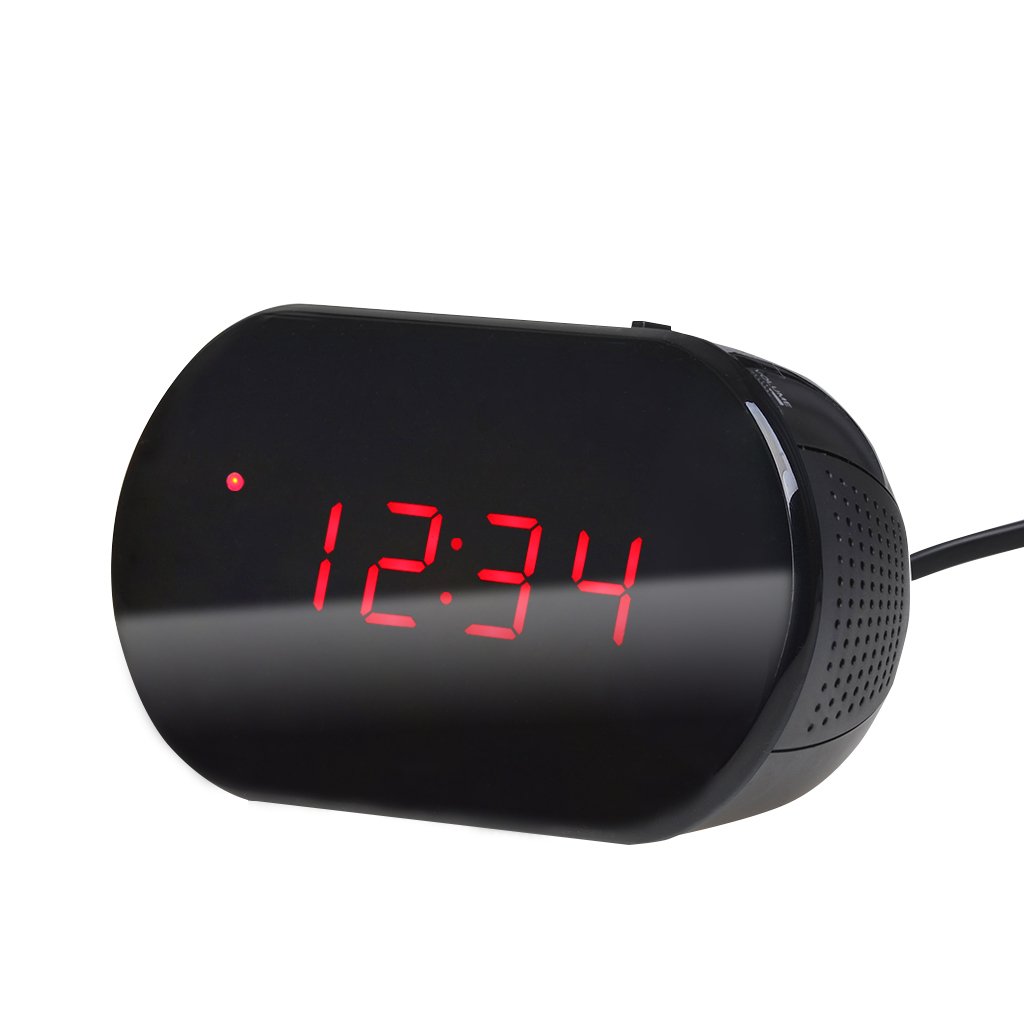
1 pav.: priekis view of the Excelvan LK-T091 Digital LED Alarm Clock Radio.
Pakuotės turinys:
- 1 x Excelvan Digital LED Alarm Clock Radio (Model LK-T091)
- 1 x Vartotojo vadovas
2. Svarbi saugos informacija
- Nenaudokite įkraunamų baterijų for the backup power. Alkaline or lithium batteries are recommended for optimal performance and longevity.
- Ensure the power adapter is compatible with your local power supply (AC230V ~ 50Hz).
- Saugokite įrenginį nuo vandens, drėgmės ar ekstremalių temperatūrų.
- Nestatykite prietaiso šalia šilumos šaltinių arba tiesioginiuose saulės spinduliuose.
- Nebandykite patys ardyti ar remontuoti įrenginio. Visus techninės priežiūros darbus patikėkite kvalifikuotiems specialistams.
- Laikyti vaikams nepasiekiamoje vietoje.
3. Produktas baigtasview
Valdikliai ir ekranas:

Figure 2: Top panel controls of the Excelvan LK-T091.
- Skystųjų kristalų ekranas: Rodo laiką, žadintuvo būseną ir radijo dažnį.
- SNOOZE mygtukas: Laikinai nutildo žadintuvą.
- SET / PRESET Button: Used to set time/alarm and save radio presets.
- ALARM / MEM Button: Activates alarm setting mode and recalls radio presets.
- Perkrovimo mygtukas: Resets the unit.
- Tuning Buttons (▲ / ▼): Adjust time, alarm, and radio frequency.
- RADIO / SLEEP Button: Turns radio on/off and activates sleep timer.
- ALARM OFF / BUZZER / RADIO Switch: Selects alarm sound source (off, buzzer, or radio).
- GARSUMO rankenėlė: Adjusts radio volume.

3 pav.: galinis view showing the battery compartment for backup power.
4. Sąranka
4.1 Maitinimo jungtis
- Connect the AC power cord to the power input jack on the back of the clock radio.
- Plug the other end of the power cord into a standard AC230V ~ 50Hz wall outlet.
- The LED display will light up, indicating the unit is powered on.
4.2 Atsarginio akumuliatoriaus įrengimas
The clock radio uses one 9V (6F22 type) battery (not included) for backup power. This battery maintains time settings during a power outage.
- Įrenginio apačioje raskite baterijų skyrių.
- Atidarykite akumuliatoriaus skyriaus dangtelį.
- Insert one 9V (6F22 type) alkaline or lithium battery, ensuring correct polarity (+ and -).
- Saugiai uždarykite akumuliatoriaus skyriaus dangtelį.
- Note: The battery backup only maintains time settings; the display will not be visible during a power outage. Do not use rechargeable batteries.
4.3 Laiko nustatymas
- Paspauskite ir palaikykite NUSTATYTI mygtuką, kol pradės mirksėti valandų skaitmenys.
- Naudokite ▲ or ▼ (Tuning) buttons to adjust the hour.
- Paspauskite NUSTATYTI dar kartą paspauskite mygtuką; mirksės minučių skaitmenys.
- Naudokite ▲ or ▼ (Tuning) buttons to adjust the minutes.
- Paspauskite NUSTATYTI button once more to confirm and exit time setting mode. The time is displayed in 24-hour format.
5. Naudojimo instrukcijos
5.1 Signalizacijos nustatymas
The alarm can be set to wake you with a buzzer or your favorite FM radio station.
- Paspauskite ir palaikykite SIGNALAS mygtuką, kol pradės mirksėti žadintuvo valandų skaitmenys.
- Naudokite ▲ or ▼ (Tuning) buttons to adjust the alarm hour.
- Paspauskite SIGNALAS button again; the alarm minute digits will flash.
- Naudokite ▲ or ▼ (Tuning) buttons to adjust the alarm minutes.
- Paspauskite SIGNALAS dar kartą paspauskite mygtuką, kad patvirtintumėte ir išeitumėte iš žadintuvo nustatymo režimo.
- Norėdami įjungti žadintuvą, stumkite ALARM OFF / BUZZER / RADIO switch to either BUZZERIS or RADIJAS. An alarm indicator will appear on the display.
- To turn off the alarm, slide the switch to SIGNALAS IŠJUNGTAS.

Figure 4: Choose to wake up to a buzzer sound or your preferred radio station.
5.2 Snausti funkcija
Kai suskamba žadintuvas, paspauskite didelį SNAIGĖ button to temporarily silence the alarm for approximately 9 minutes. The alarm will sound again after this period. To cancel snooze and turn off the alarm, slide the ALARM OFF / BUZZER / RADIO pereiti prie SIGNALAS IŠJUNGTAS.

Figure 5: The snooze function allows for a short delay before the alarm sounds again.
5.3 FM radijo veikimas
5.3.1 Tuning the Radio
- Paspauskite RADIJAS mygtuką, kad įjungtumėte FM radiją.
- Naudokite ▲ or ▼ (Tuning) buttons to manually tune to your desired FM frequency (87.5 – 108 MHz).
- To automatically scan for the next available station, press and hold the ▲ or ▼ (Tuning) buttons for a few seconds until the frequency starts scanning.
- Reguliuokite garsumą naudodami TOMAS rankenėlė.
- Paspauskite RADIJAS button again to turn off the radio.
5.3.2 Saving and Recalling Presets
The clock radio can store up to 10 FM radio station presets.
- Tune to your desired station using the tuning method described above.
- Paspauskite ir palaikykite SET / PRESET mygtuką, kol ekrane pradės mirksėti „P01“ (arba kitas galimas išankstinio nustatymo numeris).
- Naudokite ▲ or ▼ (Tuning) buttons to select the desired preset number (P01-P10).
- Paspauskite SET / PRESET dar kartą, kad išsaugotumėte stotį pasirinktame išankstiniame nustatyme.
- To recall a saved preset, press the ALARM / MEM mygtuką pakartotinai, kad peržiūrėtumėte išsaugotas stotis.

Figure 6: Digital FM tuning allows for precise station selection and saving presets.
5.4 Miego laikmačio funkcija
Miego laikmatis leidžia radijui groti nustatytą laiką, prieš automatiškai išsijungiant.
- Kol groja radijas, paspauskite MIEGAS button repeatedly to cycle through the available sleep timer durations: 90, 75, 60, 45, 30, 15, 00 minutes.
- The selected duration will be displayed briefly. The radio will automatically turn off after the set time.
- Norėdami atšaukti miego laikmatį, paspauskite MIEGAS button until "00" is displayed, or turn off the radio manually.
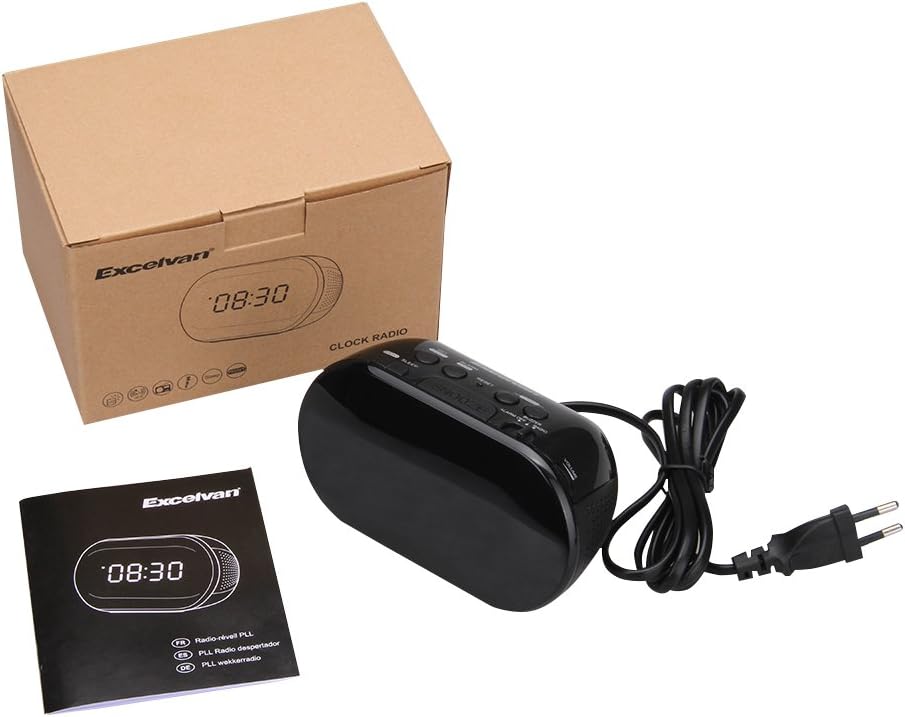
Figure 7: The sleep timer allows you to fall asleep to music, which then automatically turns off.
6. Priežiūra
6.1 Valymas
- Nuvalykite įrenginio išorę minkštu, sausu skudurėliu.
- Nenaudokite abrazyvinių valiklių, vaško ar tirpiklių, nes jie gali pažeisti apdailą.
- Ensure the unit is unplugged from the power outlet before cleaning.
6.2 Akumuliatoriaus keitimas
If the time settings are lost during a power outage, the 9V backup battery may need to be replaced. Follow the instructions in Section 4.2 for battery installation.
7. Problemų sprendimas
| Problema | Galima priežastis | Sprendimas |
|---|---|---|
| No display / Unit not turning on | Power cord not connected or power outlet not active. | Įsitikinkite, kad maitinimo laidas yra tvirtai prijungtas prie įrenginio ir veikiančio sieninio lizdo. |
| Laiko / žadintuvo nustatymai prarandami išsijungus maitinimuitage | Atsarginė baterija išsikrovusi arba neįdėta. | Install a new 9V alkaline or lithium battery in the battery compartment. |
| Prastas FM radijo priėmimas | Antena nėra ištiesta arba silpnas signalo lygis. | Extend the FM wire antenna fully. Try repositioning the unit for better reception. |
| Signalizacija neskamba | Alarm not set or alarm switch is in "OFF" position. | Verify alarm time is set correctly. Ensure the ALARM OFF / BUZZER / RADIO jungiklis nustatytas į BUZZERIS or RADIJAS. |
| Ekranas per ryškus/tamsus | No brightness adjustment feature on this model. | The display brightness is fixed. |
8. Specifikacijos
- Modelis: LK-T091
- Ekranas: LED, 24-hour format
- Signalizacijos tipas: Single alarm (Buzzer or FM Radio)
- FM dažnio diapazonas: 87.5 – 108 MHz
- Miego laikmatis: 00, 15, 30, 45, 60, 75, 90 minučių
- Maitinimo įvestis: Kintamoji srovė 230V ~ 50Hz
- Atsarginė baterija: 1 x 9V (6F22 type) battery (not included)
- Gaminio matmenys (ilgis x aukštis x gylis): Maždaug 14.15 cm x 7.14 cm x 0.89 cm
- Svoris: Maždaug 380 g
- Medžiaga: AC (Plastic)
- Spalva: Juoda
9. Garantija ir palaikymas
Excelvan products are designed to provide reliable performance. For specific warranty information, please refer to the warranty card included with your purchase or contact your retailer. If you encounter any issues or require technical assistance, please contact Excelvan customer support through their official websvetainėje arba kontaktinėje informacijoje, pateiktoje kartu su jūsų produktu.
Please have your model number (LK-T091) and purchase details ready when contacting support.