
1. Įvadas
The Audioengine B1 is a premium Bluetooth receiver designed to integrate high-quality wireless audio streaming into your existing home stereo system. Featuring Bluetooth 5.3 with aptX Adaptive technology, it delivers superior sound quality and extended wireless range. This manual provides detailed instructions for setting up, operating, and maintaining your B1 receiver.
2. Kas yra dėžutėje
- Audioengine B1 Bluetooth Receiver
- RCA Audio Cable (3ft/1m)
- Power Adapter with Detachable Cable
- Mikropluošto maišelis
- Sąrankos vadovas (šis vadovas)

Image: All items included with the Audioengine B1 Premium Bluetooth Receiver.
3. Produktas baigtasview
The Audioengine B1 features a compact design with essential connections for seamless integration into your audio setup.
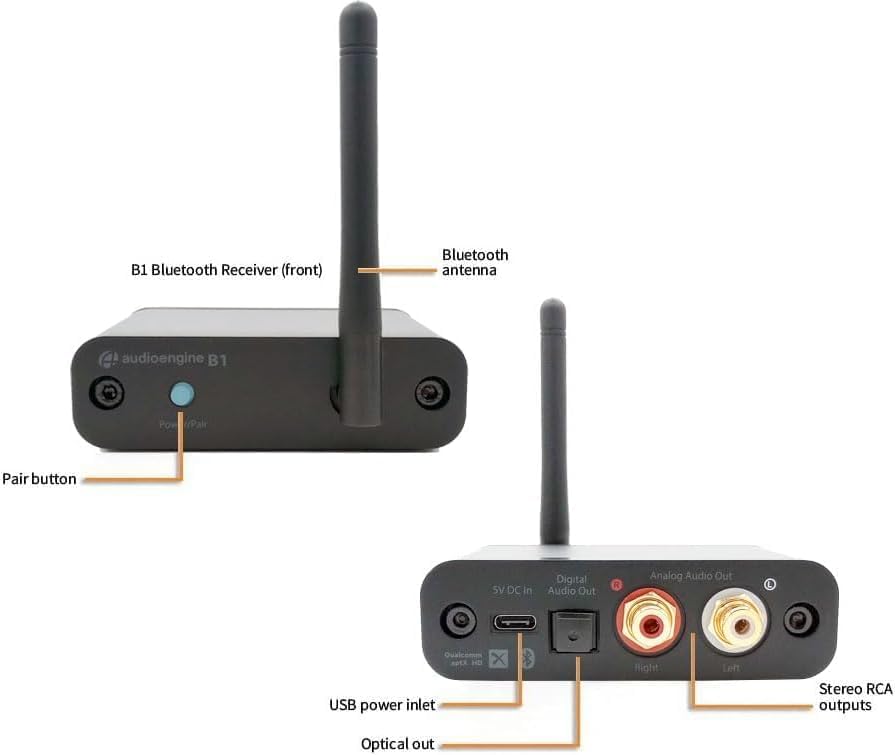
Image: Front and rear panels of the B1 receiver, highlighting the Power/Pair button, Bluetooth antenna, USB power input, Optical output, and Analog RCA outputs.
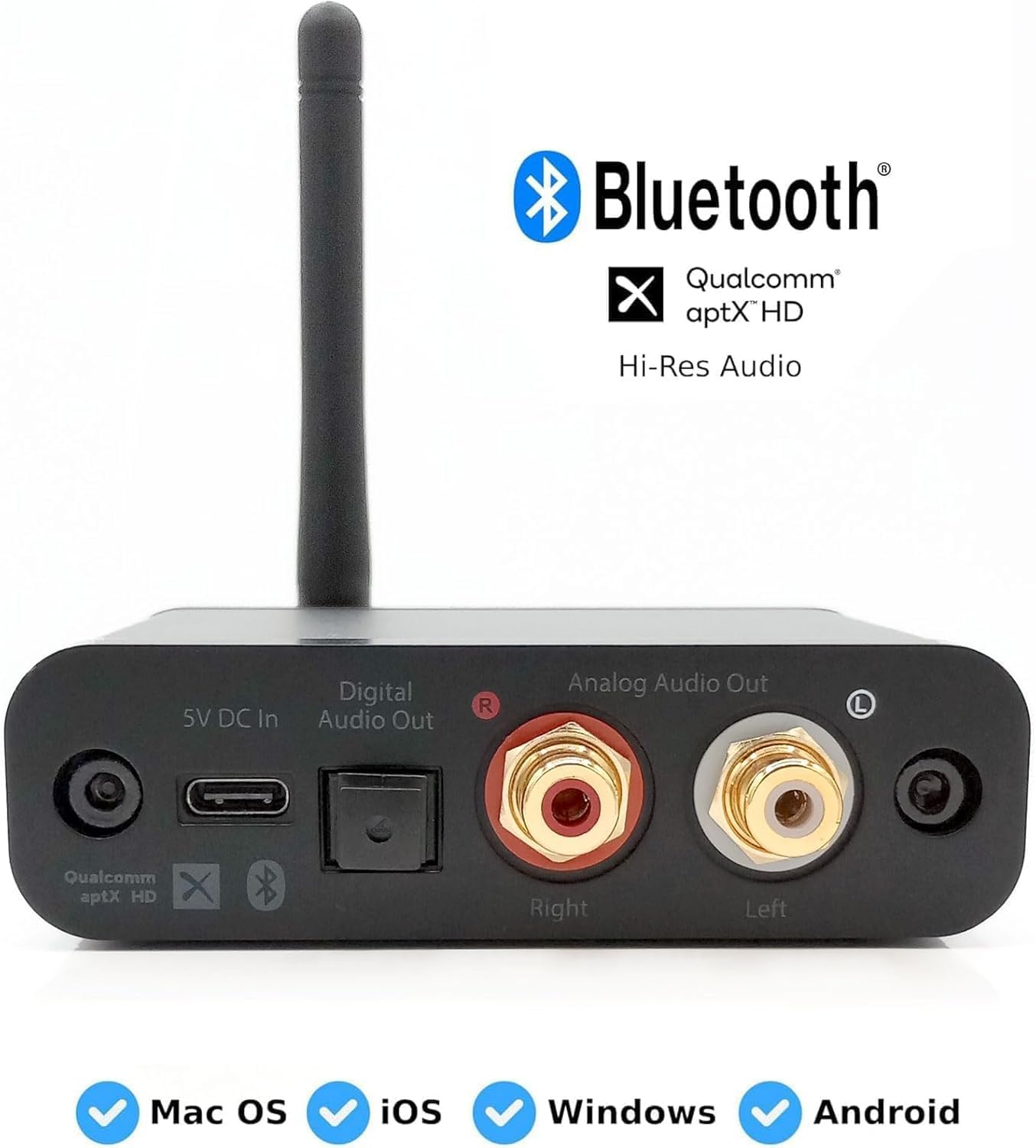
Vaizdas: Išsamus view of the B1's rear connections, including digital optical and analog RCA outputs, and power input. Also shows compatibility with various operating systems.
- Power/Pair Button: Used to power on/off the device and initiate Bluetooth pairing.
- „Bluetooth“ antena: Ensures stable and extended wireless range.
- 5V DC In (USB Power Inlet): Connects to the included power adapter for power.
- Skaitmeninė garso išvestis (optinė): For connecting to a digital audio input on your stereo system or DAC.
- Analog Audio Out (RCA): For connecting to analog RCA inputs on your stereo system or powered speakers.
4. Sąrankos instrukcijos
Follow these steps to connect your Audioengine B1 to your home stereo system and start streaming music wirelessly.
- Prijunkite garso kabelius: Connect the included RCA audio cables from the B1's Analog Audio Out (or an optical cable from Digital Audio Out) to an available input on your music system (e.g., AUX, CD, Tape input). Ensure left and right channels are matched (red for right, white for left).

Image: The B1 receiver connected to a vintage Marantz stereo receiver via RCA cables.
- Prijunkite maitinimą: Connect the included power adapter to the B1's 5V DC In port and plug it into an AC outlet. The B1 will automatically power on and enter pairing mode, indicated by a blinking light on the Power/Pair button.

Image: The B1 receiver powered on and ready for pairing, positioned on a stereo receiver.
- Susiekite įrenginį: On your smartphone, tablet, or computer, go to your Bluetooth settings. Select "Audioengine B1" from the list of available devices to pair and connect. The light on the B1's Power/Pair button will turn solid once connected.

Image: A smartphone displaying the Bluetooth pairing menu, showing the Audioengine B1 as a discoverable device.
- Leiskite savo muziką: Select the corresponding input on your stereo system (e.g., AUX) and start playing music from your paired device. Enjoy high-fidelity wireless audio!
Sąrankos vaizdo vadovas
Video: Official quick start guide for the Audioengine B1 receiver, demonstrating the connection process to an audio system.
Video: A step-by-step demonstration of how to set up the Audioengine B1 Wireless Bluetooth Receiver quickly.
5. Naudojimo instrukcijos
Once connected, the B1 operates seamlessly. It will automatically reconnect to the last paired device when powered on and within range. To pair a new device, press and hold the Power/Pair button until the light blinks, then select "Audioengine B1" from your device's Bluetooth settings.
The B1 features an extended wireless range of up to 100 feet (30 meters), allowing you to stream music from a distance without interruption. Its 32-bit DAC ensures high-resolution audio playback, enhancing your listening experience.
6. Priežiūra
To ensure the longevity and optimal performance of your Audioengine B1, follow these simple maintenance guidelines:
- Valymas: Use a soft, dry cloth to clean the exterior of the B1. Avoid using harsh chemicals or abrasive materials.
- Vieta: Place the B1 in a well-ventilated area, away from direct sunlight, heat sources, and moisture. Ensure the Bluetooth antenna is not obstructed for optimal signal reception.
- Kabelių valdymas: Laikykite laidus tvarkingai sutvarkytus, kad išvengtumėte pažeidimų ir užtikrintumėte stabilų sujungimą.
7. Problemų sprendimas
If you encounter any issues with your Audioengine B1, refer to the following common solutions:
- Nėra garso arba garsas skamba pertraukiamai:
- Ensure the B1 is properly powered on and the indicator light is solid.
- Verify that your audio system is set to the correct input source (e.g., AUX, CD).
- Patikrinkite visus garso kabelius, ar jie tvirtai prijungti.
- Confirm your device is successfully paired and connected to "Audioengine B1" via Bluetooth.
- Move the B1 further away from other electronic devices or power supplies that might cause interference.
- Nepavyksta susieti įrenginio:
- Ensure the B1 is in pairing mode (blinking indicator light). If not, press and hold the Power/Pair button until it blinks.
- Turn off Bluetooth on other nearby devices that might be trying to connect to the B1.
- Try restarting both the B1 (unplug and replug power) and your source device.
- Analog Output Issues (e.g., after power failure):
- If the B1's analog output stops working and only digital output is available, reboot the device by unplugging it, waiting a few seconds, and then plugging it back in.
- Bright Power Light:
- The power light will blink when awaiting pairing and then turn off after approximately three minutes if no connection is made, entering standby. If the light remains too bright for your environment, consider repositioning the unit or using a small, non-obstructive cover.
8. Specifikacijos
| Funkcija | Specifikacija |
|---|---|
| Prekės ženklas | Garso variklis |
| Modelio numeris | B1 |
| Ryšio technologija | Bluetooth 5.3 |
| Ypatinga funkcija | Bluetooth 5.3 aptX-HD, Optical, iOS, Android, Windows, MacOS |
| Suderinami įrenginiai | Stereo imtuvai |
| Jungties tipas | Optical, RCA |
| Garso kodavimas | Stereo |
| Garso išvesties režimas | Stereo, erdvinis garsas |
| Erdvinio garso kanalo konfigūracija | 2.0 |
| Kanalų skaičius | 2 |
| Palaikomos interneto paslaugos | POVOJUS |
| Kontrolės metodas | Programėlė |
| Garso išvesties tipas | Garsiakalbiai |
| Formatas | WAV, WMA |
| Belaidė technologija | Bluetooth |
| Prekės matmenys D x P x A | 9.52 "D x 8.89" P x 2.54" A |
| Prekės svoris | 5 uncijos |
9. Garantija ir palaikymas
The Audioengine B1 Bluetooth Receiver comes with a 3 metų gamintojo garantija. Ši garantija apima medžiagų ir gamybos defektus normaliai naudojant.
For technical support, troubleshooting assistance, or warranty claims, please visit the official Audioengine websvetainėje arba susisiekite tiesiogiai su jų klientų aptarnavimo tarnyba. Išsaugokite pirkimo įrodymą, kad galėtumėte patvirtinti garantiją.