
1. Įvadas
Thank you for choosing the Yongnuo YN-467 II i-TTL Flash Speedlite. This advanced flash unit is designed to provide versatile lighting solutions for Canon DSLR cameras, offering improved features over its predecessor. This manual will guide you through the setup, operation, and maintenance of your YN-467 II to help you achieve optimal photographic results.
2. Saugos informacija
- Do not disassemble or attempt to repair the flash unit yourself. Refer to qualified service personnel.
- Blykstę laikykite sausą. Saugokite ją nuo lietaus ar drėgmės.
- Nelieskite blykstės vamzdžio iš karto po įjungimo, nes jis gali būti karštas.
- Use only specified batteries (AA alkaline or Ni-MH). Incorrect battery types may cause damage or malfunction.
- Laikyti vaikams nepasiekiamoje vietoje.
- Venkite tiesioginio blykstės poveikio akims, ypač iš arti, nes ji gali pakenkti regėjimui.
3. Pakuotės turinys
Patikrinkite, ar jūsų pakuotėje yra visi šie daiktai:
- 1 x Yongnuo YN-467 II Flash Unit
- 1 x apsauginis krepšys
- 1 x mini stovas
- 1 x User Manual (English, Chinese)
4. Pagrindinės savybės
The Yongnuo YN-467 II offers several enhancements and core functionalities:
- Improved Mark II Version: Enhanced design and functionality compared to the classic YN-467.
- Kompiuterio prievadas: Includes a PC synchronization port for wired flash triggering.
- Improved Button Design: Ergonomic control panel for easier operation.
- Keli blykstės režimai: Supports TTL (Through-The-Lens), Manual (M), S1, and S2 optic slave modes.
- Auto Zoom Head: Automatically adjusts flash coverage to match the lens focal length.
- AF LED: Assists with autofocus in low-light conditions.
- Superfast Recycle Time: Approximately 2 seconds at full power with AA alkaline batteries.
- Vadovo numeris: GN33 (at ISO 100, 105mm).
- Maitinimo valdymas: 7 levels of light quantity output control in manual mode (1/1, 1/2, 1/4, 1/8, 1/16, 1/32, 1/64).
5. Sąranka
5.1 Akumuliatoriaus įdėjimas
The YN-467 II requires four (4) AA size batteries. Both alkaline and Ni-MH rechargeable batteries are suitable.
- Raskite baterijų skyriaus dangtelį blykstės įrenginio šone.
- Atidarykite dangtelį rodyklės nurodyta kryptimi.
- Įdėkite keturias AA baterijas, užtikrindami teisingą poliškumą (+/-), kaip pažymėta skyriaus viduje.
- Tvirtai uždarykite baterijų skyriaus dangtelį, kol jis spragtelėdamas užsifiksuos vietoje.
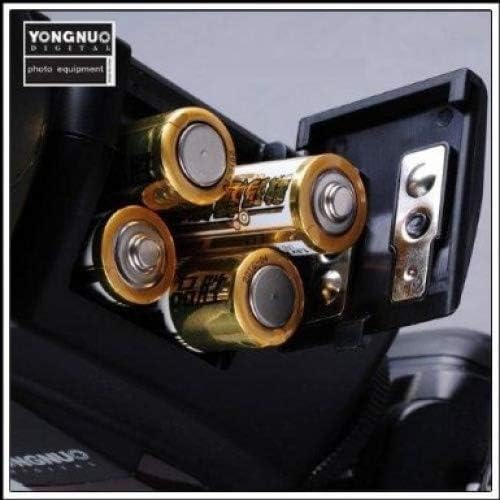
Figure 5.1: Battery compartment with four AA batteries correctly installed.
5.2 Blykstės pritvirtinimas prie fotoaparato
The YN-467 II is designed to mount onto the hot shoe of Canon DSLR cameras.
- Ensure both the flash unit and your camera are powered off.
- Slide the flash's mounting foot into the camera's hot shoe until it stops.
- Tighten the locking wheel or lever on the flash unit to secure it firmly to the camera's hot shoe. Do not overtighten.
- Įjunkite fotoaparatą, tada įjunkite blykstę.
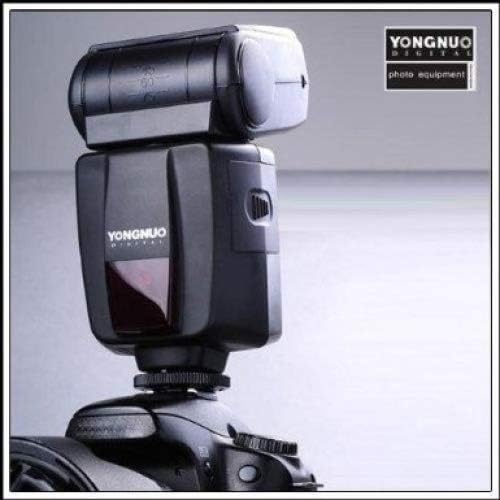
Figure 5.2: Yongnuo YN-467 II flash mounted on a Canon DSLR camera.
6. Veikimo režimai
The YN-467 II offers several flash modes to suit various shooting conditions. Use the mode button on the flash unit to cycle through the available modes.
6.1 TTL Mode (Through-The-Lens)
In TTL mode, the flash automatically determines the appropriate light output based on the camera's metering system. This is the most convenient mode for general photography.
- Mount the flash to your camera and power both on.
- Select TTL mode on the flash unit.
- The flash will communicate with your camera to provide automatic exposure.
6.2 Rankinis (M) režimas
Manual mode allows you to set the flash power output manually. This provides precise control over lighting for consistent results.
- Select M mode on the flash unit.
- Use the control buttons (usually '+' and '-') to adjust the flash power from 1/1 (full power) down to 1/64.
- Available power levels: 1/1, 1/2, 1/4, 1/8, 1/16, 1/32, 1/64.
6.3 Optic Slave Modes (S1 & S2)
These modes allow the YN-467 II to be triggered wirelessly by another flash unit.
- S1 režimas: The flash will fire in response to the first flash it detects. This is suitable for use with manual flashes or flashes that do not emit a pre-flash.
- S2 režimas: The flash will ignore the first pre-flash from a master flash (e.g., a camera's built-in flash or another TTL flash) and fire on the second flash. This is useful when using the YN-467 II as an off-camera slave with a TTL master flash.
7. Išplėstinės funkcijos
7.1 Auto Zoom Head
The YN-467 II features an auto-zoom function that automatically adjusts the flash head's coverage to match the focal length of the lens attached to your camera. This ensures efficient light distribution.
7.2 AF Assist LED
In low-light conditions, the built-in AF assist LED will emit a pattern to help your camera's autofocus system lock onto subjects more easily. This function typically activates automatically when needed.
7.3 PC Synchronization Port
The PC port allows for a wired connection to trigger the flash, offering an alternative to hot shoe or optical triggering. This is useful for studio setups or when optical triggering is not feasible.
8. Priežiūra
- Valymas: Blykstės įrenginį valykite minkšta, sausa šluoste. Įsisenėjusius nešvarumus galima lengvai nuvalyti.amp galima naudoti šluostę, po to nusausinkite sausą šluostę. Nenaudokite tirpiklių ar abrazyvinių valiklių.
- Saugykla: When not in use for extended periods, remove the batteries to prevent leakage and corrosion. Store the flash in its protection bag in a cool, dry place.
- Akumuliatoriaus priežiūra: Always use fresh batteries. If using rechargeable batteries, ensure they are fully charged before use.
9. Problemų sprendimas
If you encounter issues with your YN-467 II flash, please refer to the following common problems and solutions:
- Blykstė nesuveikia:
- Patikrinkite, ar blykstės įrenginys įjungtas.
- Įsitikinkite, kad baterijos yra tinkamai įdėtos ir jų įkrova pakankama.
- Įsitikinkite, kad blykstė tvirtai pritvirtinta prie fotoaparato karštosios jungties.
- Patikrinkite fotoaparato nustatymus, kad įsitikintumėte, jog įjungta išorinė blykstė.
- In slave modes (S1/S2), ensure the master flash is firing and the sensor is unobstructed.
- Flash recycle time is slow:
- Batteries may be low. Replace with fresh alkaline batteries or fully charged Ni-MH batteries.
- Recycle time is naturally longer at full power. Reduce power output if faster recycling is needed.
- Flash exposure is incorrect (too bright/dark):
- In TTL mode, check camera exposure compensation settings.
- In Manual mode, adjust the flash power output accordingly.
- Įsitikinkite, kad blykstės galvutė nukreipta teisingai (nėra užblokuota).
- Flash does not zoom automatically:
- Ensure the flash is securely mounted and communicating with the camera.
- Check camera settings related to flash zoom.
10. Specifikacijos
| Vadovo numeris | 33 (esant ISO 100, 105 mm) |
| Blykstės režimas | TTL, M, S1, S2 |
| Grandinės dizainas | Izoliuotas vartų bipolinis tranzistorius (IGBT) |
| Vertikalus pasukimo kampas | 0–90 laipsnių |
| Horizontalus sukimosi kampas | 0–270 laipsnių |
| Maitinimo šaltinis | 4 x AA dydžio baterijos (šarminės arba Ni-MH) |
| Perdirbimo laikas | Approximately 2 seconds (with AA alkaline cells at full power) |
| Spalvos temperatūra | 5,600 tūkst |
| Blykstės trukmė | nuo 1/800 iki 1/20,000 XNUMX sek |
| Blykstės valdymas | TTL auto flash or manual (7 levels: 1/1 to 1/64) |
| Matmenys | 72 x 135 x 85 mm |
| Grynasis svoris | 250g |
| Suderinami tvirtinimai | Canon |
| Modelio numeris | YN467II-C |
11. Garantija ir palaikymas
For specific warranty information, please refer to the warranty card included with your product or visit the official YONGNUO website. If you require technical support or have questions not covered in this manual, please contact YONGNUO customer service through their official channels.
YONGNUO Official Websvetainė: www.yongnuo.com.cn (Atkreipkite dėmesį: ši nuoroda skirta tik informaciniams tikslams ir gali būti keičiama.)


