
Įvadas
Ačiū, kad pirkoteasing the RCA 32LB45RQ 32-Inch Full 1080p 60Hz LCD HDTV. This manual provides essential information for the safe and efficient operation of your television. Please read it thoroughly before using the product and retain it for future reference.
Saugos informacija
Kad išvengtumėte pažeidimų ir užtikrintumėte saugų veikimą, laikykitės šių saugos priemonių:
- Maitinimo šaltinis: Televizorių junkite tik prie nurodyto maitinimo šaltinio.
- Vėdinimas: Užtikrinkite tinkamą vėdinimą aplink televizorių. Neužblokuokite ventiliacijos angų.
- Skysčiai: Keep the TV away from water and moisture. Do not place liquid-filled objects on the TV.
- Valymas: Prieš valydami atjunkite televizorių nuo elektros tinklo. Naudokite minkštą, sausą šluostę. Venkite skystų valiklių.
- Vieta: Pastatykite televizorių ant stabilaus, lygaus paviršiaus arba tvirtai pritvirtinkite jį prie sienos.
- Aptarnavimas: Nebandykite patys taisyti televizoriaus. Visus techninės priežiūros darbus patikėkite kvalifikuotiems specialistams.
Kas yra dėžutėje
Patikrinkite, ar yra visi komponentai:
- RCA 32LB45RQ 32-Inch LCD HDTV
- Stovi
- Nuotolinio valdymo pultas
- 2 AA baterijos
- Maitinimo laidas
- Vartotojo vadovas (šis dokumentas)
Sąranka
Stovo tvirtinimas
To attach the included stand, carefully place the TV screen-down on a soft, clean surface to prevent scratches. Align the stand with the mounting holes on the bottom of the TV and secure it using the provided screws. Ensure the stand is firmly attached before placing the TV upright.

Priekyje view of the RCA 32LB45RQ HDTV with its stand attached.
Montavimas ant sienos
The RCA 32LB45RQ is wall mountable. A VESA-compatible wall mount kit (sold separately) is required. Refer to the wall mount kit's instructions for proper installation. Ensure the wall can support the weight of the TV and the mount.
Periferinių įrenginių prijungimas
Your TV offers various input ports for connecting external devices:
- HDMI: Connect Blu-ray players, game consoles, cable/satellite boxes, and other HD devices. The TV has 3 HDMI ports.
- USB: Prijunkite USB atmintines, kad galėtumėte atkurti medijos failus. Televizorius turi 1 USB prievadą.
- Komponentas (YPbPr): Connect older video devices using component video and stereo audio cables. The TV has 1 component input.
- VGA: Connect a computer. The TV has 1 VGA input.
- Antena / kabelis: Prijunkite anteną, jei norite transliuoti belaidžiu būdu, arba kabelinės televizijos ryšį.

Galinis view of the RCA 32LB45RQ HDTV, highlighting the various input ports for external devices.
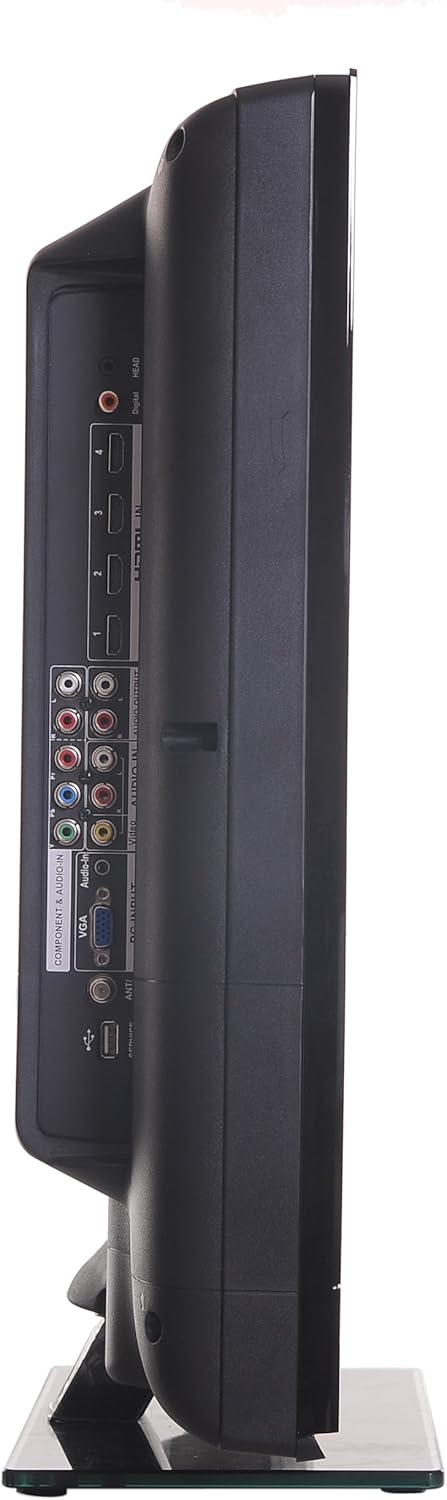
Šoninė view of the RCA 32LB45RQ HDTV, showing additional input ports for convenient access.
Įjungimas ir pradinė sąranka
After connecting all desired devices and the power cord, press the power button on the TV or remote control. Follow the on-screen prompts for initial setup, including language selection, time zone, and channel scanning for over-the-air or cable channels.
Veikiantis
Nuotolinis valdymasview
The included remote control allows you to access all TV functions. Insert the two AA batteries (included) into the remote control, observing polarity.
Pagrindinės funkcijos
- Galia: Paspauskite, jei norite įjungti arba išjungti televizorių.
- Garsumo didinimas / sumažinimas: Sureguliuokite garso lygį.
- Kanalas aukštyn/žemyn: Keisti televizijos kanalus.
- Nutildyti: Silence the TV audio.
- Įvestis: Cycle through available input sources (HDMI 1, HDMI 2, Component, VGA, TV).
Meniu naršymas
Press the 'Menu' button on your remote to access the TV's settings. Use the arrow keys to navigate and 'OK' or 'Enter' to select options.
- Vaizdo nustatymai: Adjust brightness, contrast, color, tint, sharpness, and select picture modes (e.g., Standard, Dynamic, Movie).
- Garso nustatymai: Adjust bass, treble, balance, and select sound modes (e.g., Standard, Music, Movie).
- Settings/Setup: Access general TV settings such as language, time, parental controls (V-Chip), and software updates.
Interneto paslaugos
The TV supports a built-in browser for basic internet access. Use the remote control to navigate web puslapių.
Priežiūra
Ekrano valymas
Švelniai nuvalykite ekraną minkštu, nepūkuotu skudurėliu. Jei dėmės sunkiai įveikiamos, šiek tiek nuvalykite.ampen the cloth with water or a specialized screen cleaner (ensure it is safe for LCD screens) and wipe gently. Do not spray liquid directly onto the screen.
Bendroji priežiūra
- Venkite televizoriaus tiesioginių saulės spindulių ar ekstremalių temperatūrų.
- Nedėkite sunkių daiktų ant televizoriaus viršaus.
- Atjunkite televizorių nuo elektros tinklo žaibuojant arba kai jis bus nenaudojamas ilgesnį laiką.
Trikčių šalinimas
Jei kyla problemų dėl televizoriaus, dažniausiai pasitaikančias problemas ir jų sprendimus rasite šioje lentelėje:
| Problema | Galima priežastis / sprendimas |
|---|---|
| Nėra galios | Ensure the power cord is securely plugged into the TV and a working electrical outlet. Check the power indicator light. |
| Nėra vaizdo, bet yra garsas | Check the input source selection. Ensure the connected device is powered on and sending a signal. |
| Nėra garso, bet vaizdas yra | Patikrinkite garsumo lygį ir įsitikinkite, kad televizorius nėra nutildytas. Patikrinkite išorinių įrenginių garso kabelio jungtis. |
| Prasta vaizdo kokybė | Adjust picture settings (brightness, contrast, sharpness). Check antenna or cable connections. Ensure the input source is providing a high-quality signal. |
| Nuotolinio valdymo pultas neveikia | Patikrinkite ir pakeiskite baterijas. Įsitikinkite, kad tarp nuotolinio valdymo pulto ir televizoriaus IR jutiklio nėra jokių kliūčių. |
Specifikacijos
Detailed technical specifications for the RCA 32LB45RQ HDTV:
| Funkcija | Specifikacija |
|---|---|
| Modelio pavadinimas | 32LB45RQ |
| Ekrano dydis | 32 colių |
| Ekrano technologija | LCD |
| Rezoliucija | 1080p (1920 x 1080) |
| Atnaujinimo dažnis | 60 Hz |
| Krašto santykis | 16:9 |
| Kontrasto santykis | 5000:1 |
| Reagavimo laikas | 8 milisekundės |
| Tunerio tipas | ATSC, NTSC |
| Iš viso HDMI prievadų | 3 |
| Iš viso USB prievadų | 1 |
| Component Inputs | 1 |
| VGA įėjimai | 1 |
| Ryšio technologija | HDMI, USB |
| Palaikomos interneto paslaugos | Naršyklė |
| Montavimo tipas | Sieninis laikiklis |
| Spalva | Juoda |
| Prekės svoris | 17.4 svaro |
| Įtraukti komponentai | Stovas, televizorius |
| Parental Control Technology | V formos lustas |
| Modelio metai | 2017 |

Energy Guide label for the RCA 32LB45RQ HDTV, showing estimated yearly energy cost.
Garantija ir palaikymas
Informacija apie garantiją
This RCA 32LB45RQ HDTV comes with a Limited 1 year parts and labor warranty. Please retain your proof of purchase for warranty claims. For specific terms and conditions, refer to the warranty card included with your product or contact RCA customer support.
Pagalba klientams
For technical assistance, troubleshooting beyond this manual, or warranty service, please contact RCA customer support. Contact information can typically be found on the RCA official websvetainėje arba ant produkto pakuotės.