
Įvadas
The Microsoft Optical Desktop Elite for Bluetooth provides a wireless keyboard and mouse solution designed for use with Windows PCs. This combo utilizes Bluetooth wireless technology for connectivity, offering enhanced range and reliability. It enables synchronization and information sharing between your PC and other Bluetooth-enabled devices.
Kas yra dėžutėje
- Microsoft Bluetooth Keyboard
- Microsoft Bluetooth Optical Mouse
- USB Bluetooth Transceiver
- Baterijos (iš anksto įdiegtos arba pridedamos atskirai)
- Produkto dokumentacija

Image: The retail packaging for the Microsoft Optical Desktop Elite for Bluetooth, showing the keyboard, mouse, and USB transceiver.
Sąranka
Įdiekite baterijas
Ensure fresh batteries are installed in both the keyboard and the mouse. Refer to the battery compartment markings for correct polarity.
Connect USB Transceiver
Plug the included USB Bluetooth transceiver into an available USB port on your Windows PC. The system will typically install the necessary drivers automatically.
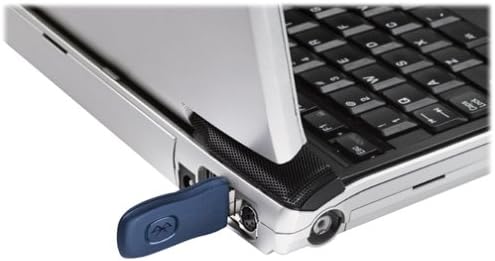
Image: A blue USB Bluetooth transceiver plugged into the side of a laptop computer.
Suporuokite įrenginius
Follow the on-screen prompts or refer to your Windows Bluetooth settings to pair the keyboard and mouse with the transceiver. This usually involves pressing a connect button on the devices and the transceiver.
Install Software (Optional)
For advanced customization of keyboard shortcuts and mouse buttons, install the Microsoft IntelliPoint and IntelliType Pro software from the official Microsoft website or the included CD (if applicable).
Naudojimo instrukcijos
The Microsoft Optical Desktop Elite for Bluetooth offers a range of features for enhanced productivity.

Image: The Microsoft Optical Desktop Elite keyboard and mouse, showcasing their ergonomic design and wireless nature.
Klaviatūros ypatybės:
- Standartinis QWERTY išdėstymas: Full-size keyboard with a standard QWERTY layout.
- Programmable Hot Keys: Utilize the customizable hot keys for quick access to applications, documents, or web puslapių.
- Medijos valdikliai: Dedicated keys for volume control, play/pause, and track navigation.
- Slinkimas iš vienos pusės į kitą: The keyboard features a scroll wheel or button for horizontal scrolling in documents and web puslapių.
Pelės savybės:
- Optinis sekimas: Provides precise and smooth cursor control on various surfaces.
- Slinkties ratukas: For vertical scrolling and button functionality.
- Slinkimas iš vienos pusės į kitą: The mouse scroll wheel also supports horizontal scrolling.
- Programuojami mygtukai: Customize side buttons for specific functions using the IntelliPoint software.
- Ilgesnis baterijos veikimo laikas: Designed for extended use between battery replacements.

Image: A detailed diagram highlighting various features and buttons on the Microsoft Optical Desktop Elite keyboard and mouse.
Priežiūra
Valymas:
- Klaviatūra: Šiek tiek naudokite minkštą, be pūkelių šluostę dampnuplaukite vandeniu arba švelniu valymo tirpalu. Venkite per didelės drėgmės.
- Pelė: Clean the optical sensor area on the bottom of the mouse with a dry cotton swab. Wipe the body with a soft, damp audinys.
- Do not immerse devices in liquid.
Baterijos keitimas:
- When battery indicators on the keyboard or mouse signal low power, replace batteries promptly.
- Atidarykite baterijų skyrių, išimkite senas baterijas ir įdėkite naujas, užtikrindami teisingą poliškumą.
- Senas baterijas išmeskite pagal vietinius reikalavimus.
Trikčių šalinimas
- Devices not connecting or frequently disconnecting:
- Ensure the USB Bluetooth transceiver is securely plugged into a working USB port.
- Check battery levels in both the keyboard and mouse. Replace if low.
- Re-pair the devices with the transceiver. Refer to the "Pair Devices" step in the Setup section.
- Ensure no other strong wireless signals (e.g., Wi-Fi routers, other Bluetooth devices) are causing interference. Try moving the transceiver closer to the devices.
- Iš naujo paleiskite kompiuterį.
- Mouse cursor is erratic or unresponsive:
- Nuvalykite optinį jutiklį pelės apačioje.
- Ensure you are using the mouse on a suitable surface. Highly reflective or transparent surfaces may cause issues.
- Patikrinkite akumuliatoriaus lygį.
- Keyboard keys are not responding:
- Patikrinkite akumuliatoriaus lygį.
- Ensure the keyboard is paired correctly.
- Verify that the keyboard is not in a sleep mode. Press any key to wake it.
- Side-to-side scrolling not working:
- Ensure the IntelliPoint/IntelliType Pro software is installed and configured correctly.
- Verify that the application you are using supports horizontal scrolling.
Specifikacijos
| Funkcija | Detalė |
|---|---|
| Prekės ženklas | Microsoft |
| Modelis | Optical Desktop Elite for Bluetooth |
| Ryšio technologija | „Bluetooth“, USB, belaidis |
| Suderinami įrenginiai | Personal Computer (Windows OS) |
| Judesio aptikimas | Optical (Mouse) |
| Klaviatūros išdėstymas | QWERTY (105 Keys) |
| Maitinimo šaltinis | Maitinamas baterijomis |
| Prekės svoris | 4 svaro (apytiksliai) |
| Spalva | Juoda/mėlyna |
Garantija ir palaikymas
For warranty information and technical support, please refer to the documentation included with your product or visit the official Microsoft support websvetainėje. Išsaugokite pirkimo įrodymą garantiniams reikalavimams.
Palaikymas internetu: support.microsoft.com