
Fujifilm Fujifilm FinePix 3800
„Fujifilm FinePix 3800“ skaitmeninio fotoaparato naudotojo vadovas
Model: FinePix 3800 (V-4401)
Įvadas
This manual provides comprehensive instructions for the operation, maintenance, and troubleshooting of your Fujifilm FinePix 3800 Digital Camera. Designed for both novice and experienced photographers, the FinePix 3800 offers a 3.0-megapixel sensor, 6x optical zoom, and various features to capture high-quality images and videos.
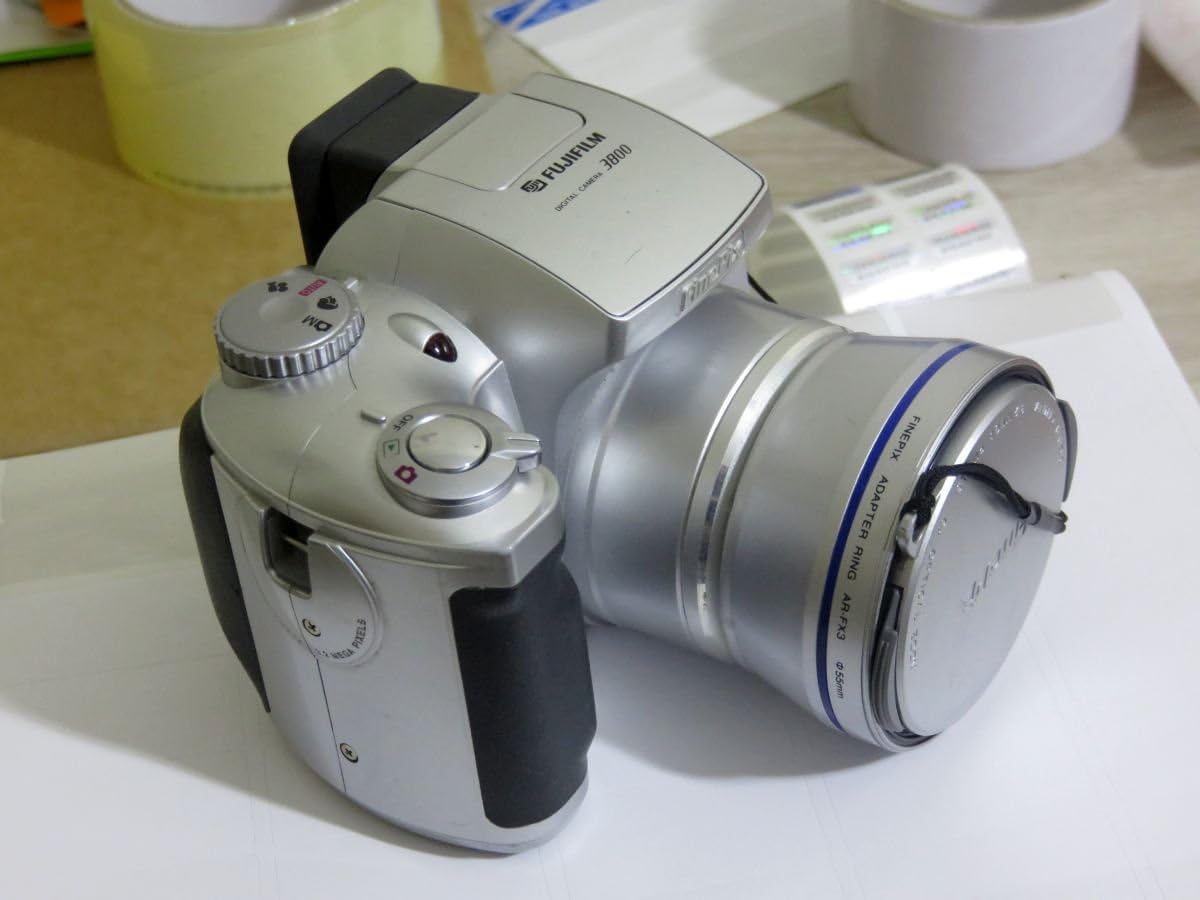
1 pav.: priekis view of the Fujifilm FinePix 3800 Digital Camera with the lens cap attached, showcasing its silver body and ergonomic grip.
Sąranka
1. Akumuliatoriaus įdėjimas
The FinePix 3800 operates on four (4) AA batteries. For optimal performance and extended usage, it is highly recommended to use rechargeable Nickel Metal Hydride (NiMH) batteries. Alkaline batteries are suitable for temporary use but will deplete quickly.
- Raskite baterijų skyriaus dangtelį fotoaparato apačioje arba šone.
- Norėdami atidaryti skyrių, pastumkite arba pakelkite dangtelį.
- Įdėkite keturias AA baterijas, užtikrindami teisingą poliškumą (+/-), kaip nurodyta skyriaus viduje.
- Tvirtai uždarykite baterijų skyriaus dangtelį, kol jis spragtelėdamas užsifiksuos vietoje.
2. Atminties kortelės įdėjimas
The camera uses xD-Picture Card memory. A 16 MB xD card is typically included, capable of storing approximately 12 images in fine mode or 26 images in normal mode.
- Raskite atminties kortelės lizdą, paprastai šalia akumuliatoriaus skyriaus.
- Atidarykite atminties kortelės angos dangtelį.
- Insert the xD-Picture Card with the metal contacts facing the correct direction (refer to the diagram inside the slot). Push gently until it clicks into place.
- Tvirtai uždarykite atminties kortelės lizdo dangtelį.
3. Pradinis įjungimas ir datos / laiko nustatymas
After installing batteries and the memory card, power on the camera for the first time.
- Turn the power dial or press the power button to switch on the camera.
- The LCD monitor will display the initial setup screen, prompting you to set the date and time.
- Use the camera's navigation buttons to adjust the year, month, day, hour, and minute.
- Confirm the settings to proceed. Correct date and time settings are crucial for proper image file valdymas.
Naudojimo instrukcijos
1. Pagrindiniai fotografavimo režimai
The FinePix 3800 offers various shooting modes to suit different conditions and user preferences.
- Automatinis režimas: For simple point-and-shoot operation. The camera automatically adjusts aperture, shutter speed, and white balance.
- Rankinis režimas: Provides control over settings such as aperture, exposure compensation, and white balance for advanced users.
- Scene Position: Optimize settings for specific scenes like landscape or portrait.

Figure 2: The Fujifilm FinePix 3800 with its lens extended and the pop-up flash activated, ready for capturing images.
2. Priartinimo valdymas
The camera features a 6x optical zoom Fujinon lens (equivalent to 38-228mm on a 35mm camera) and a variable digital zoom.
- Use the zoom lever (typically located near the shutter button) to zoom in (telephoto) or zoom out (wide-angle).
- Optical zoom provides higher quality images. Digital zoom can be used to extend magnification further (up to 3.25x in 640x480 pixel mode), but may result in reduced image quality.
3. Blykstės režimai
The built-in pop-up flash offers several modes:
- Automatinė blykstė: Fotoaparatas automatiškai nustato, ar reikia blykstės.
- Raudonų akių efekto mažinimas: Emits pre-flashes to reduce red-eye effect.
- Forced Flash: Blykstė suveikia nepriklausomai nuo aplinkos apšvietimo.
- Suppressed Flash: Blykstė išjungta.
- Slow Synchro: Combines flash with a slow shutter speed for balanced exposure of subject and background in low light.
4. White Balance and Exposure
- Baltos spalvos balansas: In manual mode, select from 6 preset positions (e.g., Daylight, Cloudy, Fluorescent) or use automatic white balance for accurate color reproduction.
- Užrakto greitis: The camera supports shutter speeds from 3 to 1/1,500 second. In manual mode, you can adjust this setting to control motion blur or freeze action.
5. LCD Monitor and Electronic Viewieškiklis (EVF)
The FinePix 3800 features a 1.8-inch LCD monitor and an electronic viewfinder for composing shots and reviewvaizdus.

3 pav.: galinis view of the Fujifilm FinePix 3800, highlighting the 1.8-inch LCD monitor, electronic viewieškiklis ir valdymo mygtukai.
- Use the LCD for a larger preview ir meniu naršymas.
- The EVF is useful in bright sunlight or to conserve battery power during image playback.
- A dedicated button (e.g., "EVF/LCD") allows switching between the two displays.
6. Movie and Voice Memo Capabilities
- Filmo režimas: Record digital videos with sound in QVGA (320 x 240) format, up to approximately 60 seconds in length at 10 frames per second.
- Balso atmintinė: Add up to 30 seconds of voice tags to your captured images for personal notes or descriptions.
7. Image Transfer to PC
Transferring images and videos to your computer is straightforward using the included USB cable and FinePixViewer programinė įranga.
- Prijunkite vieną USB kabelio galą prie fotoaparato USB prievado, o kitą – prie kompiuterio.
- Ensure the camera is powered on. Your computer should automatically recognize the camera as a removable storage device.
- Use the FinePixViewer software (included on CD-ROM) or your computer's file explorer to browse and transfer files.
Priežiūra
1. Kameros valymas
- Objektyvas: Use a soft, lint-free cloth specifically designed for optical lenses. Gently wipe in a circular motion. Avoid using harsh chemicals.
- Korpusas: Nuvalykite fotoaparato korpusą minkšta, sausa šluoste. Jei nešvarumai sunkiai įveikiami, šiek tiek nuvalykite.ampNuvalykite šluostę vandeniu ir nusausinkite. Nenaudokite tirpiklių.
- LCD ekranas: Use a soft, dry cloth. For smudges, a screen cleaner designed for electronics can be used sparingly.
2. Akumuliatoriaus priežiūra
- Jei fotoaparatas ilgesnį laiką nebus naudojamas, išimkite baterijas, kad išvengtumėte jų pratekėjimo.
- Baterijas laikykite vėsioje, sausoje vietoje.
- If using rechargeable batteries, follow the charger manufacturer's instructions for charging and maintenance.
3. Atminties kortelių tvarkymas
- Prieš pirmą kartą naudodami, visada formatuokite naujas atminties korteles fotoaparate.
- Avoid removing the memory card while the camera is writing data (e.g., after taking a photo) to prevent data corruption.
- Keep memory cards away from strong magnetic fields and extreme temperatures.
Trikčių šalinimas
This section addresses common issues you might encounter with your FinePix 3800.
Kamera neįsijungia
- Įsitikinkite, kad baterijos įdėtos teisingai, laikantis poliškumo.
- Check battery charge level. Replace with fresh alkaline batteries or fully charged NiMH batteries.
- Įsitikinkite, kad baterijų skyriaus dangtelis yra sandariai uždarytas.
Prasta vaizdo kokybė
- Neryškūs vaizdai: Ensure the lens is clean. Check if the camera is in focus. Use a tripod in low light or for slow shutter speeds.
- Neteisingos spalvos: Adjust white balance settings to match the lighting conditions.
- Dark/Overexposed Images: Check flash settings. Adjust exposure compensation if available in manual mode.
Memory Card Errors
- Ensure the memory card is inserted correctly and fully.
- Pabandykite formatuoti atminties kortelę (Pastaba: tai ištrins visus kortelėje esančius duomenis. Svarbu sukurti atsarginę kopiją. files pirmas.).
- If errors persist, the memory card may be faulty and require replacement.
Computer Does Not Recognize Camera
- Įsitikinkite, kad USB kabelis yra tvirtai prijungtas tiek prie fotoaparato, tiek prie kompiuterio.
- Verify the camera is powered on and in the correct connection mode (if applicable).
- Install or reinstall the FinePixViewer software and USB drivers from the included CD-ROM.
- Išbandykite kitą kompiuterio USB prievadą.
Specifikacijos
Key technical specifications for the Fujifilm FinePix 3800 Digital Camera:
| Funkcija | Specifikacija |
|---|---|
| Modelio pavadinimas | Fujifilm FinePix 3800 |
| Veiksminga nejudančioji raiška | 3.0 megapikselio |
| Nuotraukų jutiklių technologija | CCD |
| Optinis priartinimas | 6x |
| Skaitmeninis priartinimas | Up to 3.25x (in 640x480 mode) |
| Maksimalus židinio nuotolis | 228 milimetrai (35 mm atitikmuo) |
| Minimalus židinio nuotolis | 38 milimetrai (35 mm atitikmuo) |
| Didžiausia diafragma | f/2.8 |
| Užrakto greitis | 3 to 1/1,500 seconds |
| ISO jautrumas | ISO 100 equivalent (Expanded ISO Minimum: 100, Maximum: 1600) |
| LCD ekrano dydis | 1.8 colių |
| Viewieškiklis | Elektroninė |
| Atminties tipas | xD-Picture Card (16 MB included) |
| Ryšys | USB |
| Maitinimo šaltinis | 4 x AA baterijos |
| Matmenys (A x P x G) | Maždaug 3.03 x 3.9 x 2.7 colio |
| Svoris | Approx. 0.88 Pounds (without batteries/card) |
| Vaizdo raiška | QVGA (320x240) with audio, max 60 seconds |
Garantija ir palaikymas
Informacija apie garantiją
The Fujifilm FinePix 3800 Digital Camera comes with a 1 metų ribota garantija from the manufacturer. Please retain your proof of purchase for warranty claims. For detailed terms and conditions, refer to the warranty card included with your product or contact Fujifilm customer support.
Papildomi ištekliai
- Oficialus naudotojo vadovas (PDF): For a more detailed guide, you can download the official PDF manual: Atsisiųskite PDF vadovą
- Fujifilm Store: Explore other Fujifilm products and support resources: Visit Fujifilm Store
Ask a question about this manual
Ask about setup, troubleshooting, compatibility, parts, safety, or missing instructions. Manuals+ will review the question and use this page’s manual context to help answer it.