
ແນະນຳ
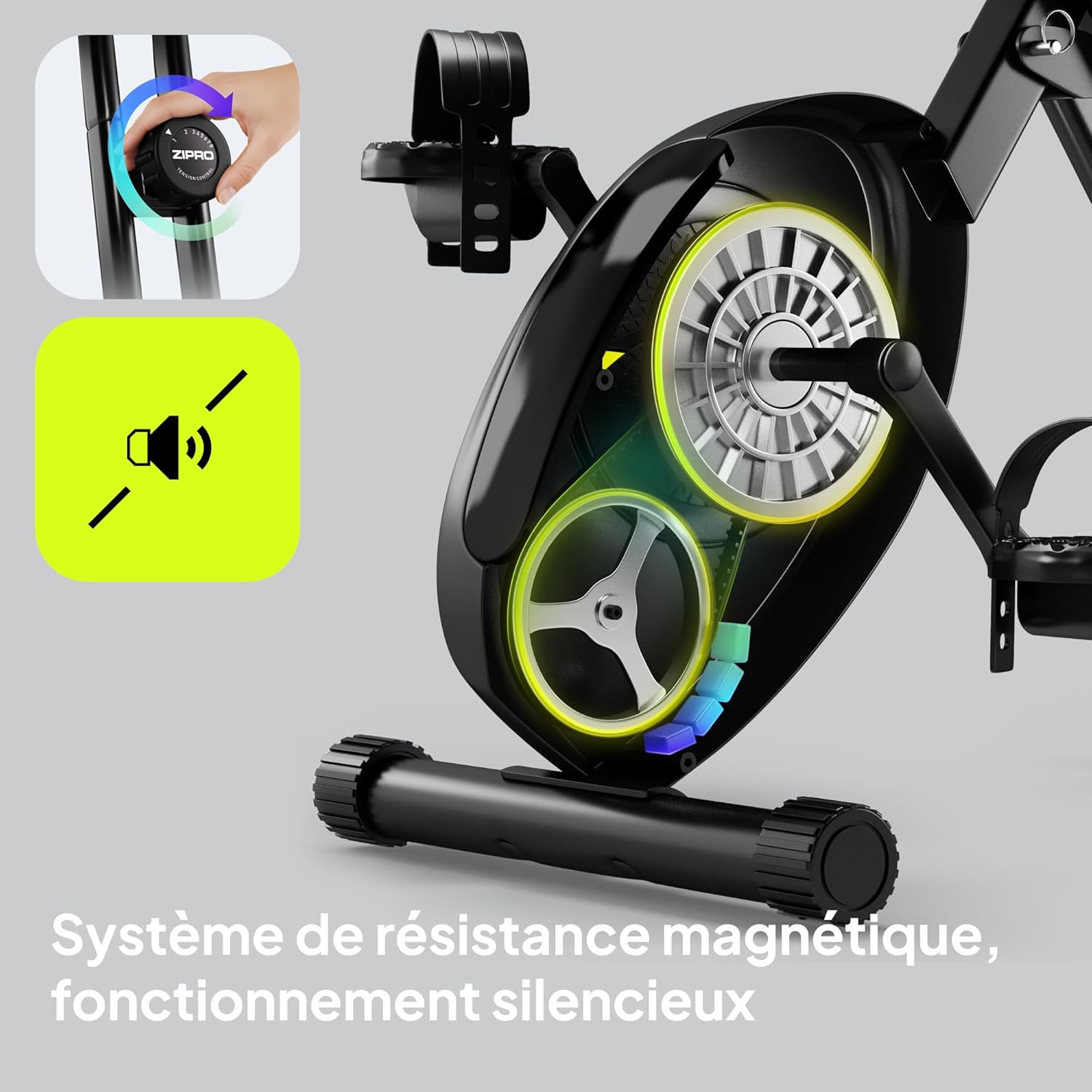
Thank you for choosing the ZIPRO Eclipse X Foldable Exercise Bike. This manual provides essential information for the safe and efficient use of your new fitness equipment. The Eclipse X is designed for comfortable home workouts, featuring a foldable structure, adjustable seat, and stable design. It integrates easily into small spaces and is simple to move. Its adjustable magnetic resistance system offers 8 levels, ensuring smooth and silent operation suitable for all fitness levels.
ຂໍ້ມູນຄວາມປອດໄພ
ກະລຸນາອ່ານຄໍາແນະນໍາທັງຫມົດຢ່າງລະອຽດກ່ອນທີ່ຈະປະກອບແລະນໍາໃຊ້. ຮັກສາຄູ່ມືນີ້ໄວ້ສໍາລັບການອ້າງອີງໃນອະນາຄົດ.
- ປຶກສາແພດຂອງທ່ານກ່ອນທີ່ຈະເລີ່ມໂຄງການອອກກໍາລັງກາຍໃດໆ.
- ໃຫ້ແນ່ໃຈວ່າທຸກພາກສ່ວນຖືກມັດຢ່າງປອດໄພກ່ອນທີ່ຈະໃຊ້ແຕ່ລະຄັ້ງ.
- ວາງລົດຖີບອອກ ກຳ ລັງກາຍຢູ່ເທິງພື້ນຜິວທີ່ຮາບພຽງ.
- ຮັກສາເດັກນ້ອຍ ແລະສັດລ້ຽງຢູ່ຫ່າງຈາກອຸປະກອນໃນລະຫວ່າງການປະຕິບັດງານ.
- ບໍ່ໃຫ້ເກີນນ້ໍາຫນັກຜູ້ໃຊ້ສູງສຸດຂອງ 110 ກິໂລ (242 lbs).
- ໃສ່ເສື້ອຜ້າອອກກຳລັງກາຍ ແລະ ເກີບທີ່ເໝາະສົມ.
- ຢຸດການອອກກໍາລັງກາຍທັນທີຖ້າທ່ານຮູ້ສຶກອ່ອນເພຍ, ວິນຫົວ, ຫຼືມີອາການປວດ.
ການຕິດຕັ້ງແລະການປະກອບ
The ZIPRO Eclipse X is designed for easy setup. Follow these steps to prepare your bike for use.
1. ການຫຸ້ມຫໍ່
Carefully remove all components from the packaging. Check against the parts list (not provided in this manual, refer to your product's included guide) to ensure all items are present and undamaged.
2. Unfolding the Bike
To unfold the bike, locate the folding mechanism (often a pin or lever near the main frame hinge). Release the mechanism and carefully extend the frame until it locks into the upright position. Ensure the locking pin is fully engaged for stability.


3. ການປັບບ່ອນນັ່ງ
The seat height and distance are adjustable for optimal comfort. Loosen the adjustment knob located beneath the seat, slide the seat to your desired height and distance, and then securely tighten the knob. Ensure your knees have a slight bend at the bottom of the pedal stroke.


ຄໍາແນະນໍາການດໍາເນີນງານ
1. Powering On the Console
The console is battery-powered. It will automatically turn on when you start pedaling or press any button. To conserve battery, it will automatically turn off after a period of inactivity.
2. Using the Console Display
The integrated computer display tracks your workout metrics:
- ເວລາ: ໄລຍະເວລາຂອງການອອກກໍາລັງກາຍຂອງທ່ານ.
- ຄວາມໄວ: ຄວາມໄວຮອບວຽນປະຈຸບັນ.
- ໄລຍະທາງ: ໄລຍະທາງທັງໝົດທີ່ກວມເອົາໃນລະຫວ່າງກອງປະຊຸມ.
- ແຄລໍຣີ: ຄາດຄະເນການເຜົາຜານພະລັງງານ.
- ກຳມະຈອນ: Heart rate measured via hand sensors on the handlebars.
Use the "MODE" button to cycle through display functions. "RESET" typically clears current workout data. "SET" may be used for setting target values.


3. Adjusting Magnetic Resistance
The bike features 8 levels of magnetic resistance. Turn the resistance knob, located on the main frame, clockwise to increase resistance and counter-clockwise to decrease it. Start with a lower resistance and gradually increase as your fitness improves.

4. Using Pedal Straps
The non-slip pedals are equipped with adjustable straps. Place your feet on the pedals and tighten the straps to secure your feet, preventing them from slipping during your workout.
5. Bluetooth Connectivity and Phone Holder
The ZIPRO Eclipse X features Bluetooth connectivity, allowing for data management with compatible fitness applications. A phone holder is integrated into the console for convenience.

ບໍາລຸງຮັກສາ
ການບຳລຸງຮັກສາເປັນປະຈຳຮັບປະກັນອາຍຸການໃຊ້ງານທີ່ຍາວນານ ແລະ ປອດໄພຂອງລົດຖີບອອກກຳລັງກາຍຂອງທ່ານ.
- ທໍາຄວາມສະອາດ: ເຊັດລົດຖີບດ້ວຍການໂຄສະນາamp ຜ້າຫຼັງຈາກແຕ່ລະການນໍາໃຊ້ເພື່ອເອົາເຫື່ອແລະຝຸ່ນ. ຫຼີກລ້ຽງການເຮັດຄວາມສະອາດຂັດ.
- ການກວດກາ: ກວດສອບສະລັອດທັງໝົດ, ແກ່ນໝາກໄມ້, ແລະຊິ້ນສ່ວນເຄື່ອນຍ້າຍເປັນໄລຍະເພື່ອຄວາມແໜ້ນໜາ ແລະສວມ. ຮັດເຄື່ອງທີ່ວ່າງໃຫ້ແໜ້ນ.
- ການລະບາຍສີ: The magnetic resistance system is generally maintenance-free. Do not lubricate internal components unless specifically instructed by the manufacturer.
- ການເກັບຮັກສາ: When not in use, fold the bike for compact storage. Ensure it is stored in a dry, cool place away from direct sunlight.


ການແກ້ໄຂບັນຫາ
ອ້າງອີງໃສ່ພາກນີ້ສໍາລັບບັນຫາທົ່ວໄປແລະການແກ້ໄຂຂອງພວກເຂົາ.
| ບັນຫາ | ສາເຫດທີ່ເປັນໄປໄດ້ | ການແກ້ໄຂ |
|---|---|---|
| ຄອນໂຊນບໍ່ສະແດງ | ແບັດເຕີຣີໝົດ; ການເຊື່ອມຕໍ່ວ່າງ | Replace batteries (AA or AAA, typically); Check console cable connections. |
| ສິ່ງລົບກວນຜິດປົກກະຕິໃນລະຫວ່າງການປະຕິບັດງານ | Loose parts; Friction from moving components | Check and tighten all bolts and nuts. Ensure no foreign objects are caught in the mechanism. |
| ຄວາມຕ້ານທານບໍ່ປ່ຽນແປງ | ສາຍຕ້ານທານຖືກຕັດການເຊື່ອມຕໍ່ ຫຼື ເສຍຫາຍ | Inspect the resistance cable connection to the knob and the flywheel. Contact support if damaged. |
| ລົດຖີບຮູ້ສຶກບໍ່ໝັ້ນຄົງ | Not fully unfolded/locked; Uneven surface | Ensure the folding mechanism is fully engaged. Place the bike on a level surface. |
ຂໍ້ມູນຈໍາເພາະ
| ຄຸນສົມບັດ | ລາຍລະອຽດ |
|---|---|
| ຊື່ຕົວແບບ | Eclipse X |
| ໝາຍເລກຕົວແບບ | 15248434 |
| ຍີ່ຫໍ້ | ZIPRO |
| ສີ | ດຳ |
| ກົນໄກການຕໍ່ຕ້ານ | Magnetic (8 levels) |
| ລະບົບຂັບ | pedals |
| ວັດສະດຸ | PU (main material) |
| ຄວາມອາດສາມາດນ້ໍາຫນັກຜູ້ໃຊ້ສູງສຸດ | 110 ກິໂລກຣາມ |
| Max Recommended User Height | 185 ຊັງຕີແມັດ |
| ຂະໜາດສິນຄ້າ (L x W x H) | 85.5 x 44.5 x 107.5 cm (Unfolded) |
| Folded Footprint | Less than 0.5 m² |
| ນ້ໍາຫນັກລາຍການ | 14.4 ກິໂລກຣາມ |
| ແຫຼ່ງພະລັງງານ | ໃຊ້ພະລັງງານແບັດເຕີຣີ (ສຳລັບຄອນໂຊນ) |
| ຄຸນນະສົມບັດພິເສດ | Bluetooth connectivity, Integrated transport wheels, Adjustable seat (height and distance), Foldable design |
| ການນໍາໃຊ້ທີ່ແນະນໍາ | ພາຍໃນ |
| ປະເທດຕົ້ນກໍາເນີດ | ຈີນ |
ຂໍ້ມູນການຮັບປະກັນ
The ZIPRO Eclipse X exercise bike comes with a standard manufacturer's warranty. Please refer to the warranty card included with your product for specific terms, conditions, and duration. Keep your proof of purchase for any warranty claims.
ການຊ່ວຍເຫຼືອລູກຄ້າ
For technical assistance, spare parts, or any questions regarding your ZIPRO Eclipse X exercise bike, please contact ZIPRO customer support. Contact details can typically be found on the manufacturer's webສະຖານທີ່ຫຼືອຸປະກອນການຫຸ້ມຫໍ່.
You may also visit the official ZIPRO webເວັບໄຊສໍາລັບ FAQs ແລະຊັບພະຍາກອນເພີ່ມເຕີມ: www.zipro.pl (ໝາຍເຫດ: ນີ້ແມ່ນຕົວຍຶດບ່ອນ URL, please verify the correct support webເວັບໄຊ).