
ສິນຄ້າເກີນview
The CACACOL Vidda C5 Boundless Master 4K Projector is a high-performance home cinema device designed to deliver stunning visual and audio experiences. It features advanced tri-color laser technology, native 4K UHD resolution, and smart connectivity options. This manual provides essential information for setup, operation, and maintenance to ensure optimal performance and longevity of your projector.
ຄຸນນະສົມບັດທີ່ສໍາຄັນ
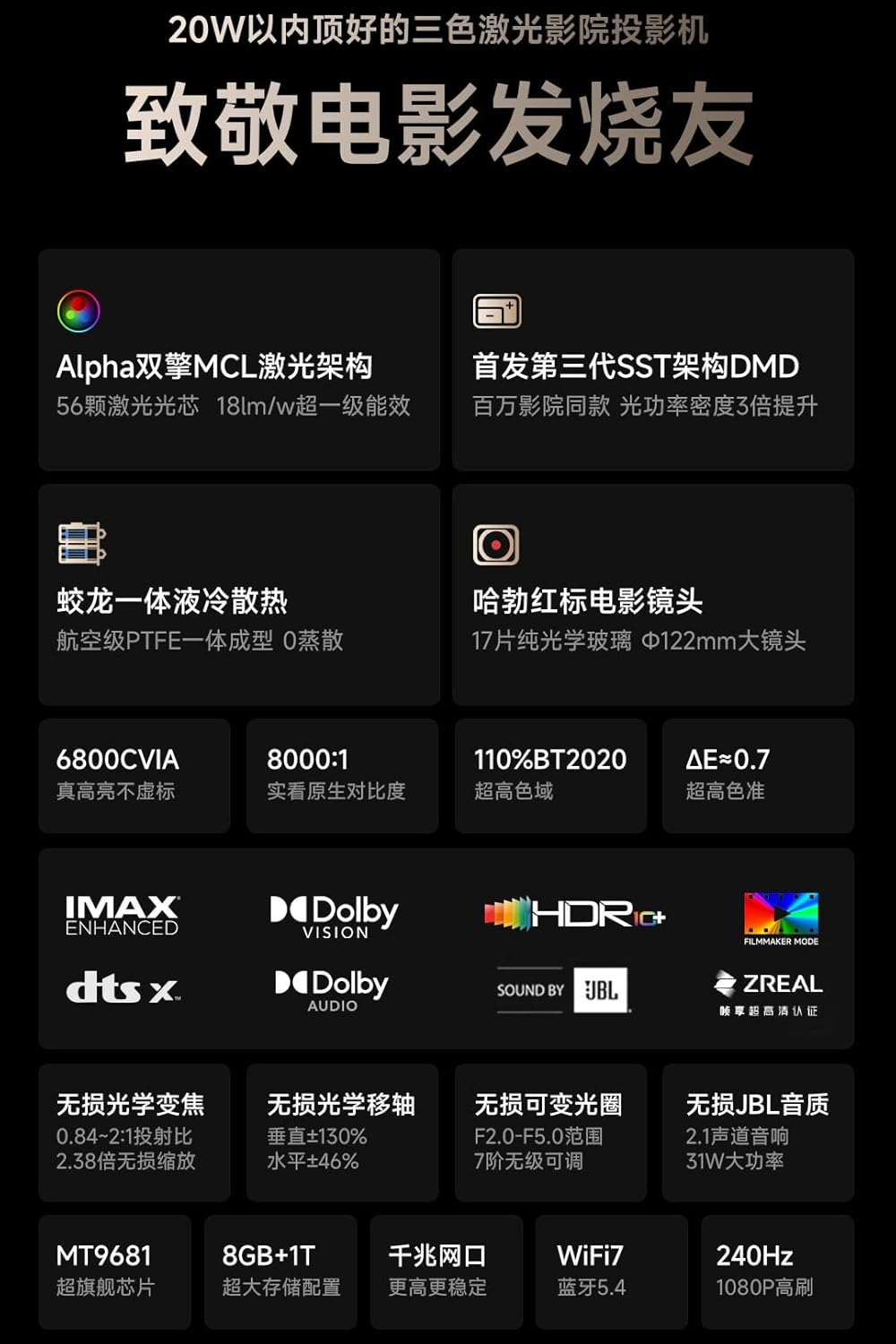
- Pure Laser Power: Alpha Dual MCL RGB Laser Optical Engine delivers 8500 ISO Lumens (6800 CVIA lumen) with 56 industrial-grade laser chips for vibrant colors across DCI-P3 and 110% BT.2020 color spaces.
- Cinema-Grade Image Quality: Native 4K UHD resolution with Third-Generation SST Architecture DMD, ΔE<0.7 color accuracy, and support for Dolby Vision, IMAX Enhanced, HDR10+, HLG, and HDR Vivid. Features a native 8000:1 contrast ratio.
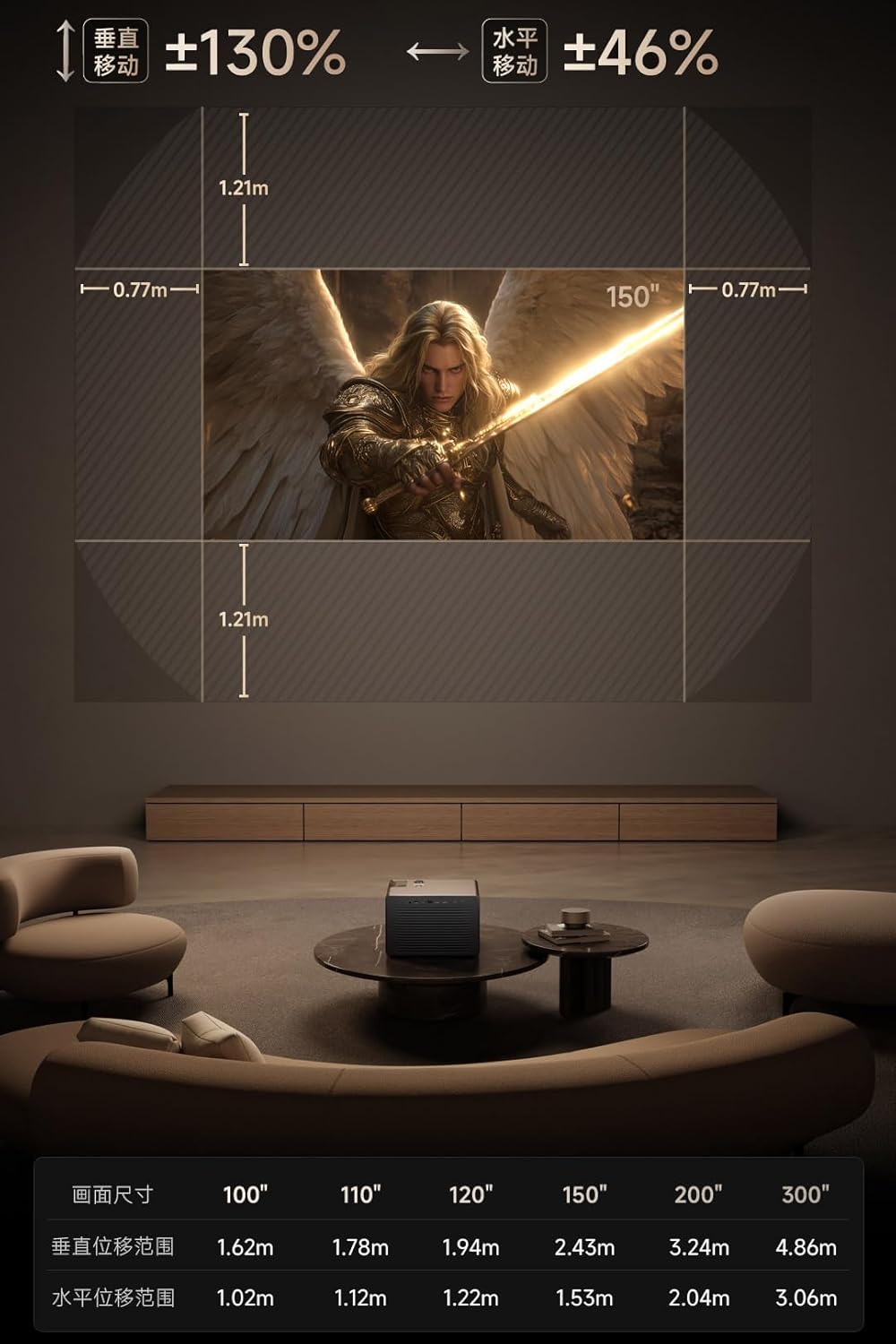
- Adaptive Optics: 17pcs Pure Optical Glass Elements with a Φ122mm Diameter Large Lens, 0.84–2.0:1 Super Lossless Optical Zoom, and ±130% Vertical & ±46% Horizontal Super Lossless Optical Shift for flexible 50~300" projection. Includes auto focus, obstacle avoidance, screen alignment, and human-eye protection sensors.
- ສຽງອັດສະລິຍະ: Sound by J&L with Dual 8W Full Range and 15W Independent subwoofer Chamber, tuned with Dolby Digital+ and DTS:X support. HDMI 2.1 eARC outputs 7.1.4-channel surround audio. Integrated Liquid Cooling System ensures quiet operation.
- ການເຊື່ອມຕໍ່ອັດສະລິຍະ: Powered by MediaTek MT9681 Quad A73 processor with 8GB RAM + 1TB storage. Built-in Android Chinese OS with English support, AirPlay, Android Cast, Huawei Cast+, and Miracast. Compatible with KD3 Google TV Stick for Google & Netflix Licensed Android TV OS Global Version.
ແມ່ນຫຍັງຢູ່ໃນກ່ອງ
- CACACOL Vidda C5 Boundless Master 4K Projector
- Power Adapter
- ການຄວບຄຸມໄລຍະໄກ
Product Components and Ports
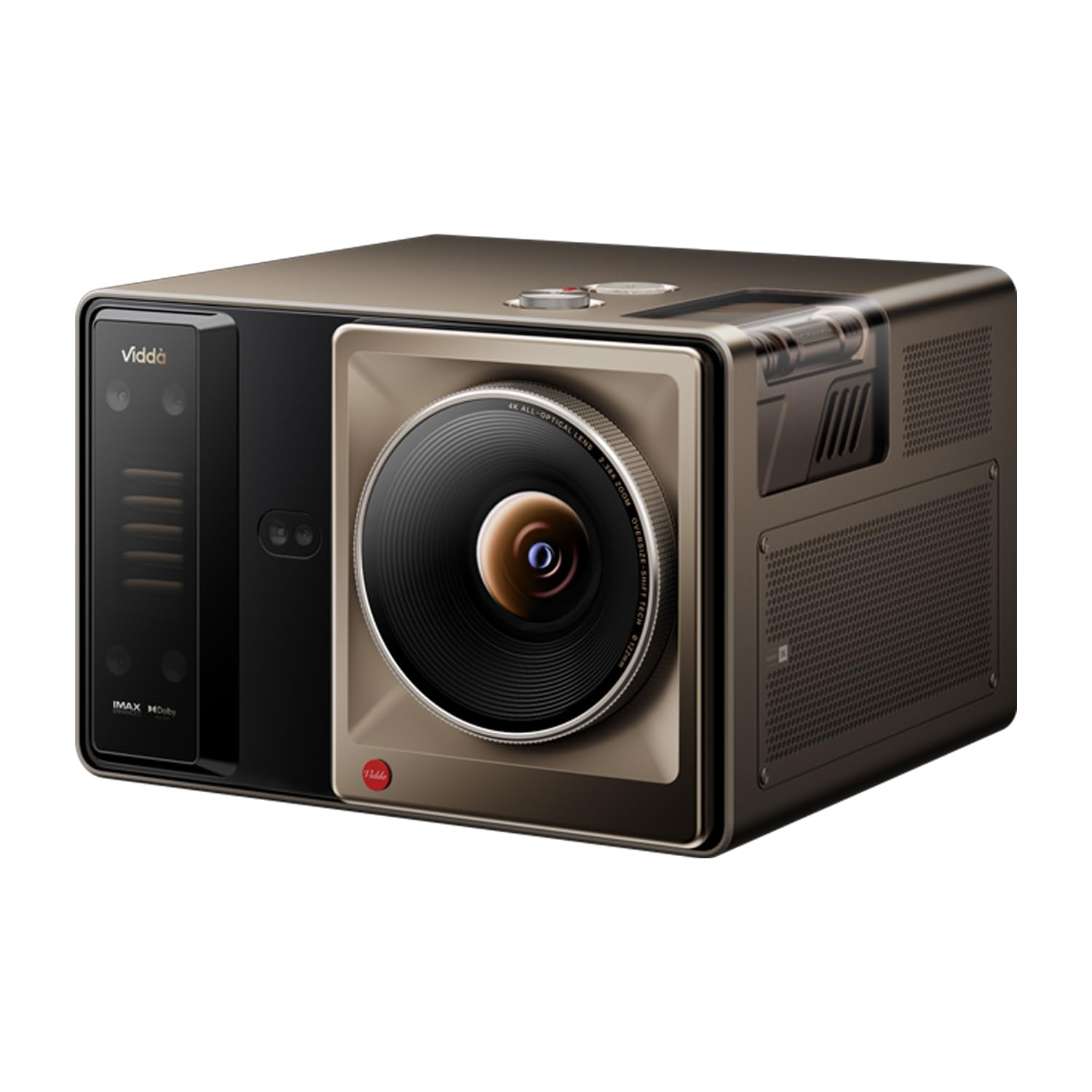
ຮູບພາບ: ດ້ານເທິງແລະດ້ານຫລັງ view of the CACACOL Vidda C5 Projector, showcasing its sleek design and port layout. The top features the lens and ventilation, while the back panel houses various connectivity options.
ຮູບພາບ: ໃກ້ຊິດ view of the projector's rear panel, detailing the input and output ports. These include S/PDIF, Service USB, USB 1, LAN, AV IN, HDMI 2 (eARC), and HDMI 3, along with the power input.
ລາຍລະອຽດ Port:
- S/PDIF: ຜົນຜະລິດສຽງດິຈິຕອນສໍາລັບການເຊື່ອມຕໍ່ກັບລະບົບສຽງພາຍນອກ.
- Service USB: For firmware updates and service use.
- USB 1: For connecting USB storage devices or accessories.
- LAN: ພອດອີເທີເນັດສໍາລັບການເຊື່ອມຕໍ່ເຄືອຂ່າຍແບບມີສາຍ.
- AV ໃນ: Analog audio/video input for older devices.
- HDMI 2 (eARC): HDMI input with enhanced Audio Return Channel for high-quality audio passthrough to compatible sound systems.
- HDMI3: Standard HDMI input for connecting various media sources.
- ການປ້ອນຂໍ້ມູນພະລັງງານ: ສໍາລັບການເຊື່ອມຕໍ່ອະແດບເຕີພະລັງງານ.
ຕັ້ງຄ່າ
ການຈັດວາງ
Position the projector on a stable, flat surface. The ultra-short throw design allows for placement inches away from the projection surface. Consider the desired screen size (50-300 inches) and adjust the projector's distance accordingly. The projector features optical zoom and shift for fine-tuning the image position without moving the unit.
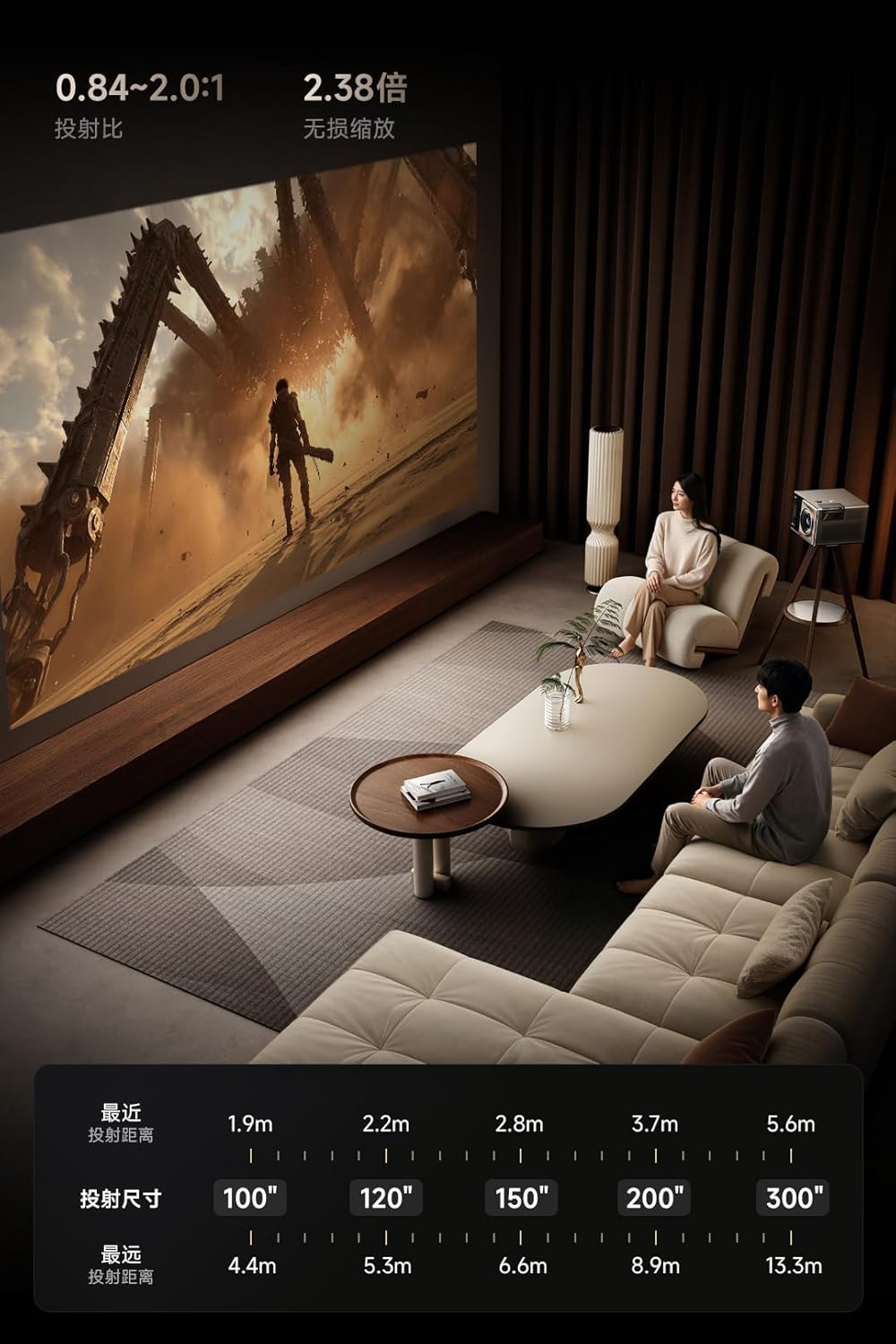
ຮູບພາບ: ອະດີດample of projector placement in a living room setting, demonstrating how the ultra-short throw allows for a large image from a short distance to the wall, integrating seamlessly into the home environment.

ຮູບພາບ: A chart illustrating the relationship between projection distance and screen size, providing guidance on how far to place the projector from the wall to achieve various screen dimensions from 100 to 300 inches.
Initial Power-On and Automatic Adjustments
- Connect the power adapter to the projector and a power outlet.
- ກົດປຸ່ມເປີດປິດຢູ່ໃນໂປຣເຈັກເຕີຫຼືຣີໂດຄວບຄຸມ.
- The projector will automatically perform autofocus, obstacle avoidance, and screen alignment to optimize the image for your environment.
ວິດີໂອ: This video demonstrates how to use Spatial Adaptation and Spatial Recall features, which automatically adjust the projector's image to fit the screen and environment, and how to save these settings for future use in different spaces.
ຄໍາແນະນໍາການດໍາເນີນງານ
Smart OS and Streaming
The projector runs on an Android Chinese OS with English language support. You can navigate the interface using the provided remote control. For a full Google TV experience with licensed Netflix and other streaming services, connect the included KD3 Google TV Stick to an HDMI input.
ປະສົບການສຽງ
The integrated J&L audio system provides rich sound with dual 8W full-range speakers and a 15W independent subwoofer. It supports Dolby Digital+ and DTS:X. For external audio systems, use the HDMI 2.1 eARC port for 7.1.4-channel surround audio output.
ການເຊື່ອມຕໍ່
The projector supports Wi-Fi 7 and Bluetooth 5.4 for seamless wireless connections. You can also use AirPlay, Android Cast, Huawei Cast+, and Miracast for screen mirroring from compatible devices.

ຮູບພາບ: ຫຼາຍກວ່າview of the projector's advanced features, including Alpha Dual MCL Laser, SST Architecture DMD, liquid cooling, Hubble Red Label Cinema Lens, 6800 CVIA lumens, 8000:1 contrast, 110% BT.2020 color gamut, and various HDR/audio supports.

ຮູບພາບ: ລະອຽດ view of the projector's optical system, highlighting the 8000:1 native contrast, 0.84~2.0:1 projection ratio, Hubble Red Label Cinema Lens with 17 pure optical glass elements, and ±130% vertical & ±46% horizontal optical shift capabilities.
ຮູບພາບ: Illustration of the projector's audio system, featuring J&L sound with 2x8W full-range speakers and a 15W independent subwoofer, along with details on the MT9681 flagship CPU, 8GB RAM + 1TB storage, WiFi 7, and Bluetooth 5.4 connectivity.
ບໍາລຸງຮັກສາ
ທໍາຄວາມສະອາດ
- ເລນ: ໃຊ້ຜ້າແພທີ່ອ່ອນນຸ່ມ, ບໍ່ມີສານດ່າງທີ່ອອກແບບມາສະເພາະສຳລັບແວ່ນຕາເພື່ອເຊັດເລນໂປເຈັກເຕີ້ຄ່ອຍໆ. ຫຼີກລ້ຽງການວັດສະດຸຂັດຫຼືສານເຄມີທີ່ຮ້າຍແຮງ.
- ເຊັນເຊີ: Periodically clean the auto-focus and obstacle avoidance sensors with a dry microfiber cloth to ensure accurate performance.
- ພາຍນອກ: ເຊັດດ້ານນອກຂອງໂປເຈັກເຕີດ້ວຍຜ້າອ່ອນ, ແຫ້ງ. ຢ່າໃຊ້ເຄື່ອງເຮັດຄວາມສະອາດຂອງແຫຼວໂດຍກົງໃນອຸປະກອນ.
ລະບາຍອາກາດ
The projector features an integrated liquid cooling system. Ensure that the ventilation grilles are not obstructed to allow for proper airflow and prevent overheating. Maintain adequate space around the projector for optimal heat dissipation.
ການແກ້ໄຂບັນຫາ
ບັນຫາທົ່ວໄປແລະການແກ້ໄຂ
- ບໍ່ມີຮູບ: Ensure the power cable is securely connected and the projector is turned on. Check the input source selection (HDMI, etc.) matches your device.
- ຮູບມົວ: Allow the automatic autofocus to complete. If still blurry, manually adjust focus via the settings menu. Ensure the projection surface is flat and clean.
- Image Not Aligned: The projector features automatic screen alignment. If the image is still skewed, check for any physical obstructions or manually adjust keystone correction in the settings.
- ບໍ່ມີສຽງ: Verify the volume is not muted or too low. Check audio output settings and ensure external audio devices are correctly connected via HDMI eARC or S/PDIF.
- ບັນຫາການເຊື່ອມຕໍ່ (Wi-Fi/Bluetooth): ໃຫ້ແນ່ໃຈວ່າໂປເຈັກເຕີຢູ່ພາຍໃນຂອບເຂດຂອງເຣົາເຕີ Wi-Fi ຫຼືອຸປະກອນ Bluetooth ຂອງທ່ານ. ປິດເປີດໂປເຈັກເຕີ ແລະອຸປະກອນເຄືອຂ່າຍຂອງທ່ານຄືນໃໝ່.
ຂໍ້ມູນຈໍາເພາະ
| ຄຸນສົມບັດ | ຂໍ້ມູນຈໍາເພາະ |
|---|---|
| ຍີ່ຫໍ້ | CACACOL |
| ໝາຍເລກຕົວແບບ | C5-Boundless-Master |
| ຄວາມລະອຽດການສະແດງ | 3840 x 2160 (4K UHD) |
| ຄວາມສະຫວ່າງ | 8500 ISO ລູເມັນ (6800 CVIA ລູເມັນ) |
| ອັດຕາສ່ວນກົງກັນຂ້າມ | native 8000:1 |
| ຄວາມຖືກຕ້ອງຂອງສີ | ΔE<0.7, DCI-P3, 110% BT.2020 |
| ແຫຼ່ງແສງ | Alpha Dual MCL RGB Laser Optical Engine |
| ໂຮງງານຜະລິດ | MediaTek MT9681 Quad A73 |
| RAM + ບ່ອນເກັບຂໍ້ມູນ | 8GB RAM + 1TB Storage |
| ເຕັກໂນໂລຊີການເຊື່ອມຕໍ່ | HDMI, USB, Wi-Fi 7, Bluetooth 5.4, LAN, AV IN, S/PDIF |
| ຄຸນນະສົມບັດພິເສດ | Auto Focus, Auto Obstacle Avoidance, Auto Screen Alignment, Built-In Speaker (J&L Audio), Digital Keystone Correction, Liquid Cooling System |
| ຂະໜາດສິນຄ້າ | 11.54 x 10.75 x 8.39 ນິ້ວ |
| ນ້ໍາຫນັກລາຍການ | 23.5 ປອນ |
ການຮັບປະກັນແລະການສະຫນັບສະຫນູນ
This product is eligible for a 3-Year Protection Plan. For detailed warranty information and terms, please refer to the documentation included with your purchase or contact CACACOL customer support.
For technical assistance, troubleshooting, or any product-related inquiries, please visit the official CACACOL support webເວັບໄຊ ຫຼືຕິດຕໍ່ທີມງານບໍລິການລູກຄ້າຂອງເຂົາເຈົ້າ.