
Motorola Moto G 5G (2025) XT2513V
Motorola Moto G 5G (2025) XT2513V User Manual
Model: XT2513V
ແນະນຳ
This manual provides essential instructions for setting up, operating, maintaining, and troubleshooting your Motorola Moto G 5G (2025) XT2513V smartphone. Please read this guide thoroughly to ensure proper use and to maximize your device's capabilities.
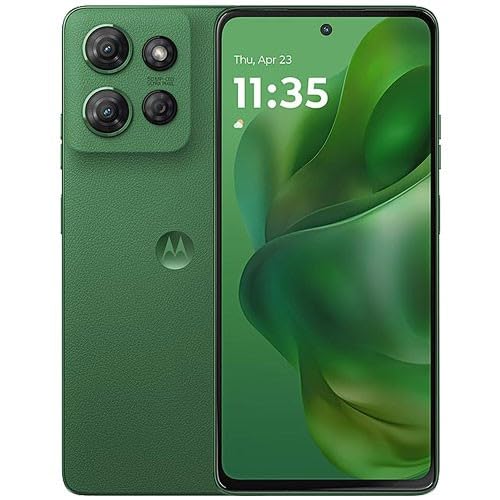
ຮູບພາບ: ທາງຫນ້າ view of the Motorola Moto G 5G (2025) XT2513V smartphone.
1. ຕັ້ງຄ່າ
1.1 ສິ່ງທີ່ຢູ່ໃນກ່ອງ
- Motorola Moto G 5G (2025) XT2513V Smartphone
- ສາຍ USB-C
- SIM Ejector Tool
- ຄູ່ມືເລີ່ມຕົ້ນດ່ວນ
- ຂໍ້ມູນຄວາມປອດໄພແລະການຮັບປະກັນ
1.2 ການໃສ່ SIM Card
- ຊອກຫາຖາດຊິມຢູ່ດ້ານຂ້າງຂອງໂທລະສັບຂອງທ່ານ.
- ສຽບເຄື່ອງຖອດຊິມເຂົ້າໄປໃນຮູນ້ອຍຂ້າງຖາດແລະຍູ້ຄ່ອຍໆຈົນກວ່າຖາດຈະປົ່ງອອກ.
- Place your Nano SIM card into the tray with the gold contacts facing down. Ensure it fits securely.
- ຍູ້ຖາດກັບໃສ່ໂທລະສັບຢ່າງລະມັດລະວັງຈົນກວ່າມັນຈະກົດໃສ່ບ່ອນ.

Image: Illustration of SIM card insertion.
1.3 ການສາກອຸປະກອນ
Before first use, fully charge your phone. Connect the USB-C cable to the phone's charging port and the other end to a compatible power adapter. Plug the adapter into a wall outlet. The battery indicator will show charging progress.
ໝາຍເຫດ:
- ໃຊ້ພຽງແຕ່ເຄື່ອງສາກ ແລະສາຍທີ່ອະນຸມັດໂດຍ Motorola.
- The device supports fast charging.
1.4 ເປີດ ແລະ ຕັ້ງຄ່າເບື້ອງຕົ້ນ
ກົດປຸ່ມເປີດປິດຄ້າງໄວ້ຈົນກ່ວາໂລໂກ້ Motorola ປະກົດຂຶ້ນ. ປະຕິບັດຕາມການເຕືອນໃນຫນ້າຈໍເພື່ອ:
- ເລືອກພາສາຂອງທ່ານ.
- ເຊື່ອມຕໍ່ກັບເຄືອຂ່າຍ Wi-Fi.
- ເຂົ້າສູ່ລະບົບດ້ວຍບັນຊີ Google ຂອງທ່ານ ຫຼືສ້າງອັນໃໝ່.
- ຕັ້ງຄ່າການລັອກໜ້າຈໍ (PIN, ຮູບແບບ, ລະຫັດຜ່ານ, ລາຍນິ້ວມື, ຫຼື ການປົດລັອກດ້ວຍໜ້າ).
- Review ແລະຍອມຮັບຂໍ້ກໍານົດແລະເງື່ອນໄຂ.
2. ປະຕິບັດການອຸປະກອນຂອງທ່ານ
2.1 ການນໍາທາງພື້ນຖານ
- ເລື່ອນຂຶ້ນ: ເຂົ້າເຖິງລິ້ນຊັກແອັບ.
- ປັດລົງ: ເປີດແຜງການແຈ້ງເຕືອນ ແລະການຕັ້ງຄ່າດ່ວນ.
- ແຕະ: ເລືອກລາຍການ.
- ແຕະຄ້າງໄວ້: ເຂົ້າເຖິງເມນູບໍລິບົດ ຫຼືຍ້າຍໄອຄອນ.
- ເມື່ອເຂົ້າຕາຈົນ: ຊູມເຂົ້າ ຫຼືອອກ.
2.2 ໂທອອກ ແລະ ສົ່ງຂໍ້ຄວາມ
ເພື່ອໂທອອກ, ເປີດ ໂທລະສັບ app, ໃສ່ເບີໂທ, ແລະປາດໄອຄອນການໂທ. ເພື່ອສົ່ງຂໍ້ຄວາມ, ເປີດປຸ່ມ ຂໍ້ຄວາມ app, tap "Start chat," enter the recipient's number or contact name, and type your message.
2.3 ການເຊື່ອມຕໍ່ກັບເຄືອຂ່າຍ
ການເຊື່ອມຕໍ່ Wi-Fi
- ໄປທີ່ ການຕັ້ງຄ່າ > ເຄືອຂ່າຍ ແລະອິນເຕີເນັດ > ອິນເຕີເນັດ.
- ເປີດ Wi-Fi.
- ເລືອກເຄືອຂ່າຍທີ່ທ່ານຕ້ອງການຈາກບັນຊີລາຍຊື່ແລະໃສ່ລະຫັດຜ່ານຖ້າຫາກວ່າ prompted.
Mobile Data (5G)
Your device supports 5G cellular technology. Ensure your SIM card is active and your plan includes mobile data. To enable/disable mobile data, go to ການຕັ້ງຄ່າ > ເຄືອຂ່າຍ ແລະອິນເຕີເນັດ > ເຄືອຂ່າຍມືຖື and toggle the "Mobile data" option.
2.4 ການນໍາໃຊ້ກ້ອງຖ່າຍຮູບ
ເປີດ ກ້ອງຖ່າຍຮູບ app. Tap the shutter button to take a photo. Swipe left or right to switch between photo, video, portrait, and other modes. Tap the camera icon to switch between front and rear cameras.

Image: Camera app interface.
2.5 ຄຸນສົມບັດຄວາມປອດໄພ
Protect your device with various security options:
- ເຊັນເຊີນີ້ວມື: Register your fingerprints for quick and secure unlocking. Go to ການຕັ້ງຄ່າ > ຄວາມປອດໄພ & ຄວາມເປັນສ່ວນຕົວ > ປົດລັອກອຸປະກອນ.
- ປົດລັອກດ້ວຍໜ້າ: ຕັ້ງຄ່າການຮັບຮູ້ໃບໜ້າສຳລັບການປົດລັອກທີ່ສະດວກ.
- ລັອກ ໜ້າ ຈໍ: ເລືອກລະຫວ່າງຮູບແບບ, PIN, ຫຼືລະຫັດຜ່ານ.
3. ບໍາລຸງຮັກສາ
3.1 ການປັບປຸງຊອບແວ
ກວດສອບການອັບເດດຊອບແວເປັນປະຈຳເພື່ອຮັບປະກັນວ່າອຸປະກອນຂອງທ່ານມີຄຸນສົມບັດຫຼ້າສຸດ ແລະແພັດຄວາມປອດໄພ. ໄປທີ່ ການຕັ້ງຄ່າ > ລະບົບ > ການປັບປຸງລະບົບ.
3.2 ການທໍາຄວາມສະອາດອຸປະກອນຂອງທ່ານ
Use a soft, lint-free cloth to clean the screen and body of your phone. Avoid harsh chemicals or abrasive materials. Do not immerse the device in water as it is not water resistant.
3.3 ການດູແລຫມໍ້ໄຟ
- ຫຼີກເວັ້ນອຸນຫະພູມທີ່ຮຸນແຮງ.
- ຢ່າປ່ອຍໃຫ້ແບດເຕີລີ່ໄຫຼເຕັມທີ່ເລື້ອຍໆ.
- ຖອດສາຍສາກອອກເມື່ອແບັດເຕີຣີເຕັມ.
- The device features a 5000 mAh battery for extended use.
3.4 ການຄຸ້ມຄອງການເກັບຮັກສາ
Your device comes with 128 GB of internal storage. To manage storage, go to ການຕັ້ງຄ່າ > ການເກັບຮັກສາ. You can free up space by deleting unused apps, photos, and videos, or by moving files to cloud storage.
4. ການແກ້ໄຂບັນຫາ
4.1 ບັນຫາທົ່ວໄປ ແລະການແກ້ໄຂ
- ອຸປະກອນບໍ່ເປີດ: ໃຫ້ແນ່ໃຈວ່າໄດ້ສາກໄຟແລ້ວ. ກົດປຸ່ມເປີດປິດຄ້າງໄວ້ຢ່າງໜ້ອຍ 10-15 ວິນາທີເພື່ອບັງຄັບໃຫ້ຣີສະຕາດ.
- ບັນຫາການເຊື່ອມຕໍ່ເຄືອຂ່າຍ: Check if Airplane mode is off. Restart your device. Verify SIM card insertion. Contact your carrier (Total Wireless) if issues persist.
- ແອັບຂັດຂ້ອງ ຫຼືຄ້າງ: ປິດ ແລະເປີດແອັບຄືນໃໝ່. ລ້າງ cache ຂອງ app (ການຕັ້ງຄ່າ > ແອັບ > ເລືອກແອັບ > ການເກັບຮັກສາ & cache > ລຶບລ້າງແຄດ).
- ປະສິດທິພາບຊ້າ: Close background apps. Clear cache. Check for software updates.
4.2 ຣີເຊັດເປັນຄ່າໂຮງງານ
ຄຳເຕືອນ:
A factory reset will erase all data from your phone. Back up important data before proceeding.
- ໄປທີ່ ການຕັ້ງຄ່າ > ລະບົບ > ຣີເຊັດຕົວເລືອກ.
- ແຕະ ລຶບຂໍ້ມູນທັງໝົດ (ຣີເຊັດເປັນຄ່າໂຮງງານ).
- ຢືນຢັນການຕັດສິນໃຈຂອງທ່ານແລະໃສ່ລະຫັດ PIN / ລະຫັດຜ່ານຂອງທ່ານຖ້າຖືກເຕືອນ.
5. ຂໍ້ມູນຈໍາເພາະ
| ຄຸນສົມບັດ | ລາຍລະອຽດ |
|---|---|
| ຊື່ຕົວແບບ | Moto G 5G (2025) XT2513V |
| ຍີ່ຫໍ້ | Motorola |
| ຄວາມອາດສາມາດເກັບຮັກສາຫນ່ວຍຄວາມຈໍາ | 128 GB |
| ຄວາມໄວ CPU | 2.4 GHz |
| ຄວາມລະອຽດ | 2400 x 1080 |
| ອັດຕາການໂຫຼດຂໍ້ມູນຄືນໃໝ່ | 120 Hz |
| ເຕັກໂນໂລຊີໂທລະສັບມືຖື | 5G |
| ຜູ້ໃຫ້ບໍລິການໄຮ້ສາຍ | ໄຮ້ສາຍທັງໝົດ |
| ສີ | ສີຂຽວ |
| ຈຳນວນຊ່ອງໃສ່ຊິມກາດ | ຊິມດຽວ |
| ຂະໜາດຂອງຊິມກາດ | ນາໂນ |
| ລະດັບຄວາມຕ້ານທານນ້ໍາ | ບໍ່ທົນທານຕໍ່ນ້ໍາ |
| ຄວາມອາດສາມາດຫມໍ້ໄຟ | 5000 ລ້ານamp ຊົ່ວໂມງ |
| ເວລາລົມໂທລະສັບ | 16 ຊົ່ວໂມງ |
| ຄວາມລະອຽດວິດີໂອທີ່ມີປະສິດທິພາບ | 1080 ພິກເຊລ |
| ອັດຕາເຟຣມ | 120 fps |
| UPC | 784196698691 |
6. ການຮັບປະກັນແລະການສະຫນັບສະຫນູນ
6.1 ການຮັບປະກັນຈໍາກັດ
Your Motorola Moto G 5G (2025) XT2513V is covered by a limited warranty. Please refer to the "Safety and Warranty Information" document included in your product packaging for full details on warranty terms, conditions, and exclusions.
6.2 ສະຫນັບສະຫນູນລູກຄ້າ
For technical assistance, troubleshooting, or warranty claims, please contact Motorola customer support or your service provider, Total Wireless.
- ສະຫນັບສະຫນູນ Motorola Webເວັບໄຊ: ຢ້ຽມຢາມ www.motorola.com/support ສຳລັບຄຳຖາມທີ່ຖືກຖາມເລື້ອຍໆ, ຄູ່ມື ແລະ ຕົວເລືອກການຕິດຕໍ່.
- Total Wireless Support: For carrier-specific issues, visit the Total Wireless support webເວັບໄຊ ຫຼືຕິດຕໍ່ບໍລິການລູກຄ້າຂອງເຂົາເຈົ້າ.
Ask a question about this manual
Ask about setup, troubleshooting, compatibility, parts, safety, or missing instructions. Manuals+ will review the question and use this page’s manual context to help answer it.