
1. ບົດແນະນຳ
Thank you for choosing the DazzlingStage 60W 9LED RGBW Stage Wall Wash Bar Light. This manual provides essential information for the safe and effective operation of your lighting fixture. Please read it thoroughly before installation and use, and retain it for future reference.
ນີ້ stage light bar features 9 high-power RGBW LEDs, offering a wide spectrum of colors and dynamic lighting effects suitable for various events and venues.

ຮູບພາບ 1.1: ຫຼາຍກວ່າview of the DazzlingStage 60W 9LED RGBW Stage Wall Wash Bar Lights in various colors.
2. ຄໍາແນະນໍາຄວາມປອດໄພ
- ຄວາມປອດໄພທາງໄຟຟ້າ: ຮັບປະກັນການສະຫນອງພະລັງງານ voltage matches the specifications of the fixture. Always disconnect power before cleaning, servicing, or moving the unit.
- ການຕິດຕັ້ງ: Install the fixture in a well-ventilated area, away from heat sources. Ensure secure mounting to prevent accidental falls.
- ການດໍາເນີນງານ: Do not look directly into the light source when the fixture is operating, as it can cause eye damage. Avoid operating the unit in wet or damp ເງື່ອນໄຂ.
- ບໍາລຸງຮັກສາ: ອ້າງອີງການບໍລິການທັງໝົດໃຫ້ກັບບຸກຄະລາກອນທີ່ມີຄຸນວຸດທິ. ຢ່າພະຍາຍາມສ້ອມແປງເຄື່ອງດ້ວຍຕົນເອງ.
- ເດັກນ້ອຍ: ຮັກສາອຸປະກອນໃຫ້ໄກຈາກເດັກນ້ອຍ.
3. ເນື້ອໃນຊຸດ
ພາຍຫຼັງການຫຸ້ມຫໍ່, ກະລຸນາກວດສອບວ່າລາຍການທັງໝົດທີ່ລະບຸໄວ້ຂ້າງລຸ່ມນີ້ແມ່ນລວມຢູ່ໃນສະພາບດີ:
- DazzlingStage 60W 9LED RGBW Stage Wall Wash Bar Light (x1 per pack)
- Power Cord (x1 per pack)
- Remote Control (x1 per pack)
- Mounting Bracket (x1 per pack)
- Knobs (x2 per pack)
- Black Gaskets (x2 per pack)
- Instruction Manual (x1 per pack)

ຮູບພາບ 3.1: ເນື້ອໃນລວມຢູ່ໃນຊຸດຜະລິດຕະພັນ.
4. ອົງປະກອບຂອງຜະລິດຕະພັນ
Familiarize yourself with the main components of the light bar:
- LED Array: 9 RGBW LEDs for color mixing.
- ກະດານຄວບຄຸມ: Features a 4-digit LED display and control buttons (MENU, UP, DOWN, ENTER) for mode selection and parameter adjustment.
- ຜອດເຂົ້າ/ອອກ DMX: For connecting to a DMX controller or linking multiple units.
- Power IN/OUT: For power connection and daisy-chaining power to other units.
- ວົງເລັບຕິດຕໍ່: ວົງເລັບສາມາດປັບໄດ້ສໍາລັບການຢືນຢູ່ຊັ້ນຫຼື truss mounting.
- ເຄື່ອງລະບາຍຄວາມຮ້ອນ: Integrated cooling system to maintain optimal operating temperature.

Image 4.1: Key components and dimensions of the light bar.
5. ການຕິດຕັ້ງແລະການຕິດຕັ້ງ
The DazzlingStage Wall Wash Bar Light offers flexible installation options:
5.1 ການຕິດຕັ້ງຕົວຍຶດ
Attach the included mounting bracket to the light bar using the provided knobs and gaskets. Ensure the bracket is securely fastened.
5.2 ຕົວເລືອກການຈັດວາງ
- ພື້ນເຮືອນ: The bracket allows the light bar to stand upright on a flat surface. Adjust the angle as needed.
- ການຕິດຕັ້ງ Truss: ໃຊ້ທີ່ເຫມາະສົມ clamps (not included) to attach the bracket to a lighting truss. Ensure the truss and clamps can support the weight of the fixture.
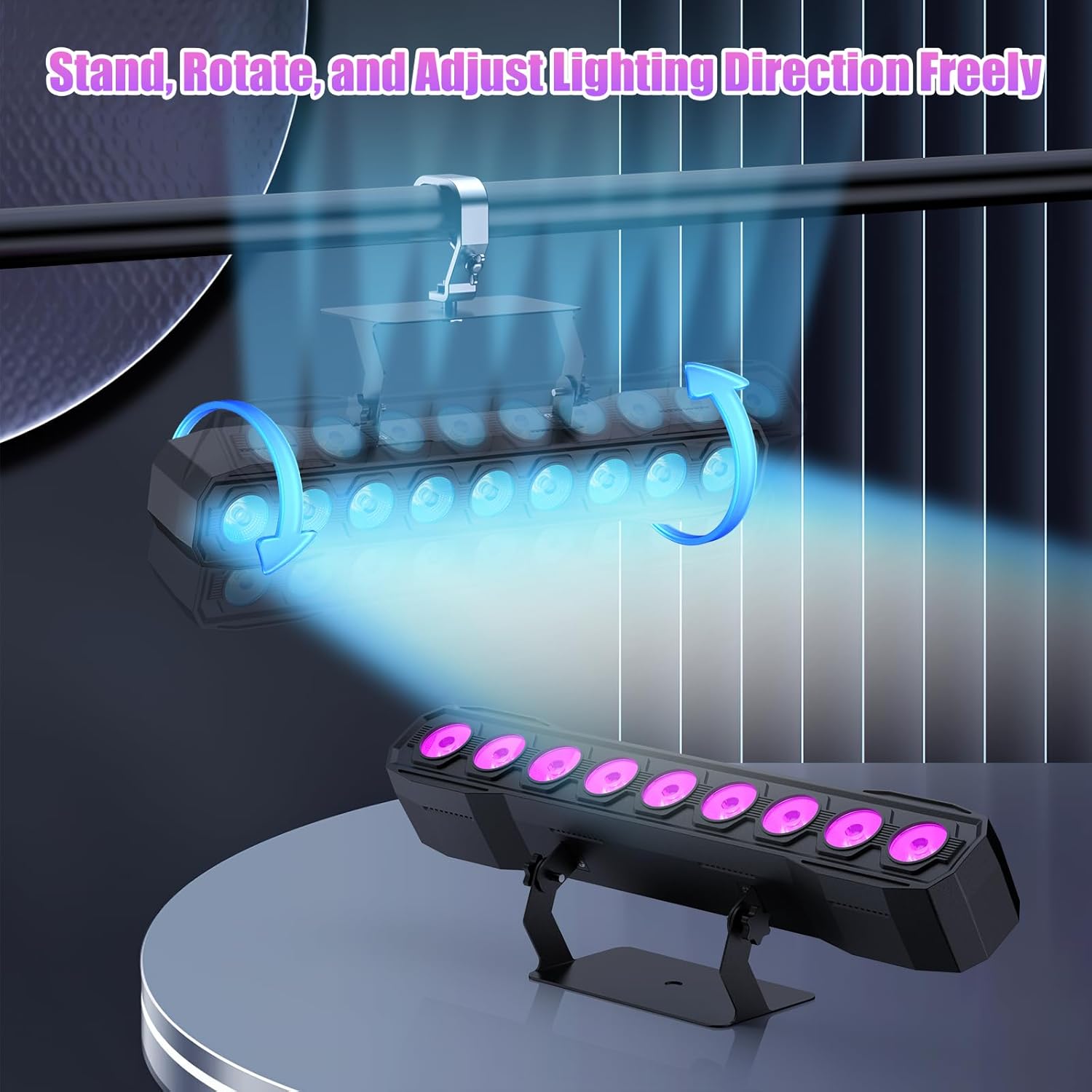
Image 5.1: Illustration of mounting and angle adjustment options.
5.3 ການເຊື່ອມຕໍ່ພະລັງງານ
Connect the power cord to the Power IN port on the back of the fixture and then to a suitable power outlet. Multiple units can be daisy-chained using the Power OUT port to simplify wiring for larger setups.
6. ຮູບແບບການເຮັດວຽກ
The DazzlingStage Wall Wash Bar Light supports several control modes:
- ການຄວບຄຸມ DMX512: ສຳລັບການຄວບຄຸມແບບມືອາຊີບຜ່ານຄອນໂຊນ DMX.
- ແບບອັດຕະໂນມັດ: Pre-programmed lighting sequences.
- Sound-Activated Control: Lights react to ambient sound.
- ການຄວບຄຸມໄລຍະໄກ: Convenient wireless control using the included remote.
- ຮູບແບບ Master-Slave: Link multiple units where one acts as a master and others as slaves, synchronizing effects.
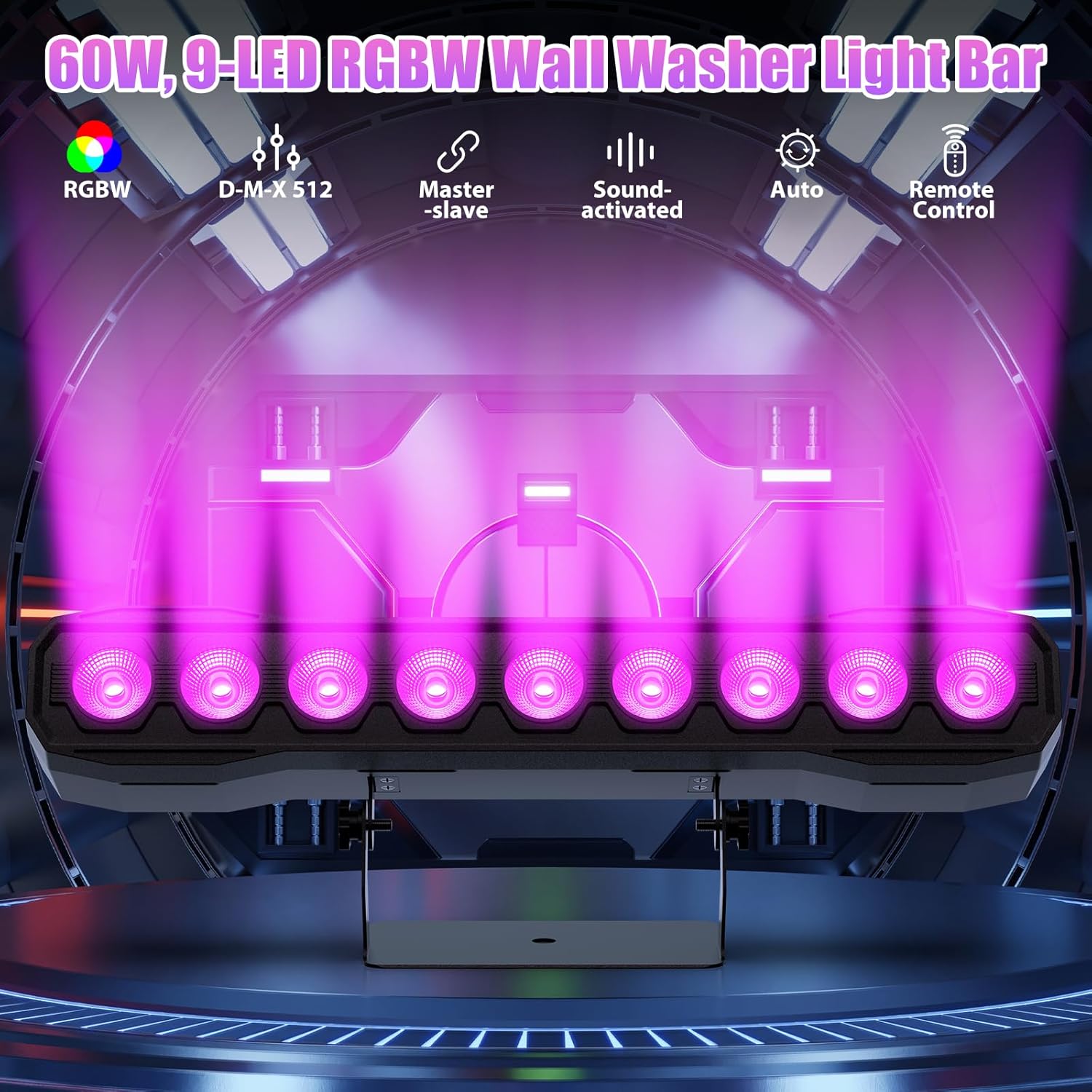
ຮູບພາບ 6.1: ຫຼາຍກວ່າview ຂອງຮູບແບບການຄວບຄຸມທີ່ມີຢູ່.
6.1 Display Panel Operation
Use the buttons on the back of the fixture to navigate the menu and select modes:
- ເມນູ: ຮອບວຽນຜ່ານຕົວເລືອກເມນູຫຼັກ.
- ຂຶ້ນລົງ: Adjusts values or navigates sub-menus.
- ຕື່ມ: ຢືນຢັນການເລືອກ.
6.2 ຜົນກະທົບແສງສະຫວ່າງ
The fixture supports various dynamic effects:
- ການປະສົມສີ: Over 16.7 million color combinations with 0-100% linear dimming.
- ກະໂປ່ງ: Flashing effect.
- ໂດດ: Instant color changes.
- ມະລາຍຫາຍໄປ: ການປ່ຽນລະຫວ່າງສີທີ່ລຽບງ່າຍ.
- ກຳມະຈອນ: Gradual changing effects.
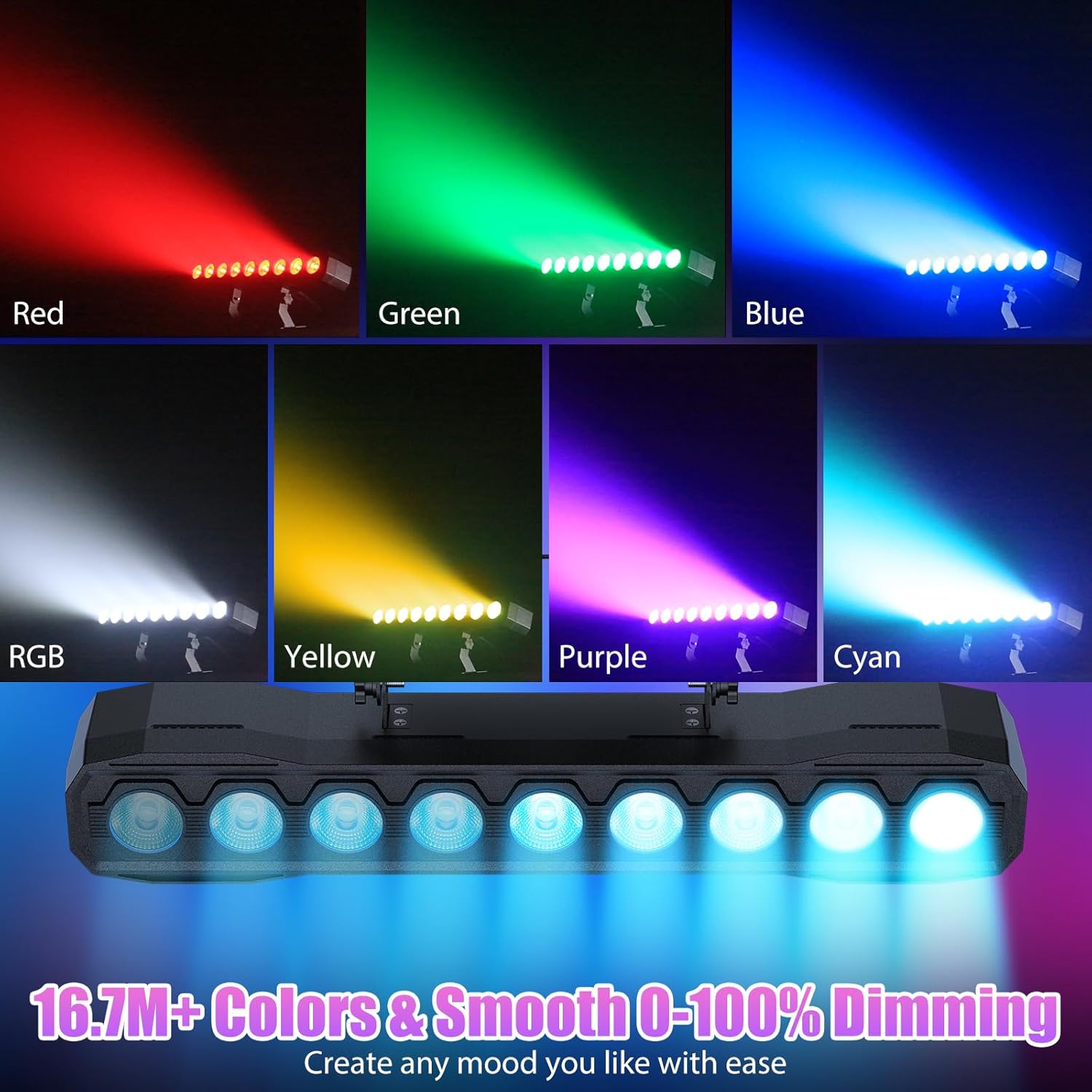
ຮູບພາບ 6.2: ຕົວຢ່າງamples of color mixing and dimming capabilities.

Image 6.3: Visual representation of Strobe, Jump, Fade, and Pulse effects.
7. ຟັງຊັນຄວບຄຸມໄລຍະໄກ
ຣີໂໝດຄວບຄຸມທີ່ມາພ້ອມກັບເຄື່ອງນີ້ໃຫ້ການເຂົ້າເຖິງໜ້າທີ່ຕ່າງໆໄດ້ຢ່າງສະດວກສະບາຍ:
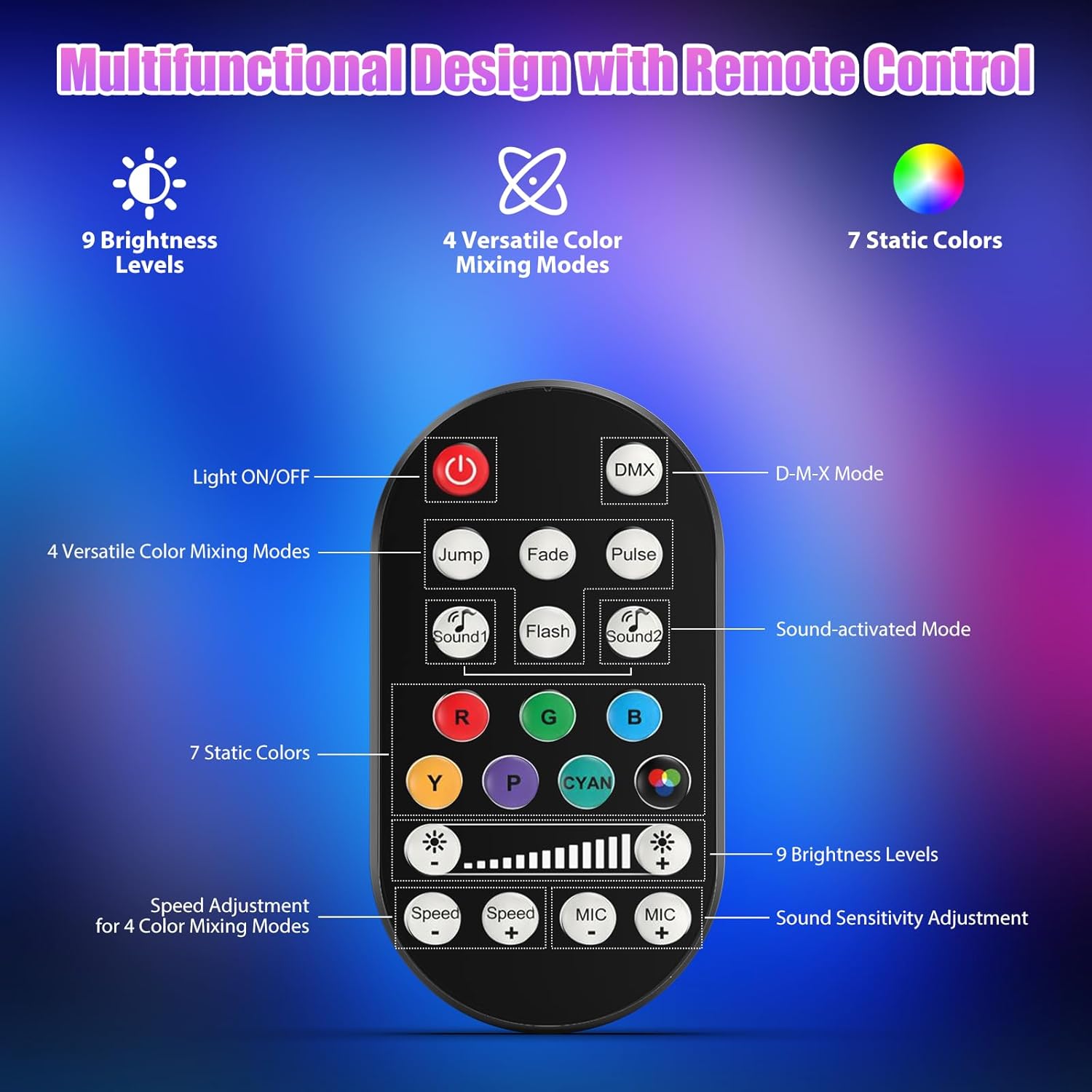
ຮູບພາບ 7.1: ຮູບແບບການຄວບຄຸມໄລຍະໄກແລະຫນ້າທີ່.
- ເປີດ/ປິດໄຟ: ເປີດ ຫຼື ປິດເຄື່ອງ.
- DMX: Activates DMX control mode.
- Jump, Fade, Pulse, Flash: Selects different color mixing modes.
- Sound1, Sound2: Activates sound-activated modes with different sensitivities.
- R, G, B, Y, P, Cyan, White: Selects static colors.
- ລະດັບຄວາມສະຫວ່າງ: Adjusts the overall intensity of the light (9 levels).
- ຄວາມໄວ +/-: ປັບຄວາມໄວຂອງຜົນກະທົບແບບເຄື່ອນໄຫວ.
- MIC +/-: Adjusts the sound sensitivity for sound-activated modes (15 levels).
8. DMX512 Control
For advanced control, connect the fixture to a DMX512 controller. The light bar typically uses 4 or 8 DMX channels. Refer to the display panel for DMX address setting and channel assignments.
8.1 ການຕັ້ງຄ່າທີ່ຢູ່ DMX
Use the MENU, UP, DOWN, and ENTER buttons on the fixture's display panel to set the DMX starting address. The display will show 'AXXX' where XXX is the address (e.g., A001).
8.2 DMX Channel Functions (Example - 8 Channel Mode)
| ຊ່ອງ | ຟັງຊັນ | ຊ່ວງມູນຄ່າ | ລາຍລະອຽດ |
|---|---|---|---|
| CH1 | ພຣະອາຈານ Dimmer | 0-255 | ຄວາມສະຫວ່າງໂດຍລວມ (0% ຫາ 100%) |
| CH2 | ສີແດງເຂັ້ມ | 0-255 | Red LED brightness (0% to 100%) |
| CH3 | ສີຂຽວເຂັ້ມ | 0-255 | Green LED brightness (0% to 100%) |
| CH4 | ສີຟ້າເຂັ້ມ | 0-255 | Blue LED brightness (0% to 100%) |
| CH5 | ສີຂາວເຂັ້ມ | 0-255 | White LED brightness (0% to 100%) |
| CH6 | Strobe/Effect | 0-255 | 0-10: No function; 11-255: Strobe speed (slow to fast) |
| CH7 | ໂຄງການອັດຕະໂນມັດ | 0-255 | Selects and controls speed of built-in auto programs |
| CH8 | ສຽງມີການເຄື່ອນໄຫວ | 0-255 | Activates sound mode and adjusts sensitivity |
ຕາຕະລາງ 8.1: ຕົວຢ່າງample DMX Channel Functions (may vary slightly by firmware version).
9. ບໍາລຸງຮັກສາ
ການບໍາລຸງຮັກສາເປັນປົກກະຕິຮັບປະກັນປະສິດທິພາບທີ່ດີທີ່ສຸດແລະຍືດອາຍຸຂອງ fixture ຂອງທ່ານ.
- ທໍາຄວາມສະອາດ: Periodically clean the lens and housing with a soft, lint-free cloth. Do not use abrasive cleaners or solvents. Ensure the fixture is powered off and cool before cleaning.
- ການກວດກາ: Regularly check power cables, DMX cables, and mounting hardware for any signs of wear or damage. Replace damaged components immediately.
- ການເກັບຮັກສາ: ເມື່ອບໍ່ໄດ້ໃຊ້ເປັນເວລາດົນ, ໃຫ້ເກັບຮັກສາອຸປະກອນດັ່ງກ່າວໄວ້ໃນສະພາບແວດລ້ອມທີ່ແຫ້ງແລ້ງ, ບໍ່ມີຝຸ່ນ.
10. ການແກ້ໄຂບັນຫາ
ຖ້າຫາກທ່ານພົບບັນຫາ, ເບິ່ງບັນຫາທົ່ວໄປດັ່ງຕໍ່ໄປນີ້ແລະການແກ້ໄຂ:
| ບັນຫາ | ສາເຫດທີ່ເປັນໄປໄດ້ | ການແກ້ໄຂ |
|---|---|---|
| ບໍ່ມີພະລັງງານ | Power cable disconnected; No power from outlet; Blown fuse | Check power cable connection; Test outlet with another device; Replace fuse if necessary |
| ບໍ່ມີຜົນຜະລິດແສງສະຫວ່າງ | Dimmer channel at 0%; Incorrect mode selected; DMX signal issue | Increase dimmer level; Select desired operating mode; Check DMX cable and address settings |
| Incorrect colors/effects | Incorrect DMX channel values; Remote control interference | Verify DMX channel settings; Ensure remote is pointed directly at the sensor; Check for other IR interference |
| ໂໝດເປີດສຽງບໍ່ເຮັດວຽກ | Microphone sensitivity too low; No sound input | Increase MIC sensitivity via remote or display; Ensure sufficient sound is present near the fixture |
| Fixture overheating | Poor ventilation; Blocked heat sink | Ensure adequate airflow around the unit; Clean any dust or debris from the heat sink fins |
11. ຂໍ້ມູນຈໍາເພາະ
| ຄຸນສົມບັດ | ລາຍລະອຽດ |
|---|---|
| ຍີ່ຫໍ້ | DazzlingStage |
| ໝາຍເລກຕົວແບບ | ZQ06190 |
| ແຫຼ່ງແສງ | 9 x 60W RGBW LEDs |
| ການປະສົມສີ | RGBW 4-in-1, 16.7 million colors |
| ຫຼຸດແສງ | 0-100% ການ dimming ເອເລັກໂຕຣນິກ linear |
| Beam Angle | ມຸມກວ້າງ 35° |
| ໂໝດຄວບຄຸມ | DMX512, Auto, Sound-Activated, Remote Control, Master-Slave |
| ຊ່ອງ DMX | 4 or 8 Channels (selectable) |
| ຈໍສະແດງຜົນ | ຈໍ LED 4 ຕົວເລກ |
| ວັດສະດຸ | Acrylonitrile Butadiene Styrene (ABS) |
| ຂະໜາດສິນຄ້າ | 18.1 x 5.5 x 5.1 ນິ້ວ (46 x 14 x 13 cm) |
| ນ້ໍາຫນັກລາຍການ | ປະມານ. 1.98 lbs (0.9 ກິໂລ) |
| ການປ້ອນຂໍ້ມູນພະລັງງານ | AC 100-240V, 50/60Hz |
| ຜູ້ຜະລິດ | Shenzhen Zhuoqiong Technology Co., Ltd. |
12. ການຮັບປະກັນແລະການສະຫນັບສະຫນູນ
DazzlingStage products are designed for reliability and performance. For warranty information, please refer to the terms and conditions provided at the time of purchase or contact your retailer.
If you require technical assistance or have questions not covered in this manual, please contact DazzlingStage customer support through the retailer's platform or the official brand website. Please have your model number (ZQ06190) and purchase details ready when contacting support.