
1. ບົດແນະນຳ
This manual provides detailed instructions for the safe and efficient operation of your DazzlingStage 180W Dual-Color COB LED Par Light. This high-performance stage light features two 90W COB LEDs, offering both cool white (6500K) and warm white (3200K) illumination. It is designed for various applications including stage lighting, events, and parties. Please read this manual thoroughly before use and retain it for future reference.

Figure 1: DazzlingStage 180W Dual-Color COB LED Par Light. This image shows the front view of the black stage light with two circular COB LED elements, one emitting cool white light and the other warm white light.
2. ຂໍ້ມູນຄວາມປອດໄພ
ເພື່ອຮັບປະກັນການປະຕິບັດງານທີ່ປອດໄພ, ກະລຸນາປະຕິບັດຕາມຂໍ້ຄວນລະວັງຕໍ່ໄປນີ້:
- ເຊື່ອມຕໍ່ເຄື່ອງກັບປລັກສຽບໄຟທີ່ມີດິນຢູ່ສະເໝີ.
- ຫ້າມບໍ່ໃຫ້ອຸປະກອນຖືກຝົນ ຫຼື ຄວາມຊຸ່ມຊື່ນ.
- ຮັບປະກັນການລະບາຍອາກາດທີ່ເຫມາະສົມເພື່ອປ້ອງກັນຄວາມຮ້ອນເກີນ.
- ຫຼີກເວັ້ນການສໍາຜັດກັບຕາໂດຍກົງກັບແຫຼ່ງແສງສະຫວ່າງ, ຍ້ອນວ່າມັນສາມາດເຮັດໃຫ້ເກີດຄວາມເສຍຫາຍຕາ.
- ຕັດໄຟກ່ອນ ທຳ ຄວາມສະອາດຫຼືບໍລິການ.
- ພຽງແຕ່ບຸກຄະລາກອນທີ່ມີຄຸນວຸດທິຄວນປະຕິບັດການສ້ອມແປງ.
- Use the included safety rope ring when suspending the light.
3. ເນື້ອໃນຊຸດ
ກວດສອບວ່າລາຍການທັງຫມົດແມ່ນມີຢູ່ໃນຊຸດ:
- COB Light (quantity varies by pack size)
- ສາຍໄຟ
- ຄູ່ມືການສອນ
- ຈັບ
- ລູກບິດ (2)
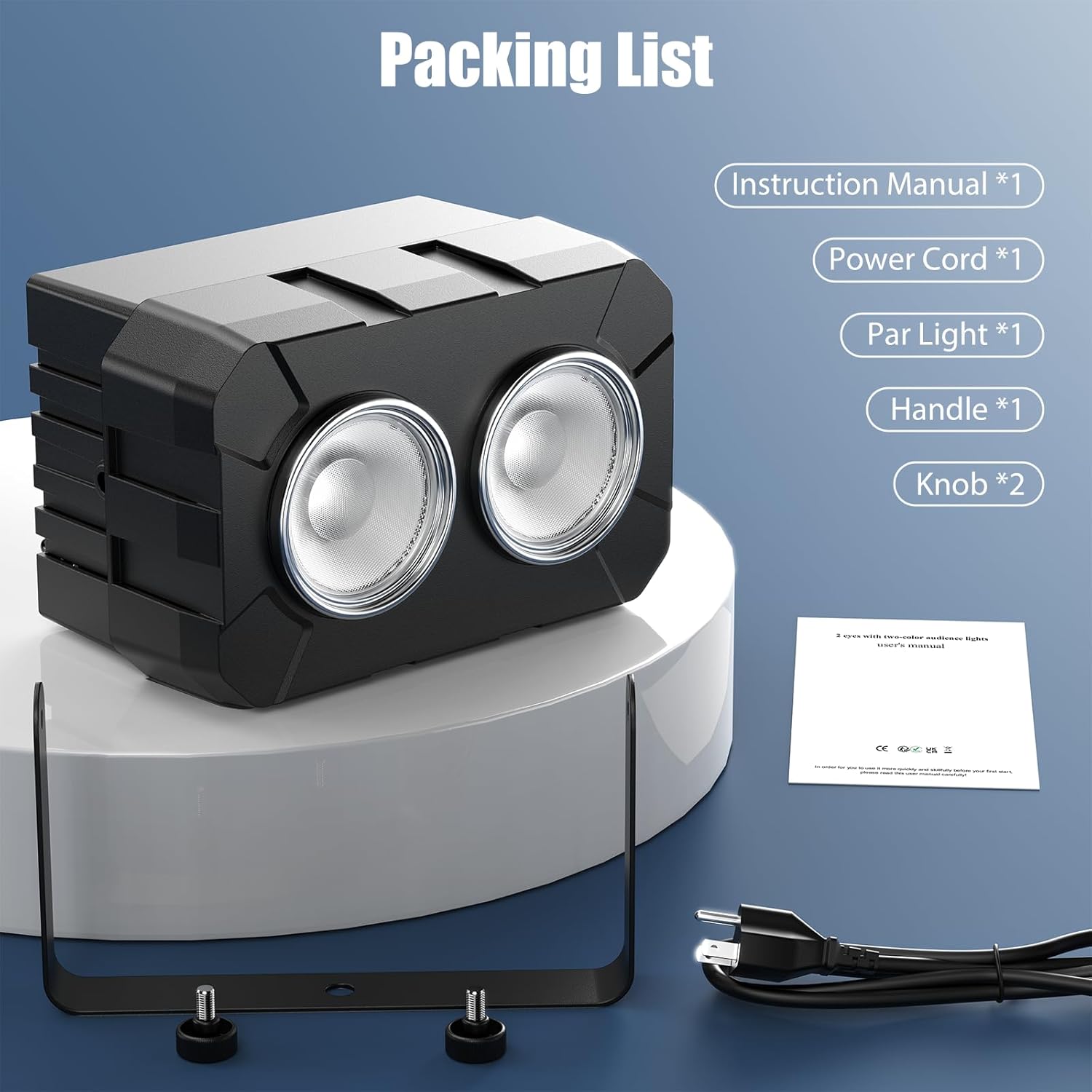
Figure 2: Illustrated packing list showing the COB light, power cord, handle, knobs, and instruction manual.
4. ການຕິດຕັ້ງແລະການຕິດຕັ້ງ
The DazzlingStage COB LED Par Light is designed for flexible installation. It can be placed on a flat surface, mounted on a truss, or hung from a ceiling.
4.1 ການຕິດຕັ້ງ
- Attach the adjustable mounting bracket to the light using the provided knobs.
- Securely fasten the light to a truss, ceiling, or stand using appropriate clamps (not included) and the mounting bracket.
- Always use the safety rope ring to provide an additional layer of security when suspending the light.
4.2 Power Connection and Daisy-Chaining
Connect the power cable to the "Power In" port on the rear of the unit. For multiple units, you can daisy-chain up to 6 lights using the "Power Out" port to connect to the next unit's "Power In" port.

Figure 3: Four COB LED Par Lights connected in a daisy-chain configuration, illustrating easy power linking for multiple units.
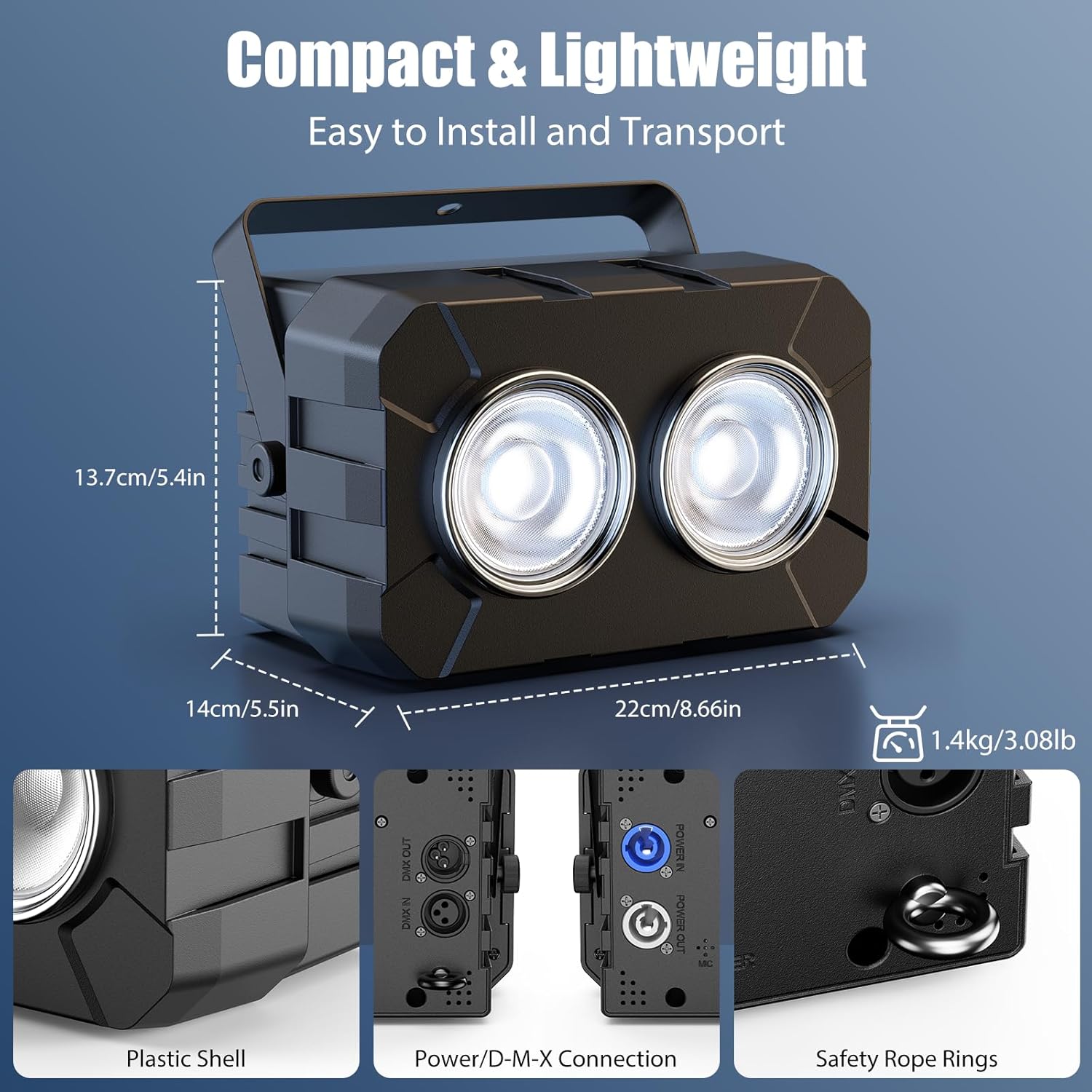
ຮູບທີ 4: ລາຍລະອຽດ view of the light's rear panel, highlighting the Power In/Out, DMX In/Out, 4-digit display, control buttons, and safety rope ring.
5. ຮູບແບບການເຮັດວຽກ
The DazzlingStage COB LED Par Light offers four primary control modes:
- ຮູບແບບ Master-Slave: Connect multiple units via DMX cables. Set one unit as the master, and others as slaves. Slave units will mirror the master's settings.
- DMX512 Mode (8 Channel): For professional control, connect the light to a DMX controller. Use the 4-digit display and buttons to set the DMX address and channel mode (8 channels). Refer to your DMX controller's manual for specific programming.
- ແບບອັດຕະໂນມັດ: The light cycles through pre-programmed patterns and effects automatically.
- ໂໝດສຽງເປີດ: The light reacts to ambient sound and music, changing patterns and intensity in sync with the audio.
Video 1: Demonstration of the DazzlingStage 180W Dual-Color COB LED Par Light's various lighting effects and modes, including warm white, cool white, mixed white, strobe, jump, gradient, pulse, and DMX control.
6. ຄຸນນະສົມບັດແລະຫນ້າທີ່ທີ່ສໍາຄັນ
6.1 Adjustable Color Temperature
The light features both cool white (6500K) and warm white (3200K) COB LEDs, allowing for a wide range of color temperatures. You can adjust the mix to achieve desired ambient lighting, from crisp cool white to rich warm white.

Figure 5: An illustration showing the adjustable color temperature range (3200K-6500K) of the COB LED Par Light, transitioning from warm white to cool white.
6.2 Dimming and Strobe Effects
- ມືດມົວ: Smooth 0-100% linear dimming allows for precise control over light intensity.
- ກະໂປ່ງ: The light supports strobe effects from 1 to 25 times per second, creating dynamic visual impacts.

Figure 6: Three lights demonstrating various light sources and effects, including jump, gradient, pulse, and strobe modes.
7. ບໍາລຸງຮັກສາ
Regular maintenance ensures optimal performance and extends the lifespan of your DazzlingStage COB LED Par Light.
- ທໍາຄວາມສະອາດ: ເຮັດຄວາມສະອາດເລນແລະບ່ອນຢູ່ເປັນໄລຍະດ້ວຍຜ້າອ່ອນໆ, ແຫ້ງ. ຢ່າໃຊ້ເຄື່ອງເຮັດຄວາມສະອາດຂັດຫຼືສານລະລາຍ.
- ການກວດກາ: Regularly check power cables and DMX connections for any signs of damage.
- ການເກັບຮັກສາ: ເມື່ອບໍ່ໄດ້ໃຊ້, ໃຫ້ເກັບຮັກສາແສງສະຫວ່າງໄວ້ໃນສະພາບແວດລ້ອມທີ່ແຫ້ງແລ້ງ, ບໍ່ມີຝຸ່ນ.
8. ການແກ້ໄຂບັນຫາ
| ບັນຫາ | ສາເຫດທີ່ເປັນໄປໄດ້ | ການແກ້ໄຂ |
|---|---|---|
| ແສງບໍ່ເປີດ | ບໍ່ມີແຫຼ່ງຈ່າຍໄຟ ຫຼື ສາຍໄຟທີ່ມີບັນຫາ. | Check power connection and cable. Ensure the power outlet is functional. |
| ບໍ່ມີການຄວບຄຸມ DMX | Incorrect DMX address, faulty DMX cable, or incorrect DMX mode setting. | Verify DMX address and channel settings. Check DMX cable connections. Ensure the unit is in DMX512 mode. |
| ແສງແຈ້ງເກີນໄປ/ມືດ | Dimming level not adjusted. | Adjust the dimming setting via the control panel or DMX controller. |
| ໂໝດເປີດສຽງບໍ່ເຮັດວຽກ | No sound input or microphone sensitivity too low. | Ensure there is sufficient sound near the unit. Check microphone sensitivity settings if available. |
9. ຂໍ້ມູນຈໍາເພາະ
| ຄຸນສົມບັດ | ລາຍລະອຽດ |
|---|---|
| ອັນດັບທີtage | AC100-240V, 50/60Hz |
| Lamp ລູກປັດ | 2 x 90W COB LED (Cool White + Warm White) |
| Output Angle | 35° |
| ອຸນຫະພູມສີ (CCT) | 3200K-6500K |
| ອາຍຸ LED ສະເລ່ຍ | 50,000 ຊົ່ວໂມງ |
| ຫຼຸດແສງ | 0-100% Linear Dimming |
| ຄວາມຖີ່ Strobe | 1-25 ເທື່ອ/ວິນາທີ |
| ຮູບແບບການເຮັດວຽກ | DMX512, Master-Slave, Auto, Sound-Activated |
| ຊ່ອງທາງຄວບຄຸມ | 8 ຊ່ອງທາງ DMX |
| ຈໍສະແດງຜົນ | 4-Digit Digital Display + 4 Buttons |
| ລະດັບການປົກປ້ອງ | IP20 |
| ຂະໜາດສິນຄ້າ (L x W x H) | 22ຊມ x 14ຊມ x 13.7ຊມ (8.66in x 5.5in x 5.4in) |
| ນ້ຳໜັກສິນຄ້າ | 1.4kg (3.08lb) |
| ວັດສະດຸ | Acrylonitrile Butadiene Styrene (ABS) |
10. ການຮັບປະກັນແລະການສະຫນັບສະຫນູນ
For warranty information or technical support, please contact DazzlingStage customer service through the retailer where the product was purchased. Please have your model number (ZQ01321) and purchase date available when contacting support.