
ແນະນຳ
This manual provides essential instructions for the safe installation, operation, and maintenance of your Jupiter Zphyr 5-Blade BLDC Ceiling Fan. Please read this manual thoroughly before installation and use, and retain it for future reference.
The Jupiter Zphyr fan features a Brushless Direct Current (BLDC) motor, designed for high energy efficiency and quiet operation. It includes a remote control for convenient operation and advanced features.
ຂໍ້ມູນຄວາມປອດໄພ
- ແນະນຳການຕິດຕັ້ງແບບມືອາຊີບ: ການຕິດຕັ້ງຄວນໄດ້ຮັບການປະຕິບັດໂດຍຊ່າງໄຟຟ້າທີ່ມີຄຸນວຸດທິຕາມລະຫັດໄຟຟ້າທ້ອງຖິ່ນ.
- ຕັດການເຊື່ອມຕໍ່ພະລັງງານ: Always ensure the main power supply is disconnected before attempting any installation, maintenance, or cleaning.
- Remove Regulator: It is crucial to remove or disconnect any existing fan regulator before installing this BLDC fan. Failure to do so may damage the fan's motor.
- ການຕິດຕັ້ງທີ່ປອດໄພ: Ensure the fan is securely mounted to a ceiling joist or a structure capable of supporting its weight.
- ໄລຍະຫ່າງຂອງໃບມີດ: Maintain adequate clearance between the fan blades and any obstructions.
- ໃຊ້ພາຍໃນເຮືອນເທົ່ານັ້ນ: ພັດລົມນີ້ຖືກອອກແບບມາສໍາລັບການນໍາໃຊ້ພາຍໃນເຮືອນເທົ່ານັ້ນ.
- ສະບັບtage: Operate the fan only within the specified voltage range (230 Volts AC).

ສຳຄັນ: Disconnect the regulator before installation to prevent damage.
ເນື້ອໃນຊຸດ
ກວດສອບວ່າອົງປະກອບທັງຫມົດແມ່ນມີຢູ່ກ່ອນທີ່ຈະເລີ່ມຕົ້ນການຕິດຕັ້ງ:
- ສະພາມໍເຕີ
- 5 ໃບມີດ
- ລົງ Rod
- Clamp ສະພາແຫ່ງ
- ການຄວບຄຸມໄລຍະໄກ

Image: Jupiter Zphyr 5-Blade BLDC Ceiling Fan with its remote control.
ການຕິດຕັ້ງແລະການຕິດຕັ້ງ
For detailed installation steps, refer to the separate installation guide provided with your fan. The following is a general overview:
- ການກະກຽມສໍາລັບການຕິດຕັ້ງ: Turn off power at the circuit breaker. Ensure the existing fan regulator is removed or bypassed.
- Mount the Bracket: Securely attach the mounting bracket to the ceiling junction box or a suitable support structure.
- Assemble Down Rod and Motor: Insert the down rod through the canopy and connect it to the motor assembly.
- ສາຍພັດລົມ: Connect the fan's electrical wires to the household wiring according to the wiring diagram in the detailed installation guide. Ensure all connections are secure.
- ຕິດແຜ່ນໃບ: Securely attach the five blades to the motor housing.
- ກວດສອບຄັ້ງສຸດທ້າຍ: Double-check all connections and ensure the fan is securely mounted before restoring power.

Image: An illustration of the Jupiter BLDC Ceiling Fan components, highlighting its energy efficiency and inverter compatibility.
ຄໍາແນະນໍາການດໍາເນີນງານ
ຟັງຊັນການຄວບຄຸມໄລຍະໄກ
The Jupiter Zphyr fan is operated using the included smart remote control. Ensure the remote has working batteries.

Image: The smart remote control for the Jupiter Zphyr fan, detailing its various functions.
- ເປີດ/ປິດ: ກົດປຸ່ມເປີດປິດເພື່ອເປີດ ຫຼືປິດພັດລົມ.
- LED: ເປີດ ຫຼື ປິດໄຟ LED ແບບປະສົມປະສານ.
- ການຄວບຄຸມຄວາມໄວ: Buttons labeled 1-5 (or similar) adjust the fan speed.
- Boost Speed: Activates maximum fan speed for rapid cooling.
- ຮູບແບບການນອນ: Gradually reduces fan speed by 10 RPM every hour for comfortable sleep.
- ໂໝດຈັບເວລາ: Set the fan to automatically switch off after 2, 4, 6, or 8 hours.
- Reverse Rotation (REV): Changes the direction of blade rotation. Useful for different seasons.
ການຫມຸນສອງທິດທາງ
The fan offers bi-directional rotation for year-round comfort:
- ໂໝດລະດູຮ້ອນ (ທວນເຂັມໂມງ): Pushes air downwards, creating a cooling breeze.
- ໂໝດລະດູໜາວ (ຕາມເຂັມໂມງ): Draws cool air up, circulating warm air near the ceiling downwards, helping to distribute heat more evenly.
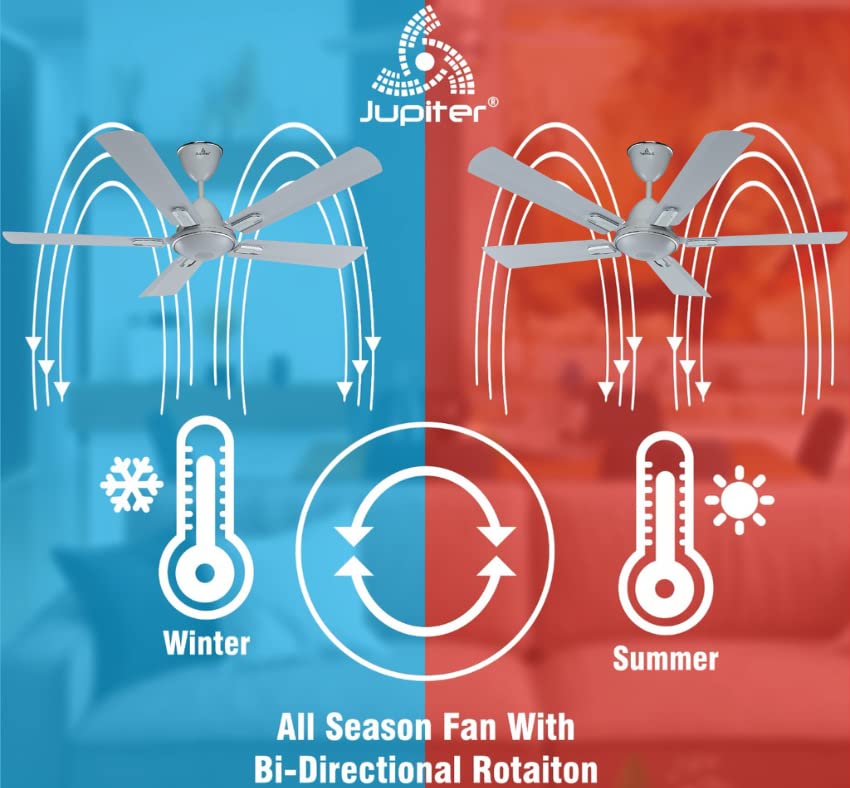
Image: Illustration demonstrating the fan's bi-directional rotation for effective air circulation in both winter and summer.
Jupiter Fan Controller App (for Android with IR Blaster)
For Android phones equipped with an IR Blaster, the Jupiter Fan Controller App can be used to manage the fan. The app functions identically to the physical remote control, allowing you to:
- Switch the fan ON/OFF.
- ປັບຄວາມໄວພັດລົມ.
- Set a timer and switch ON Sleep mode.
- Switch the LED light ON/OFF.
- Activate Boost Mode.

Image: A smartphone displaying the Jupiter Fan Controller App interface, compatible with Android phones featuring an IR Blaster.
Energy Efficiency and Performance
The Jupiter Zphyr fan is designed with a Super Energy Efficient BLDC Motor, offering significant power savings and consistent performance.
- ມໍເຕີ BLDC: Consumes significantly less power compared to traditional induction fans.
- Inverter Stabilization Technology: Maintains consistent speed even during low input voltage or power fluctuations, and runs longer on inverter batteries.
- High Air Delivery: Provides air delivery comparable to standard ceiling fans while consuming less energy.
- ຕົວຊີ້ບອກ LED: The fan's LED can also serve as a subtle night lamp.

Image: The BEE 5-star energy rating label for the Jupiter Zphyr fan, indicating high energy efficiency.
Power Savings Comparison
The image below illustrates the potential energy savings of the Jupiter 5 BLDC Fan compared to other fan types, based on specific usage and electricity cost assumptions:

Image: A comparative table showing wattage consumption, warranty, air delivery, units consumed, electricity cost, and savings for Jupiter 5 BLDC Fan, BEE 1 Star Rated Fan, and Regular Fan.
Note: Calculations are based on 15 hours usage per day, 365 days a year, and electricity charges of ₹7 per unit. Savings are calculated against a regular fan.
ບໍາລຸງຮັກສາ
- ທໍາຄວາມສະອາດ: Regularly clean the fan blades and motor housing with a soft, damp ຜ້າ. ຢ່າໃຊ້ເຄື່ອງເຮັດຄວາມສະອາດຂັດຫຼືສານລະລາຍ. ໃຫ້ແນ່ໃຈວ່າປິດໄຟກ່ອນທີ່ຈະທໍາຄວາມສະອາດ.
- ຍອດເງິນໃບ: If the fan wobbles, check that all blades are securely attached and balanced.
- ບໍ່ຈໍາເປັນຕ້ອງມີການນ້ໍາມັນ: The BLDC motor is designed for maintenance-free operation and does not require lubrication.
ການແກ້ໄຂບັນຫາ
| ບັນຫາ | ສາເຫດທີ່ເປັນໄປໄດ້ | ການແກ້ໄຂ |
|---|---|---|
| ພັດລົມບໍ່ເລີ່ມຕົ້ນ | No power supply; Remote control batteries low/dead; Incorrect wiring; Existing regulator not removed. | Check power supply; Replace remote batteries; Verify wiring connections (consult electrician); Ensure regulator is removed. |
| ການຄວບຄຸມໄລຍະໄກບໍ່ເຮັດວຽກ | Batteries low/dead; Obstruction between remote and fan; Remote out of range. | Replace batteries; Ensure clear line of sight; Operate within 20ft distance. |
| ພັດລົມສັ່ນ | Loose blades; Unbalanced blades; Loose mounting. | Tighten blade screws; Check blade balance; Ensure mounting bracket is secure. |
| ພັດລົມເຮັດໃຫ້ສຽງຜິດປົກກະຕິ | Loose screws; Internal component issue. | Check and tighten all screws; If noise persists, contact customer service. |
ຂໍ້ມູນຈໍາເພາະ
| ຄຸນສົມບັດ | ລາຍລະອຽດ |
|---|---|
| ຍີ່ຫໍ້ | ດາວພະຫັດ |
| ຕົວແບບ | Zphyr |
| ການອອກແບບພັດລົມໄຟຟ້າ | ພັດລົມເພດານ |
| ສີ | ສີຂາວ |
| ແຫຼ່ງພະລັງງານ | ໄຟຟ້າສາຍ |
| ຂະໜາດສິນຄ້າ | 45D x 30W x 20H ຊມ |
| ຄຸນນະສົມບັດພິເສດ | Automatic Shut-Off, High Velocity, Remote Controlled, Reverse Rotation |
| ການນໍາໃຊ້ທີ່ແນະນໍາ | ໃຊ້ພາຍໃນເຮືອນເທົ່ານັ້ນ |
| ລະດັບສຽງ | 60 Decibels |
| ວັດtage | 35 ວັດ |
| ຈໍານວນແຜ່ນໃບ | 5 |
| ຄວາມຍາວຂອງແຜ່ນໃບ | ຂະ ໜາດ 1200 ມີລີແມັດ |
| ສະບັບtage | 230 ໂວນ (AC) |
| ນ້ໍາຫນັກລາຍການ | 4.5 ກິໂລກຣາມ |
| ວິທີການຄວບຄຸມ | ໄລຍະໄກ |
| ສະເພາະເຈາະຈົງ | CE |
| ປະເທດຕົ້ນກໍາເນີດ | ປະເທດອິນເດຍ |
ການຮັບປະກັນແລະການສະຫນັບສະຫນູນ
The Jupiter Zphyr fan comes with a ການຮັບປະກັນ 3 ປີຈໍາກັດ. For warranty claims, the product must be returned to the manufacturer's plant at Hyderabad, with all freight charges paid by the customer.
For queries, returns, or technical support, please contact:
- Numberາຍເລກບໍລິການລູກຄ້າ: +91-9440285167
- ID ອີເມວ: support@jupiterfans.com
- Webເວັບໄຊ: www.jupiterfans.com
Please register your warranty on the official webເວັບໄຊ: www.jupiterfans.com