
ແນະນຳ
This manual provides essential information for the safe installation, operation, and maintenance of your Eglo connect.z Smart Home LED Ceiling Light Totari-Z. Please read these instructions carefully before installation and retain them for future reference.
The Eglo connect.z Totari-Z is a smart home LED ceiling light with a white metal body and a round illuminated surface made of white plastic with a sparkling crystal effect. It offers adjustable light color, dimmable functionality, and can be controlled via Bluetooth, app, and compatible voice assistants using ZigBee 3.0 technology.

Image: The Eglo connect.z Totari-Z LED Ceiling Light, showcasing its round design and illuminated surface.
ຂໍ້ມູນຄວາມປອດໄພ
For detailed safety instructions, please refer to the official safety document provided by Eglo. It is crucial to follow all safety guidelines during installation and operation to prevent accidents or damage.
ເນື້ອໃນຊຸດ
ຊຸດຜະລິດຕະພັນປະກອບມີ:
- Eglo connect.z Smart Home LED Ceiling Light Totari-Z
- ຄູ່ມືຜູ້ໃຊ້
Please ensure all components are present and undamaged before proceeding with installation.
ການຕິດຕັ້ງແລະການຕິດຕັ້ງ
The Eglo connect.z Totari-Z ceiling light requires assembly and ceiling mounting. Professional installation is recommended for electrical connections.
ການຕິດຕັ້ງທາງດ້ານຮ່າງກາຍ
- ການກະກຽມ: ໃຫ້ແນ່ໃຈວ່າການສະຫນອງພະລັງງານໄປຫາພື້ນທີ່ຕິດຕັ້ງຖືກປິດຢູ່ທີ່ຕົວຕັດວົງຈອນຕົ້ນຕໍ.
- ການຕິດຕັ້ງ: Securely attach the light fixture to the ceiling using appropriate hardware.
- ສາຍໄຟ: Connect the electrical wires according to local electrical codes and the wiring diagram provided in the full safety manual.
- ສະພາແຫ່ງ: Attach the light diffuser and any decorative elements to the main fixture.
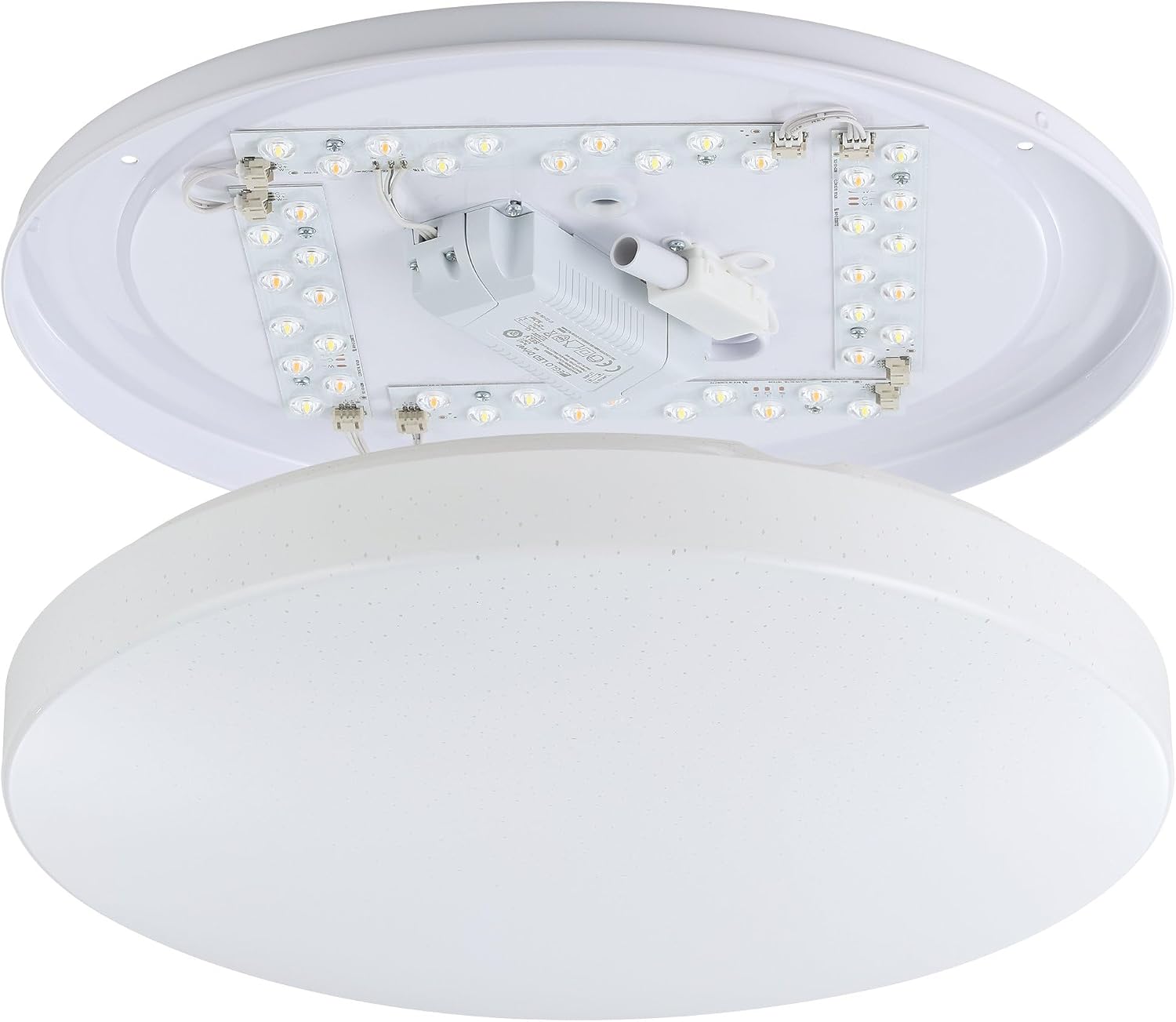
ຮູບພາບ: ພາຍໃນ view of the Eglo connect.z Totari-Z ceiling light, showing LED strips and wiring components. This illustrates the internal structure for installation.

Image: Visual guide illustrating easy installation and setup steps for Eglo connect.z smart lighting, including app integration.
ການເຊື່ອມໂຍງເຮືອນອັດສະລິຍະ
The light can be controlled via the AwoX Home Control app, a separate connect.z remote control (EGLO 99099, sold separately), or compatible voice assistants through ZigBee 3.0.
For App Control:
- Download the free AwoX Home Control app (available for iOS 13+ and Android 8+).
- Follow the in-app instructions to pair your Totari-Z light.
For Voice Control (e.g., Amazon Alexa):
- Ensure you have a compatible voice assistant device with an integrated ZigBee bridge (e.g., Amazon Echo or Echo Plus).
- Follow the instructions provided by your voice assistant platform to discover and connect new devices.
- The Eglo connect.z products are compatible with other ZigBee products.

Image: A compatibility chart showing various Amazon Alexa (Echo 4th Gen, Echo 1st-3rd Gen, Echo Flex, Echo Dot, Echo Show) and Google Home (Nest Audio, Home mini, Nest mini, Nest Hub) devices and their compatibility with Eglo connect.z lights, indicating whether a WiFi + Zigbee Gateway is required.
ຄໍາແນະນໍາການດໍາເນີນງານ
The Eglo connect.z Totari-Z offers a range of lighting options and smart features.
Basic Functions (via App or Remote Control)
- ມືດມົວ: ປັບຄວາມສະຫວ່າງຂອງແສງ.
- ການປັບອຸນຫະພູມສີ: Change the light color from warm white (2700 Kelvin) to neutral white and cool white (up to 6500 Kelvin).
- ການເລືອກສີ RGB: Choose from a wide selection of RGB colors to set the mood.
- Saving Favorites: Save your preferred light settings for quick access.
- Grouping Lights: Create groups of lights for synchronized control.

Image: A diagram illustrating the various functionalities of Eglo connect.z smart lights, including timer, dimming, color temperature change, RGB selection, night light, favorite modes, disco function, light alarm, presence simulation, and light group creation. It also shows the AwoX APP interface and the optional connect.z remote control (EGLO 99099).
Advanced App Features (AwoX Home Control App)
- ໂມງຈັບເວລາ: Schedule the light to turn on or off at specific times.
- ແສງກາງຄືນ: Activate a soft, low-intensity light for nighttime.
- Twilight Simulation: Mimic the natural progression of light from dusk to dawn.
- ແສງປຸກ: Use light to gently wake you up.
- Presence Simulation: Make it appear as if someone is home by turning lights on and off randomly.
- ໂໝດດິສໂກ: Dynamic light effects for entertainment.
ການຄວບຄຸມສຽງ
Once integrated with a compatible voice assistant (e.g., Amazon Alexa), you can control the light using voice commands. Examples ປະກອບມີ:
- "Alexa, turn on the ceiling light."
- "Alexa, set the ceiling light to warm white."
- "Alexa, dim the ceiling light to 50%."
- "Alexa, change the ceiling light to blue."

Image: This image displays various smart home devices like Amazon Echo, Google Nest, and a tablet, illustrating the voice control capabilities of Eglo connect.z smart lights. It highlights voice commands and remote control options for smart home integration.
ບໍາລຸງຮັກສາ
To maintain the appearance and functionality of your Eglo connect.z Totari-Z ceiling light:
- ທໍາຄວາມສະອາດ: Disconnect power before cleaning. Use a soft, dry cloth to wipe the surface. Do not use abrasive cleaners or solvents.
- ໄຟ LED: The integrated LED light source is not user-replaceable. If the LEDs fail, the entire fixture may need to be replaced.
ການແກ້ໄຂບັນຫາ
| ບັນຫາ | ສາເຫດທີ່ເປັນໄປໄດ້ | ການແກ້ໄຂ |
|---|---|---|
| ແສງບໍ່ໄດ້ເປີດ. | ບໍ່ມີໄຟຟ້າ, ການເຊື່ອມຕໍ່ວ່າງ, ສະວິດມີບັນຫາ. | Check power supply, ensure connections are secure, test the switch. |
| Cannot connect to AwoX Home Control app. | Bluetooth/Wi-Fi off, light not in pairing mode, app issues. | Ensure Bluetooth/Wi-Fi is enabled on your device. Power cycle the light. Restart the app. Refer to the app's help section for pairing instructions. |
| ການຄວບຄຸມດ້ວຍສຽງ (Alexa/Google Home) ບໍ່ເຮັດວຽກ. | No ZigBee bridge, incorrect setup, network issues. | Verify your voice assistant device has an integrated ZigBee bridge or is connected to one. Re-run device discovery in your voice assistant app. Check your home Wi-Fi network. |
| Light color/dimming not responding. | Connectivity issue, remote battery low, app glitch. | Check app/remote connection. Replace remote batteries if applicable. Power cycle the light. |
If problems persist, please contact Eglo customer support.
ຂໍ້ມູນຈໍາເພາະ
| ຄຸນສົມບັດ | ລາຍລະອຽດ |
|---|---|
| ຍີ່ຫໍ້ | ເອໂກ |
| ຊື່ຕົວແບບ | TOTARI-Z |
| ໝາຍເລກຕົວແບບ | 900001 |
| ຂະໜາດ (L x W x H) | 38L x 38W x 7H cm (Ø 38 cm) |
| ສີ | ສີຂາວ |
| ວັດສະດຸ | Crystal, Metal, Plastic |
| ແບບ | ທັນສະໄຫມ |
| ປະເພດແຫຼ່ງແສງ | LED |
| ຈໍານວນໄຟ | 4 |
| ພະລັງງານ | 4 x 4.8 ວັດ (ທັງໝົດ 19.2 ວັດ) |
| ແສງສະຫວ່າງ Flux | 1900 lumens (2160 lm max) |
| ອຸນຫະພູມສີ | 2700-6500 Kelvin (Warm White to Cool White) |
| ຄຸນສົມບັດສີ | ການເລືອກສີ RGB |
| Dimmable | ແມ່ນແລ້ວ |
| ອະນຸສັນຍາການເຊື່ອມຕໍ່ | Zigbee 3.0, Bluetooth |
| ວິທີການຄວບຄຸມ | Voice (Amazon Alexa), App (AwoX Home Control), Remote Control (optional) |
| ຫ້ອງຮຽນປະສິດທິພາບພະລັງງານ | F |
| ປະເພດການຕິດຕັ້ງ | ເພດານ Mount |
| ໃຊ້ພາຍໃນ/ນອກ | ພາຍໃນ |
| ຕ້ອງການສະພາແຫ່ງ | ແມ່ນແລ້ວ |
| ປະເທດຕົ້ນກໍາເນີດ | ຈີນ |

Image: Diagram showing the dimensions of the Eglo connect.z Totari-Z ceiling light: 38 cm (14.96 inches) diameter and 7 cm (2.76 inches) height.
ຮັບປະກັນ
ຜະລິດຕະພັນນີ້ມາພ້ອມກັບ a ການຮັບປະກັນຂອງຜູ້ຜະລິດ 2 ປີ. ກະລຸນາຮັກສາຫຼັກຖານການຊື້ຂອງທ່ານສໍາລັບການຮຽກຮ້ອງການຮັບປະກັນ. ການຮັບປະກັນກວມເອົາຂໍ້ບົກພ່ອງຂອງວັດສະດຸແລະການເຮັດວຽກພາຍໃຕ້ການນໍາໃຊ້ປົກກະຕິ.
ສະຫນັບສະຫນູນແລະຕິດຕໍ່
For further assistance, technical support, or warranty inquiries, please contact Eglo customer service or visit their official webເວັບໄຊ.
- Eglo Official Store: Visit Eglo Store on Amazon
- ຂໍ້ມູນຄວາມປອດໄພ: ດາວໂຫລດຂໍ້ມູນຄວາມປອດໄພ (PDF)