
ຂໍ້ມູນຄວາມປອດໄພທີ່ສໍາຄັນ
Before operating the Hover-1 Nano Kick Scooter, please read and understand all safety instructions. Failure to follow these instructions may result in serious injury.
- ຈຳກັດອາຍຸ ແລະນ້ຳໜັກ: This scooter is designed for children aged 5 years and older, with a maximum weight limit of 110 lbs (50 kg).
- ໃສ່ອຸປະກອນຄວາມປອດໄພ: Always wear appropriate safety gear, including a helmet, knee pads, and elbow pads, when riding the scooter.
- ການເບິ່ງແຍງກວດກາ: ເດັກນ້ອຍຄວນໄດ້ຮັບການເບິ່ງແຍງຈາກຜູ້ໃຫຍ່ສະເໝີໃນຂະນະທີ່ຂີ່ລົດ.
- ເງື່ອນໄຂການຂີ່: Ride on smooth, paved surfaces away from traffic. Avoid riding on uneven terrain, loose gravel, or wet surfaces.
- ການເບິ່ງເຫັນ: The scooter features multi-color LED lights on the wheels, stem, and deck to enhance visibility, especially in low-light conditions. However, always be aware of your surroundings.
- ເບກ: The scooter is equipped with a rear braking system. Practice braking in a safe area before riding at higher speeds.
- Avoid Stunts: Do not attempt stunts, jumps, or aggressive riding, as this can lead to loss of control and injury.
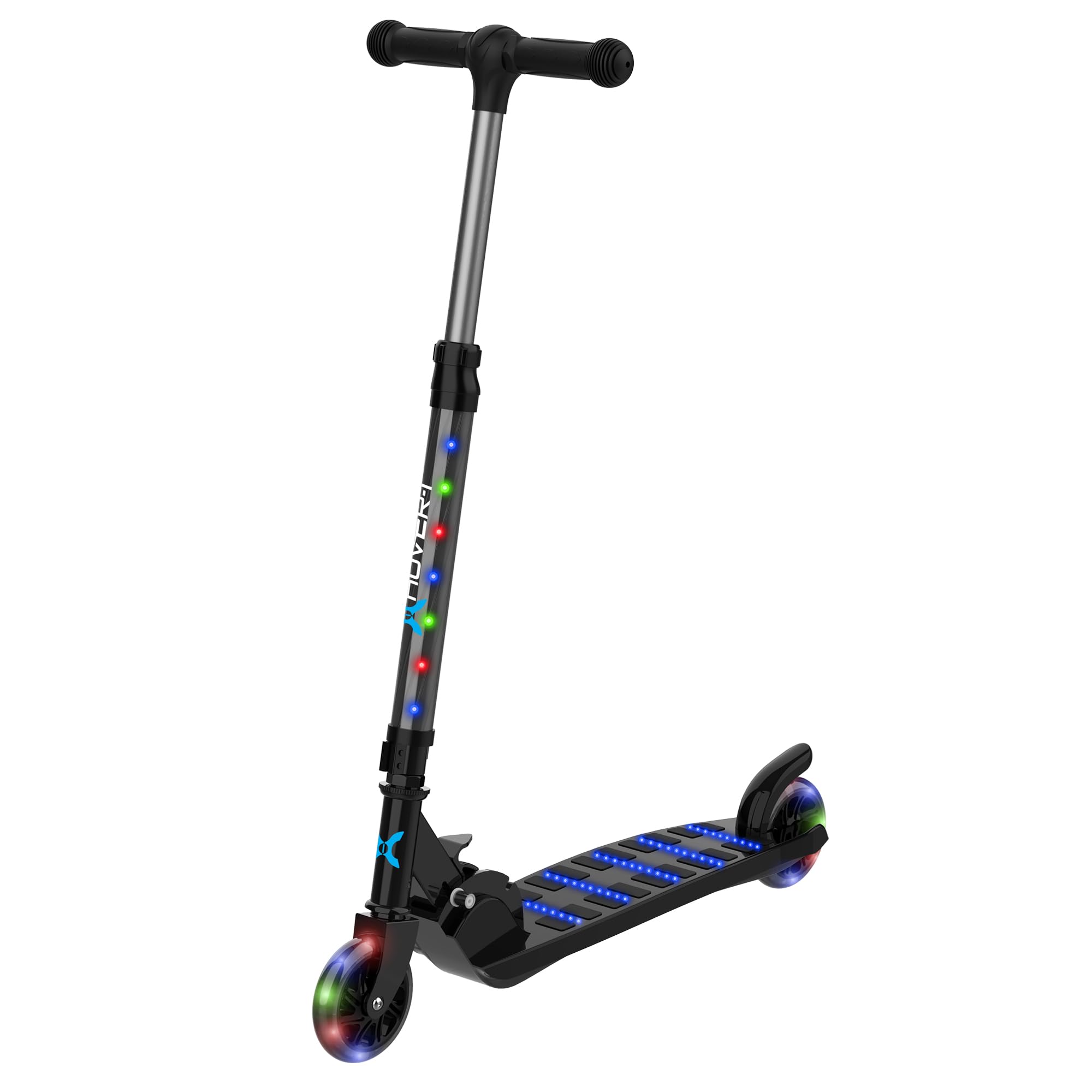
Image: A child safely riding the Hover-1 Nano Kick Scooter, demonstrating the importance of safety gear.
ສິນຄ້າເກີນview ແລະອົງປະກອບ
The Hover-1 Nano Kick Scooter is designed for a fun and safe riding experience. Familiarize yourself with its main components:
- ແຮນຈັບທີ່ສາມາດປັບໄດ້: Allows for height customization to suit different riders.
- Soft Grip Handles: Provide comfort and secure grip during use.
- Lean-to-Steer Axle: Enables intuitive steering by leaning.
- Solid PU Tires: Durable and provide a smooth ride.
- ໄຟ LED ຫຼາຍສີ: Integrated into the wheels, stem, and deck for enhanced visibility and style.
- ການອອກແບບພັບ: ເພື່ອຄວາມສະດວກໃນການເກັບຮັກສາ ແລະ ການເຄື່ອນຍ້າຍ.
- ເບກຫຼັງ: For controlled stopping.

Image: Detail of the scooter's soft, comfortable handles for improved grip.

Image: The scooter showcasing its multi-colored LED lights on the wheels, stem, and deck.
ການຕິດຕັ້ງແລະການປະກອບ
The Hover-1 Nano Kick Scooter requires minimal assembly. Follow these steps to prepare your scooter for use:
- ແກະກ່ອງ: ເອົາສ່ວນປະກອບທັງຫມົດອອກຈາກການຫຸ້ມຫໍ່ຢ່າງລະມັດລະວັງ.
- ການຕິດຕັ້ງ Handlebar: Insert the handlebar stem into the main scooter body until it clicks securely into place. Ensure it is fully engaged.
- ປັບຄວາມສູງຂອງແຮນເບີ:
- ຊອກຫາ clamp on the stem of the scooter.
- ເປີດ clamp and adjust the handlebar to the desired height, ensuring it is comfortable for the rider.
- ປິດ clamp firmly to secure the handlebar in position. Ensure the handlebar is stable and does not wobble.
- Battery Installation (for LED lights):
- The scooter's LED lights require 3 AA batteries (not included).
- Locate the battery compartment, typically on the underside of the deck or within the stem.
- Open the compartment, insert the batteries according to the polarity indicators (+/-), and securely close the cover.

Image: The adjustable handlebar mechanism, allowing customization for rider height.
ຄໍາແນະນໍາການດໍາເນີນງານ
Operating the Hover-1 Nano Kick Scooter is straightforward. Follow these guidelines for a safe and enjoyable ride:
- ເລີ່ມ: Place one foot firmly on the scooter deck. Use the other foot to push off the ground to gain momentum.
- ການຊີ້ນຳ (ແບບອຽງເພື່ອຊີ້ນຳ): The scooter uses a lean-to-steer mechanism. To turn, gently lean your body in the desired direction. The front wheels will pivot accordingly.
- ເບກ: To slow down or stop, apply pressure to the rear brake located above the rear wheel with your foot. Apply gradual pressure for smooth stops.
- ພັບສໍາລັບການເກັບຮັກສາ:
- ຊອກຫາກົນໄກພັບຢູ່ໃກ້ກັບຖານຂອງແກນ handlebar.
- Follow the instructions on the scooter to release the locking mechanism and fold the handlebar down towards the deck.
- ໃຫ້ແນ່ໃຈວ່າສະກູດເຕີ້ຖືກພັບຢ່າງປອດໄພກ່ອນທີ່ຈະແບກຫາບ ຫຼື ເກັບຮັກສາ.

Image: The scooter in its compact, folded design, highlighting its portability and ease of storage.
ບໍາລຸງຮັກສາ
Regular maintenance ensures the longevity and safe operation of your Hover-1 Nano Kick Scooter:
- ທໍາຄວາມສະອາດ: ເຊັດ scooter ດ້ວຍການໂຄສະນາamp cloth after use. Avoid using harsh chemicals or abrasive cleaners. Do not hose down the scooter.
- ການກວດກາລໍ້: Periodically check the solid PU tires for wear and tear. Ensure they are free from debris.
- Handlebar and Connections: Regularly check that the handlebar is securely fastened and that all clamps and bolts are tight.
- ການປ່ຽນແບັດເຕີຣີ: When the LED lights dim or stop working, replace the 3 AA batteries in the designated compartment. Ensure correct polarity.
- ການເກັບຮັກສາ: Store the scooter in a dry, cool place away from direct sunlight and moisture. Use the folding feature for compact storage.
ການແກ້ໄຂບັນຫາ
If you encounter issues with your Hover-1 Nano Kick Scooter, refer to the following common solutions:
- ໄຟ LED ບໍ່ເຮັດວຽກ:
- Check if the 3 AA batteries are correctly installed with the proper polarity.
- ປ່ຽນແບັດເຕີຣີເກົ່າຫຼືທີ່ໝົດໄປດ້ວຍອັນໃໝ່.
- Handlebar Wobbles:
- Ensure the handlebar stem is fully inserted and the clamp ຖືກຮັດແໜ້ນຢ່າງປອດໄພ.
- Inspect for any loose screws or connections in the handlebar assembly.
- Scooter Not Rolling Smoothly:
- ກວດເບິ່ງລໍ້ສໍາລັບສິ່ງເສດເຫຼືອຫຼືສິ່ງກີດຂວາງ.
- Ensure wheel axles are not overly tight or loose.
For further assistance, please contact Hover-1 customer support.
ຂໍ້ມູນຈໍາເພາະ
| ຍີ່ຫໍ້ | ເລື່ອນ-1 |
| ຊື່ຕົວແບບ | Nano- Folding Kick Scooter |
| ຊ່ວງອາຍຸ (ລາຍລະອຽດ) | Youth (5+ Years Old) |
| ນ້ ຳ ໜັກ ຈຳ ກັດ | 110 ປອນ (50 ກິໂລ) |
| ນ້ໍາຫນັກລາຍການ | 3.1 ປອນ (1.4 ກິໂລ) |
| ຈຳ ນວນລໍ້ | 2 |
| ວັດສະດຸລໍ້ | Polyurethane (Solid PU) |
| ວັດສະດຸກອບ | ອາລູມິນຽມ, ພາດສະຕິກ |
| ປະເພດແຖບຈັບ | ສາມາດປັບໄດ້ |
| ຂະໜາດລໍ້ | 3 ນິ້ວ |
| ແບບເບກ | ເບກຫຼັງ |
| ຄຸນນະສົມບັດພິເສດ | Lightweight, LED Lights |
| UPC | 888255211835 |
ການຮັບປະກັນແລະການສະຫນັບສະຫນູນ
ການຮັບປະກັນ: The Hover-1 Nano Kick Scooter comes with a 90-day warranty from the date of purchase. This warranty covers manufacturing defects under normal use. Please retain your proof of purchase for warranty claims.
ການຊ່ວຍເຫຼືອລູກຄ້າ: For product support, troubleshooting assistance, or warranty inquiries, please visit the official Hover-1 Brand Store or contact their customer service department. You can find more information and contact details on the Hover-1 Brand Store on Amazon.