
BOSCH D-Tect150
ຄູ່ມືຜູ້ໃຊ້ Bosch D-Tect 150 Wall and Floor Scanner
Model: D-Tect150
1. ຜະລິດຕະພັນເກີນview
The Bosch D-Tect 150 is an advanced wall and floor scanner designed for precise detection of various materials. Utilizing state-of-the-art Ultra-Wide Band (UWB) radar technology, it accurately identifies ferrous and non-ferrous metals, electrical cables, wooden beams, and plastics, including heating pipes in floors and walls. This tool provides millimetre-accurate detection, indicating objects via acoustic and visual signals on its large, illuminated color display.
The D-Tect 150 offers an intuitive user interface with a multilingual menu and specific modes tailored for different applications. Its robust design ensures durability on construction sites, featuring IP54 dust and splash protection and remaining fully functional even after drops from up to 1 meter. The device is calibration-free, self-calibrating throughout its operation for immediate and continuous use.

Figure 1: Bosch D-Tect 150 Wall and Floor Scanner. This image shows the front view of the blue and black scanner with its digital display showing detection results.
2. ຂໍ້ມູນຄວາມປອດໄພ
Always read and understand all safety warnings and instructions before operating the Bosch D-Tect 150. Failure to follow these instructions may result in electric shock, fire, and/or serious injury.
- ຄວາມປອດໄພທາງໄຟຟ້າ: Be aware of live electrical cables. The device detects power cables, but always exercise extreme caution. Do not rely solely on the detection device to determine the presence of live wires.
- ການຈັດການແບັດເຕີຣີ: Use only specified batteries (4 x 1.5 V LR6 (AA)). Ensure correct polarity. Do not mix old and new batteries or different types of batteries. Remove batteries if the device is not used for extended periods.
- ເງື່ອນໄຂສິ່ງແວດລ້ອມ: The device has IP54 dust and splash protection. However, avoid direct exposure to heavy rain or immersion in water. Operate within specified temperature ranges.
- ແຊກແຊງ: Strong electromagnetic fields or large metal objects nearby may affect detection accuracy.
- ການນໍາໃຊ້ຈຸດປະສົງ: This device is intended for detecting objects in walls and floors. Do not use for purposes other than its intended use.
3. ອົງປະກອບແລະສິ່ງທີ່ຢູ່ໃນກ່ອງ
The Bosch D-Tect 150 package includes the following items:
- Bosch D-Tect 150 Wall and Floor Scanner
- ກະເປົ໋າພົກພາອ່ອນ
- 4 x AA 1.5V Batteries

Figure 2: Contents of the Bosch D-Tect 150 package. The image displays the scanner, its soft carrying case, and the included AA batteries.
4. ຕັ້ງຄ່າ
4.1. ການຕິດຕັ້ງຫມໍ້ໄຟ
- ເປີດຝາປິດຊ່ອງໃສ່ຫມໍ້ໄຟທີ່ຕັ້ງຢູ່ດ້ານຫຼັງຂອງອຸປະກອນ.
- Insert the 4 x 1.5V LR6 (AA) batteries, ensuring correct polarity as indicated inside the compartment.
- ປິດຝາປິດຊ່ອງໃສ່ຫມໍ້ໄຟຢ່າງປອດໄພ.
4.2. ການເປີດເຄື່ອງເບື້ອງຕົ້ນ ແລະການເລືອກພາສາ
- ກົດ ເລີ່ມ ປຸ່ມເພື່ອເປີດອຸປະກອນ.
- Upon first use, the device may prompt you to select a language. Use the arrow buttons to navigate and the ຕັ້ງຄ່າ ປຸ່ມເພື່ອຢືນຢັນການເລືອກຂອງທ່ານ.
4.3. Calibration
The Bosch D-Tect 150 is designed for calibration-free operation. It automatically calibrates from the start of detection and continues to self-calibrate throughout your project, ensuring readiness for use at any time.
5. ຄໍາແນະນໍາການດໍາເນີນງານ
5.1. Selecting Detection Mode
The D-Tect 150 offers seven distinct detection modes for various materials and conditions:
- ຄອນກີດ: For standard concrete.
- Wet Concrete: For concrete with higher moisture content.
- Deep Concrete: For detecting objects at greater depths in concrete.
- In-Floor Heating: Specifically for locating heating pipes in floors.
- drywall: For detecting studs, pipes, and wires behind drywall.
- ໂລຫະ: For general metal detection.
- ສັນຍານ View: Provides a detailed graphical representation of the signal strength, useful for complex situations.
Use the menu and arrow buttons on the device to select the appropriate mode for your application.
5.2. ປະຕິບັດການສະແກນ
- Ensure the selected detection mode is suitable for the material you are scanning.
- ວາງເຄື່ອງສະແກນໃຫ້ຮາບພຽງກັບພື້ນຜິວທີ່ຈະສະແກນ.
- ກົດ ເລີ່ມ ປຸ່ມ.
- Move the device slowly and steadily across the surface. The display will show the location and depth of detected objects.
- Objects are indicated by both visual cues on the display and an acoustic signal.

Figure 3: The Bosch D-Tect 150 being used to scan a wall, showing its ability to detect hidden pipes and electrical wires.

Figure 4: A user marking the location of detected objects on a wall after scanning with the Bosch D-Tect 150, demonstrating its precision for drilling applications.
5.3. Interpreting the Display
The large, illuminated color display provides critical information:
- Object Location: Indicates the exact position of the object.
- ຄວາມເລິກ: Shows the depth of the object from the surface.
- ຄຸນສົມບັດວັດສະດຸ: Displays the likely material of the detected object (e.g., metal, wood, plastic).
- Permitted Drilling Depth: Suggests a safe drilling depth to avoid detected objects.
- Detection Strength: Visual bars indicate the strength of the detected signal.
For a visual demonstration of the product's capabilities and operation, please watch the official product video:
Video 1: Bosch D-Tect 150 Wall and Floor Scanner with Ultra Wide Band Radar Technology. This video provides an overview of the scanner's features, applications, and how it operates in various detection modes.
6. ບໍາລຸງຮັກສາ
6.1. ທໍາຄວາມສະອາດ
- ຮັກສາອຸປະກອນໃຫ້ສະອາດເພື່ອຮັບປະກັນປະສິດທິພາບທີ່ດີທີ່ສຸດ.
- ເຊັດພາຍນອກດ້ວຍຜ້າອ່ອນ, ງamp ຜ້າ. ຢ່າໃຊ້ເຄື່ອງເຮັດຄວາມສະອາດຂັດຫຼືສານລະລາຍ.
- Regularly clean the sensor area to prevent debris from affecting detection accuracy.
6.2. ການເກັບຮັກສາ
- Store the device in its soft carrying case when not in use.
- Store in a dry, dust-free environment, away from extreme temperatures.
- ຖອດແບດເຕີຣີອອກຖ້າເກັບຮັກສາໄວ້ເປັນເວລາດົນເພື່ອປ້ອງກັນການຮົ່ວໄຫຼ.
7. ການແກ້ໄຂບັນຫາ
| ບັນຫາ | ສາເຫດທີ່ເປັນໄປໄດ້ | ການແກ້ໄຂ |
|---|---|---|
| ອຸປະກອນບໍ່ເປີດ. | ແບັດເຕີຣີຕາຍ ຫຼື ຕິດຕັ້ງບໍ່ຖືກຕ້ອງ. | ກວດສອບຂົ້ວຂອງແບັດເຕີຣີ. ປ່ຽນແບັດເຕີຣີໃໝ່. |
| Inaccurate detection. | Incorrect mode selected; dirty sensor; strong interference; rapid scanning. | Select appropriate mode. Clean sensor. Move away from interference sources. Scan slowly and steadily. |
| No detection of known objects. | Object too deep; material not detectable in current mode; device malfunction. | Try "Deep Concrete" or "Signal View" mode. Ensure object is within detection limits. Contact support if issue persists. |
| ຈໍສະແດງຜົນແມ່ນມືດມົວ ຫຼືອ່ານບໍ່ໄດ້. | ຫມໍ້ໄຟຕ່ໍາ; ການຕັ້ງຄ່າການສະແດງ. | Replace batteries. Check display brightness settings in the menu. |
If you encounter issues not listed here or if solutions do not resolve the problem, please contact Bosch customer support.
8. ຂໍ້ມູນຈໍາເພາະ
| ຄຸນສົມບັດ | ລາຍລະອຽດ |
|---|---|
| ຍີ່ຫໍ້ | BOSCH |
| ໝາຍເລກຕົວແບບ | D-Tect150 |
| ເຕັກໂນໂລຊີການຊອກຫາ | Ultra-Wide Band (UWB) Radar |
| ສູງສຸດ. ຄວາມເລິກຂອງການກວດຫາ | 150 ມມ (ປະມານ 6 ນິ້ວ) |
| Max. Detection Depth (Water-filled plastic pipe) | Up to 60 mm (2-3/8 inch) |
| Measuring Accuracy of Object Centre | ± 5 ມມ |
| ອຸປະກອນການກວດພົບ | Ferrous and non-ferrous metals, electrical cables, wooden beams, plastics (e.g., heating pipes) |
| ການປ້ອງກັນຝຸ່ນ ແລະ ນ້ຳกระเด็น | IP54 |
| ການສະຫນອງພະລັງງານ | 4 x 1.5 V LR6 (AA) batteries |
| ຂະໜາດ (L x W x H) | 220 x 97 x 120 ມມ (ປະມານ 8.75 x 3.78 x 4.34 ນິ້ວ) |
| ນ້ໍາຫນັກລາຍການ | 0.7 kg (approx. 1.6 pounds) |
| ປະເພດການສະແດງ | LCD ສີ |
| ການສອບທຽບຕົນເອງ | Yes, continuous |
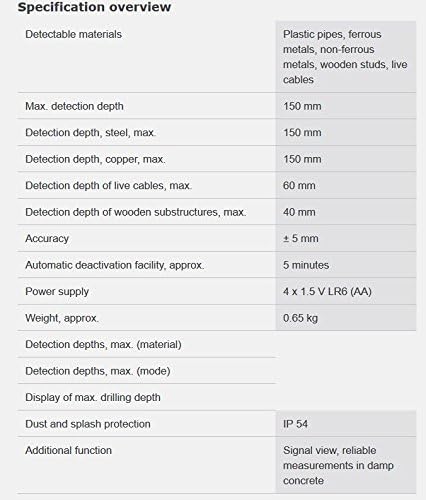
Figure 5: A detailed specification overview table for the Bosch D-Tect 150, listing detectable materials, detection depths, accuracy, power supply, and other key features.
9. ການຮັບປະກັນແລະການສະຫນັບສະຫນູນ
9.1. ຂໍ້ມູນການຮັບປະກັນ
Bosch provides a limited warranty for the D-Tect 150 Wall and Floor Scanner. Please refer to the warranty card included with your product for specific terms, conditions, and duration of coverage. Keep your purchase receipt as proof of purchase for warranty claims.
9.2. ການຊ່ວຍເຫຼືອລູກຄ້າ
For technical assistance, troubleshooting, or warranty service, please contact Bosch customer support. You can find contact information on the official Bosch webເວັບໄຊທ໌ຫຼືໃນເອກະສານທີ່ສະຫນອງໃຫ້ກັບຜະລິດຕະພັນຂອງທ່ານ.
Additional resources, including user guides and manuals, may be available online:
Ask a question about this manual
Ask about setup, troubleshooting, compatibility, parts, safety, or missing instructions. Manuals+ will review the question and use this page’s manual context to help answer it.