
Introduction
Thank you for choosing the Bigben 5000mAh MagSafe Compatible Wireless Power Bank. This portable power bank is designed to provide convenient wireless charging for compatible devices, as well as wired charging via its USB-C port. Please read this manual carefully before using the product to ensure safe and optimal performance.
Коопсуздук маалыматы
Аспабыңызга жаракат же зыян келтирбөө үчүн, төмөнкү коопсуздук чараларын сактаңыз:
- Кубат банкын экстремалдык температурага, тике күн нуруна же отко чыгарбаңыз.
- Power банкты сууга же башка суюктуктарга батырбаңыз.
- Power bankты түшүрүп алуудан, уруп алуудан же ажыратып алуудан алыс болуңуз.
- Балдар жетпеген жерде сактаңыз.
- Тастыкталган заряддоо кабелдерин жана адаптерлерин гана колдонуңуз.
- Эгерде Power Bank шишип кетсе, жыт чыгарса же өтө ысып кетсе, колдонууну дароо токтотуңуз.
- Жергиликтүү эрежелерге ылайык кубат банкын жоопкерчилик менен жок кылыңыз.
Пакеттин мазмуну
Сураныч, пакетте төмөнкү нерселерди текшериңиз:
- Bigben 5000mAh MagSafe Compatible Wireless Power Bank
- USB-Cден USB-Cге чейин кубаттоочу кабель
- Колдонуучунун Колдонмосу (бул документ)
Продукт бүттүview
Familiarize yourself with the components of your power bank:

Сүрөт: алдыңкы view of the Bigben 5000mAh Power Bank, highlighting the LED indicator lights and the USB-C port.
- LED көрсөткүч жарыктары: Four small lights indicating the remaining battery level.
- USB-C порту: For charging the power bank and for wired device charging.
- Зымсыз заряддоо бети: The flat surface designed for MagSafe compatible wireless charging.
- Кубат баскычы: Зымсыз кубаттоону иштетет жана батареянын деңгээлин текшерет.
Жайгашуу
Power Bank заряддоо
Биринчи жолу колдонуудан мурун, Power Bank'ыңызды толугу менен заряддаңыз.
- Берилген USB-C кабелин кубат банкынын USB-C портуна туташтырыңыз.
- USB-C кабелинин экинчи учун шайкеш келген USB дубал адаптерине туташтырыңыз (кошулмада жок).
- The LED indicator lights will illuminate to show the charging status. When all four LEDs are solid, the power bank is fully charged.
LED көрсөткүч абалы:
- 1 LED: 0-25% charged
- 2 LEDs: 25-50% charged
- 3 LEDs: 50-75% charged
- 4 LEDs: 75-100% charged
Иштеп жатат
Зымсыз кубаттоо (MagSafe менен шайкеш)
This power bank supports MagSafe compatible wireless charging up to 10W.
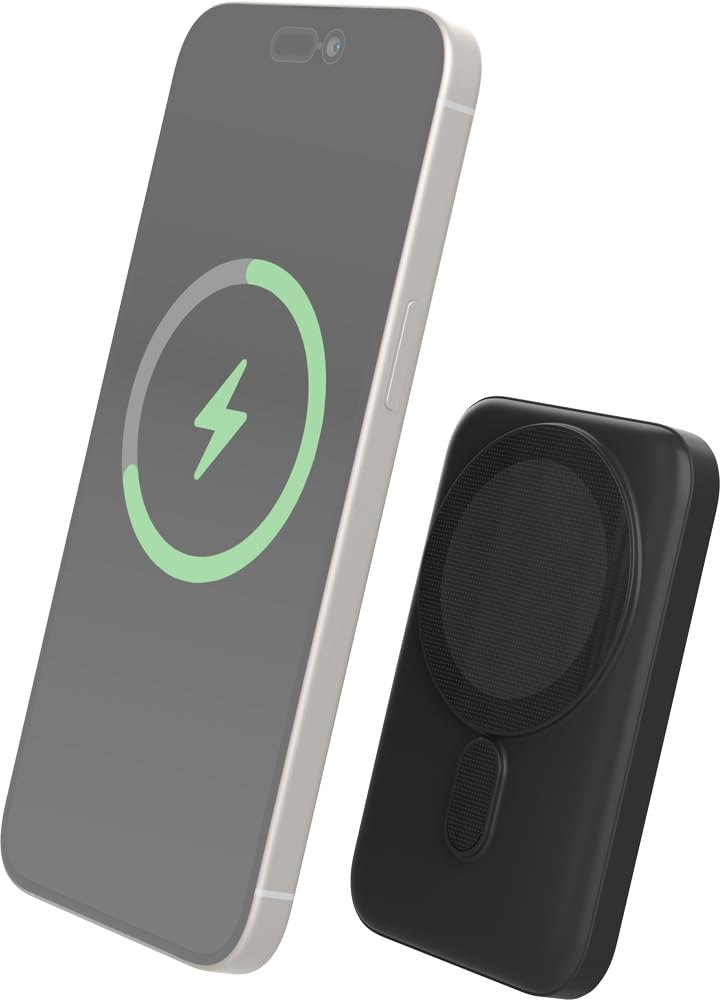
Image: The Bigben power bank magnetically connected to the back of a smartphone, illustrating the wireless charging function.
- Ensure your device is MagSafe compatible or has a MagSafe compatible case.
- Align the power bank with the back of your device. The magnets will snap it into place.
- The power bank will automatically begin charging your device. The LED indicators on the power bank will show its remaining charge.
- To stop charging, simply detach the power bank from your device.
Note: For optimal magnetic attachment and charging efficiency, ensure there are no obstructions between the power bank and your device.
Зымдуу кубаттоо
You can also charge devices using a USB-C cable.
- Connect one end of a USB-C cable (not included, or use the provided one if suitable) to the power bank's USB-C port.
- Кабелдин экинчи учун аппаратыңыздын заряддоо портуна туташтырыңыз.
- Power банк түзмөгүңүздү автоматтык түрдө кубаттай баштайт.
Техникалык тейлөө
Тазалоо
- Тазалоодон мурун кубат банкын бардык түзмөктөрдөн жана кубат булактарынан ажыратыңыз.
- Бетти жумшак, кургак, түксүз чүпүрөк менен сүртүңүз.
- Катуу химиялык заттарды, тазалоочу эриткичтерди же күчтүү жуучу каражаттарды колдонбоңуз.
Сактагыч
- Power банкты күн тийбеген жана экстремалдык температурадан алыс, салкын, кургак жерде сактаңыз.
- If storing for an extended period, charge the power bank to approximately 50% every three months to maintain battery health.
Проблемаларды чечүү
| Көйгөй | Мүмкүн чечим |
|---|---|
| Power банк заряддалбай жатат |
|
| Түзмөк зымсыз кубатталбай жатат |
|
| Device not charging via cable |
|
| LED көрсөткүчтөрү иштебейт |
|
Техникалык шарттар
| Өзгөчөлүк | Деталь |
|---|---|
| Модель номери | 6128 |
| Батарея сыйымдуулугу | 5000mAh |
| Зымсыз чыгуу | Up to 10W (MagSafe Compatible) |
| Киргизүү/чыгаруу порту | USB-C |
| Салмагы | Болжол менен 300 г |
Кепилдик жана колдоо
Bigben products are designed and manufactured to the highest standards. For warranty information or technical support, please refer to the warranty card included with your purchase or visit the official Bigben webсайт.
For further assistance, please contact Bigben customer service.