
Shargeek STM2E-1
Shargeek STORM2 Slim Portable Charger User Manual
Модел: STM2E-1
Introduction
This manual provides comprehensive instructions for the safe and efficient use of your Shargeek STORM2 Slim Portable Charger. Please read this manual thoroughly before operating the device and retain it for future reference.
The Shargeek STORM2 Slim is a high-capacity portable power bank featuring a unique transparent design and an IPS display screen. It offers 130W max output with 100W USB-C and 30W USB-A ports, suitable for charging various devices including laptops, tablets, and smartphones.

Image: The Shargeek STORM2 Slim portable charger, showcasing its transparent design that reveals internal components and the included yellow USB-C to USB-C cables.
Продукт өзгөчөлүктөрү
- Ачык дизайн: The see-through casing reveals the internal battery and circuit layout, highlighting the device's engineering.
- IPS дисплей экраны: A clear screen provides real-time information on battery life, output distribution, temperature, operation hours, and active ports.
- Жогорку кубаттуулугу: 20000mAh battery capacity, capable of multiple charges for various devices.
- Тез кубаттоо: Features a 100W USB-C PD port and a 30W USB-A port, supporting 130W max output for rapid charging.
- Жалпы шайкештик: Charges laptops, phones, tablets, and other devices with USB-C or USB ports.

Сүрөт: деталдуу view of the Shargeek STORM2 Slim's IPS LCD screen, showing various data points such as input/output wattage, томtage, current, battery level, and temperatures.
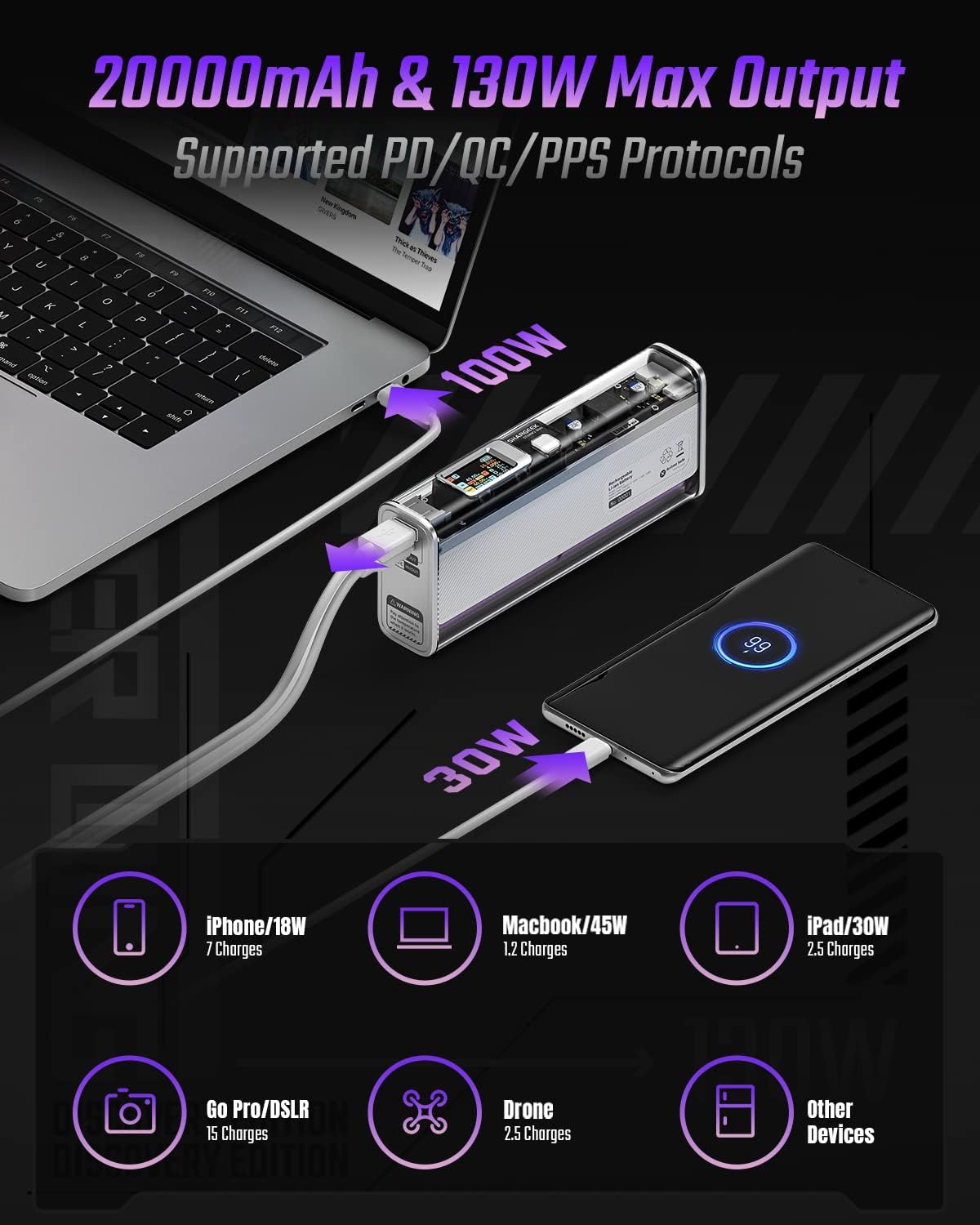
Image: The Shargeek STORM2 Slim connected via USB-C to a laptop for 100W charging and via USB-A to a smartphone for 30W charging, demonstrating its dual-port capability.
Орнотуу жана биринчи колдонуу
Пакеттин мазмуну:
- Shargeek STORM2 Slim Portable Charger
- USB-C - USB-C кабели
- Колдонуучунун Колдонмосу (бул документ)
Алгачкы заряддоо:
- Before first use, fully charge your STORM2 Slim.
- Connect the provided USB-C to USB-C cable to the USB-C port on the STORM2 Slim.
- Connect the other end of the cable to a compatible USB-C power adapter (not included) with a minimum of 100W output for fastest charging.
- The IPS screen will display charging status and battery percentage. The device is fully charged when the screen indicates 100%.
- A full recharge typically takes approximately 90 minutes with a 100W power adapter.
Иштөө нускамалары
Түзмөктөрдү кубатталууда:
- Identify the appropriate charging cable for your device (USB-C to USB-C or USB-A to device-specific cable).
- Connect one end of the cable to your device and the other end to the corresponding port (USB-C or USB-A) on the STORM2 Slim.
- The IPS screen will automatically activate and display the charging output (watts, volts, amps) for the connected device(s).
- The STORM2 Slim can charge two devices simultaneously using both the USB-C and USB-A ports.
Understanding the IPS Screen:
The IPS screen provides detailed real-time information. Use the physical button on the side of the power bank to navigate through different display modes or access settings.
- Input/Output Dashboard: Shows power input (IN) when charging the power bank and power output (OUT) when charging devices, including wattage, томtage, and current for each port.
- Батарея деңгээли: Калган батареянын пайызын көрсөтөтtage and a visual icon.
- Тtage & Учурдагы: Detailed readings for the internal battery cells.
- Температура: Shows the internal circuit board and battery temperatures.
- Иштөө убактысы: A resettable timer indicating the duration of current operation.
To access menus: Long-press the button. To navigate: Short-press. Тандоо: Long-press.
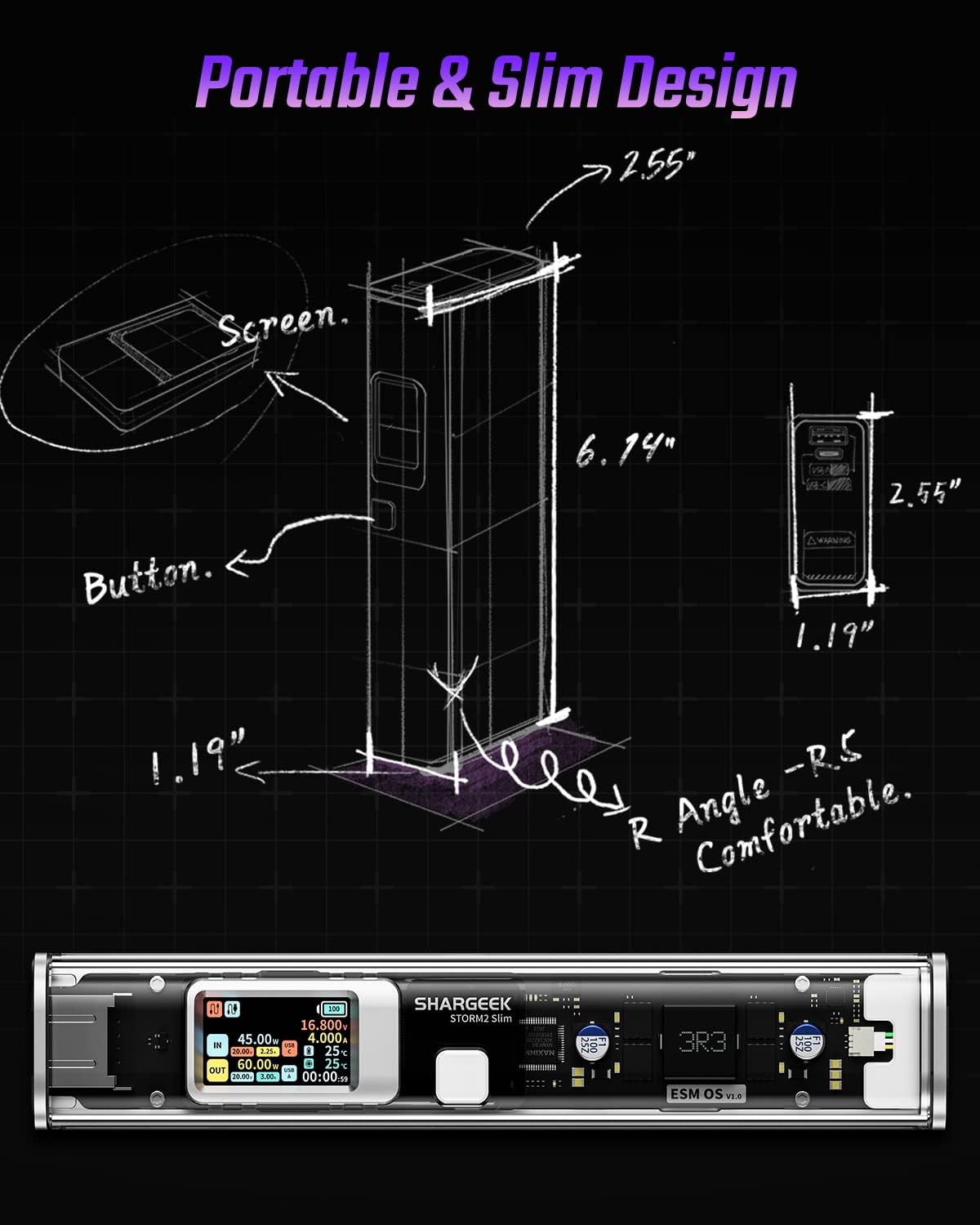
Image: A technical drawing illustrating the dimensions of the Shargeek STORM2 Slim and pointing out the screen and button locations.
Техникалык тейлөө
- Тазалоо: Power банктын сыртын тазалоо үчүн жумшак, кургак чүпүрөктү колдонуңуз. Катуу химиялык заттарды же абразивдүү материалдарды колдонуудан алыс болуңуз.
- Сактагыч: Түзмөктү салкын, кургак жерде, күндүн түз нурунан, өтө жогорку температурадан жана нымдуулуктан алыс сактаңыз.
- Батареяга кам көрүү: To prolong battery life, avoid fully discharging the power bank frequently. Recharge it when the battery level is low. If storing for extended periods, charge it to approximately 50-70% every 3-6 months.
- Тамчылардан качуу: While designed with an aluminum alloy frame for durability, avoid dropping the device as it may damage internal components or the transparent casing.
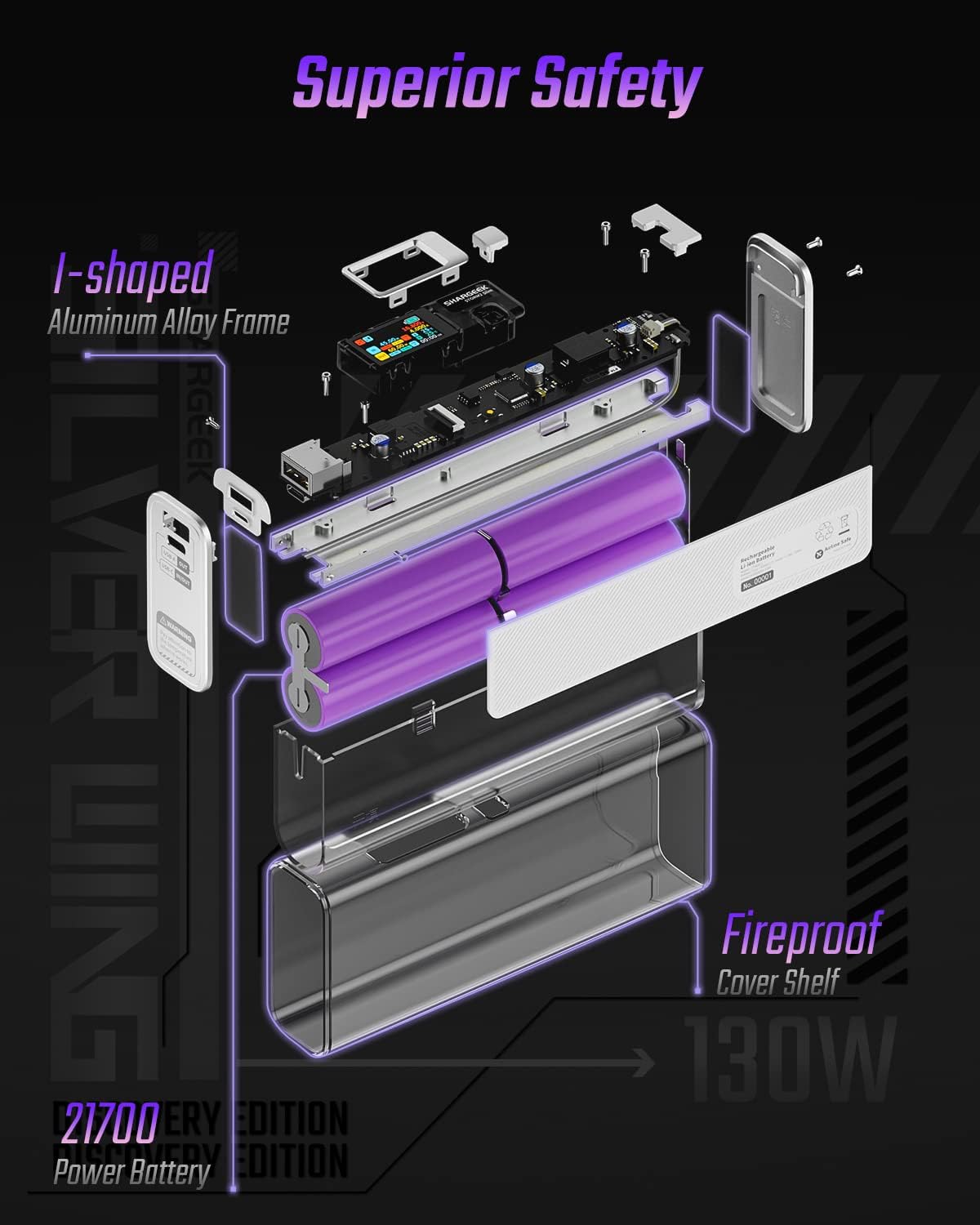
Image: An exploded diagram of the Shargeek STORM2 Slim, illustrating its internal structure including the I-shaped aluminum alloy frame, fireproof cover shelf, and 21700 power batteries, highlighting its robust construction.
Проблемаларды чечүү
| Көйгөй | Мүмкүн себеп | Чечим |
|---|---|---|
| Түзмөк кубат банкынан кубатталбай жатат. | Low power bank battery; incompatible cable; device not properly connected; device requires more power than available. | Recharge the STORM2 Slim. Ensure cable is fully inserted and compatible. Check device power requirements against power bank output. Try a different cable or port. |
| Power банк заряддалбай жатат. | Charging cable or adapter faulty; power bank port damaged. | Try a different USB-C cable and power adapter. Ensure the adapter meets the recommended power output (e.g., 100W). If problem persists, contact support. |
| IPS screen is blank or unresponsive. | Power bank is off; temporary software glitch. | Press the button to activate the screen. If unresponsive, try connecting a device to charge or connecting the power bank to a charger to see if it activates. If problem persists, contact support. |
| Жай кубаттоо. | Кабель тез кубаттоону колдобойт; түзмөк тез кубаттоону колдобойт; бир нече түзмөк туташып турат. | Ensure you are using a high-quality USB-C PD cable. Verify your device supports fast charging. Charging multiple devices simultaneously may reduce individual charging speeds. |
Техникалык шарттар
- Модель номери: STM2E-1
- Батарея сыйымдуулугу: 20000mAh
- Максималдуу чыгаруу: 130 Вт
- USB-C чыгышы: 100 Вт чейин кубаттуулукту жеткирүү (PD)
- USB-A чыгаруу: 30 Вт чейин
- Киргизүү: USB-C (up to 100W PD)
- Дисплей: IPS экраны
- Өлчөмдөрү: 3 x 6.5 x 15.59 см (болжол менен 1.18 x 2.56 x 6.14 дюйм)
- Салмагы: Болжол менен 689 г (1.52 фунт)
- Батарея түрү: Литий ион
Кепилдик жана колдоо
Кепилдик маалыматы:
Shargeek products are covered by a limited warranty against defects in materials and workmanship. Please refer to the warranty card included with your purchase or visit the official Shargeek webдеталдуу кепилдик шарттары жана шарттары үчүн сайт.
Кардарларды колдоо:
For technical assistance, troubleshooting, or warranty claims, please contact Shargeek customer support through their official webсайт же продукт таңгагында көрсөтүлгөн байланыш маалыматы.
Official Shargeek Store Link: Shargeek Official Store
Коопсуздук маалыматы
- Аппаратты сууга, нымдуулукка же экстремалдык температурага тийгизбеңиз.
- Do not disassemble, modify, or attempt to repair the device yourself. This will void the warranty and may cause damage or injury.
- Балдар жетпеген жерде сактаңыз.
- Сертификатталган жана шайкеш келген кубаттоочу кабелдерди жана адаптерлерди гана колдонуңуз.
- Аппаратты түшүрүүдөн же катуу таасирлерден сактаныңыз.
- Түзмөктү электрондук таштандылар боюнча жергиликтүү эрежелерге ылайык жоопкерчилик менен жок кылыңыз.
Ask a question about this manual
Ask about setup, troubleshooting, compatibility, parts, safety, or missing instructions. Manuals+ will review the question and use this page’s manual context to help answer it.