
소개
The Leadjoy R20 2.4GHz Wireless USB Adapter is designed to enhance your gaming experience on Xbox Series S/X consoles by providing a robust and reliable wireless connection for compatible controllers. This manual will guide you through the installation, operation, and maintenance of your R20 adapter.
패키지 내용
아래 나열된 모든 품목이 패키지에 포함되어 있는지 확인하세요.
- Leadjoy R20 Wireless USB Adapter
- 사용 설명서(본 문서)
The image below illustrates the R20 Wireless USB Adapter and its key features.
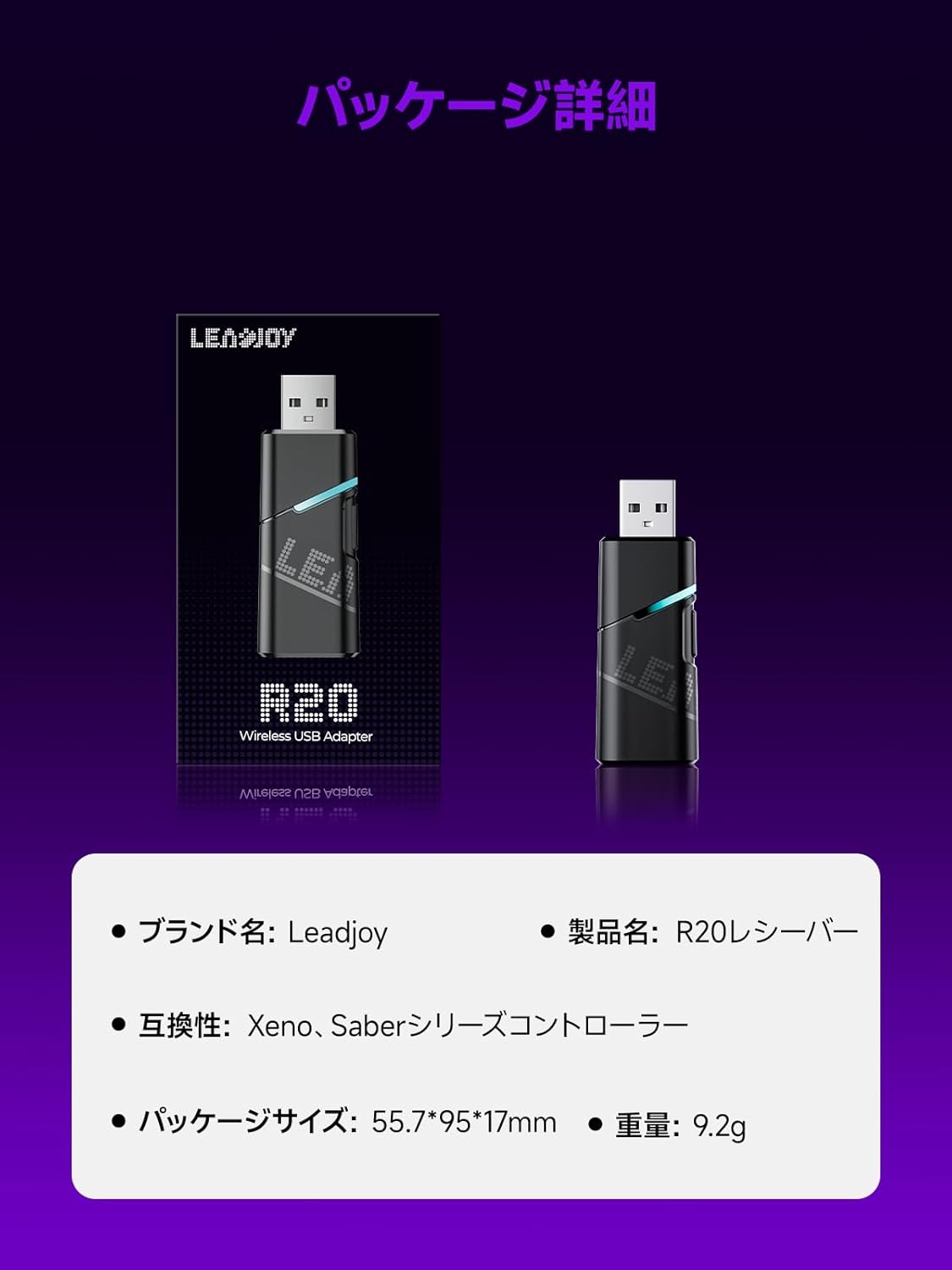
Image: Leadjoy R20 Wireless USB Adapter. This image displays the R20 adapter in its packaging, highlighting its compact design. Text overlays indicate the brand name 'Leadjoy', product name 'R20 Receiver', compatibility with 'Xeno, Saber series controllers', package size '55.7*95*17mm', and weight '9.2g'.
설정 및 설치
Follow these steps to connect your Leadjoy R20 Wireless USB Adapter to your Xbox console:
- 1단계: Insert the R20 receiver into an available USB port on your Xbox console. Ensure the console is powered on.
- 2단계: Connect your original Xbox controller to the R20's USB port using a USB cable.
- 3단계: Once the controller's indicator light remains steadily lit, the connection is successful. You can now pair your Leadjoy controller with the R20 receiver.
The diagram below visually explains the connection process.

Image: Connection Method. This diagram illustrates the three steps for connecting the R20 adapter. Step 1 shows inserting the R20 into the Xbox console. Step 2 shows connecting an original Xbox controller to the R20 via a cable. Step 3 shows pairing a Leadjoy controller with the R20 receiver after successful connection.
메모: Do not disconnect the original controller from the R20 receiver during use to maintain a stable connection.
작동 지침
The R20 receiver provides a stronger signal compared to the original R10 receiver, offering improved performance. If you find the functions of the original Xbox controller insufficient or the operation feel unsatisfactory, and wish to enjoy games on your Xbox console using Xeno Plus, this R20 receiver makes it possible.
After successful setup, your compatible Leadjoy controller will connect wirelessly to the Xbox console via the R20 adapter, allowing for seamless gameplay.
명세서
| 상표 | 리드조이 |
| 모델 번호 | LJR2001-1 (R20) |
| 색상 | 검은색 |
| 연결성 | 2.4GHz 무선 |
| 호환성 | Xbox Series S/X, Xeno, Saber series controllers |
| 품목 무게 | 9.2g |
| 패키지 크기 | 55.7 x 95 x 17mm |
| 원산지 | 중국 |
유지
To ensure the longevity and optimal performance of your Leadjoy R20 Wireless USB Adapter, please observe the following maintenance guidelines:
- 어댑터를 깨끗하고 먼지가 없는 상태로 유지하세요. 청소 시에는 부드럽고 마른 천을 사용하세요.
- 어댑터를 극한의 온도, 습도 또는 직사광선에 노출시키지 마세요.
- Do not attempt to disassemble or repair the adapter yourself. This may void your warranty.
- 사용하지 않을 때는 어댑터를 안전한 곳에 보관하여 물리적 손상을 방지하세요.
문제 해결
If you encounter issues with your Leadjoy R20 Wireless USB Adapter, please try the following steps:
- 연결 없음: Ensure the R20 adapter is fully inserted into the Xbox console's USB port and the original Xbox controller is securely connected to the R20. Check if the controller's indicator light is steadily lit.
- 간헐적인 연결: Ensure there are no obstructions between your Leadjoy controller and the R20 adapter. Avoid placing the adapter near other wireless devices that may cause interference.
- 컨트롤러가 응답하지 않음: Try disconnecting and reconnecting both the R20 adapter from the console and the original controller from the R20. Restart your Xbox console if necessary.
- 펌웨어 업데이트 : Check the official Leadjoy website for any available firmware updates for the R20 adapter, which may resolve performance issues.
이러한 단계를 시도한 후에도 문제가 지속되면 고객 지원팀에 문의하세요.
보증 및 지원
The Leadjoy R20 Wireless USB Adapter comes with a standard manufacturer's warranty. Please refer to the warranty card included in your product packaging for specific terms and conditions, including the warranty period and coverage details.
For technical support, troubleshooting assistance, or warranty claims, please contact Leadjoy customer service through their official web사이트 또는 제품 설명서에 제공된 연락처 정보를 참조하세요.
보증을 위해 구매 증빙서류를 보관하세요.