
SmallRig RF20C
SmallRig RF20C RGB Portable LED Photo Torch User Manual
Model: RF20C (5335)
브랜드: SmallRig
1. 서론
The SmallRig RF20C RGB Portable LED Photo Torch is a versatile and powerful lighting tool designed for photographers, videographers, and content creators. It features 5-color LED beads, adjustable beam angle, and supports creative lighting effects with included gobos. This manual provides essential information for the safe and effective use of your device.
2. 안전 정보
- 기기를 물이나 과도한 습기에 노출시키지 마세요.
- LED 조명에 눈이 직접 노출되지 않도록 하십시오.
- 기기를 분해하거나 개조하지 마십시오. 수리는 반드시 공인된 담당자만 수행해야 합니다.
- 어린이의 손이 닿지 않는 곳에 보관하세요.
- Ensure proper ventilation during extended use, as the device may become warm.
- 지정된 충전 케이블과 전원 어댑터만 사용하세요.
3. 패키지 내용
패키지에 모든 품목이 들어 있는지 확인하세요.
- RF20C Portable Focusable LED Video Light x 1
- Gobos x 20
- Silicone Gobo Holder x 1
- 보관 가방 x 1
- 사용 설명서 x 1 (본 문서)
- 충전 케이블 x 1
4. 설정
4.1 초기 충전
Before first use, fully charge the RF20C. Connect the provided USB-C charging cable to the device's charging port and to a compatible USB power adapter (PD 36W recommended). The device can be used while charging.

Figure 4.1: Internal battery illustration and runtime information.

Figure 4.2: Portable design, mounting options, cooling fan, and charging capability.
4.2 Attaching Gobos
To use the creative pattern gobos, first remove the plano-convex lens from the front of the light. Then, attach the silicone gobo holder and insert the desired gobo. This ensures optimal projection effects.

Figure 4.3: Gobo projection examples and installation tip.
5. 사용 설명서
5.1 전원 켜기/끄기 및 기본 제어
The RF20C features a single multi-function button for control. To prevent accidental activation during transport, the device requires a specific action to turn on.
- 전원 켜기: Rotate the control button to turn on the device.
- 전원 끄기 : 제어 버튼을 3초 동안 길게 누르세요.
- 색상 변경: Short press the control button to cycle through the available colors (Red, 5600K White, Purple, Orange, Cyan).
- 밝기 조정: Rotate the control button to increase or decrease the light brightness.
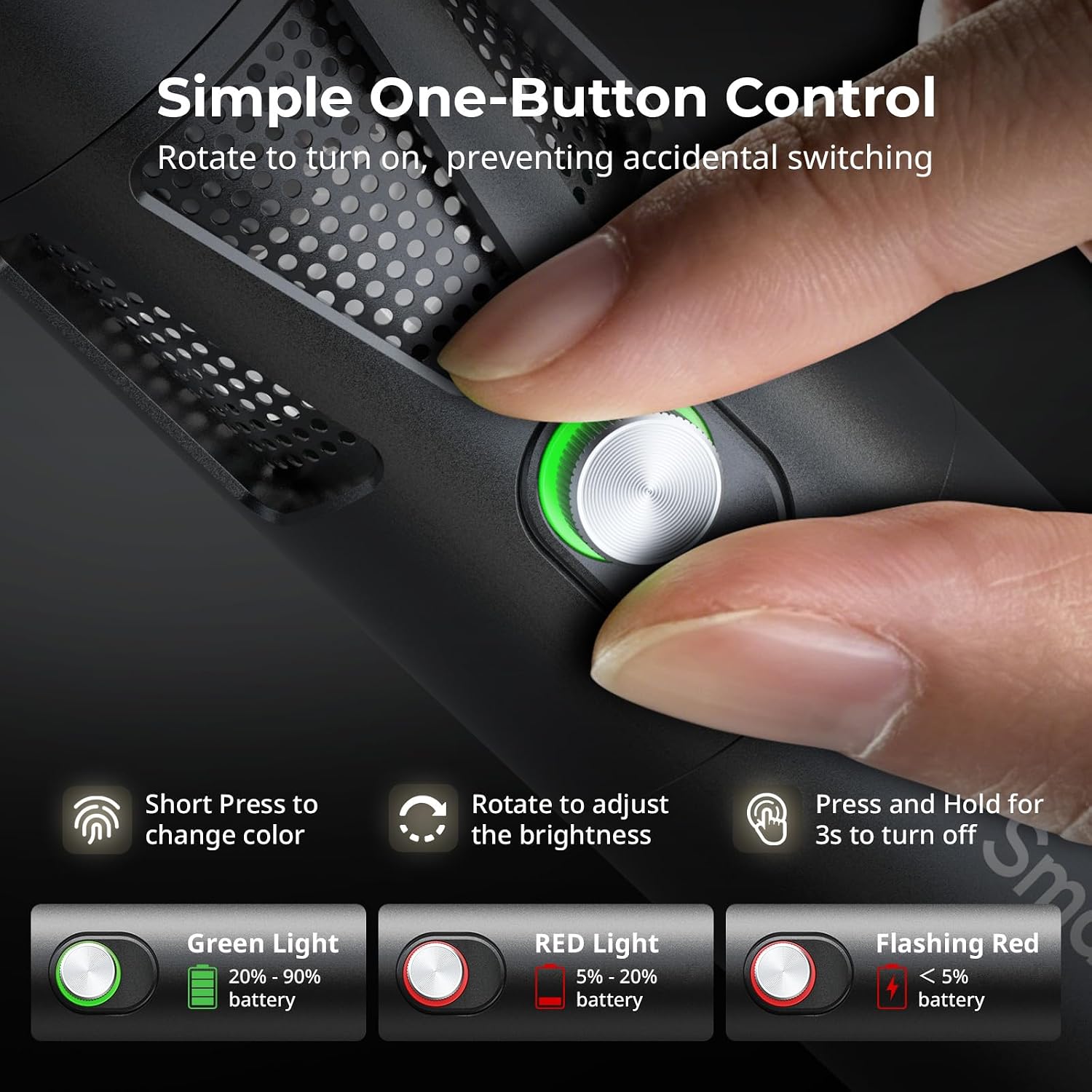
Figure 5.1: One-button control and battery indicator.

Figure 5.2: Available LED colors.
5.2 빔 각도 조정
The front plano-convex lens allows for adjustment of the beam angle. Push or pull the lens to change the focus of the light from a narrow 24° beam to a wider 60° diffusion.
- Extend the lens: Narrows the beam (e.g., 24°).
- Retract the lens: Diffuses the beam (e.g., 60°).

Figure 5.3: Beam angle adjustment mechanism.
5.3 배터리 표시등
The control button's LED indicates the battery status:
- 녹색불: 배터리 잔량 20% ~ 90%.
- 빨간불: 배터리 잔량 5% ~ 20%.
- 깜박이는 빨간불: 배터리 잔량이 5% 미만입니다.

Figure 5.4: Brightness comparison of RF20C.
6. 유지관리
- Clean the device regularly with a soft, dry cloth. Do not use harsh chemicals or abrasive materials.
- 기기를 서늘하고 건조한 곳에 보관하고, 직사광선과 극한의 온도를 피하세요.
- When not in use for extended periods, charge the battery to approximately 50% every three months to prolong battery life.
- Keep the lens and LED surface free from dust and fingerprints for optimal light output.
7. 문제 해결
| 문제 | 가능한 원인 | 해결책 |
|---|---|---|
| 장치가 켜지지 않습니다. | 배터리 부족; 잘못된 전원 켜기 절차. | Charge the device. Ensure you rotate the control button to power on. |
| 광 출력이 어둡습니다. | Low battery; brightness set too low; dirty lens. | Charge the device. Rotate the control button to increase brightness. Clean the lens. |
| Gobo projection is blurry. | Plano-convex lens not removed; gobo not seated correctly. | Remove the plano-convex lens before attaching the silicone gobo holder. Ensure gobo is properly inserted. |
| Device becomes warm during use. | Normal operation, especially at high power; fan obstruction. | This is normal. Ensure the fan vents are not obstructed for proper heat dissipation. If excessively hot, reduce brightness or allow to cool. |
| 선풍기 소음이 꽤 크다. | Normal operation for cooling. | The device uses a high-speed fan for efficient heat dissipation. This noise is part of normal operation. Consider distance from audio recording equipment. |
8. 사양
| 특징 | 세부 사항 |
|---|---|
| 모델 | RF20C (5335) |
| 힘 | 20와트 |
| 입력 | 20 V / 1.8 A (max. 36 W) |
| LED 색상 | Red, 5600K White, Purple, Orange, Cyan |
| 연색지수(CRI) | ≥ 97 |
| TLCI(텔레비전 조명 일관성 지수) | ≥ 99 (at 5600 K) |
| 휘도 | 5400 Lux @ 1m / 5600K |
| 배터리 용량 | 10000mAh (2 x 5000mAh / 7.4V / 37Wh) |
| 작동 시간(최대 출력) | 최대 1.5시간 |
| 충전 중 | USB-C PD 36W Fast Charging, supports charging while operating |
| 빔 각도 조정 | 24° ~ 60° |
| 재료 | 알루미늄 합금, ABS |
| 제품 치수 | φ49.0 x 200.0 mm / φ1.9 x 7.9 inches |
| 제품 무게 | 520.0 ± 20.0g / 18.3 ± 0.7 온스 |
| 연결 기술 | USB |
| 원산지 | 중국 |
9. 보증 및 지원
SmallRig products are designed and manufactured to the highest quality standards. This product is covered by a limited warranty from the date of purchase. For detailed warranty terms, technical support, or service inquiries, please refer to the official SmallRig web사이트를 방문하거나 현지 유통업체에 문의하세요.
보증 청구를 위해 구매 증명서를 보관하십시오.
10. 사용 시나리오
The SmallRig RF20C is suitable for various applications, including:
- 사진술
- 비디오 녹화
- 라이브 스트리밍
- Creative Accent Lighting
- Macro Work and Close-ups

그림 10.1: 예amples of RF20C usage scenarios.
Ask a question about this manual
Ask about setup, troubleshooting, compatibility, parts, safety, or missing instructions. Manuals+ will review the question and use this page’s manual context to help answer it.