
BOMGE BM-07
BOMGE BM-07 Audio Mixer Instruction Manual
Comprehensive guide for setup, operation, and maintenance of your BOMGE BM-07 Audio Mixer.
소개
The BOMGE BM-07 is a versatile 7-channel audio mixer designed for recording, live streaming, and podcasting. It features digital USB and Bluetooth connectivity, echo and delay effects, and 48V phantom power. This manual provides detailed instructions to help you get the most out of your mixer.
패키지 내용
시작하기 전에 패키지에 모든 품목이 들어 있는지 확인하세요.
- 1x BOMGE BM-07 Audio Mixer
- 1x USB to Type-C Power Cable
- 1x 사용 설명서(이 문서)
설치 가이드
1. 믹서 전원 공급하기
The BM-07 mixer can be powered in three ways using the provided USB to Type-C cable:
- 전원 은행: Connect the USB-C end to the mixer and the USB-A end to a power bank.
- 전원 어댑터: Connect the USB-C end to the mixer and the USB-A end to a standard USB power adapter (e.g., phone charger).
- 컴퓨터: Connect the USB-C end to the mixer and the USB-A end to a computer's USB port.

Image: The BOMGE BM-07 mixer showing its USB-C power input and three power source options: power bank, power adapter, and computer.
2. 입력 장치 연결
The BM-07 offers various input options for microphones, instruments, and other audio sources.
- 마이크/라인 입력(채널 1-5): Use XLR or 6.35mm (1/4 inch) jacks for microphones or line-level instruments like guitars.
- 48V 팬텀 파워: For condenser microphones, activate the 48V phantom power switch located near the XLR inputs for Channels 1-3.
- Stereo Line Inputs (Channels 6/7): Use the L/R 6.35mm or L/R RCA stereo inputs to connect devices such as CD players, keyboards, or computers.

Image: Detail of the mixer's input section, highlighting the XLR/6.35mm combo jacks and the 48V phantom power switches for individual channels.
3. 출력 장치 연결
Connect your monitoring or amplification systems to the mixer's outputs:
- 주요 출력 : Use the L/R 6.35mm jacks to connect to active speakers, power amplifiers, or active sound systems.
- RCA 출력 : An additional L/R RCA output is available for connecting to other recording or playback devices.
- 헤드폰 모니터: Plug your headphones into the 3.5mm headphone jack for real-time audio monitoring.

Image: The mixer's headphone output, showing a 6.35mm cable connected for real-time monitoring.
4. Computer/Mobile Device Connection for Recording
The BM-07 features a built-in sound card for direct connection to computers, mobile phones, or tablets for recording.
- USB-B 연결: Connect the mixer's USB-B port to your computer using a compatible cable. Ensure the "PC" switch on the mixer is engaged for computer audio.
- 모바일 기기 연결: For mobile phones or tablets, a USB to Phone OTG Adapter is required for data transfer.

Image: Visual guide for connecting the mixer to a computer or mobile device, illustrating the USB-B port and the PC/USB switch.
5. 블루투스 페어링
To wirelessly stream music from a Bluetooth-enabled device:
- Ensure Bluetooth is enabled on your device (e.g., phone, tablet, computer).
- On the mixer, select the Bluetooth input mode. The display will show a Bluetooth icon.
- 검색 "BM-07" in your device's Bluetooth settings and pair.
- Once connected, you can stream audio to the mixer. Bluetooth range is approximately 1.5 feet.

Image: The mixer's display indicating Bluetooth mode and a smartphone successfully paired with the BM-07.
작동 지침
Familiarize yourself with the mixer's controls for optimal audio mixing.

Image: A comprehensive labeled diagram of the BOMGE BM-07 mixer's control panel, indicating the function of each knob and button.
채널 제어 (채널 1-5)
- 게인 노브: Adjusts the input sensitivity for each channel. Use this to set the initial signal level.
- 2-Band EQ (HIGH/LOW): Controls the high and low frequencies for tone shaping. Turn clockwise to boost, counter-clockwise to cut.
- FX 노브: Sends a portion of the channel's signal to the internal effects processor.
- 볼륨 노브: Adjusts the output volume for each individual channel.
Master and Effect Controls
- DELAY/REPEAT Knob: Adjusts the parameters for the built-in delay and echo effects.
- EFF Knob: 메인 믹스로 전송되는 효과음의 전체적인 레벨을 조절합니다.
- MONITOR VOL Knob: 헤드폰 출력의 볼륨을 조절합니다.
- MAIN VOL Knob: 믹서의 전체 출력 볼륨을 조절합니다.
- LED Peak Level Indicator: Provides visual feedback on the audio signal levels, helping to prevent clipping.
USB-A Interface for Playback/Recording
The USB-A port allows for direct playback of MP3 music from a USB stick or recording of the mixer's output to a USB stick.
- 재생: Insert a USB stick with MP3 files. Use the built-in controls (Play/Pause/Next/Previous) to manage playback.
- 녹음: Insert a USB stick. Press the "REC" button to start recording the main mix to the USB stick.
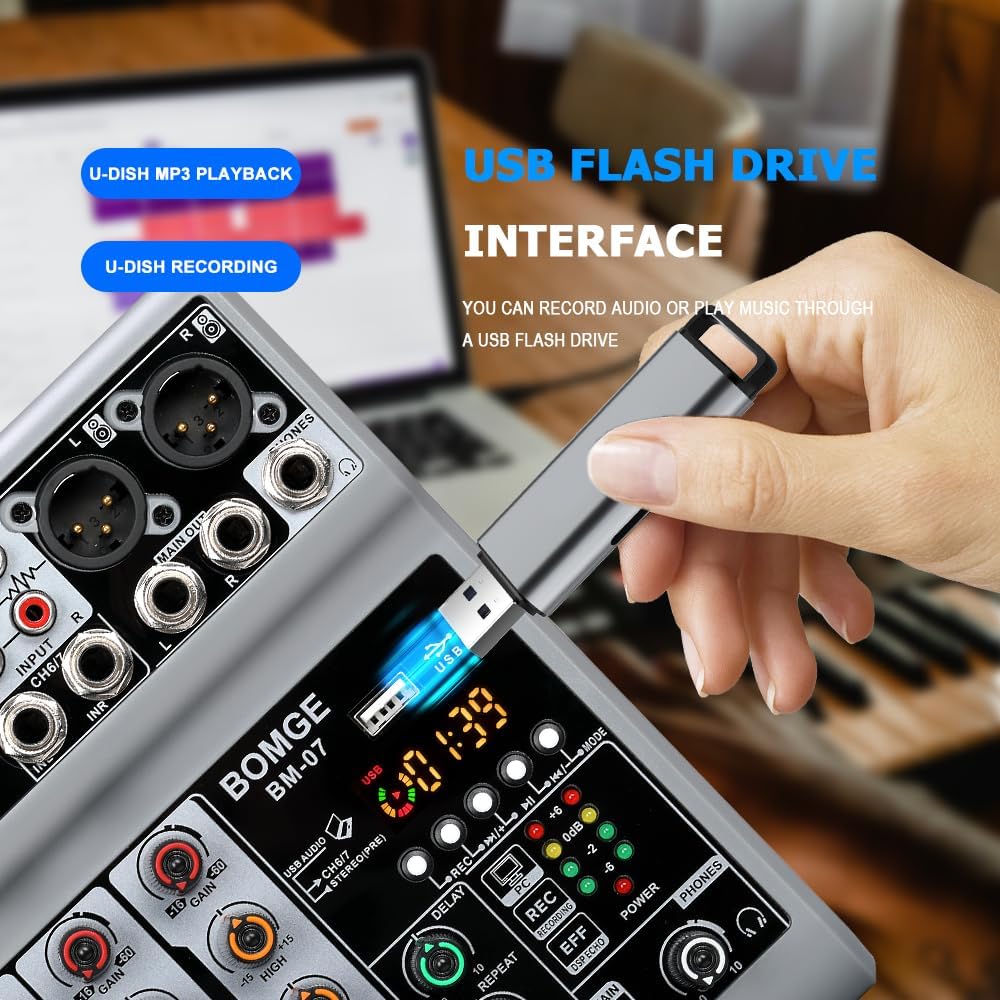
Image: The mixer's USB-A port with a flash drive connected, illustrating its function for both music playback and audio recording.
Important Note on Input Modes
The Bluetooth, USB (for computer/mobile), and 4/5 channel functions (referring to the stereo line inputs) are available as one of three options and cannot be used simultaneously. Select the desired input mode using the appropriate switch or button.
공식 제품 영상
Video: An official product video demonstrating the features and operation of the BOMGE BM-07 Audio Mixer. This video is 23 seconds long and provides a visual overview of the mixer's capabilities.
유지
- 청소: Use a soft, dry cloth to clean the mixer's surface. Avoid using liquid cleaners or solvents, as they may damage the finish or internal components.
- 저장: 믹서기는 직사광선과 극한의 온도를 피해 서늘하고 건조한 곳에 보관하세요.
- 손질: Avoid dropping the mixer or subjecting it to strong impacts.
문제 해결
- 사운드 출력 없음:
- 모든 케이블 연결 상태(입력, 출력, 전원)를 확인하십시오.
- Ensure the MAIN VOL knob is turned up.
- Verify individual channel VOL knobs are turned up.
- Confirm the correct input mode (USB, Bluetooth, Line) is selected.
- 팬텀 전원을 사용하는 경우 콘덴서 마이크에 대해 팬텀 전원이 활성화되어 있는지 확인하십시오.
- 왜곡된 소리:
- Reduce the GAIN knob for the input channel.
- Lower the individual channel VOL knob.
- Check the LED Peak Level Indicator; if it's consistently red, the signal is clipping.
- Ensure output devices (speakers, headphones) are not overdriven.
- 블루투스 연결 문제:
- 믹서가 블루투스 모드인지 확인하십시오.
- Check that Bluetooth is enabled on your device and "BM-07" is selected.
- Move your device closer to the mixer (within 1.5 feet).
- 기기의 페어링을 해제한 후 다시 페어링해 보세요.
- USB Recording/Playback Problems:
- Ensure the USB stick is properly formatted and contains compatible MP3 file재생을 위한 s.
- Verify the USB stick has sufficient free space for recording.
- Confirm the correct USB mode (USB-A for stick, USB-B for computer) is selected.
- For mobile recording, ensure the OTG adapter is correctly connected and functioning.
명세서
| 상표 | 봄게 |
| 모델 | BM-07 |
| 채널 수 | 7 (5 Mic/Line, 2 Stereo Line/USB/Bluetooth) |
| 제품 크기(D x W x H) | 1.8" x 5.9" x 7.4"(4.57cm x 14.99cm x 18.8cm) |
| 품목 무게 | 550그램 |
| 연결 기술 | 보조, 블루투스, USB |
| 전원 | Corded Electric (5V USB-C) |
| 주파수 응답 | 24 kHz (XNUMX kHz) |
| Output Connector Types | 6.35mm (1/4 inch), RCA, USB |
| 오디오 입력 유형 | Microphone, Computer, Musical Instruments, Electric Guitar, Mobile Phone |
| 팬텀 파워 | +48V (on select XLR inputs) |
| 효과 | Echo, Delay |
보증 정보
The BOMGE BM-07 Audio Mixer comes with a 1년 보증 구매일로부터. 본 보증은 정상적인 사용 중 발생한 제조상의 결함 및 오작동에 적용됩니다. 오용, 사고, 무단 개조 또는 부적절한 설치로 인한 손상은 보증되지 않습니다.
보증 청구를 위해 구매 증명서를 보관하십시오.
고객 지원
For technical assistance, troubleshooting, or warranty inquiries, please contact BOMGE customer support through the retailer's platform or the official BOMGE website. Please have your product model (BM-07) and purchase details ready when contacting support.
You can visit the official BOMGE store on Amazon for more information: BOMGE Music Studio
관련 문서 - BM-07
 |
사용 설명서: Mixer de Estúdio e Gravação BOMGE 4/6 Canais Guia 완전한 믹서 BOMGE de 4/6 canais para DJ e estúdio. Aprenda sobre conexão, Operação, solução de Problemas especiações para gravação, 스트리밍 및 공연을 생체 내에서. |
 |
BOMGE 4/6/8/12 Channel DJ & Studio Compact Mixer User Manual with USB/BT/REC Detailed user manual for the BOMGE 4/6/8/12 Channel DJ & Studio Compact Mixer. Covers troubleshooting, production description, channel and master control sections, specifications, and connection diagrams for USB, Bluetooth, and recording features. |
 |
BOMGE 4/6채널 DJ 및 스튜디오 컴팩트 믹서(USB/BT/REC 포함) - 사용 설명서 BOMGE 4/6채널 DJ & 스튜디오 컴팩트 믹서 사용 설명서에는 기능, 작동법, 문제 해결 방법 및 사양이 자세히 설명되어 있습니다. USB/BT 재생, 녹음, DSP 효과 및 연결 방법에 대한 정보가 포함되어 있습니다. |
 |
BOMGE Q-12 오디오 믹서 사용 설명서 USB와 48V 팬텀 파워를 탑재하여 녹음과 스튜디오에서 사용할 수 있는 BOMGE Q-12 2채널 오디오 믹서 사운드 믹싱 콘솔의 사용 설명서입니다. |
 |
BOMGE 4/6 채널 DJ 및 스튜디오 컴팩트 믹서 사용 설명서 BOMGE 4/6 채널 DJ & 스튜디오 컴팩트 믹서의 기능, 작동법, 문제 해결 방법 및 사양을 자세히 설명하는 종합 사용자 설명서입니다. 가정용 음악 제작, 방송 및 라이브 스트리밍에 적합합니다. |
 |
BOMGE Professional 4/6채널 DJ 및 스튜디오 믹서 사용 설명서 BOMGE Professional 4/6채널 DJ 및 스튜디오 믹서의 포괄적인 사용 설명서입니다. DJing, 스튜디오 녹음, 라이브 스트리밍을 위한 기능, 설정, 문제 해결, 사양 및 사용 방법을 자세히 설명합니다. USB, Bluetooth 및 녹음 기능이 포함되어 있습니다. |
Ask a question about this manual
Ask about setup, troubleshooting, compatibility, parts, safety, or missing instructions. Manuals+ will review the question and use this page’s manual context to help answer it.