
1. 서론
This manual provides essential information for setting up, operating, and maintaining your HP OmniDesk Slim Desktop PC, Model S03-0006. This desktop PC is designed for daily tasks, offering an Intel Core i3-14100 processor, ample memory, and various connectivity options for productivity and entertainment.
2. 패키지 내용
패키지에 모든 품목이 들어 있는지 확인하세요.
- HP S03-000 OmniDesk Slim Desktop PC
- 전원 공급 장치
- USB Black Wired Keyboard (if included with specific bundle)
- USB Wired Mouse (if included with specific bundle)
참고: 추가 액세서리는 별도로 판매될 수 있습니다.
3. 제품 오버view
The HP OmniDesk Slim Desktop PC features a compact design with essential components for efficient computing.

그림 3.1: HP OmniDesk Slim Desktop PC showcasing는 슬림 프로입니다file, Intel Core i3-14100 processor, 8GB DDR5 RAM, 256GB SSD, Intel UHD Graphics 710, Wi-Fi 6, Bluetooth 5.4, Windows 11, and dual display support.
3.1. 포트 및 커넥터
Familiarize yourself with the various ports on your desktop PC for connecting peripherals and displays.
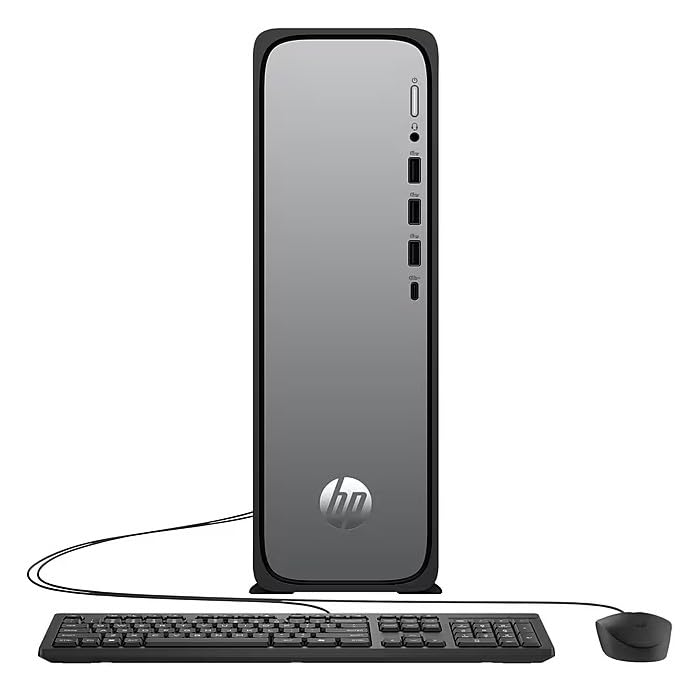
그림 3.2: Front and rear port layout of the HP OmniDesk Slim Desktop PC. Front ports include a headphone/microphone combo jack, USB Type-A 5Gbps ports, and a USB Type-C 10Gbps port. Additional ports (typically rear) include 4 USB 2.0 Type-A, 1 RJ-45 (Ethernet), 1 HDMI Out, and 1 DisplayPort 1.4.
- 전면 포트:
- 헤드폰/마이크 콤보
- USB Type-A 5Gbps signaling rate (3 ports)
- USB Type-C 10Gbps signaling rate (1 port)
- 후면 포트:
- USB 2.0 Type-A (4 ports)
- RJ-45(이더넷)
- HDMI 1.4b (1 port)
- DisplayPort 1.4a (1 port)
4. 설정 가이드
Follow these steps to set up your HP OmniDesk Slim Desktop PC:
- 모니터 연결: Connect your monitor to the PC using an HDMI or DisplayPort cable. Ensure the cable is securely plugged into both the PC and the monitor.
- 주변기기 연결: Plug in your USB keyboard and mouse into the available USB ports on the PC.
- 전원 연결: Connect the power supply cable to the PC's power input, then plug the other end into a wall outlet or surge protector.
- 전원 켜기: Press the power button on the front of the PC. The system will boot up, and you will see the Windows 11 setup screen.
- 초기 Windows 설정: 화면의 지시에 따라 언어, 지역, 네트워크 연결 및 사용자 계정 생성 등 Windows 11 설치를 완료하십시오.
5. 사용 설명서
5.1. 기본 동작
- 전원 켜기/끄기: PC를 켜려면 전원 버튼을 누르십시오. PC를 종료하려면 시작 버튼을 클릭한 다음 전원 > 종료를 클릭하십시오.
- 다시 시작: 시작 버튼을 클릭한 다음 전원 > 다시 시작을 클릭합니다.
- 수면 모드 : 시작 버튼을 클릭한 다음 전원 > 절전을 클릭합니다.
5.2. 네트워크에 연결하기
Your PC supports both wired (Ethernet) and wireless (Wi-Fi) network connections.
- 유선 연결: Connect an Ethernet cable from your router or modem to the RJ-45 port on the back of the PC.
- 무선 연결(Wi-Fi 6):
- 작업 표시줄에서 Wi-Fi 아이콘을 클릭합니다.
- 목록에서 원하는 Wi-Fi 네트워크를 선택하세요.
- 메시지가 표시되면 네트워크 보안 키(암호)를 입력한 다음 클릭하십시오. 연결하다.
5.3. 듀얼 디스플레이 지원
To extend your desktop to a second monitor:
- Connect the second monitor to an available video output port (HDMI or DisplayPort) on your PC.
- 바탕 화면에서 마우스 오른쪽 버튼을 클릭하고 선택하세요. 디스플레이 설정.
- Under "Multiple displays," select how you want the displays to behave (e.g., Extend these displays, Duplicate these displays).
6. 유지관리
- 소프트웨어 업데이트: 시스템 안정성과 보안을 유지하려면 정기적으로 Windows 업데이트를 확인하고 설치하세요. 다음 링크로 이동하세요. 설정 > Windows 업데이트.
- 드라이버 업데이트 : Keep your device drivers updated. HP Support Assistant (MyHP) can help manage these updates.
- 청소: Use a soft, dry cloth to clean the exterior of the PC. Avoid liquid cleaners directly on components. Ensure ventilation openings are clear of dust.
- 백업 데이터: 중요한 내용을 정기적으로 백업하세요 file데이터 손실을 방지하려면 외부 드라이브나 클라우드 저장소에 저장하세요.
7. 문제 해결
| 문제 | 가능한 해결책 |
|---|---|
| PC 전원이 켜지지 않습니다. |
|
| 모니터에 표시되지 않습니다. |
|
| 인터넷에 연결되지 않았습니다. |
|
| Peripherals (keyboard/mouse) not working. |
|
8. 사양
| 모델명 | HP OmniDesk Desktop HP S03-000 PC |
| 모델 번호 | OmniDesk Slim S03-0006 |
| 프로세서 | Intel Core i3-14100 (3.5 GHz, 6 MB Cache) |
| 제도법 | Intel UHD Graphics 710(통합) |
| 숫양 | 8 GB DDR5 (4800 MT/s), Max 64 GB |
| 저장 | 256GB SSD(솔리드 스테이트 드라이브) |
| 운영 체제 | 윈도우 11 홈 |
| 연결성 | Realtek Wi-Fi 6 (2x2), Bluetooth 5.4, Gigabit Ethernet (RJ-45) |
| 포트 |
|
| 치수(높이 x 너비 x 깊이) | 11.61 x 3.94 x 11.97 인치 |
| 무게 | 8.38 파운드 |
| 인증 | ENERGY STAR certified, EPEAT Gold with Climate+ |
9. 보증 및 지원
9.1. 보증 정보
This HP OmniDesk Slim Desktop PC comes with a 90일 한정 보증자세한 약관 및 조건은 제품과 함께 제공된 보증서를 참조하세요.
9.2. 기술 지원
기술 지원, 드라이버 다운로드 또는 추가 정보가 필요하시면 HP 공식 지원 웹사이트를 방문하십시오. website. You can also utilize the pre-installed MyHP application for device customization, optimization, and access to helpful messages and settings.
Always provide your product model number (S03-0006) and serial number when contacting support.