
1. 서론
The KONNWEI MAXOBD OBD2 Scanner is a professional diagnostic tool designed to read and clear diagnostic trouble codes (DTCs) from your vehicle's engine control unit (ECU). It provides access to various vehicle systems, allowing users to monitor live data, perform I/M readiness tests, and retrieve vehicle information. This manual provides detailed instructions for the proper use and maintenance of your MAXOBD scanner.
2. 안전 정보
Before operating the MAXOBD OBD2 Scanner, please read and understand all safety messages and instructions in this manual. Failure to do so may result in personal injury or damage to the vehicle or the scanner.
- 항상 안전한 환경에서 자동차 테스트를 수행하세요.
- ANSI 표준을 충족하는 보안경을 착용하십시오.
- 의복, 머리카락, 손, 도구, 테스트 장비 등을 움직이거나 뜨거운 엔진 부품에서 멀리 두십시오.
- 환기가 잘 되는 작업 공간에서 차량을 운전하세요. 배기가스는 유독합니다.
- 변속기를 PARK(자동 변속기) 또는 NEUTRAL(수동 변속기)에 넣고 주차 브레이크가 걸려 있는지 확인하세요.
- Keep a fire extinguisher suitable for gasoline/electrical fires nearby.
- 점화가 켜져 있거나 엔진이 작동 중인 동안에는 테스트 장비를 연결하거나 분리하지 마십시오.
3. 제품 오버view
The MAXOBD scanner features a clear display and intuitive button layout for easy navigation and operation. It connects directly to your vehicle's OBD-II port to retrieve diagnostic information.
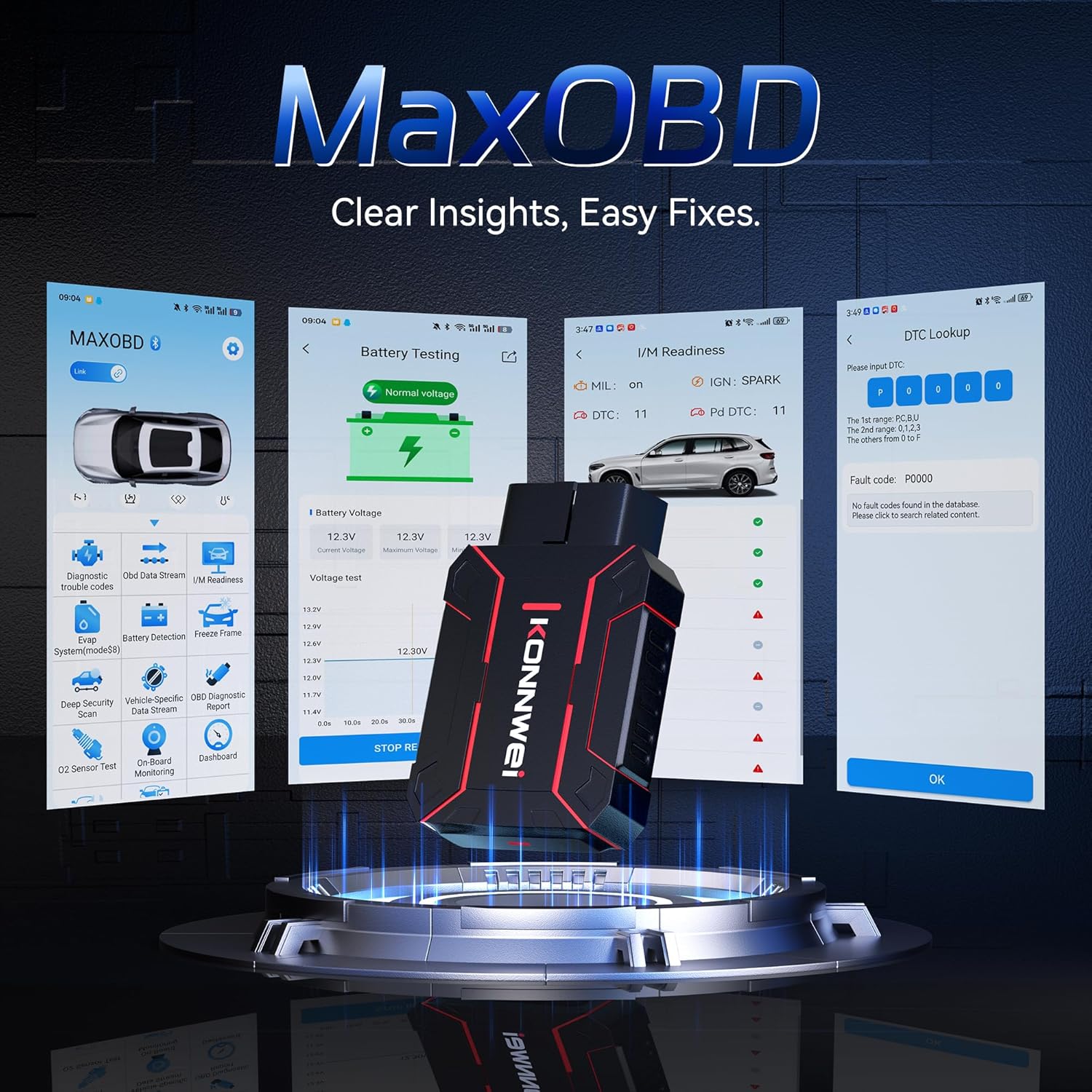
Image: The KONNWEI MAXOBD OBD2 Scanner device, illustrating its physical form and various diagnostic screen interfaces such as battery testing, I/M readiness, and DTC lookup.
주요 구성 요소:
- OBD-II Connector: Connects to the vehicle's Data Link Connector (DLC).
- LCD 디스플레이: Shows test results and menu options.
- 탐색 버튼: 메뉴를 스크롤하고 옵션을 선택하는 데 사용됩니다.
- Enter/Exit Buttons: Confirm selections or return to previous screens.
4. 설정
Follow these steps to set up your MAXOBD OBD2 Scanner:
- Locate the Vehicle's OBD-II Port: 16핀 데이터 링크 커넥터(DLC)는 일반적으로 차량 운전석 쪽 대시보드 아래에 있습니다. 찾을 수 없는 경우 차량 서비스 설명서를 참조하여 정확한 위치를 확인하십시오.
- 스캐너 연결: Plug the MAXOBD scanner's OBD-II connector firmly into the vehicle's DLC. Ensure a secure connection.
- 전원 켜기: Once connected, the scanner will automatically power on. If it does not, turn the vehicle's ignition to the 'ON' position (engine off).
5. 사용 설명서
The MAXOBD scanner offers various diagnostic functions. Use the navigation buttons to move through menus and the Enter button to select options.

Image: A visual representation of a vehicle highlighting various systems (Engine, ABS, SAS, SRS, DPF, TPMS) that the MAXOBD scanner can perform a full system scan on.
메인 메뉴 기능:
- 코드 읽기: Retrieves Diagnostic Trouble Codes (DTCs) from the vehicle's ECU. These codes indicate specific issues detected by the vehicle's onboard diagnostic system.
- 코드 지우기: Clears all DTCs from the vehicle's ECU and turns off the Malfunction Indicator Lamp (MIL). 오류 코드를 삭제하기 전에 근본적인 문제가 해결되었는지 확인하십시오.
- I/M 준비: 배출 관련 모니터링 시스템의 상태를 점검하여 배출가스 시험을 위한 준비 상태를 확인합니다.
- 데이터 스트림 : Displays real-time operational parameters from the vehicle's sensors and components. This can include engine RPM, vehicle speed, oxygen sensor readings, and more.
- 정지 화면: Captures a snapshot of sensor data at the moment a DTC was set. This data can help identify the conditions under which a fault occurred.
- O2 센서 테스트 : Retrieves O2 sensor monitoring test results for the most recently completed tests from the vehicle's onboard computer.
- 온보드 모니터 테스트: 지속적으로 모니터링되지 않는 배출 관련 파워트레인 구성 요소 및 시스템에 대한 결과를 검색합니다.
- EVAP 시스템 테스트: 차량의 증발가스 배출 제어 시스템에 대한 누출 테스트를 시작합니다.
- 차량 정보: 차량 식별 번호(VIN), 교정 ID(CALID) 및 교정 확인 번호(CVN)를 표시합니다.
Performing a Diagnostic Scan:
- Connect the scanner to the vehicle's DLC and turn the ignition to 'ON'.
- From the main menu, select 'Read Codes' and press Enter.
- 스캐너는 차량과 통신하여 감지된 모든 DTC를 표시합니다.
- Use the navigation buttons to scroll through the codes and their descriptions.
- To clear codes, return to the main menu, select 'Erase Codes', and confirm.
6. 유지관리
Proper maintenance ensures the longevity and reliable operation of your MAXOBD scanner.
- 청소: 부드러운 d를 사용하세요amp 스캐너 외부를 닦을 때는 천을 사용하십시오. 연마성 세척제나 용제를 사용하지 마십시오.
- 저장: Store the scanner in a dry, clean environment away from extreme temperatures and direct sunlight. Keep it in its original packaging or a protective case when not in use.
- 소프트웨어 업데이트: KONNWEI 공식 웹사이트를 주기적으로 확인하세요. website for available software updates to ensure your scanner has the latest vehicle compatibility and features. Follow the instructions provided on the website for updating the device.
7. 문제 해결
If you encounter issues with your MAXOBD scanner, refer to the following common problems and solutions:
| 문제 | 가능한 원인 | 해결책 |
|---|---|---|
| 스캐너의 전원이 켜지지 않습니다. | Loose connection; vehicle ignition off; faulty OBD-II port. | Ensure the scanner is securely plugged into the DLC. Turn vehicle ignition to 'ON'. Test on another vehicle if possible. |
| "링크 오류" 또는 "통신 오류" 메시지. | Loose connection; vehicle not OBD-II compliant; ignition off; communication protocol issue. | Verify connection. Ensure vehicle is OBD-II compliant (most vehicles 1996 and newer). Turn ignition to 'ON'. Try a different vehicle if available. |
| 화면이 검게 나오거나 멈췄습니다. | 소프트웨어 오류; 정전. | Disconnect and reconnect the scanner. If the issue persists, contact customer support. |
If the problem persists after attempting these solutions, please contact KONNWEI customer support for further assistance.
8. 사양
- 상표: KONNWEI
- 모델: maxobdTM
- 전원: 배터리 전원 공급 (OBD-II 포트 이용)
- 운영 체제: 리눅스
- 화면 크기: 2.8 인치
- 자동차 적합 유형: Universal Fit (for OBD-II compliant vehicles)
- 패키지 크기: 10.04 x 7.28 x 2.76 인치
9. 보증 및 지원
KONNWEI products are designed for reliability and performance. For warranty information, please refer to the documentation included with your purchase or visit the official KONNWEI website. For technical support, troubleshooting assistance, or any other inquiries, please contact KONNWEI customer service through their official channels.
KONNWEI Official Web대지: Visit the KONNWEI Store on Amazon