
Carlinkit Mini Ultra
Carlinkit Mini Ultra Wireless CarPlay & Android Auto Adapter User Manual
Model: Mini Ultra
소개
The Carlinkit Mini Ultra is designed to convert your vehicle's existing wired CarPlay or Android Auto system into a wireless experience. This adapter provides a convenient plug-and-play solution, allowing you to enjoy seamless smartphone integration without the need for cables. It supports both Apple CarPlay (iOS 10+) and Android Auto (Android 11+) for compatible vehicles.
안전 정보
Always prioritize safety while driving. Do not attempt to operate or adjust the adapter or your smartphone while the vehicle is in motion. Ensure the adapter is securely connected to prevent dislodgement. Adhere to all local traffic laws and regulations.
상자 안에 무엇이 들어있나요?
- Carlinkit Mini Ultra Adapter (Product)
- OTG Adapter (USB-A to USB-C)
- Color Box Packing
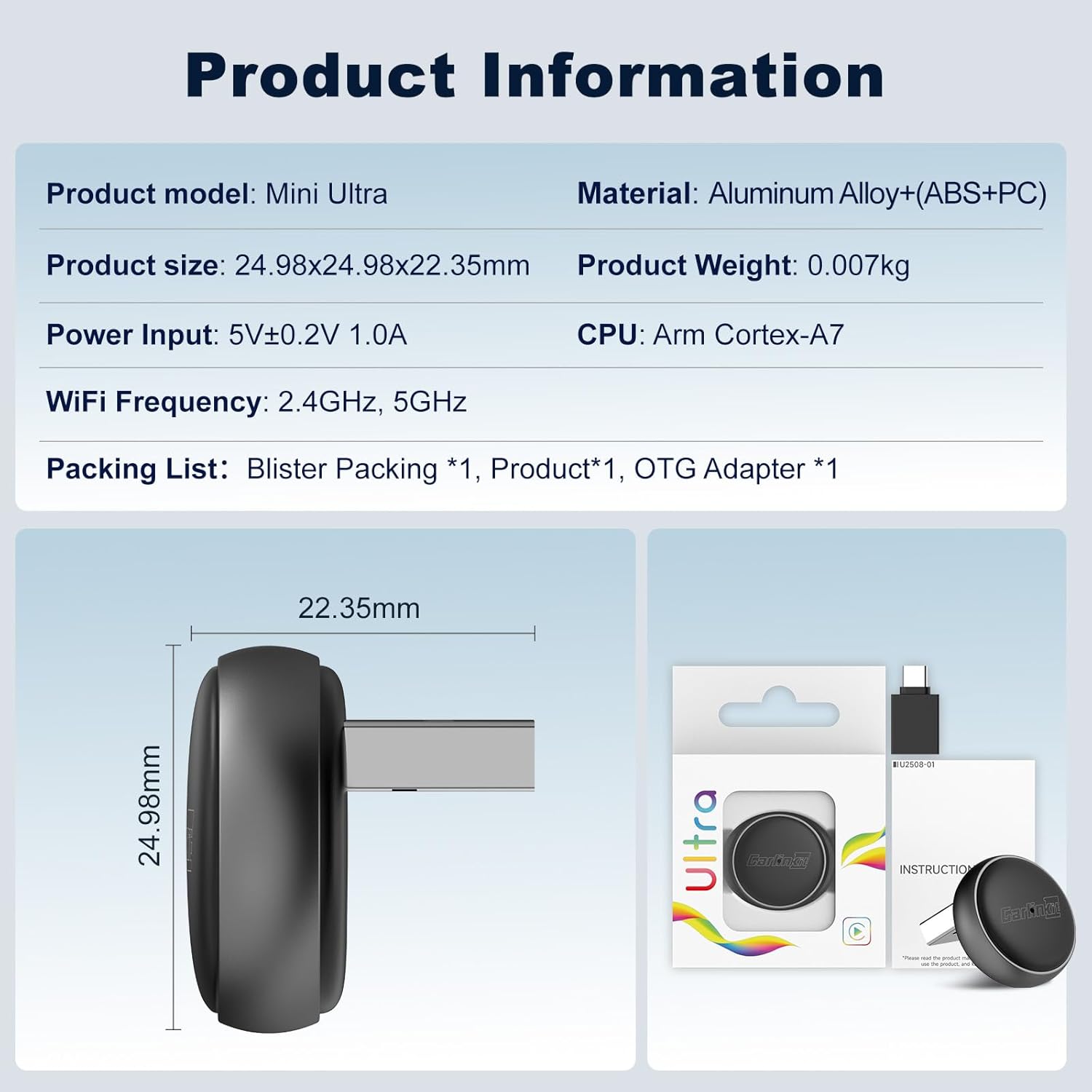
Image: The Carlinkit Mini Ultra adapter, its OTG adapter, and packaging, illustrating the contents of the box.
호환성 요구 사항
Before setup, ensure your vehicle and smartphone meet the following requirements:
- 차량: Must have a factory-installed wired CarPlay or wired Android Auto system. The adapter does not convert a non-CarPlay/Android Auto system to one. Not compatible with BMW or Tesla vehicles.
- 아이폰: Requires iOS 10 or later for Wireless CarPlay.
- 안드로이드 폰: Requires Android 11 or later for Wireless Android Auto.

Image: Visual representation of vehicle and phone compatibility for the Carlinkit Mini Ultra adapter, showing supported wired CarPlay and Android Auto systems.
설치 지침
Follow these steps to set up your Carlinkit Mini Ultra adapter:
- Step 1: Insert the Adapter. Plug the Carlinkit Mini Ultra adapter into your car's USB-A port. If your car only has a USB-C port, use the included OTG adapter. The adapter's indicator light will illuminate.
- Step 2: Enable Bluetooth and Wi-Fi on Your Phone. On your iPhone or Android phone, go to your settings and ensure both Bluetooth and Wi-Fi are turned on.
- Step 3: Pair Your Phone. On your car's infotainment screen, a Bluetooth device name (e.g., "Vehiconn_XXXX") will appear. On your phone, search for this Bluetooth device and pair with it. Confirm any pairing requests on both your phone and car screen.
- Step 4: Connect to CarPlay/Android Auto. After successful Bluetooth pairing, your phone will automatically connect to the adapter via Wi-Fi. Tap "Connect" or "Agree" on your car's screen to initiate wireless CarPlay or Android Auto.

Image: A four-step visual guide demonstrating how to connect the Carlinkit Mini Ultra adapter, from plugging it in to establishing a wireless CarPlay/Android Auto connection.
Video: This video demonstrates the Carlinkit Mini Ultra adapter, showing its compact design, easy installation into a car's USB port, and seamless conversion of wired CarPlay/Android Auto to wireless. It highlights features like high-fidelity audio, voice commands for navigation and calls, split-screen multitasking, and automatic connection upon entering the vehicle.
작동 지침
Once connected, the Carlinkit Mini Ultra provides a fully integrated wireless experience:
- 자동 연결: After the initial setup, the adapter will automatically connect to your phone when you start your car, providing a "get in and go" experience.
- Native Control Retention: All original car controls, including steering wheel buttons, touchscreen, and rotary knobs, remain fully functional with wireless CarPlay/Android Auto.
- 음성 제어: Utilize your car's original microphone for voice commands (Siri for CarPlay, Google Assistant for Android Auto) for navigation, music playback, calls, and more, ensuring hands-free operation.
- 고성능 오디오: Enjoy clear audio quality through your car's sound system for music, podcasts, and calls.
- 분할 화면 멀티태스킹: Many vehicles support split-screen functionality, allowing you to view navigation and control media simultaneously.

Image: This image illustrates how the Carlinkit Mini Ultra adapter allows users to maintain control over their car's infotainment system using existing touch, steering wheel, knob, and voice controls.
유지 관리 및 업데이트
To ensure optimal performance and compatibility, keep your Carlinkit Mini Ultra adapter updated:
- 무선(OTA) 업데이트: The adapter supports OTA firmware updates. This allows for performance improvements, bug fixes, and enhanced compatibility with new car models or phone OS versions.
- 펌웨어 업데이트:
- 어댑터를 차량의 USB 포트에 꽂으세요.
- Turn on Wi-Fi on your mobile phone and connect to the adapter's Wi-Fi signal (the network name will be displayed on your car screen or in the adapter's settings).
- 열기 web 휴대전화의 브라우저에 다음을 입력하세요. URL: 192.168.50.100
- Navigate to the settings interface and click on 'Upgrade' to check for and install available updates.
- 청소: 부드럽고 마른 천을 사용하여 어댑터를 닦으세요. 액체 세척제나 연마재는 사용하지 마세요.

Image: A visual guide detailing the steps to access the adapter's background settings and perform an Over-The-Air (OTA) firmware update.
문제 해결
문제가 발생하면 다음 해결 방법을 시도해 보세요.
- 연결 없음:
- Ensure your car has wired CarPlay/Android Auto.
- Verify Bluetooth and Wi-Fi are enabled on your phone.
- Forget the Bluetooth connection on your phone and car, then re-pair.
- 차량에 다른 USB 포트가 있다면 사용해 보세요.
- Restart your phone and car's infotainment system.
- Audio Issues (Drops/Distortion):
- 어댑터의 펌웨어 업데이트를 확인하십시오.
- 다른 Bluetooth 장치가 방해하지 않는지 확인하세요.
- Adjust audio settings on your car's system.
- 성능 저하/렉:
- 휴대폰의 운영체제가 최신 상태인지 확인하세요.
- 휴대폰에서 불필요한 앱을 종료하세요.
- Perform an OTA update on the adapter.
- 어댑터 전원이 켜지지 않음:
- USB 연결을 확인하세요.
- Ensure the car's USB port is active (some ports may only activate with the ignition on).
- 다른 USB 포트나 케이블을 사용해 보세요.
명세서
| 제품 모델 | Mini Ultra |
| 제품 크기 | 24.98mm x 24.98mm x 22.35mm |
| 제품 무게 | 0.007kg |
| 전원 입력 | 5V ± 0.2V 1.0A |
| Wi-Fi 주파수 | 2.4GHz, 5GHz |
| CPU | 암 코텍스-A7 |
| 재료 | Aluminum Alloy + (ABS+PC) |
| 커넥터 유형 | USB-A/타입-C |
| 작동 온도 | -20°C ~ 60°C (-4°F ~ 140°F) |
Image: Detailed product information for the Carlinkit Mini Ultra, including model, dimensions, weight, power input, Wi-Fi frequency, CPU, and materials.
보증 정보
The Carlinkit Mini Ultra adapter comes with a 1년 보증 구매일로부터. 본 보증은 정상적인 사용 중 제조상의 결함 및 고장에 적용됩니다. 보증 청구를 위해 구매 증빙 자료를 보관하십시오. 본 보증은 오용, 사고, 무단 개조 또는 부적절한 설치로 인한 손상에는 적용되지 않습니다.
지원하다
For further assistance, technical support, or warranty inquiries, please contact Carlinkit customer service through the official website or your retailer's support channels. You may also refer to the FAQ section on the Carlinkit web자주 묻는 질문과 해결책을 모아놓은 사이트입니다.