
소개
This manual provides essential information for setting up, operating, maintaining, and troubleshooting your HP 15.6-inch FHD IPS Touchscreen Laptop. Please read this guide thoroughly to ensure optimal performance and longevity of your device. This laptop features an AMD Ryzen 7 7730U processor, 64GB DDR4 RAM, 2.28TB storage (2TB SSD + 288GB Docking Station Set), AMD Radeon Graphics, and runs on Windows 11 Pro.
설정
Unpacking and Initial Power-On
Carefully remove all components from the packaging. Connect the power adapter to the laptop and a power outlet. Press the power button to turn on the laptop. Follow the on-screen instructions to complete the initial Windows 11 Pro setup.
포함된 액세서리
Your laptop package includes the following accessories:
- 1x 7-in-1 Docking Station with 256GB Storage
- 32GB MicroSD 카드 1개 및 어댑터
- 1x Type-C 데이터 케이블
- 3-in-1 충전 케이블 1개
- 스웨이드 청소용 천 1개
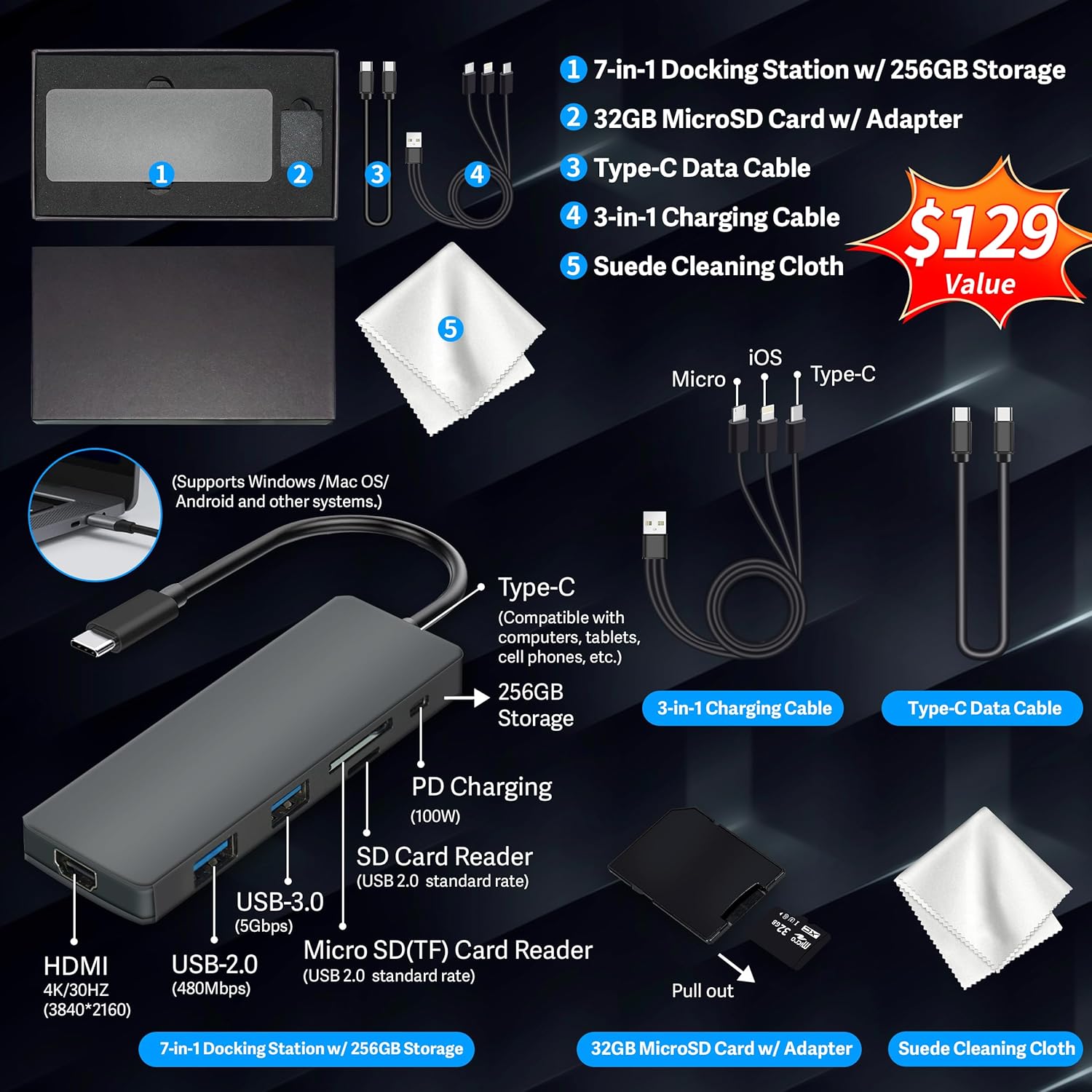
Figure 1: Included accessories, including the 7-in-1 docking station, various cables, and a cleaning cloth.
노트북 작동하기
디스플레이 기능
The HP 15.6-inch laptop features an FHD IPS touchscreen display with a resolution of 1920 x 1080 pixels and an anti-glare coating. This display provides clear and vibrant visuals from various view각도를 나타냅니다.

Figure 2: The 15.6-inch FHD IPS display offers crisp and vivid details.
연결성 및 주변 장치
Your laptop is equipped with various connectivity options and integrated features to enhance your user experience.
- 720p HD 카메라: For video calls and online meetings.
- 와이파이 6: 고속 무선 인터넷 연결을 위해.
- 블루투스: 마우스, 키보드, 헤드폰 등의 무선 주변기기를 연결하는 데 사용합니다.
- 숫자 키패드: A full numeric keypad is integrated for efficient data entry and calculations.

Figure 3: Key features for staying connected and productive, including the numeric keypad.
The laptop includes multiple ports for connecting external devices:
- USB Type-A 포트 2개
- 1x USB Type-C 포트
- 1x HDMI 포트
- 헤드폰/마이크 콤보 잭 1개

Figure 4: Multi-port configuration on the laptop for various connections.
성능 및 멀티태스킹
Equipped with an AMD Ryzen 7 7730U processor, 64GB DDR4 RAM, and AMD Radeon Graphics, this laptop is designed for efficient multitasking and demanding applications. The 2.28TB storage (2TB SSD + 288GB Docking Station Set) provides ample space and fast access to your files.

Figure 5: Core specifications for performance and storage.

Figure 6: Laptop demonstrating effortless multitasking with several applications running simultaneously.
The laptop is designed for extended use, offering reliable battery life to support your daily tasks.

Figure 7: The laptop supports continuous work throughout the day with its battery performance.
유지
To ensure the longevity and optimal performance of your HP laptop, follow these maintenance guidelines:
- 청소: Use the provided suede cleaning cloth or a soft, lint-free cloth to clean the screen and exterior. Avoid harsh chemicals.
- 소프트웨어 업데이트: Regularly update your Windows 11 Pro operating system and drivers to ensure security and performance.
- 배터리 관리 : 배터리를 자주 완전히 방전시키지 마십시오. 장기간 보관할 경우 배터리를 50~70% 정도 충전해 두십시오.
- 통풍: 과열을 방지하기 위해 노트북 통풍구가 막히지 않도록 주의하세요. 노트북은 단단하고 평평한 표면에서 사용하세요.
- 저장: 노트북은 직사광선과 극한의 온도를 피해 서늘하고 건조한 곳에 보관하세요.
문제 해결
이 섹션에서는 노트북에서 발생할 수 있는 일반적인 문제에 대해 설명합니다.
노트북 전원이 켜지지 않습니다
- 전원 어댑터가 노트북과 작동하는 전원 콘센트에 모두 단단히 연결되어 있는지 확인하세요.
- 다른 장치를 연결하여 전원 콘센트가 작동하는지 확인하세요.
- 배터리가 완전히 방전된 경우, 전원을 켜기 전에 최소 15~30분 동안 충전하세요.
화면이 계속 비어 있습니다
- 노트북의 전원이 켜져 있는지 확인하세요(전원 표시등).
- Try connecting an external monitor to see if display output is available.
- 기능 키를 사용하여 화면 밝기를 조절하세요.
Wi-Fi 연결 문제
- Windows 설정에서 Wi-Fi가 활성화되어 있는지 확인하세요.
- 라우터와 모뎀을 다시 시작하세요.
- 장치 관리자를 통해 Wi-Fi 드라이버를 업데이트하세요.
- 물리적인 장애물이나 간섭이 있는지 확인하세요.
느린 성능
- 백그라운드에서 실행 중인 불필요한 애플리케이션을 닫으세요.
- 작업 관리자에서 CPU 또는 RAM 사용량이 높은 프로세스를 확인하십시오.
- 운영 체제와 드라이버가 최신 상태인지 확인하세요.
- 디스크 정리 및 조각 모음을 실행하세요(HDD의 경우, SSD에는 필요하지 않습니다).
- 악성코드나 바이러스를 검사하세요.
명세서
Below are the detailed technical specifications for your HP 15.6-inch FHD IPS Touchscreen Laptop.

Figure 8: Laptop dimensions and weight for portability.
| 특징 | 세부 사항 |
|---|---|
| 상표 | HP |
| 모델명 | HP 15.6" FHD IPS Touchscreen Laptop |
| 화면 크기 | 15.6 인치 |
| 디스플레이 해상도 | 1920 x 1080 픽셀(FHD) |
| 디스플레이 유형 | LED IPS Touchscreen |
| 프로세서 | AMD Ryzen 7 7730U (8 Cores, 2 GHz base) |
| 그래픽 코프로세서 | AMD Radeon 그래픽(통합) |
| 램 메모리 | 64GB DDR4(3200MHz) |
| 저장 | 2 TB SSD + 288 GB Docking Station Set (Total 2.28 TB) |
| 운영 체제 | 윈도우 11 프로 |
| 연결성 | Wi-Fi 6 (802.11ax), Bluetooth, HDMI, USB |
| 포트 | 2x USB Type-A, 1x USB Type-C, 1x HDMI, 1x Headphone/Microphone Combo |
| Web캠 | 720p HD 카메라 |
| 건반 | 숫자 키패드가 있는 풀사이즈 |
| 치수(길이 x 너비 x 두께) | 14.17인치 x 9.29인치 x 0.73인치 |
| 품목 무게 | 3.52파운드(약 1.6kg) |
| 색상 | 은 |
| 한국어: | 196188514924 |
| ASIN | B0FX2NR2WN |
보증 정보
Your HP laptop comes with a manufacturer's warranty. For upgraded components (RAM/SSD), a 1-year warranty is provided by SnowBell. The original 1-year manufacturer warranty applies to all other components of the laptop. Please retain your proof of purchase for warranty claims. For detailed terms and conditions, refer to the warranty documentation included with your product or visit the official HP support web대지.
지원하다
추가 지원, 기술 지원 또는 서비스 문의 사항이 있으시면 다음 리소스를 참조하세요.
- HP 공식 지원 Web대지: 방문하다 지원.hp.com 드라이버, 설명서 및 문제 해결 가이드를 참조하십시오.
- 온라인 도움말: Utilize the built-in Windows 11 Pro help features for software-related questions.
- Contact Retailer: For issues related to upgraded components or purchase, contact SnowBell or your point of purchase.


