
소개
The Fender Mustang LTX50 is a versatile 50-watt modeling combo amplifier designed for guitarists seeking a wide range of authentic Fender tones and modern features. Equipped with a 12-inch Celestion G12P-80 speaker, it delivers dynamic sound suitable for practice, rehearsal, and performance. This amplifier offers 25 amp models and 25 effects, covering various musical styles from clean to high-gain. Its intuitive color display, onboard tuner, and 100 user preset slots provide easy customization and quick access to your preferred sounds. The Mustang LTX50 also features Bluetooth audio streaming for playing along with tracks and USB-C connectivity for direct recording and monitoring.
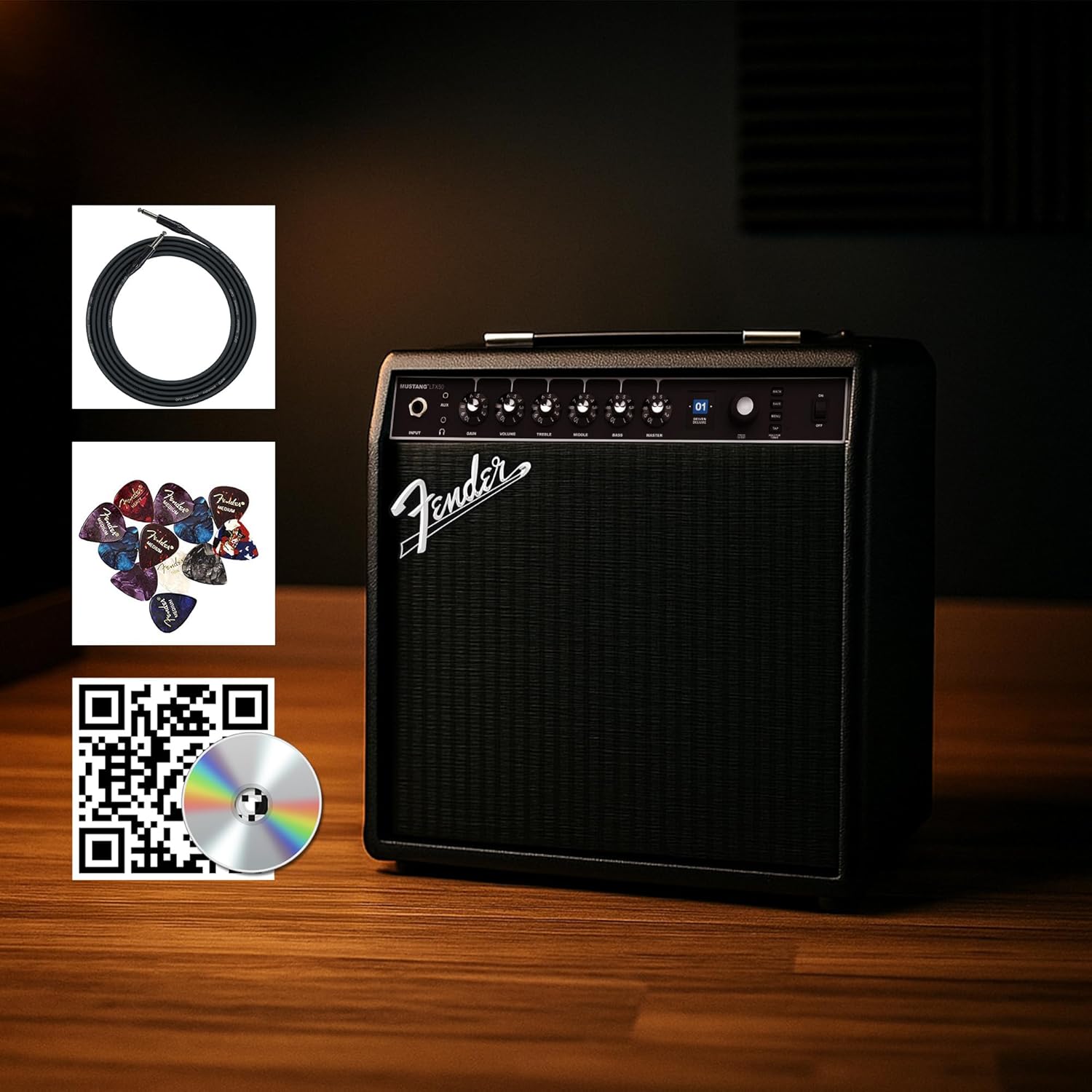
Figure 1: Fender Mustang LTX50 Guitar Combo Amplifier with included accessories.
설정
1. 언박싱 및 초기 검사
- 조심스럽게 amp앰프와 포장에 포함된 모든 액세서리.
- 검사하다 amplifier for any signs of damage that may have occurred during shipping.
- Confirm all included items are present: Mustang LTX50 amplifier, power cord, instrument cable, 12-pack guitar picks, and instructional DVD.
2. 전원 연결하기
- 확인하십시오 amp앰프의 전원 스위치가 꺼짐 위치에 있습니다.
- Connect the included power cord to the AC input on the rear panel of the amp리퍼.
- 전원 코드의 다른 쪽 끝을 접지된 전기 콘센트에 꽂습니다.
3. 기타 연결하기
- Use the included instrument cable to connect your guitar to the 입력 전면 패널의 잭 amp리퍼.
4. 기본 제어view
Familiarize yourself with the front panel controls before powering on the amp리퍼.
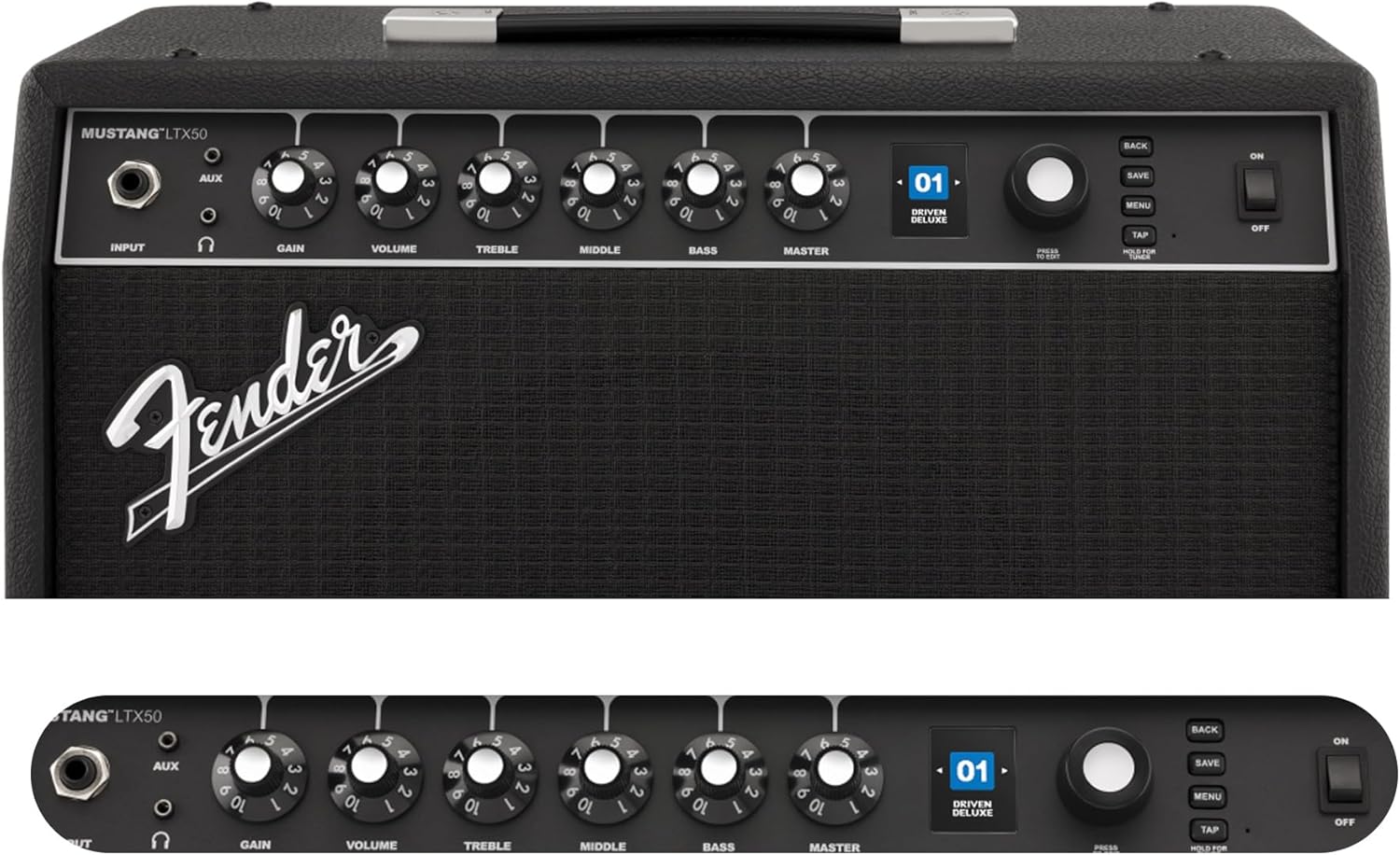
Figure 2: Front Panel Controls of the Mustang LTX50.
작동 지침
1. 전원 켜기 / 끄기
- To power on, ensure all volume controls are set to minimum, then flip the 힘 ON 위치로 전환합니다.
- 전원을 끄려면 스위치를 끄세요. 힘 OFF 위치로 전환합니다.
2. 사전 설정 탐색
- 사용하세요 인코더 knob (large rotary knob) to scroll through the 100 available presets (70 factory, 30 user).
- 를 누르세요 인코더 knob to select a preset.
- The color LCD displays the current preset number and name.
3. 조정 Amp 모델 및 효과
- 를 누르세요 메뉴 액세스하는 버튼 amp앰프 설정.
- Navigate through options like AMP, STOMP, MOD, DELAY, REVERB using the 인코더.
- Select an option and use the 인코더 to choose different amp 모델 또는 효과.
- Adjust parameters for each effect using the smaller control knobs (GAIN, VOLUME, TREBLE, MIDDLE, BASS, MASTER) or by selecting parameters on the display.
- 누르다 구하다 to store your customized preset.
4. 내장 튜너 사용하기
- 를 누르고 계세요 수도꼭지 button to activate the chromatic tuner.
- Play a single note on your guitar; the display will show the note and indicate if it is sharp, flat, or in tune.
- Press any button or play for a few seconds to exit tuner mode.
5. Fender Tone 3.0 App Control
- Download the Fender Tone 3.0 app from your device's app store (iOS/Android).
- 모바일 기기에서 Bluetooth를 활성화하세요.
- 에 amplifier, press the 메뉴 button, navigate to "Bluetooth," and select "Pair."
- Select "Mustang LTX50" from your device's Bluetooth settings to connect.
- Use the app to wirelessly create, edit, save, and share presets, and to manage your amp리파이어 설정.
6. Playing Along with Audio (Bluetooth)
- Once paired via Bluetooth, you can stream audio from your mobile device directly to the amp리퍼.
- Adjust the volume of the streamed audio from your mobile device.
- Alternatively, connect an external audio source to the AUX IN jack on the front panel using a 3.5mm stereo cable.
7. Recording via USB-C
- USB-C 케이블을 연결하세요. amplifier's USB-C port to your computer (Mac or PC).
- 그만큼 amplifier functions as a bidirectional audio interface, allowing direct recording and monitoring.
- Refer to your Digital Audio Workstation (DAW) software's manual for specific setup instructions.
유지
1. 청소
- 연결을 끊다 amp청소하기 전에 앰프의 전원을 끄십시오.
- 부드럽고 마른 천으로 외부 표면을 닦으세요.
- 완고한 먼지의 경우 약간 damp 순한 비누를 묻힌 천으로 닦은 후 마른 천으로 닦아주세요.
- 연마성 세척제, 용제 또는 왁스는 마감재를 손상시킬 수 있으므로 사용하지 마십시오.
2. 보관
- 저장하다 amp직사광선과 극한의 온도를 피해 시원하고 건조한 곳에 보관하세요.
- 습도가 높은 곳에 보관하지 마십시오.
- If storing for extended periods, cover the amp먼지로부터 보호하기 위해 보호제를 사용합니다.
3. Safety Warnings (Proposition 65)
이 제품에는 캘리포니아 주에서 암, 선천적 기형 또는 기타 생식 기능 장애를 유발하는 것으로 알려진 화학 물질이 포함될 수 있습니다. 자세한 내용은 다음 웹사이트를 참조하십시오. www.P65Warnings.ca.gov.
문제 해결
소리가 나지 않습니다
- 확인하십시오 amp앰프 전원이 켜져 있고 전원 코드가 제대로 연결되어 있습니다.
- Check that your guitar is properly connected to the 입력 잭.
- 확인해주세요 주인 volume and individual preset volume controls are not set to zero.
- Test with a different instrument cable and guitar to rule out faulty equipment.
- If using headphones, ensure they are fully plugged into the headphone jack and that the main speaker is not muted.
왜곡되거나 원치 않는 소음
- 기타의 볼륨과 톤 조절 장치를 확인하세요.
- 감소하다 얻다 에 설정 amp리퍼.
- Ensure your instrument cable is not damaged or poorly shielded.
- Try a different power outlet to rule out electrical interference.
- If using high-gain amp models, some distortion is inherent. Adjust settings accordingly.
블루투스 연결 문제
- Ensure Bluetooth is enabled on both your mobile device and the amp리퍼.
- 확인하세요 amplifier is in pairing mode (refer to "Fender Tone 3.0 App Control" section).
- 모바일 기기를 더 가까이 가져오세요 amp리퍼.
- 기기의 페어링을 해제한 후 다시 페어링해 보세요.
- 두 가지 모두 다시 시작하세요 amplifier and your mobile device.
Amplifier Not Responding
- 전원을 껐다 켭니다 amplifier by turning it off, waiting 10 seconds, and turning it back on.
- If the issue persists, a factory reset may be necessary. Consult the Fender support website for instructions on performing a factory reset for the Mustang LTX50.
명세서
| 모델명 | MUSTANG LTX50 |
| 모델 번호 | 2311700000 |
| 상표 | 펜더 |
| Amp정수기 유형 | 디지털 모델링 |
| 전력 출력 | 50 와트 |
| 스피커 | 1 x 12" Celestion G12P-80 |
| Amp 모델 | 25 |
| 효과 | 25 (distortion, overdrive, compression, modulation, reverb, delay, octave, etc.) |
| 사전 설정 | 70 factory + 100 user slots |
| 표시하다 | Color LCD with onboard chromatic tuner |
| 연결성 | Bluetooth audio, USB-C bidirectional audio |
| 출력 | XLR line out, Headphone out |
| 앱 지원 | Fender Tone 3.0 app (iOS/Android) |
| 인클로저 재료 | 금속 |
| 품목 치수(D x W x H) | 22.3인치 깊이 x 19.9인치 너비 x 12.3인치 높이 |
| 품목 무게 | 26.4 파운드 |
| 한국어: | 840262259088 |

Figure 3: Rear Panel Connections of the Mustang LTX50.
보증 정보
The Fender Mustang LTX50 Guitar Combo Amp증폭기는 다음 항목에 포함됩니다. 2년 한정 보증. This warranty covers defects in materials and workmanship under normal use. For full terms and conditions, please refer to the warranty documentation included with your product or visit the official Fender web대지.
지원하다
For further assistance, technical support, or service inquiries regarding your Fender Mustang LTX50 amplifier, please visit the official Fender support web대지:
You may also find additional resources, FAQs, and software updates on the Fender web대지.