
GROWNEER Nex TW1 Pro New
GROWNEER Digital Torque Wrench (Model: Nex TW1 Pro New) - 3/8'' Drive, 3-60 Nm
사용 설명서
1. 이상view
The GROWNEER Digital Torque Wrench is a precision tool designed for accurate torque application in various repair and maintenance tasks. Featuring a digital display, buzzer, and LED indicators, it ensures precise tightening to prevent under or over-tightening. This 3/8-inch drive model offers a torque range of 0.7-44.2 ft-lbs (3-60 Nm) and is suitable for automotive, motorcycle, and bicycle repair, as well as other applications requiring specific torque values.
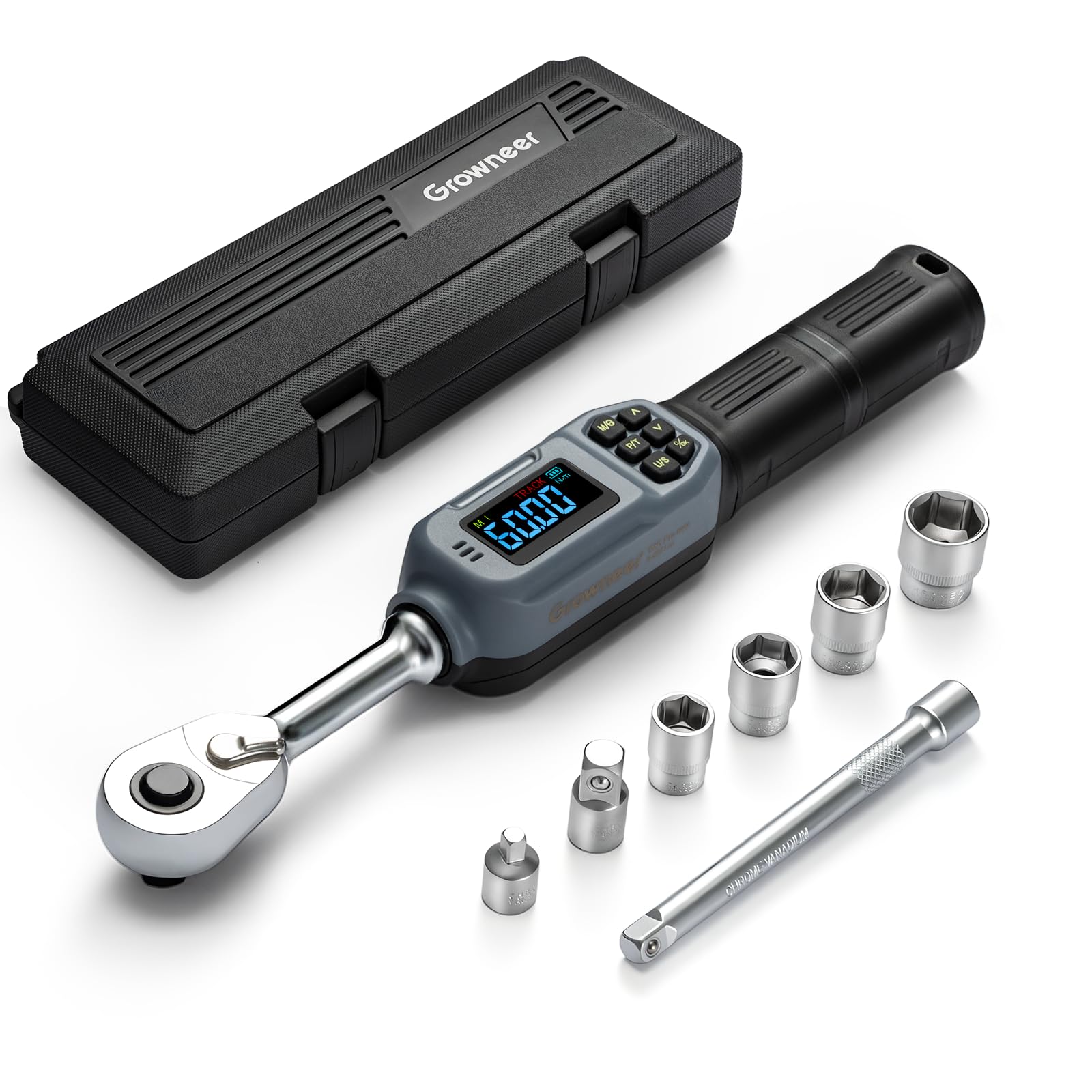
Figure 1: GROWNEER Digital Torque Wrench
2. 패키지 내용
The GROWNEER Digital Torque Wrench set includes the following items:
- Digital Torque Wrench (1 unit)
- Sockets: 14mm, 16mm, 17mm, 21mm (4 units)
- Torque Adapters (2 units)
- AAA Batteries (1 unit)
- 보관 케이스(1개)
- Extension Bar (1 unit)
- 교정 인증서 (1부)

Figure 2: Included components of the 8-in-1 Digital Torque Wrench Set
3. 제품 특징
- 높은 정확도: Features a digital display with ±2% accuracy for clockwise rotation and ±3% for counter-clockwise rotation.
- 넓은 토크 범위: Operates within 0.7-44.2 ft-lbs (3-60 Nm).
- 3/8'' Drive Ratchet Head: Designed for rapid replacement of different socket heads.
- 실시간 LED 디스플레이: Large backlit LCD display shows torque values instantly, readable in dimly lit environments.
- 여러 장치: Supports kg-cm, Nm, in-lb, and ft-lb modes.
- 사전 설정 모드 : Six preset modes allow for quick setting of common torque values.
- 데이터 저장: Stores up to 500 sets of historical data for review.
- 청각적 및 시각적 경고: Buzzer and colorful LED indicators (green for approaching, red for reaching) alert users when approaching and reaching the preset torque, preventing over-tightening.
- 인체공학적 디자인: Non-slip handle reduces hand fatigue during prolonged use.
- 다양한 응용 분야: Suitable for auto repair, bike repair, E-bike and motorcycle maintenance, and gunsmithing.

그림 3: 주요 기능

Figure 4: Colorful LCD Indicator & Buzzer Alarm
4. 설정
4.1. 배터리 설치
The digital torque wrench requires AAA batteries for operation. Use the small screwdriver provided in the kit to open the battery compartment located at the handle's end. Insert the AAA batteries according to the polarity markings, then securely close the compartment.
4.2. Attaching Sockets/Adapters
The wrench features a 3/8-inch drive ratchet head. To attach a socket or adapter, align it with the square drive and push firmly until it clicks into place. To remove, press the release button on the ratchet head and pull the accessory off. The included extension bar can be used for reaching fasteners in tight or recessed areas.

Figure 5: Attaching a socket
5. 사용 설명서
5.1. 전원 켜기/끄기
Press the power button to turn the wrench on. The LCD screen will illuminate. The wrench will automatically power off after a period of inactivity to conserve battery life.
5.2. 단위 선택
Press the "U/S" button to cycle through the available torque units: Newton-meters (Nm), Foot-pounds (ft-lb), Inch-pounds (in-lb), and Kilogram-centimeters (kg-cm).

Figure 6: Unit Selection
5.3. Setting Torque Value
Use the arrow buttons (up/down) to adjust the desired torque value. The value will be displayed on the LCD screen. The wrench supports six preset modes for quick access to frequently used torque settings.

Figure 7: 6 Preset Modes
5.4. 토크 적용
Apply force to the wrench. The real-time torque value will be displayed on the LED panel. As you approach the preset torque, the wrench will emit an intermittent beep and the LED lights will flash green. Upon reaching the preset torque, the wrench will emit a persistent beep and the LED lights will flash red, indicating that the target torque has been achieved. Stop applying force immediately to avoid over-tightening.

Figure 8: Applying Torque to a Motorcycle Component

Figure 9: Applying Torque to a Bicycle Component

Figure 10: Applying Torque to an Automotive Component
6. 유지관리
- 청소: If the wrench accidentally gets wet, wipe it immediately with a dry towel. Avoid prolonged exposure to moisture, especially saltwater, as it may damage the internal components.
- 저장: Store the wrench and its accessories in the provided storage case in a dry, clean environment when not in use.
- 구경 측정: Regular calibration is recommended to maintain accuracy. Refer to the included calibration certificate for details.
7. 문제 해결
- 부정확한 판독: Ensure the wrench is properly calibrated. Avoid overloading the wrench beyond 120% of its maximum torque value, as this can cause damage and affect accuracy.
- 디스플레이/전원 없음: AAA 배터리가 올바르게 장착되었는지, 그리고 충전량이 충분한지 확인하십시오. 필요한 경우 배터리를 교체하십시오.
- Buzzer/LED Malfunction: If the audible or visual alerts are not functioning as expected, refer to the full user manual for detailed diagnostic steps or contact customer support.
8. 사양
| 기인하다 | 값 |
|---|---|
| 모델 번호 | Nex TW1 Pro New |
| 상표 | 재배자 |
| 드라이브 크기 | 3/8인치 |
| 토크 범위 | 3-60 Nm (0.7-44.2 Ft-lbs) |
| 정확성 | ±2% Clockwise, ±3% Counter-clockwise |
| 단위 | N-m, Ft-lb, In-lb, Kg-cm |
| 작업 모드 | PEAK/TRACK |
| 재료 | 크롬 바나듐 스틸 |
| 품목 길이 | 11.4 인치 (29cm) |
| 작동 모드 | 배터리 |

그림 11: 제품 사양 및 치수
9. 안전 정보
- Do not overload the wrench. Exceeding 120% of the maximum torque value may damage the wrench and lead to inaccurate readings.
- Always ensure the correct socket or adapter is securely attached before use.
- Keep the tool clean and dry. Avoid exposure to corrosive liquids.
- 어린이의 손이 닿지 않는 곳에 보관하세요.
10. 제품 비디오
Digital Wrench for Precise Torque
Video 1: This video demonstrates the GROWNEER Digital Torque Wrench in use, highlighting its digital display and ease of operation for precise torque applications.
WATCH BEFORE BUYING - GROWNEER Digital Torque Wrench
비디오 2: 심층적인 재view and demonstration of the GROWNEER Digital Torque Wrench, showcasing its features and benefits for various tasks.
We test drive this torque screwdriver!
Video 3: A practical demonstration of the torque screwdriver functionality, showing its application in a real-world scenario.
For any project where accuracy is key!
Video 4: This video emphasizes the importance of accuracy in various projects and how the GROWNEER torque wrench helps achieve it.
Using GROWNEER 1/4" digital torque wrench.mp4
Video 5: A demonstration of using a GROWNEER digital torque wrench, focusing on its practical application.
11. 보증 및 지원
For warranty information and customer support, please refer to the documentation included with your product or visit the official GROWNEER web사이트. 보증 청구를 위해 구매 영수증을 보관하세요.
Ask a question about this manual
Ask about setup, troubleshooting, compatibility, parts, safety, or missing instructions. Manuals+ will review the question and use this page’s manual context to help answer it.