
1. 서론
This manual provides essential information for the installation, operation, and maintenance of your keepLiNK 5-Port 10G Multi-Gigabit Unmanaged Network Switch. Please read this manual thoroughly before using the device to ensure proper and safe operation. This switch is designed to provide high-speed network connectivity for various devices in home and small office environments.
2. 안전 정보
- 전원 공급 장치: 기기와 함께 제공된 전원 어댑터만 사용하세요. 전원이 볼륨과 일치하는지 확인하세요.tage requirements specified on the adapter.
- 통풍: 통풍구를 막지 마십시오. 과열을 방지하기 위해 기기 주변에 충분한 공기 흐름을 확보하십시오.
- 환경: Avoid placing the switch in areas with high humidity, extreme temperatures, direct sunlight, or near water. Keep the device away from flammable materials.
- 청소: 청소하기 전에 전원을 차단하십시오. 마른 부드러운 천을 사용하십시오. 액체 또는 에어로졸 세척제를 사용하지 마십시오.
- 번개 보호: The device features 4KV lightning protection. However, for enhanced safety during thunderstorms, it is recommended to disconnect the power adapter.
3. 패키지 내용
패키지에 다음 품목이 모두 들어 있는지 확인해 주십시오.
- keepLiNK 5-Port 10G Multi-Gigabit Unmanaged Network Switch
- 전원 어댑터
- 사용 설명서 (본 문서)
누락되거나 손상된 품목이 있는 경우 판매점에 문의하십시오.
4. 제품 오버view
The keepLiNK 5-Port 10G Multi-Gigabit Unmanaged Network Switch provides five 10 Gigabit Ethernet ports for high-speed network connections. Its metal casing는 내구성과 효율적인 방열을 보장합니다.

그림 1: 앞쪽 view of the keepLiNK 5-Port 10G Multi-Gigabit Unmanaged Network Switch, showing the five RJ45 ports and status indicators.
The switch features LED indicators for each port to show link status and activity. The auto-negotiation function intelligently detects the link speed of connected devices and adjusts to 100Mb, 1G, 2.5G, 5G, or 10G for optimal performance.
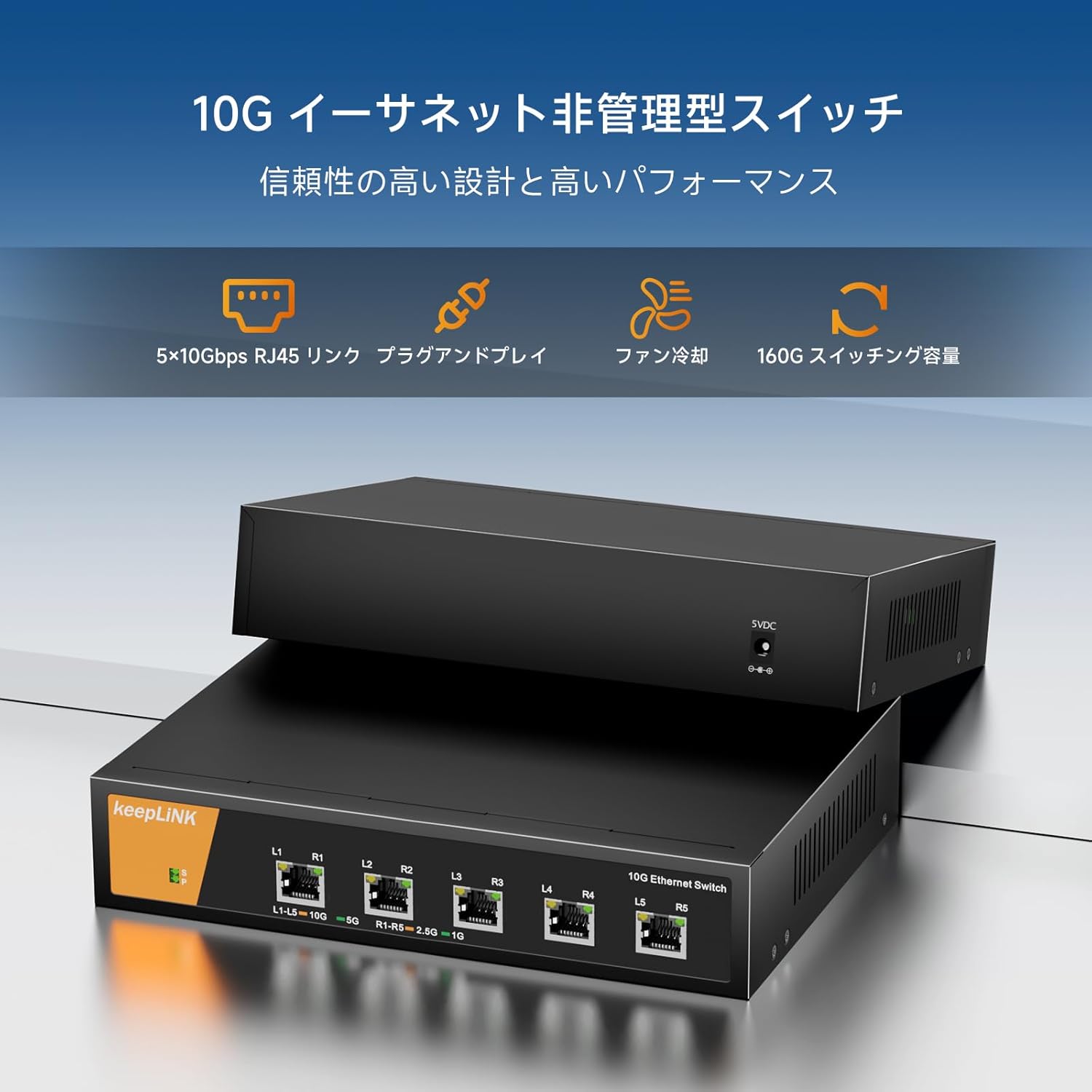
그림 2: 클로즈업 view of the switch ports with labels indicating link speed and activity.
5. 설정
The keepLiNK 5-Port 10G Multi-Gigabit Unmanaged Network Switch is designed for simple plug-and-play operation, requiring no software installation or complex configuration.

그림 3: Visual representation of the switch's plug-and-play functionality and other features like energy saving and lightning protection.
- 놓기: Choose a stable, flat surface for the switch. Ensure there is adequate space around the device for ventilation.
- 전원 연결: Connect the provided power adapter to the switch's power input port and then plug the adapter into a standard electrical outlet. The power LED indicator on the switch should illuminate.
- 장치 연결: Use Ethernet cables (Cat6a or higher recommended for 10G speeds) to connect your network devices (e.g., computers, NAS, routers, servers) to any of the five RJ45 ports on the switch.
- 연결 확인: Once a device is connected, the corresponding port LED on the switch should light up, indicating an active link. The color or blinking pattern of the LED may indicate the link speed and activity.
Important Note on Cables: For optimal 10G performance, Cat6a or Cat7 Ethernet cables are required. Cat5e cables are typically limited to 1 Gigabit per second (1Gbps) and Cat6 cables may support 10G over shorter distances (up to 55 meters).

그림 4: Chart illustrating the maximum supported speeds for different Ethernet cable types (Cat5, Cat5e, Cat6, Cat6A).
6. 사용 설명서
The keepLiNK 5-Port 10G Multi-Gigabit Unmanaged Network Switch operates automatically once connected. It functions as a central connection point for your wired network devices, facilitating high-speed data transfer.
- 자동 협상: Each port on the switch automatically detects the speed of the connected device (100Mbps, 1Gbps, 2.5Gbps, 5Gbps, or 10Gbps) and adjusts its operating mode accordingly.
- 전이중 지원: All ports support full-duplex mode, allowing data to be sent and received simultaneously, maximizing network efficiency.
- 비차단 아키텍처: The switch features a non-blocking switching architecture, meaning it can forward packets at full wire speed on all ports simultaneously, ensuring maximum throughput. The total switching capacity is 160Gbps.
- LED 표시등: Observe the LED indicators on the front panel to monitor the status of each port. A solid light typically indicates a stable link, while a blinking light indicates data activity. Refer to the product's specific LED behavior if detailed information is needed.

그림 5: 위에view of key features including 5x 10Gbps RJ45 links, plug-and-play, fan cooling, and 160G switching capacity.
7. 유지관리
To ensure the longevity and optimal performance of your keepLiNK network switch, follow these maintenance guidelines:
- 청소: Periodically clean the exterior of the switch with a soft, dry cloth. Do not use abrasive cleaners or solvents. Ensure no dust accumulates in the ventilation holes.
- 통풍: Regularly check that the ventilation openings are clear and unobstructed. The metal casing and internal fan are designed for efficient heat dissipation, but proper airflow is crucial.
- 환경 조건: Operate the switch within the specified temperature and humidity ranges (refer to Specifications section). Avoid exposing it to extreme conditions.
- 케이블 관리 : Ensure all connected Ethernet cables are properly routed and not excessively bent or strained. Damaged cables can lead to performance issues.
- 펌웨어 업데이트: As an unmanaged switch, firmware updates are generally not required or available.
8. 문제 해결
If you encounter issues with your keepLiNK network switch, refer to the following common troubleshooting steps:
- 전원 없음:
- 전원 어댑터가 스위치와 작동하는 콘센트에 제대로 연결되어 있는지 확인하십시오.
- 다른 장치를 연결하여 전원 콘센트가 작동하는지 확인하세요.
- 링크 표시등 없음:
- Check if the Ethernet cable is securely plugged into both the switch port and the connected device.
- 다른 이더넷 케이블을 사용해 보세요.
- 연결된 장치의 전원이 켜져 있고 네트워크 어댑터가 올바르게 작동하는지 확인하세요.
- 장치를 스위치의 다른 포트에 연결해 보십시오.
- 네트워크 속도가 느립니다:
- Verify that your Ethernet cables are Cat6a or higher for 10G connections. Older cables (e.g., Cat5e) will limit speeds.
- Ensure your connected devices (e.g., network cards, NAS) support 10G or multi-gigabit speeds.
- Check for network congestion on your overall network.
- Restart the switch and all connected devices.
- 간헐적인 연결:
- 이더넷 케이블에 손상이 있는지 점검하십시오.
- 스위치는 통풍이 잘 되는 곳에 설치하고 과열되지 않도록 하십시오.
- 전자기 간섭의 원인을 확인하십시오.
이러한 단계를 시도한 후에도 문제가 지속되면 고객 지원팀에 문의하세요.
9. 사양
| 특징 | 설명 |
|---|---|
| 상표 | 킵링크 |
| 모델 번호 | 10G Network Switch |
| 포트 수 | 5 |
| 인터페이스 유형 | RJ45 |
| 데이터 전송 속도 | 10 Gigabits per second (per port) |
| 스위칭 용량 | 160Gbps |
| 케이스 재질 종류 | 금속 |
| 최대 전력 소비량 | 24 와트 |
| 최대 온도 등급 | 55℃(131화씨) |
| 제품 치수 | 16.1 x 4.4 x 22cm |
| 제품 무게 | 1.3kg |
| 필요한 배터리 | 아니요 |
| 호환 장치 | Game consoles, Tablets, Laptops, Printers, Routers |
10. 보증 및 지원
keepLiNK products are designed for reliability and performance. For information regarding warranty coverage and technical support, please refer to the warranty card included with your product or visit the official keepLiNK web사이트 관련 문의 시 제품 모델 번호와 구매일자를 준비해 주시기 바랍니다.