
1. 서론
Thank you for choosing the Victoper A1200T Rechargeable LED Flashlight. This manual provides essential information for the safe and efficient operation, maintenance, and troubleshooting of your new flashlight. Please read this manual thoroughly before use and retain it for future reference.
2. 안전 지침
- Do not look directly into the LED light beam. The high intensity light can cause temporary vision impairment or permanent eye damage.
- 손전등을 어린이의 손이 닿지 않는 곳에 보관하십시오.
- Do not disassemble the flashlight. This may void the warranty and could lead to damage or injury.
- Use only the specified charging method and voltage (5V2A adapter recommended) to prevent damage to the battery or flashlight.
- 손전등을 극한의 온도나 직사광선에 장시간 노출시키지 마세요.
- 현지 규정에 따라 배터리를 폐기하십시오.
3. 패키지 내용
다음 품목이 패키지에 포함되어 있는지 확인하세요.
- Victoper A1200T Rechargeable LED Flashlight (x2)
- USB 충전 케이블(x2)
- Wrist Strap (pre-attached or included separately)
- 사용자 설명서

Image showing two Victoper A1200T rechargeable LED flashlights, each with a wrist strap, alongside two USB charging cables. The flashlights are black with a red band.
4. 제품 오버view
The Victoper A1200T is a high-performance, rechargeable LED flashlight designed for various outdoor and indoor applications. It features a durable aluminum body, multiple lighting modes, and an adjustable zoom function.
주요 특징:
- 높은 루멘 출력: Provides powerful illumination.
- 5가지 조명 모드: High, Medium, Low, Strobe, and SOS for versatile use.
- 확대/축소 가능 기능: Adjusts from a wide floodlight to a focused spotlight.
- USB 충전식: USB 케이블을 통해 편리하게 충전할 수 있습니다.
- IP65 방수: 먼지와 물 튀김에 강함.
- 내구성 있는 구조: 내구성을 위해 알루미늄 합금으로 제작되었습니다.

Graphic illustrating the Victoper A1200T flashlight's powerful beam, reaching up to 200 meters (656 feet). It also demonstrates the adjustable zoom feature, showing how to widen or narrow the light beam.
5. 설정
손전등 충전:
- Locate the USB charging port on the flashlight. It is typically covered by a rubber flap for protection.
- Open the rubber flap and insert the small end of the provided USB charging cable into the flashlight's port.
- Connect the larger end of the USB cable to a compatible 5V2A USB power source (e.g., power bank, laptop, car charger, or wall adapter).
- The indicator light near the charging port will illuminate 빨간색 손전등이 충전 중임을 나타냅니다.
- 완전히 충전되면 표시등이 켜집니다. 녹색.
- Disconnect the charging cable and securely close the rubber flap to maintain the flashlight's waterproof rating.
Note: Please use an adapter below 5V2A for charging to avoid failure to charge due to high-power adapters.
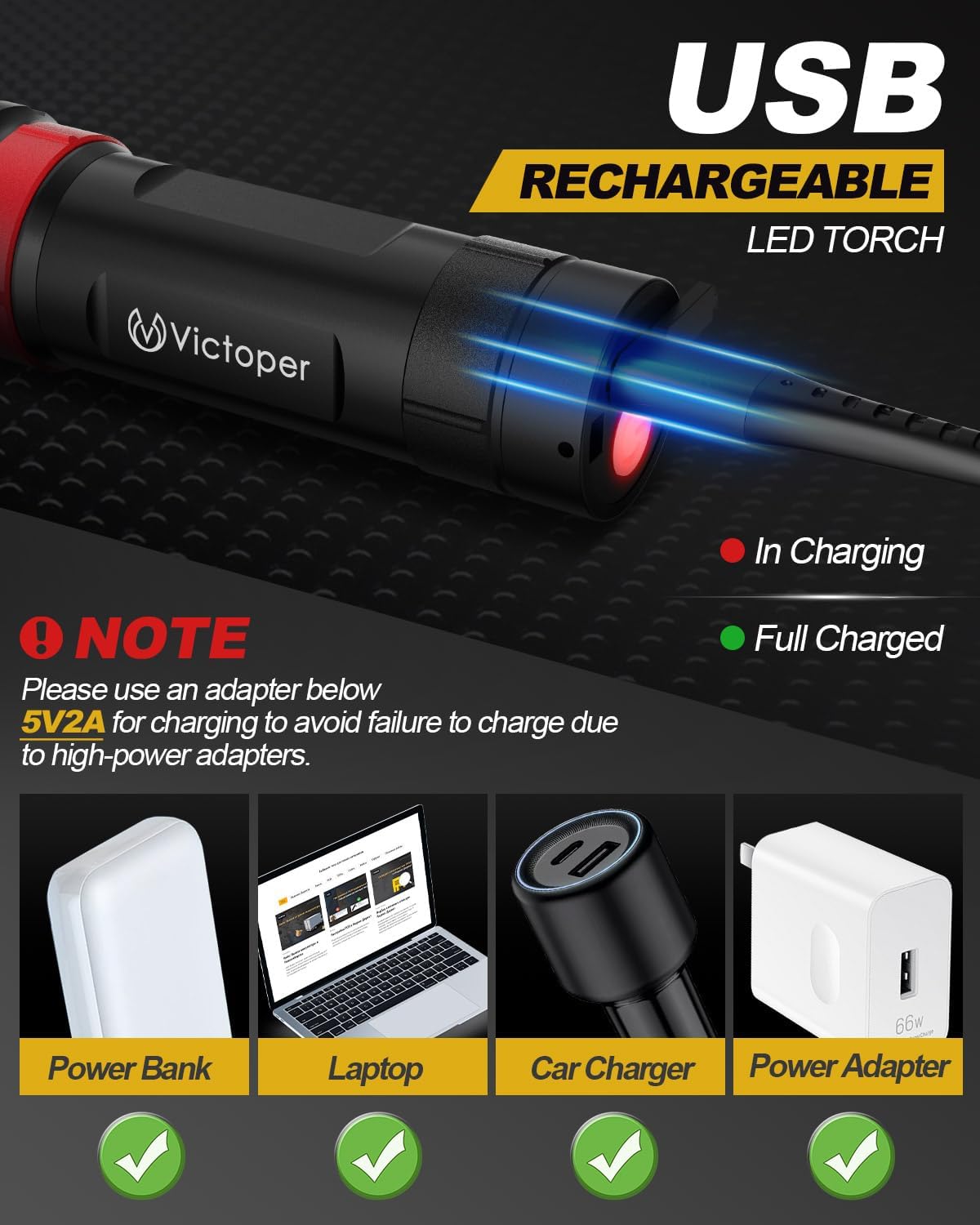
Diagram explaining the USB rechargeable feature of the Victoper A1200T flashlight. It shows the charging port, red indicator for charging, green for fully charged, and recommends using a 5V2A adapter with examples like power banks, laptops, car chargers, and wall adapters.

Image highlighting the built-in 1800mAh battery of the Victoper A1200T flashlight, providing up to 15 hours of continuous operation on a single charge.
6. 사용 설명서
전원 켜기/끄기 및 모드 전환:
- 손전등을 켜려면 ON, press the power button located on the tail cap or side of the flashlight. It will typically start in High mode.
- To cycle through the lighting modes (High → Medium → Low → Strobe → SOS), press the power button repeatedly while the flashlight is on.
- 손전등을 켜려면 끄다, press and hold the power button for approximately 5 seconds in any mode. Alternatively, if you cycle through all modes, the flashlight will turn off after the SOS mode.

Visual representation of the five distinct lighting modes available on the Victoper A1200T flashlight: High, Medium, Low, Strobe, and SOS. Each mode is depicted with a corresponding scenario.
줌 조정:
The Victoper A1200T features an adjustable head for zooming. To adjust the beam:
- Gently push the head of the flashlight forward to narrow the beam into a focused spotlight.
- Pull the head of the flashlight backward to widen the beam into a broad floodlight.
7. 유지관리
청소:
- 손전등 본체를 부드러운 천으로 닦으세요.amp 천. 연마성 세척제나 용매를 사용하지 마십시오.
- 최적의 광출력을 위해 렌즈를 깨끗하게 유지하세요. 필요한 경우 렌즈 청소용 천을 사용하세요.
저장:
- 손전등은 직사광선과 극한의 온도를 피해 시원하고 건조한 곳에 보관하세요.
- 장기간 보관 시에는 배터리 수명 연장을 위해 약 50% 정도를 충전해 두십시오. 사용하지 않을 경우 3~6개월마다 한 번씩 충전하십시오.

Illustration of the Victoper A1200T flashlight's IP65 waterproof rating, demonstrating its resilience in rainy and snowy conditions. The image also emphasizes its durable construction.
8. 문제 해결
| 문제 | 가능한 원인 | 해결책 |
|---|---|---|
| 손전등이 켜지지 않습니다. | 배터리가 소진되었습니다. | 제공된 USB 케이블을 사용하여 손전등을 충전하세요. |
| 손전등이 충전되지 않습니다. | Charging cable or adapter is faulty. Incorrect adapter voltage. | Try a different USB cable or 5V2A adapter. Ensure the adapter is 5V2A or lower. |
| 광 출력이 어둡습니다. | Battery is low. Lens is dirty. | Recharge the flashlight. Clean the lens with a soft cloth. |
| 줌 기능이 뻑뻑합니다. | 장치에 먼지나 이물질이 있습니다. | Clean the exterior of the flashlight. Avoid forcing the zoom mechanism. |
9. 사양
| 특징 | 세부 사항 |
|---|---|
| 모델 | A1200T |
| 광원 유형 | 주도의 |
| 전원 | Battery Powered (Built-in Rechargeable) |
| 배터리 용량 | 1800mAh |
| 실행 시간 | 최대 15시간 |
| 특징 | 초점 조절 가능 (줌 기능 포함) |
| 조명 모드 | 높음, 중간, 낮음, 스트로브, SOS |
| 재료 | 알류미늄 |
| 색상 | 검은색 |
| 방수 등급 | IP65 |
| 제품 치수 | 5.12인치(깊이) x 1.38인치(폭) (약 13cm x 3.5cm) |
| 품목 무게 | 12.8온스(팩당) |
| 제조업체 | Yiwu Yunmai Electronic Commerce Co., Ltd. |

Image displaying the compact dimensions of the Victoper A1200T flashlight (5.12 inches length, 1.38 inches width) and showcasing its versatility in different scenarios such as cycling, outdoor exploration, and reading.
10. 보증 및 지원
Victoper products are designed for reliability and performance. For any questions, technical support, or warranty claims, please contact our customer service team. Please have your purchase information and model number ready when contacting support.
For further assistance, please visit the official Victoper store or contact your retailer.