
1. 서론
Thank you for choosing the DazzlingStage 60W 9LED RGBW Stage Wall Wash Bar Light. This manual provides essential information for the safe and effective operation of your lighting fixture. Please read it thoroughly before installation and use, and retain it for future reference.
이것은tage light bar features 9 high-power RGBW LEDs, offering a wide spectrum of colors and dynamic lighting effects suitable for various events and venues.

이미지 1.1: 이상view of the DazzlingStage 60W 9LED RGBW Stage Wall Wash Bar Lights in various colors.
2. 안전 지침
- 전기 안전: 전원 공급 장치 볼륨을 확인하십시오.tage matches the specifications of the fixture. Always disconnect power before cleaning, servicing, or moving the unit.
- 설치: Install the fixture in a well-ventilated area, away from heat sources. Ensure secure mounting to prevent accidental falls.
- 작업: Do not look directly into the light source when the fixture is operating, as it can cause eye damage. Avoid operating the unit in wet or damp 정황.
- 유지: 모든 서비스는 자격을 갖춘 전문가에게 의뢰하십시오. 절대로 직접 수리하려고 하지 마십시오.
- 어린이들: 기기를 어린이의 손이 닿지 않는 곳에 보관하세요.
3. 패키지 내용
포장을 풀 때 아래 나열된 모든 품목이 포함되어 있고 상태가 양호한지 확인하세요.
- DazzlingStage 60W 9LED RGBW Stage Wall Wash Bar Light (x1 per pack)
- Power Cord (x1 per pack)
- Remote Control (x1 per pack)
- Mounting Bracket (x1 per pack)
- Knobs (x2 per pack)
- Black Gaskets (x2 per pack)
- Instruction Manual (x1 per pack)

이미지 3.1: 제품 패키지에 포함된 구성품.
4. 제품 구성품
라이트바의 주요 구성 요소를 숙지하십시오:
- LED 어레이: 9 RGBW LEDs for color mixing.
- 제어판: Features a 4-digit LED display and control buttons (MENU, UP, DOWN, ENTER) for mode selection and parameter adjustment.
- DMX 입력/출력 포트: For connecting to a DMX controller or linking multiple units.
- 전원 입력/출력: For power connection and daisy-chaining power to other units.
- 장착 브래킷 : Adjustable bracket for floor standing or truss mounting.
- 방열판: Integrated cooling system to maintain optimal operating temperature.

Image 4.1: Key components and dimensions of the light bar.
5. 설정 및 설치
The DazzlingStage Wall Wash Bar Light offers flexible installation options:
5.1 브래킷 장착
Attach the included mounting bracket to the light bar using the provided knobs and gaskets. Ensure the bracket is securely fastened.
5.2 배치 옵션
- 플로어 스탠딩: The bracket allows the light bar to stand upright on a flat surface. Adjust the angle as needed.
- 트러스 장착: 적절한 cl 사용amps (not included) to attach the bracket to a lighting truss. Ensure the truss and clamps can support the weight of the fixture.
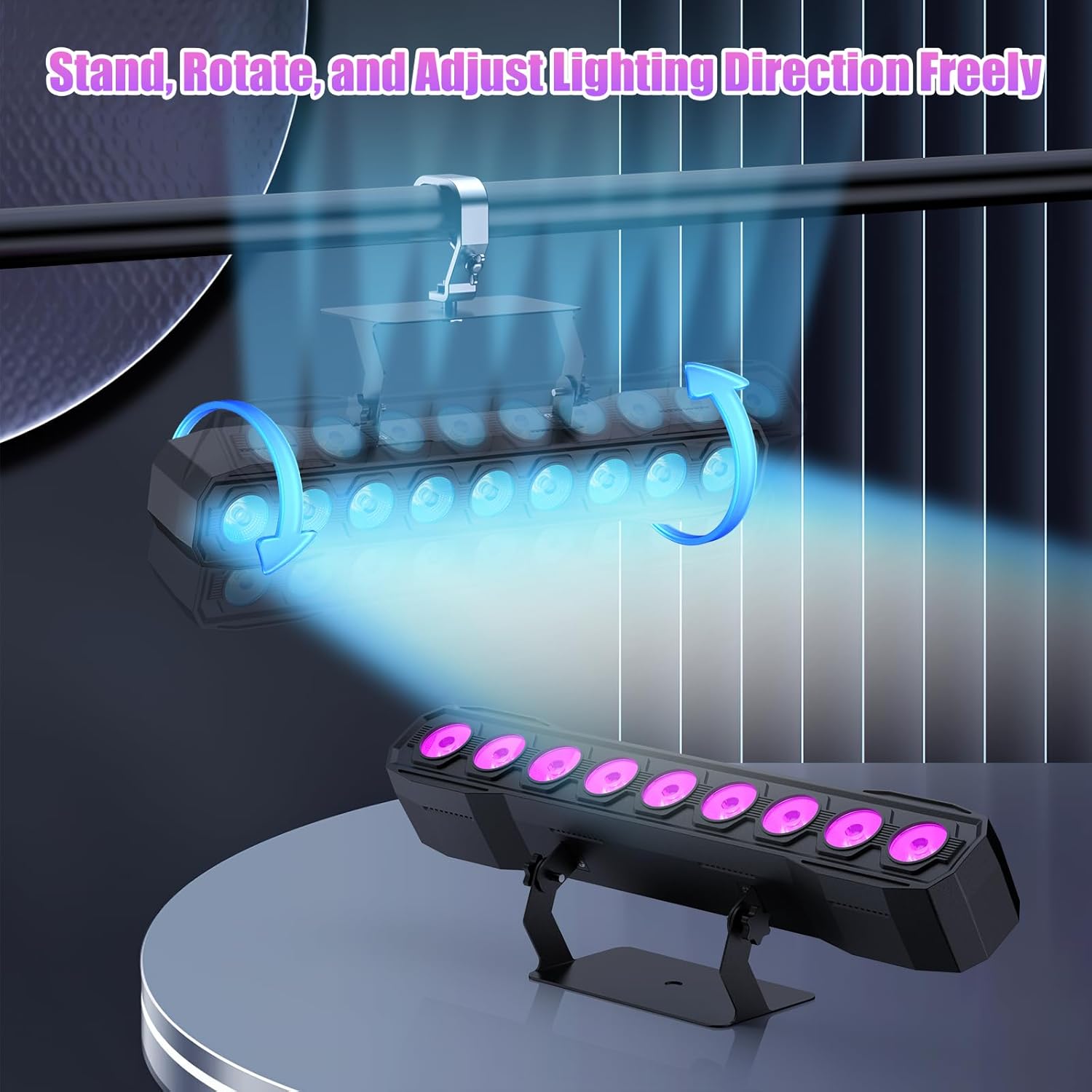
Image 5.1: Illustration of mounting and angle adjustment options.
5.3 전원 연결
Connect the power cord to the Power IN port on the back of the fixture and then to a suitable power outlet. Multiple units can be daisy-chained using the Power OUT port to simplify wiring for larger setups.
6. 작동 모드
The DazzlingStage Wall Wash Bar Light supports several control modes:
- DMX512 제어: For professional control via a DMX console.
- 자동 모드 : 사전 프로그래밍된 조명 시퀀스.
- Sound-Activated Control: 조명은 주변 소리에 반응합니다.
- 원격 제어: Convenient wireless control using the included remote.
- 마스터-슬레이브 모드: Link multiple units where one acts as a master and others as slaves, synchronizing effects.
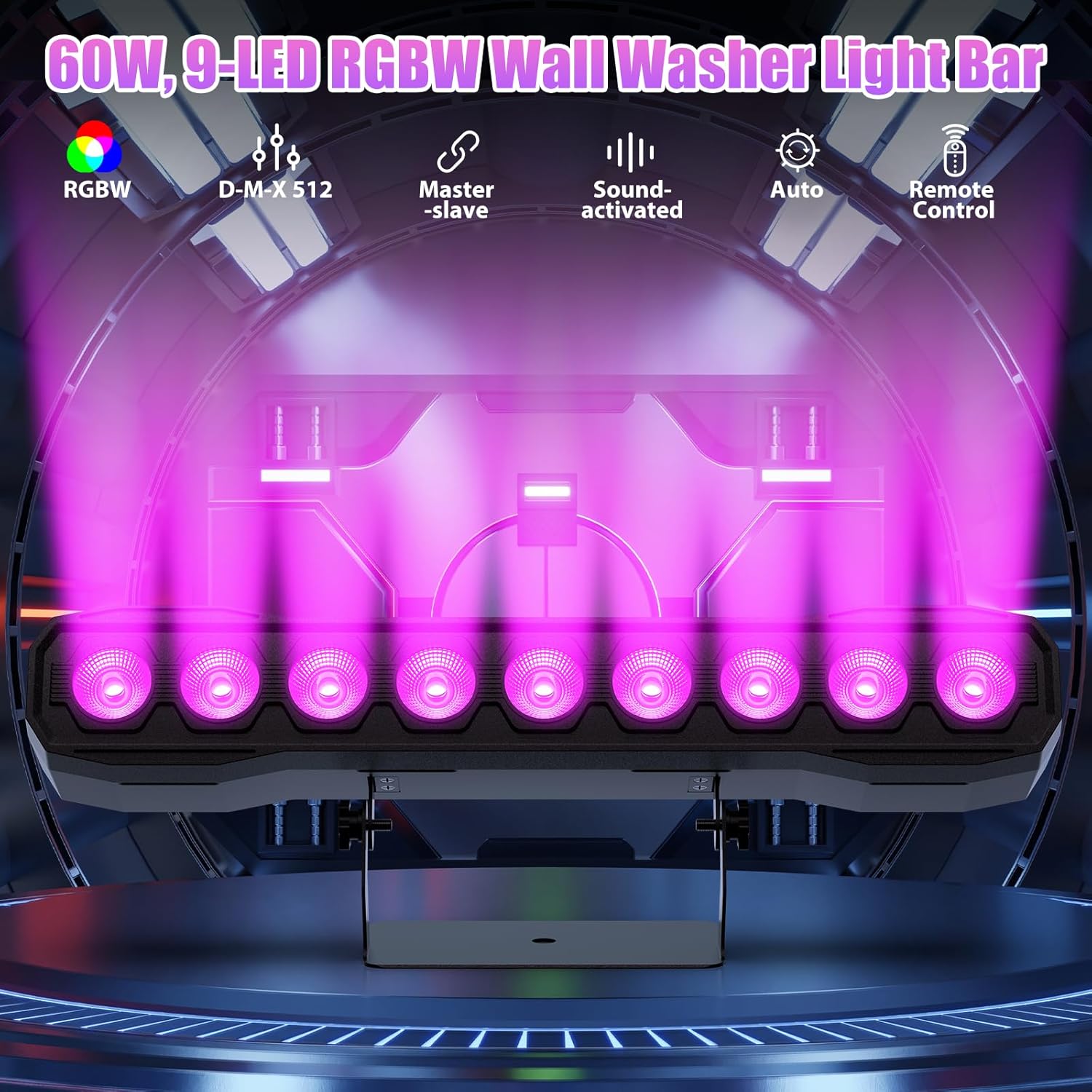
이미지 6.1: 이상view 사용 가능한 제어 모드.
6.1 Display Panel Operation
Use the buttons on the back of the fixture to navigate the menu and select modes:
- 메뉴: 기본 메뉴 옵션을 순환합니다.
- 위아래: Adjusts values or navigates sub-menus.
- 시작하다: 선택을 확인합니다.
6.2가지 조명 효과
The fixture supports various dynamic effects:
- 색상 혼합: Over 16.7 million color combinations with 0-100% linear dimming.
- 스트로브 : 깜빡임 효과.
- 도약: Instant color changes.
- 바래다: 색상 간의 부드러운 전환.
- 맥박: Gradual changing effects.
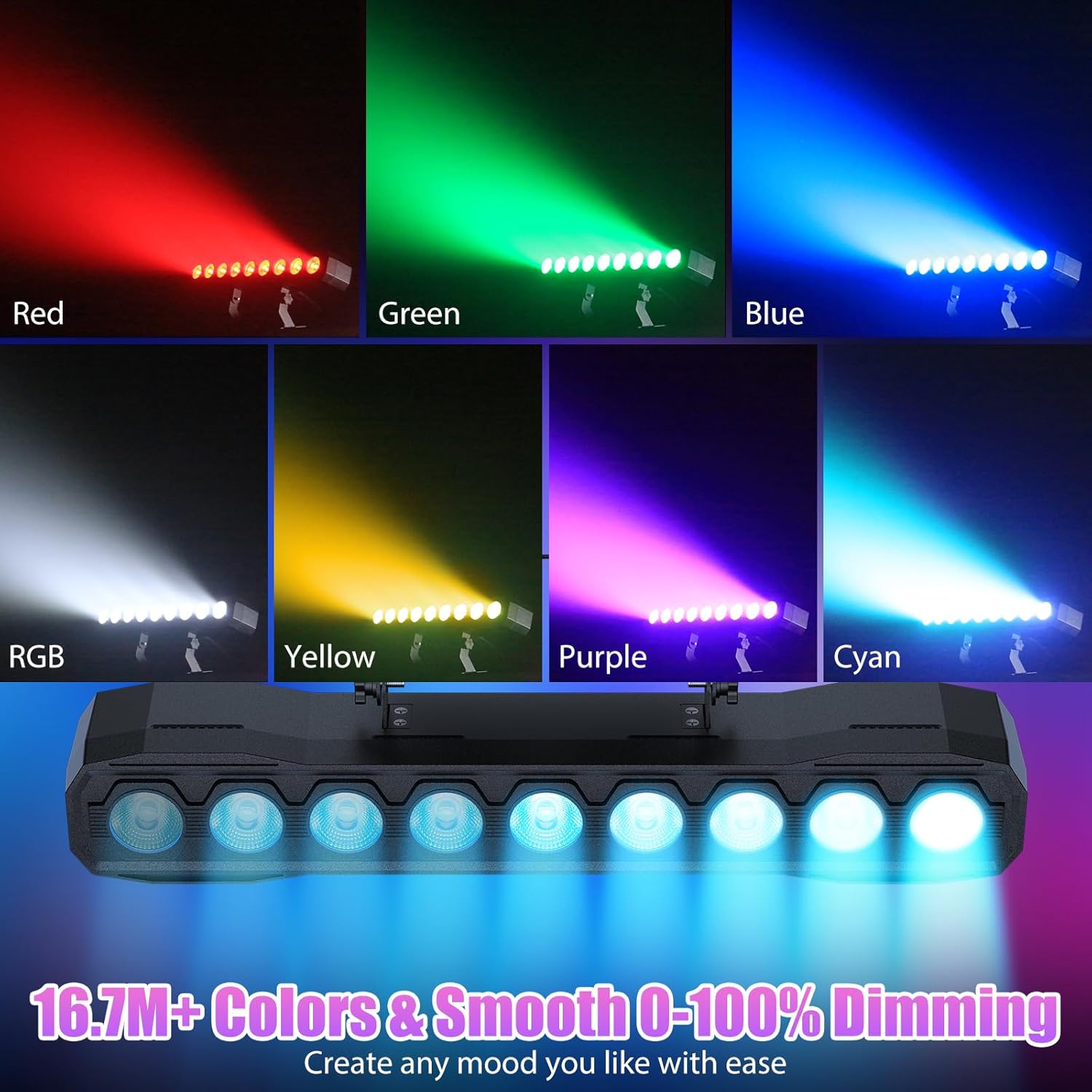
이미지 6.2: Examples of color mixing and dimming capabilities.

Image 6.3: Visual representation of Strobe, Jump, Fade, and Pulse effects.
7. 원격 제어 기능
포함된 리모컨을 사용하면 다양한 기능에 편리하게 접근할 수 있습니다.
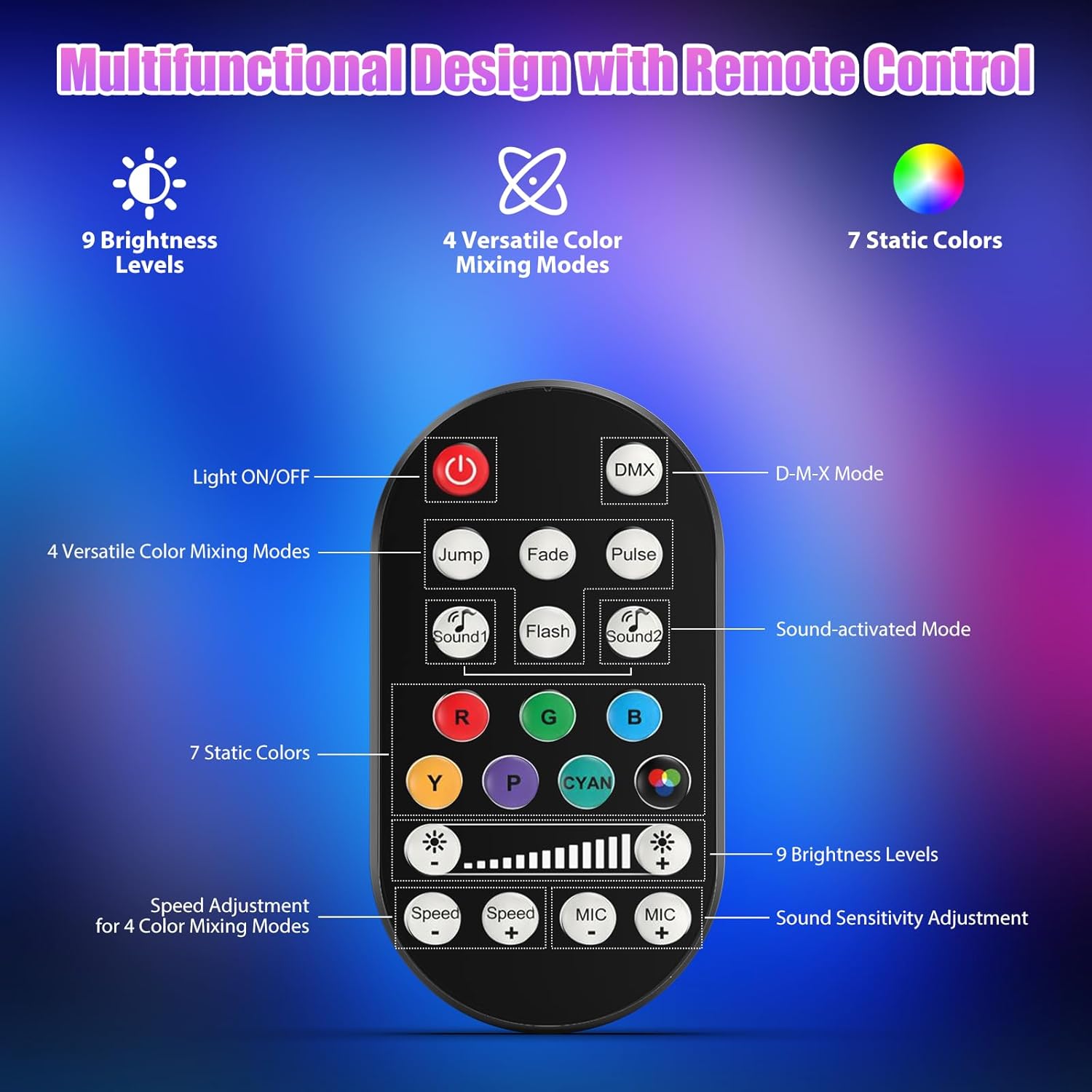
이미지 7.1: 리모컨의 배치 및 기능.
- 조명 켜기/끄기: 장치의 전원을 켜거나 끕니다.
- DMX : DMX 제어 모드를 활성화합니다.
- Jump, Fade, Pulse, Flash: Selects different color mixing modes.
- Sound1, Sound2: Activates sound-activated modes with different sensitivities.
- R, G, B, Y, P, Cyan, White: 고정 색상을 선택합니다.
- 밝기 레벨: Adjusts the overall intensity of the light (9 levels).
- 속도 +/-: 동적 효과의 속도를 조절합니다.
- MIC +/-: Adjusts the sound sensitivity for sound-activated modes (15 levels).
8. DMX512 Control
For advanced control, connect the fixture to a DMX512 controller. The light bar typically uses 4 or 8 DMX channels. Refer to the display panel for DMX address setting and channel assignments.
8.1 DMX 주소 설정
Use the MENU, UP, DOWN, and ENTER buttons on the fixture's display panel to set the DMX starting address. The display will show 'AXXX' where XXX is the address (e.g., A001).
8.2 DMX Channel Functions (Example - 8 Channel Mode)
| 채널 | 기능 | 값 범위 | 설명 |
|---|---|---|---|
| CH1 | 마스터 디머 | 0-255 | 전체 밝기(0%~100%) |
| CH2 | 적색 강도 | 0-255 | Red LED brightness (0% to 100%) |
| CH3 | 녹색 강도 | 0-255 | Green LED brightness (0% to 100%) |
| CH4 | 파란색 강도 | 0-255 | Blue LED brightness (0% to 100%) |
| CH5 | 백색 강도 | 0-255 | White LED brightness (0% to 100%) |
| CH6 | Strobe/Effect | 0-255 | 0-10: No function; 11-255: Strobe speed (slow to fast) |
| CH7 | 자동 프로그램 | 0-255 | Selects and controls speed of built-in auto programs |
| CH8 | 활성 소리 | 0-255 | Activates sound mode and adjusts sensitivity |
표 8.1: 예ample DMX Channel Functions (may vary slightly by firmware version).
9. 유지관리
정기적인 유지보수는 최적의 성능을 보장하고 조명기구의 수명을 연장합니다.
- 청소: Periodically clean the lens and housing with a soft, lint-free cloth. Do not use abrasive cleaners or solvents. Ensure the fixture is powered off and cool before cleaning.
- 점검: 전원 케이블, DMX 케이블 및 장착 하드웨어에 마모 또는 손상 흔적이 있는지 정기적으로 점검하십시오. 손상된 부품은 즉시 교체하십시오.
- 저장: When not in use for extended periods, store the fixture in a dry, dust-free environment.
10. 문제 해결
문제가 발생하면 다음의 일반적인 문제와 해결 방법을 참조하세요.
| 문제 | 가능한 원인 | 해결책 |
|---|---|---|
| 전원이 없습니다 | Power cable disconnected; No power from outlet; Blown fuse | Check power cable connection; Test outlet with another device; Replace fuse if necessary |
| 빛 출력 없음 | Dimmer channel at 0%; Incorrect mode selected; DMX signal issue | Increase dimmer level; Select desired operating mode; Check DMX cable and address settings |
| Incorrect colors/effects | Incorrect DMX channel values; Remote control interference | Verify DMX channel settings; Ensure remote is pointed directly at the sensor; Check for other IR interference |
| 사운드 활성화 모드가 작동하지 않습니다 | Microphone sensitivity too low; No sound input | Increase MIC sensitivity via remote or display; Ensure sufficient sound is present near the fixture |
| 조명기구 과열 | Poor ventilation; Blocked heat sink | Ensure adequate airflow around the unit; Clean any dust or debris from the heat sink fins |
11. 사양
| 특징 | 세부 사항 |
|---|---|
| 상표 | DazzlingStage |
| 모델 번호 | ZQ06190 |
| 광원 | 9 x 60W RGBW LED |
| 색상 혼합 | RGBW 4-in-1, 16.7 million colors |
| 디밍 | 0~100% 선형 전자식 디밍 |
| 빔 각도 | 35° 광각 |
| 제어 모드 | DMX512, Auto, Sound-Activated, Remote Control, Master-Slave |
| DMX 채널 | 4 or 8 Channels (selectable) |
| 표시하다 | 4 자리 LED 디스플레이 |
| 재료 | 아크릴로니트릴 부타디엔 스티렌(ABS) |
| 제품 치수 | 18.1 x 5.5 x 5.1인치(46 x 14 x 13cm) |
| 품목 무게 | 약 1.98파운드(0.9kg) |
| 전원 입력 | 교류 100-240V, 50/60Hz |
| 제조업체 | Shenzhen Zhuoqiong Technology Co., Ltd. |
12. 보증 및 지원
DazzlingStage products are designed for reliability and performance. For warranty information, please refer to the terms and conditions provided at the time of purchase or contact your retailer.
If you require technical assistance or have questions not covered in this manual, please contact DazzlingStage customer support through the retailer's platform or the official brand website. Please have your model number (ZQ06190) and purchase details ready when contacting support.