
소개
This manual provides detailed instructions for the installation, operation, and maintenance of your ikasus Android 14 Car Stereo Radio. This multimedia player is designed for Ford F-150 models from 2004 to 2008, featuring a 9.7-inch touch screen, wireless CarPlay, Android Auto, WiFi, Bluetooth, GPS, and backup camera support. Please read this manual thoroughly before installation and use to ensure proper functionality and safety.
중요한 안전 정보
메모: This car stereo is 아니다 a plug-and-play unit. Installation requires cutting and splicing wires. Professional installation is highly recommended. Before proceeding with installation, verify the compatibility with your vehicle's center console and model year (Ford F-150 2004-2008).

This image displays a warning indicating that the car stereo installation is not plug and play and requires cutting wires. Users should confirm their vehicle's center console before proceeding.
상자 안에 무엇이 들어있나요?
아래 목록과 귀하의 패키지 내용을 비교해 보세요.
- 차량용 MP5 플레이어 (본체) 1개
- 1 x 전원 케이블
- 1 x GPS 안테나
- 1 x 백업 카메라
- 1 x RCA 입력 및 출력 케이블
- 2 x USB 케이블
- 금속 프레임 2개
- 4 x 나사
- 1 x 사용 설명서

This image displays all the components included in the product package: the car stereo unit, a mounting frame, power cable, RCA input/output cables, USB cables, a backup camera, GPS antenna, instruction manual, and fixed brackets.
설정 및 설치
This car stereo is designed for Ford F-150 models from 2004 to 2008. Due to the nature of the installation, which requires wire cutting, it is strongly recommended to have the unit installed by a qualified professional to avoid damage to the product or your vehicle.
설치 전 확인:
- Confirm your vehicle's make, model, and year (Ford F-150, 2004-2008).
- Inspect the center console of your vehicle to ensure compatibility with the 9.7-inch screen size.
- Gather all necessary tools for wiring and mounting.
일반 설치 단계:
- 배터리 분리: 전기 작업을 시작하기 전에 항상 차량 배터리의 음극 단자를 분리하십시오.
- 오래된 장치 제거: 기존 차량용 라디오와 트림 패널을 조심스럽게 제거하십시오.
- 와이어 연결: Connect the power cable, RCA input/output, USB cables, GPS antenna, and backup camera according to the wiring diagram provided in the included instruction manual. This step involves cutting and splicing wires.
- 설치: Secure the new car stereo unit using the provided metal frames and screws into the dashboard opening.
- 테스트 기능: Before fully reassembling the dashboard, reconnect the battery and test all functions of the stereo (power, audio, touch screen, GPS, Bluetooth, camera).
- 재조립: 모든 기능이 확인되면 대시보드 트림 패널을 다시 조립하십시오.
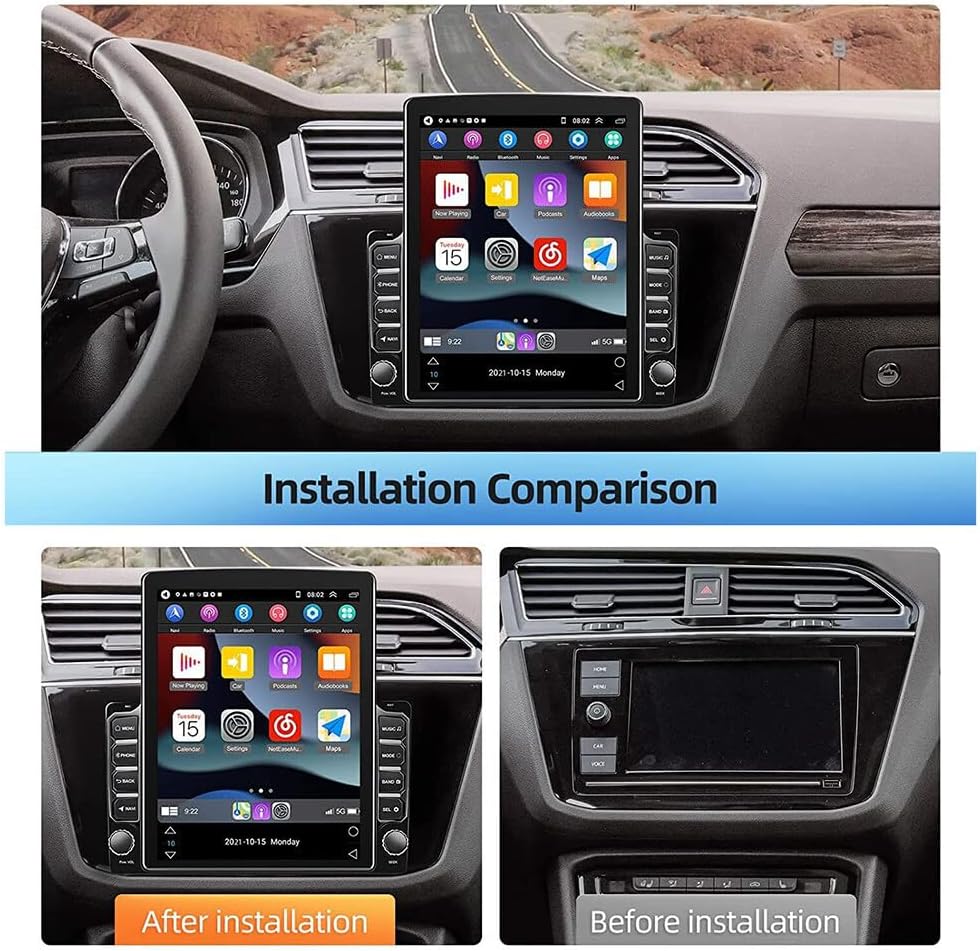
This image provides a visual comparison of a car's dashboard. The 'Before installation' panel shows the original car radio, while the 'After installation' panel displays the new 9.7-inch touchscreen car stereo seamlessly integrated into the dashboard.
작동 지침
Wireless Apple CarPlay / Wired Android Auto
The unit supports both wireless Apple CarPlay and wired Android Auto. Connect your smartphone to access contacts, emails, notifications, online maps, music, and videos. Voice control is available for hands-free operation.
- 무선 카플레이: Follow the on-screen instructions to pair your iPhone via Bluetooth for wireless CarPlay functionality.
- 유선 안드로이드 오토: Connect your Android phone using a data cable to enable Android Auto.

This image illustrates the wireless and wired connectivity options for Apple CarPlay and Android Auto, showing a smartphone connected to the car stereo display, which mirrors phone applications like navigation, music, and messages.
GPS 내비게이션 및 Wi-Fi 연결
The car stereo supports both online and offline navigation. Connect to WiFi to download offline maps or use online navigation apps like Google Maps, Waze, and Here Maps for real-time traffic updates.
- WiFi 연결 : Access the settings menu to connect to an available WiFi network or mobile hotspot.
- 항해: Select the navigation application from the main menu. For offline maps, ensure they are downloaded via WiFi.

The image shows the car stereo screen displaying a GPS navigation map with route details and speed. It highlights the device's capability for both online and offline navigation, supported by WiFi connectivity.
Bluetooth and RDS Radio
Utilize Bluetooth 5.0 for hands-free calling and audio streaming. The built-in microphone ensures clear communication. The high-quality digital stereo (RDS) FM tuner allows for automatic or semi-automatic station searching. Adjust audio settings with the stereo EQ (Jazz, Rock, Pop, Classic, etc.).
- 블루투스 페어링 : 휴대전화와 차량용 스테레오에서 블루투스를 활성화하세요. 검색 available devices and pair.
- 라디오 튜닝: Access the Radio app to scan for stations or manually tune.
백업 카메라 지원
The system supports a rearview camera input, providing a clear visual aid on the 1024x600 screen for safer reversing and parking. The display automatically switches to the camera feed when the vehicle is in reverse.

The image depicts the car stereo screen displaying a live feed from a backup camera, complete with parking guidelines, making reversing and parking maneuvers easier and safer. A camera unit is also shown in the top left corner.
스티어링 휠 제어
The unit supports your original steering wheel controls, allowing you to manage volume, tracks, and other radio functions without taking your hands off the wheel. Refer to the 'Steering Learn' option in the settings to configure these controls.

This image shows the car stereo's settings menu for 'Steering Learn,' indicating how users can configure their original steering wheel controls to manage the radio functions. A hand is shown pressing a button on a steering wheel.
Air Conditioning and Seat Controls
The system is designed to support both manual and automatic air conditioning controls, as well as seat heating and cooling functions, integrating seamlessly with your vehicle's existing systems.
유지
차량용 스테레오의 수명과 최적의 성능을 유지하려면 다음 유지 관리 지침을 따르십시오.
- 화면 청소: 전자 기기 화면 전용으로 제작된 부드럽고 보풀 없는 천을 사용하십시오. 연마성 세척제나 용제를 사용하지 마십시오.
- 일반 청소: 먼지와 이물질이 제품에 닿지 않도록 하십시오. 부드럽고 마른 천으로 외부를 닦아주세요.
- 소프트웨어 업데이트: 시스템이 효율적으로 작동하고 최신 기능을 갖추도록 정기적으로 소프트웨어 업데이트를 확인하십시오.
- 극한의 온도를 피하세요: While designed for automotive use, prolonged exposure to extreme heat or cold can affect performance.
문제 해결
차량용 스테레오에 문제가 발생하면 다음의 일반적인 문제 해결 단계를 참조하십시오.
- 전원 없음: 모든 전원 연결부와 퓨즈를 점검하십시오. 차량 배터리가 제대로 연결되어 있고 충전되어 있는지 확인하십시오.
- 소리 없음: Verify speaker connections. Check volume levels and audio settings. Ensure the mute function is not activated.
- 터치 스크린이 응답하지 않음: Try restarting the unit. If the issue persists, a factory reset might be necessary (note: this will erase custom settings).
- GPS가 작동하지 않음: GPS 안테나가 제대로 설치되었고 깨끗한지 확인하십시오. view 하늘의. GPS 설정을 확인하고 위치 서비스가 활성화되어 있는지 확인하십시오.
- 블루투스 연결 문제: 스테레오와 휴대폰 모두에서 블루투스가 활성화되어 있는지 확인하십시오. 이전에 연결했던 기기를 삭제하고 다시 연결해 보세요.
- 후방 카메라 영상이 표시되지 않음: Check the camera's power and video signal connections. Ensure the vehicle is in reverse.
For persistent issues, consult the detailed troubleshooting section in the included instruction manual or contact customer support.
명세서
| 특징 | 사양 |
|---|---|
| 운영 체제 | 안드로이드 14 |
| 화면 크기 | 9.7인치 |
| 메모리(RAM+ROM) | 2GB(RAM) + 32GB(ROM) |
| 화면 해상도 | 1024x600 |
| 미러 링크 | 안드로이드/IOS |
| 블루투스 버전 | 5.0 |
| 와이파이 | 지원됨 |
| GPS | Built-in offline maps, supports online maps |
| USB 인터페이스 | 더블 USB |
| 오디오 포맷 | APE/FLAC/WAV/MP3/WMA |
| 비디오 형식 | MKV/RMVB/AVI/MP4/MDV |
| 그림 형식 | PNG/JPEG/JPG/GIF/WBMP/BNP |
| 스티어링 휠 제어 | 지원됨 |
| 비디오 출력 | 지원됨 |
| 외부 마이크 | 지원됨 |
| 호환 차량 | Ford F-150 (2004, 2005, 2006, 2007, 2008) |
| 품목 무게 | 3.69파운드 |
| 패키지 크기 | 12.28 x 10.94 x 3.39 인치 |
보증 정보
This ikasus car stereo comes with a standard manufacturer's warranty. Please refer to the warranty card included in your package or contact the seller for specific details regarding warranty duration and coverage. Keep your proof of purchase for warranty claims.
지원하다
For technical assistance, installation queries, or any other support needs, please contact the seller or manufacturer directly. Refer to the contact information provided in your product packaging or on the seller's official web대지.