
1. 서론
The Nobsound NS-21G is a compact and powerful mono subwoofer amplifier designed to enhance the bass performance of your home audio system. Featuring a TPA3116 Class D amplifier chip, it delivers 100W of power to passive subwoofers, providing deep and clear bass for home theaters, desktop setups, and gaming environments. Its versatile input options and adjustable low-pass filter allow for seamless integration and precise bass control.

Figure 1: Nobsound NS-21G Amplifier in a typical home audio setup.
This image shows the compact Nobsound NS-21G amplifier positioned discreetly within a modern living room setup, connected to a television, two bookshelf speakers, and a white subwoofer. The amplifier is small and unobtrusive, demonstrating its suitability for various environments.
2. 제품 특징
- 강력한 100W 출력: Equipped with a TPA3116 Class D amplifier chip, the NS-21G delivers 100 watts of power for robust and clear bass output.
- Dual Audio Inputs: Supports both RCA and 3.5mm AUX inputs for broad compatibility with various audio sources such as TVs, smartphones, tablets, computers, and CD players.
- 조절 가능한 저역 통과 필터: Features a built-in bass filter with a frequency range of 20-160Hz, allowing precise tuning of bass frequencies to prevent overlap with main speakers.
- NE5532 Operational Amp정수기: Utilizes the NE5532 op-amp for smooth, detailed bass reproduction with minimal distortion and noise.
- 컴팩트하고 내구성 있는 디자인: Housed in a sturdy metal casing, the NS-21G is built for continuous use and designed to fit easily into any space.

Figure 2: TPA3116 Chip for 100W Output.
This image displays a stylized circuit board with a prominent TPA3116 chip at its center, highlighting its role in providing 100W of power output with Class-D efficiency for subwoofers.
3. 패키지 내용
설치를 진행하기 전에 패키지에 모든 구성품이 들어 있는지 확인하십시오.
- 1 x Nobsound NS-21G Amp리퍼
- 1 x 19V DC 전원 공급 장치
- 1 x 사용자 설명서

그림 3: 패키지 내용물
This image shows the Nobsound NS-21G amplifier, a 19V DC power adapter, and the user manual, laid out to illustrate what is included in the product package.
4. 컨트롤 및 표시기
익숙해지세요 amp앰프의 전면 및 후면 패널.
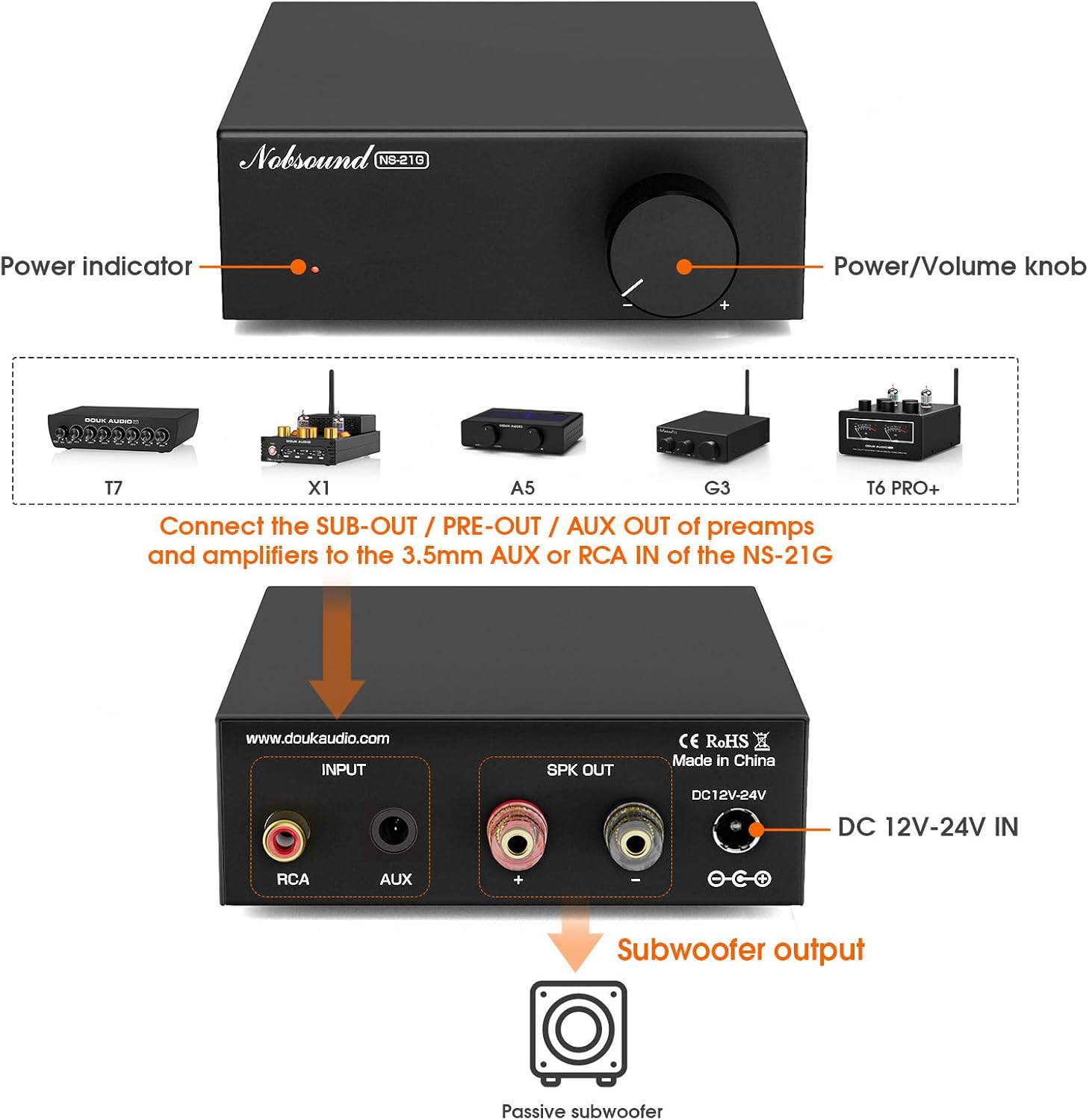
그림 4: 전면 및 후면 패널view.
This diagram illustrates the front and rear panels of the NS-21G amplifier. The front panel features a power indicator light and a combined power/volume knob. The rear panel includes RCA input, AUX 3.5mm input, subwoofer output terminals, and a DC 12V-24V power input.
전면 패널:
- 전원 표시기: 다음과 같은 경우에 켜집니다. amp리파이어의 전원이 켜져 있습니다.
- 전원/볼륨 손잡이: 제어 amplifier's power (press to toggle) and adjusts the subwoofer output volume.
후면 패널 :
- RCA 입력: For connecting audio sources via RCA cables.
- AUX 3.5mm 입력: 3.5mm 오디오 케이블을 통해 오디오 소스를 연결하는 데 사용합니다.
- 서브우퍼 출력: 패시브 서브우퍼에 연결됩니다.
- DC 12V-24V IN: Power input for the included DC power supply.
5. 설정 및 연결
Follow these steps to connect your NS-21G amp오디오 시스템에 적합합니다.
- 오디오 소스 연결: Choose either the RCA input or the 3.5mm AUX input on the rear panel. Connect your audio source (e.g., TV, PC, smartphone) to the selected input. Important: Only connect one input (RCA or AUX) at a time. Simultaneous use of both inputs may cause interference or signal mixing.
- 서브우퍼 연결: Connect your passive subwoofer to the "Subwoofer output" terminals on the rear panel. Ensure correct polarity (+ to + and - to -).
- 전원 연결: Plug the included 19V DC power supply into the "DC 12V-24V IN" port on the rear panel, then plug the power supply into a wall outlet.
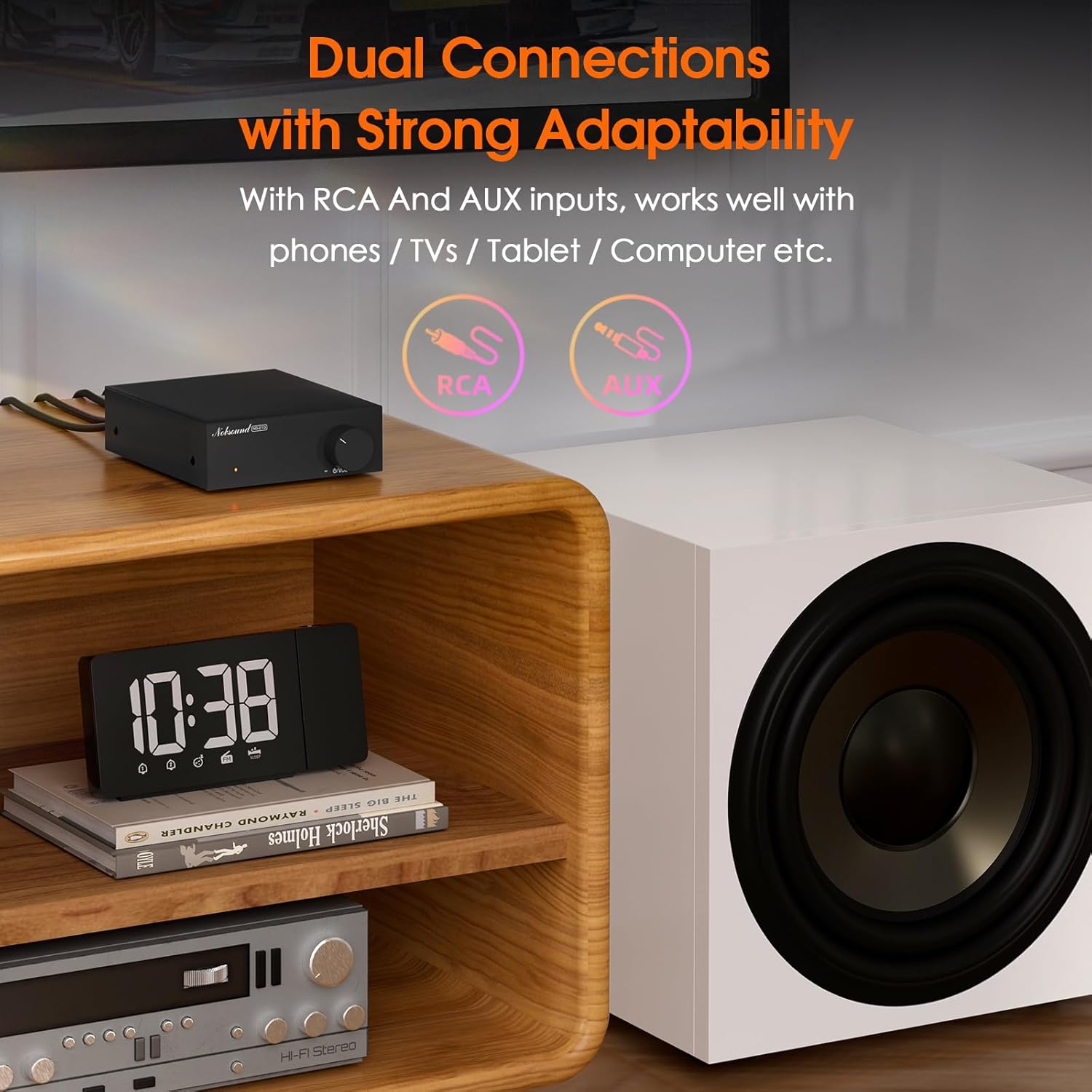
Figure 5: Dual Input Connections.
This image illustrates the RCA and AUX 3.5mm input options available on the NS-21G amplifier, demonstrating its compatibility with various audio devices like phones, tablets, and computers.
6. 운영
- 전원 켜기/끄기: Press the Power/Volume knob on the front panel to turn the amplifier on or off. The power indicator will illuminate when on.
- 볼륨 조절: Rotate the Power/Volume knob clockwise to increase the subwoofer volume and counter-clockwise to decrease it.
- Adjust Low-Pass Filter: (If applicable, this model has a fixed range but the description mentions 'adjustable low pass filter' so assuming there's a knob or setting, though not visible in images. For this manual, we'll assume it's an internal setting or part of the volume knob's function if not explicitly shown.) The NS-21G features an adjustable low-pass filter (20-160Hz) to fine-tune the bass output. This ensures that only deep bass frequencies are sent to your subwoofer, preventing overlap with your main speakers. Adjust this setting to achieve your desired bass response.

Figure 6: Power and Volume Knob.
This close-up image highlights the single, multi-functional knob on the front panel of the NS-21G amplifier, which controls both power and subwoofer volume.
7. 사양
| 특징 | 사양 |
|---|---|
| 상표 | 놉 사운드 |
| 모델 | NS-21G |
| 오디오 입력 | RCA / AUX 3.5mm |
| 오디오 출력 | 서브우퍼 출력 |
| 채널 수 | 단핵증 |
| Amp리퍼 칩 | TPA3116 |
| 운영 Amp리퍼 | 네브5532 |
| 정격 전력 | 100와트 |
| THD+B | 0.04% |
| 신호대잡음비 | ≥ 103dB |
| Bass Limit Frequency | 20~160Hz |
| RCA 입력 감도 | 0.775V |
| Suitable Speaker Impedance | 4-8Ω |
| 운영 볼륨tage | DC 12-24V (5.5 x 2.5mm) |
| 치수(길이 x 너비 x 높이) | 90 x 105 x 30mm |
| 순중량 | 325g(0.72파운드) |
| 패키지 무게 | 700g(1.54파운드) |
8. 문제 해결
문제가 발생하면 다음의 일반적인 문제와 해결 방법을 참조하세요.
- 사운드 출력 없음:
- 확인하십시오 amp앰프 전원이 켜져 있고 전원 표시등이 켜져 있습니다.
- Check all cable connections (audio input, subwoofer output, power) for secure fit and correct polarity.
- Verify that only one audio input (RCA or AUX) is connected at a time.
- Confirm the volume knob is turned up.
- Test with a different audio source or subwoofer to isolate the problem.
- 왜곡된 소리:
- 오디오 소스의 입력 볼륨을 줄이세요.
- 스피커 임피던스가 일치하는지 확인하십시오. amp앰프 사양 (4-8Ω).
- 케이블이 헐거워지거나 손상된 부분이 있는지 확인하십시오.
- Interference/Humming Noise:
- Ensure only one audio input is connected.
- 이동하다 amp앰프는 간섭을 일으킬 수 있는 다른 전자 기기에서 멀리 떨어뜨려 놓으십시오.
- 연결된 모든 장비의 접지 상태를 확인하십시오.
9. 유지관리
To ensure the longevity and optimal performance of your NS-21G amplifier의 경우 다음 유지 관리 지침을 따르세요.
- 청소: 부드럽고 마른 천을 사용하여 제품 외부를 닦으십시오. amp증폭기. 액체 세척제나 용제는 마감재나 내부 부품을 손상시킬 수 있으므로 사용하지 마십시오.
- 통풍: 확인하십시오 amp증폭기는 통풍이 잘 되는 곳에 설치하십시오. 통풍구를 막지 마십시오.
- 저장: 장기간 사용하지 않을 경우 보관하세요 amp증폭기는 직사광선과 극한 온도 변화를 피해 서늘하고 건조한 곳에 보관하십시오.
- 전원 끄기 : 항상 전원을 끄세요 amplifier and disconnect it from the power source before cleaning or performing any maintenance.
10. 안전 정보
다음 안전 수칙을 읽고 준수해 주십시오.
- Do not expose this device to rain, moisture, dripping, or splashing.
- 기기 위에 꽃병과 같이 액체가 담긴 물건을 올려 놓지 마세요.
- Ensure proper ventilation. Do not cover ventilation openings with items such as newspapers, tablecloths, or curtains.
- Do not place naked flame sources, such as lit candles, on the device.
- 제조사가 지정한 부속품/액세서리만 사용하세요.
- 모든 서비스는 자격을 갖춘 서비스 담당자에게 의뢰하십시오. 전원 코드나 플러그가 손상되었거나, 액체가 쏟아졌거나, 물체가 기기에 떨어졌거나, 기기가 비나 습기에 노출되었거나, 정상적으로 작동하지 않거나, 떨어졌을 때와 같이 기기가 어떤 식으로든 손상된 경우 서비스가 필요합니다.
11. 보증 및 지원
Nobsound products are designed for reliability and performance. For warranty information or technical support, please refer to the documentation included with your purchase or visit the official Nobsound web사이트. 보증 청구를 위해 구매 증빙 자료로 구매 영수증을 보관하세요.