
소개
The COLMI R12 Smart Ring is a wearable device designed to monitor various health metrics and provide convenient smart features. This manual provides instructions for setting up, operating, and maintaining your smart ring.

Image: The COLMI R12 Smart Ring, available in different finishes, showcasin세련된 디자인과 통합 디스플레이가 특징입니다.
1. 설정
1.1 올바른 사이즈 선택하기
구매 전asing or using your COLMI R12 Smart Ring, it is recommended to determine your correct ring size for optimal comfort and accurate data collection. A sizing kit can assist in this process.
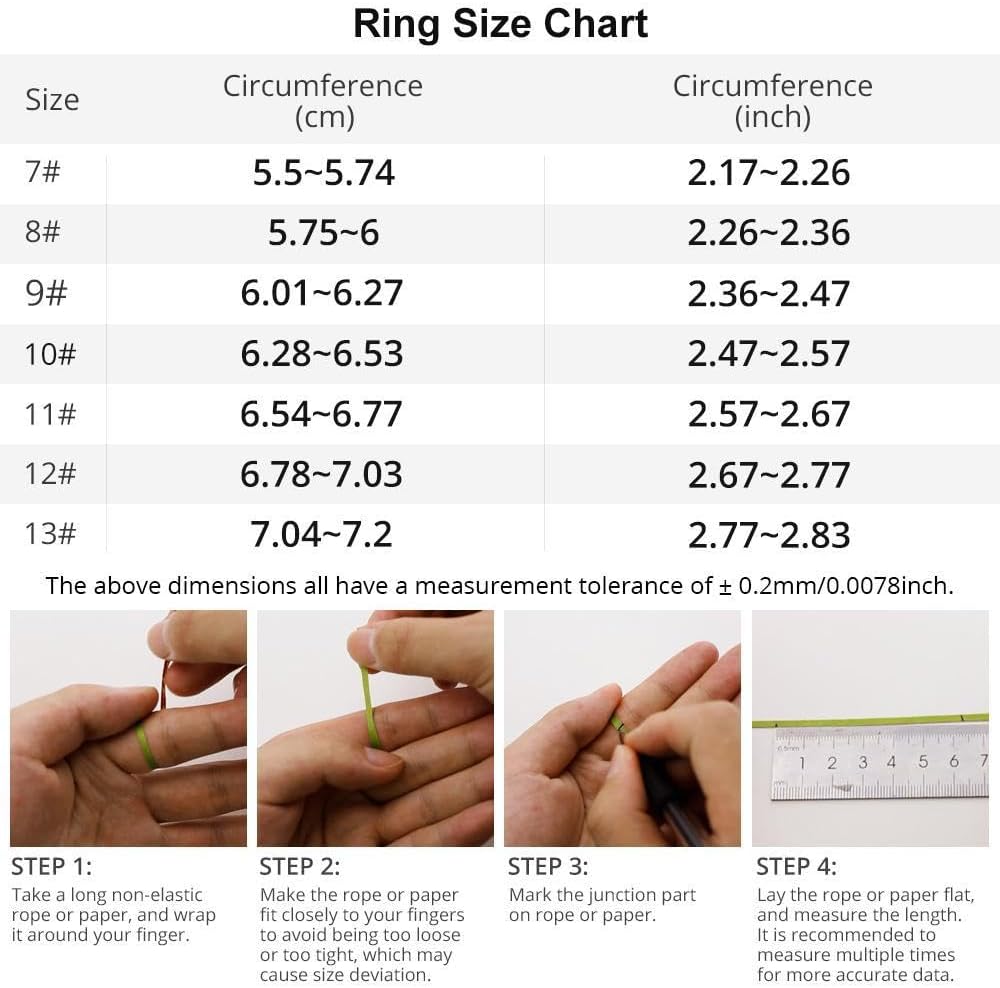
Image: A ring size chart displaying circumference measurements in centimeters and inches, along with a four-step guide on how to measure your finger using a rope or paper.
1.2 앱 다운로드 및 페어링
To utilize all features of the COLMI R12 Smart Ring, download the companion application, typically referred to as the "Q Ring" app, from your smartphone's app store (compatible with Android and iOS). Follow the in-app instructions to pair your smart ring with your mobile device via Bluetooth.

이미지: COLMI R12 스마트 링 설정의 네 단계를 보여주는 시각적 가이드(구매 포함)asing a sizing kit, selecting the ring, downloading the 'Q Ring' app, and pairing the device.
2. 사용 설명서
2.1 다기능 디스플레이
The COLMI R12 Smart Ring features a touch-sensitive display that allows you to quickly check essential information without needing your phone or watch. You can view the current time, daily steps, and battery level directly on the ring.

Image: The COLMI R12 Smart Ring displaying various metrics such as steps, power, and time on its integrated screen.
2.2 상태 모니터링
The smart ring supports continuous health monitoring through its integrated sensors. Data is recorded and can be view자세한 내용은 동반 앱에서 확인하세요.
- 심박수: Monitors your heart rate throughout the day. You can manually check your heart rate at any time via the app.
- 혈중 산소: 혈중 산소 포화도를 측정합니다.
- 수면 추적: Analyzes your sleep patterns, including awake time, light sleep, and deep sleep duration, to help you understand and improve your sleep quality.

Image: Visual representations of health data, including heart rate trends, sleep stages (wake up, REM, light, deep sleep), and blood oxygen levels, as displayed in the companion app.

Image: A screenshot of the app's heart rate monitoring feature, showing real-time heart rate data and historical trends.

Image: The sleep monitoring screen within the app, displaying total awake time, light sleep duration, and deep sleep duration.
2.3가지 스포츠 모드
When connected to the app, the COLMI R12 Smart Ring supports multiple sports modes. It can record various exercise data, including exercise time, steps, distance, and calories burned, providing a comprehensive overview of your physical activity.

Image: The app's activity statistics interface, visualizing daily, weekly, and monthly data for total steps, distance, and calories consumed.
2.4 원격 카메라 제어
When the smart ring is connected to your mobile phone, you can use a hand gesture to remotely control your phone's camera, allowing you to capture photos conveniently.

Image: A person demonstrating the smart fingertip control feature, using the ring to remotely trigger a smartphone camera.
3. 유지관리
3.1 충전 중
The COLMI R12 Smart Ring is equipped with wireless charging capabilities. Use the dedicated charging stand and charging cable provided to power your device. Ensure the ring is correctly placed on the stand for efficient charging.

Image: The COLMI R12 Smart Ring placed on its dedicated wireless charging stand, indicating the charging process.
3.2 방수성
The COLMI R12 Smart Ring features 1ATM water resistance. While it can withstand splashes and brief exposure to water, it is not recommended to expose the product to water for extended periods or during activities like swimming or showering. If the device comes into contact with water, dry it immediately.
4. 문제 해결
- 배터리 수명이 짧음: If the ring's battery drains quickly (e.g., within one day), ensure it is fully charged using the provided charging stand. Minimize continuous background app usage if not needed.
- Inaccurate Readings or Malfunctions: If the ring provides inconsistent data or stops functioning correctly after a period, try restarting the device by placing it on the charger. Ensure the app is updated to the latest version. If issues persist, contact customer support.
- 연결 문제: Ensure Bluetooth is enabled on your smartphone and the ring is within range. Try unpairing and re-pairing the device if connection problems occur.
5. 사양
| 특징 | 세부 사항 |
|---|---|
| 모델 번호 | 콜미 R12 |
| 품목 무게 | 100그램(3.53온스) |
| 배터리 용량 | 18밀리amp 시간 |
| 배터리 유형 | Lithium Polymer (Nonstandard Battery) |
| 연결 기술 | 블루투스 |
| 무선 통신 표준 | 블루투스 |
| 운영 체제 호환성 | 안드로이드, iOS |
| 메모리 저장 용량 | 1메가바이트 |
| 특별 기능 | 사진 촬영 제어, 다양한 스포츠 모드, 운동 데이터 기록 |
| GPS | GPS 없음 |
| 모양 | 둥근 |
6. 보증 및 지원
6.1 보증 정보
The COLMI R12 Smart Ring comes with a manufacturer's warranty. Please refer to the packaging or the official COLMI web구체적인 보증 약관은 해당 사이트에서 확인하세요.
6.2 고객 지원
For any usage questions, quality problems, or technical assistance, please contact COLMI's professional after-sales service. Contact details can typically be found on the product packaging, the official COLMI web사이트나 소매업체를 통해 구매할 수 있습니다.
액세서리 목록:
- 1 x COLMI R12 Smart Ring
- 1 x Portable Charging Stand
- 1 x 충전 케이블
- 1 x 사용 설명서