
1. 제품 오버view
The NUTOMO Smart Lock is a keyless entry door lock system designed for enhanced home security and convenience. It integrates multiple access methods including fingerprint recognition, digital keypad passcodes, and IC cards, alongside traditional physical keys. This lock is engineered for durability and ease of use, providing a reliable security solution without requiring an app or Wi-Fi connection.
주요 특징:
- 다양한 입력 옵션: Supports up to 100 fingerprints, 150 passcodes, and includes 2 IC cards and 2 physical keys for versatile access.
- 향상된 내구성: Constructed with high-quality aluminum alloy, designed to resist common issues such as motor failures and handle breakage.
- Advanced Security Cylinder: Features an upgraded lock cylinder with anti-violent unlocking, foreign object prevention, and anti-picking mechanisms.
- Rapid Fingerprint Recognition: Unlocks in approximately 1 second with a recognition speed of 0.3 seconds.
- 긴 배터리 수명: Powered by 4 AA batteries (not included) providing up to 8 months of operation, with a low battery warning system.
- Backlit Touch Keypad: Ensures clear visibility and accurate entry in low-light conditions, featuring anti-peeping and password protection settings.
- 간편한 설치: Designed for quick installation, typically within 15 minutes, fitting most US standard doors with adjustable design for existing holes.

Image 1.1: Complete set of NUTOMO Smart Lock components, including the exterior handle, interior deadbolt, keypad, and accompanying keys and IC cards.

이미지 1.2: 상세 view of the upgraded anti-pick lock cylinder, illustrating its internal mechanisms designed for enhanced security against forced entry and lock picking.
2. 제품 구성품
설치를 시작하기 전에 아래 나열된 모든 구성 요소가 패키지에 들어 있는지 확인하세요.
- Exterior Lock Assembly (Keypad with Handle)
- Interior Lock Assembly (Battery Cover and Thumb Turn)
- Latch/Deadbolt Mechanism
- 장착 플레이트
- 타격판 및 먼지통
- 나사(다양한 구성 요소에 대해 다양한 크기)
- 2개의 물리적 키
- IC 카드 2개
- 사용자 설명서
- 설치 템플릿
3. 설치 가이드
Follow these steps carefully to install your NUTOMO Smart Lock. A Phillips head screwdriver is typically the only tool required.
3.1. 설치 전 점검
Ensure your door dimensions are compatible with the lock. The lock fits doors between 1-3/8" (35mm) and 2.17" (55mm) thick. Verify the backset (distance from door edge to center of bore hole) is either 2-3/8" (60mm) or 2-3/4" (70mm).
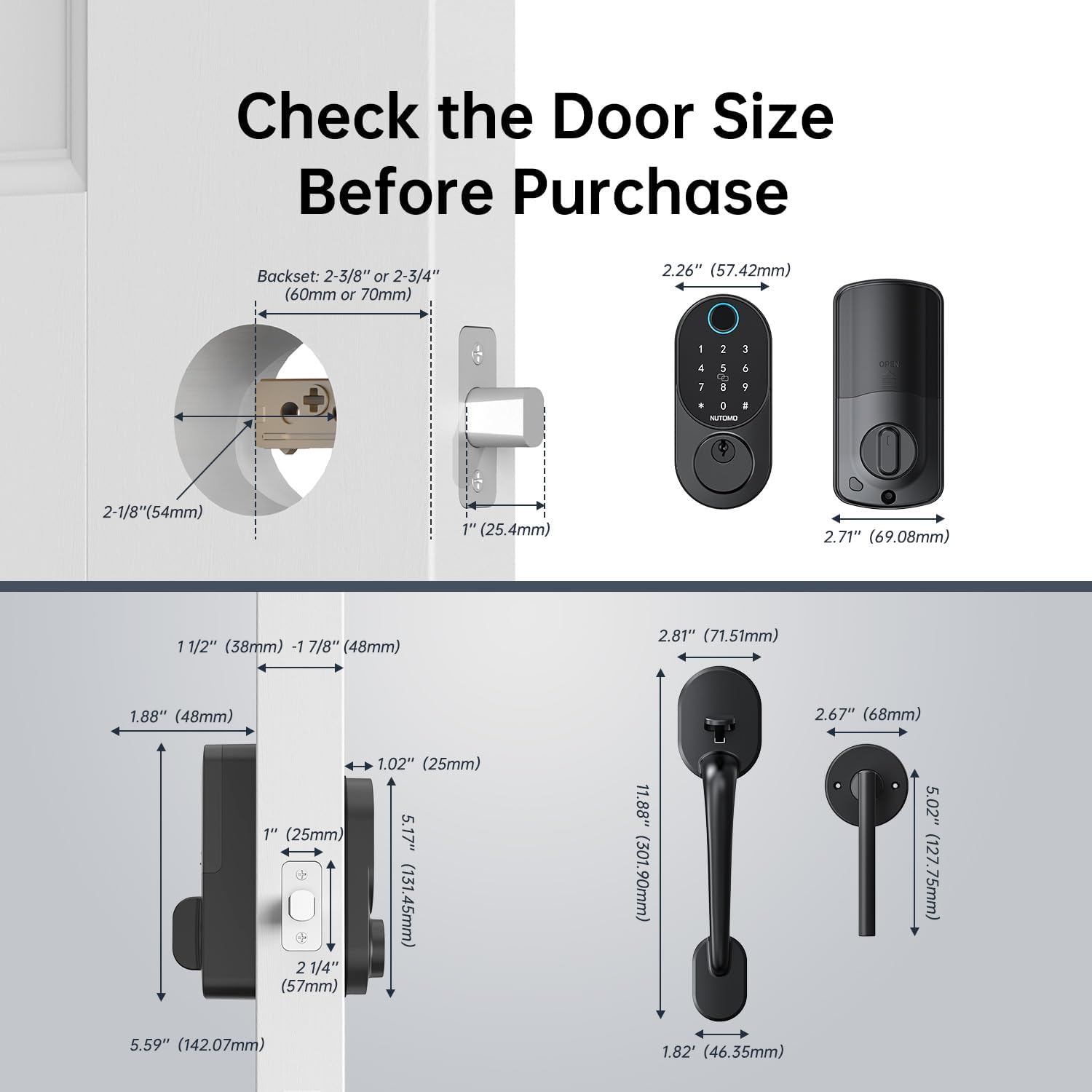
Image 3.1: Diagram illustrating critical door measurements (thickness, backset, bore hole diameter) and corresponding lock dimensions to ensure compatibility before installation.
3.2. 단계별 설치
Refer to the provided installation template for accurate drilling if necessary. For existing doors, align components with pre-drilled holes.
- Step 1: Install the Bolt. Insert the deadbolt latch into the door edge. Ensure the latch bolt is oriented correctly for your door's swing.
- Step 2: Install the Keypad. Feed the cable from the exterior keypad through the bore hole. Position the keypad assembly on the exterior side of the door.
- Step 3: Install the Mounting Plate. Secure the interior mounting plate to the exterior keypad assembly using the provided screws, ensuring the cable passes through the plate.
- Step 4: Connect the Cable. 외부 키패드에서 나오는 케이블을 내부 잠금 장치에 연결하십시오.
- Step 5: Install the Back Lock. Attach the interior lock assembly to the mounting plate, aligning it properly with the deadbolt mechanism.
- Step 6: Install Batteries and Cover. Insert 4 AA batteries (not included) into the battery compartment of the interior assembly. Secure the battery cover.

Image 3.2: A visual guide detailing the six primary steps for installing the NUTOMO Smart Lock, from bolt insertion to battery installation.
Video 3.1: Official installation video for the NUTOMO Smart Lock, demonstrating the complete setup process from start to finish.
4. 운영
The NUTOMO Smart Lock offers multiple convenient ways to secure and access your property.
4.1. Adding/Managing Fingerprints
The lock supports up to 100 unique fingerprints. Follow the instructions in the quick start guide (usually included with the lock) to enroll new fingerprints. Ensure your finger covers the entire sensor for accurate recognition.

Image 4.1: A user interacting with the smart lock's fingerprint sensor, demonstrating the biometric recognition feature for quick access.
4.2. Adding/Managing Passcodes
You can store up to 150 passcodes. When entering a passcode, the anti-peeping feature allows you to input random digits before or after your actual code to prevent others from guessing it. For example, if your code is 123456, you can enter ****123456****.

Image 4.2: Visual representation of the anti-peeping passcode function, demonstrating how to embed the correct passcode within a sequence of random digits for enhanced security.
4.3. Using IC Cards
The lock comes with 2 IC cards for convenient tap-to-unlock access. Simply present the IC card to the designated area on the lock to unlock the door.
4.4. 자동 잠금 기능
The smart lock features an auto-lock function that automatically locks the door after a set period (typically 5-900 seconds) once it has been unlocked. This prevents accidental unlocking or forgetting to lock the door.

Image 4.3: Illustration of the auto-lock feature, highlighting its ability to automatically secure the door after a user-defined delay, preventing accidental unlocks.
4.5. Manual Key Override
In case of battery depletion or electronic malfunction, the lock can always be opened using the provided physical keys. The keyhole is located discreetly on the exterior keypad assembly.

Image 4.4: The smart lock featuring a Type-C USB port for emergency charging and the inclusion of physical keys for manual override, ensuring access even if batteries are depleted.
5. 유지관리
Proper maintenance ensures the longevity and optimal performance of your NUTOMO Smart Lock.
5.1. 배터리 교체
The lock is powered by 4 AA batteries (not included). It features a low battery warning system that will alert you when the batteries need replacement. Replace all four batteries simultaneously with new, high-quality alkaline AA batteries for best performance. Do not mix old and new batteries or different battery types.
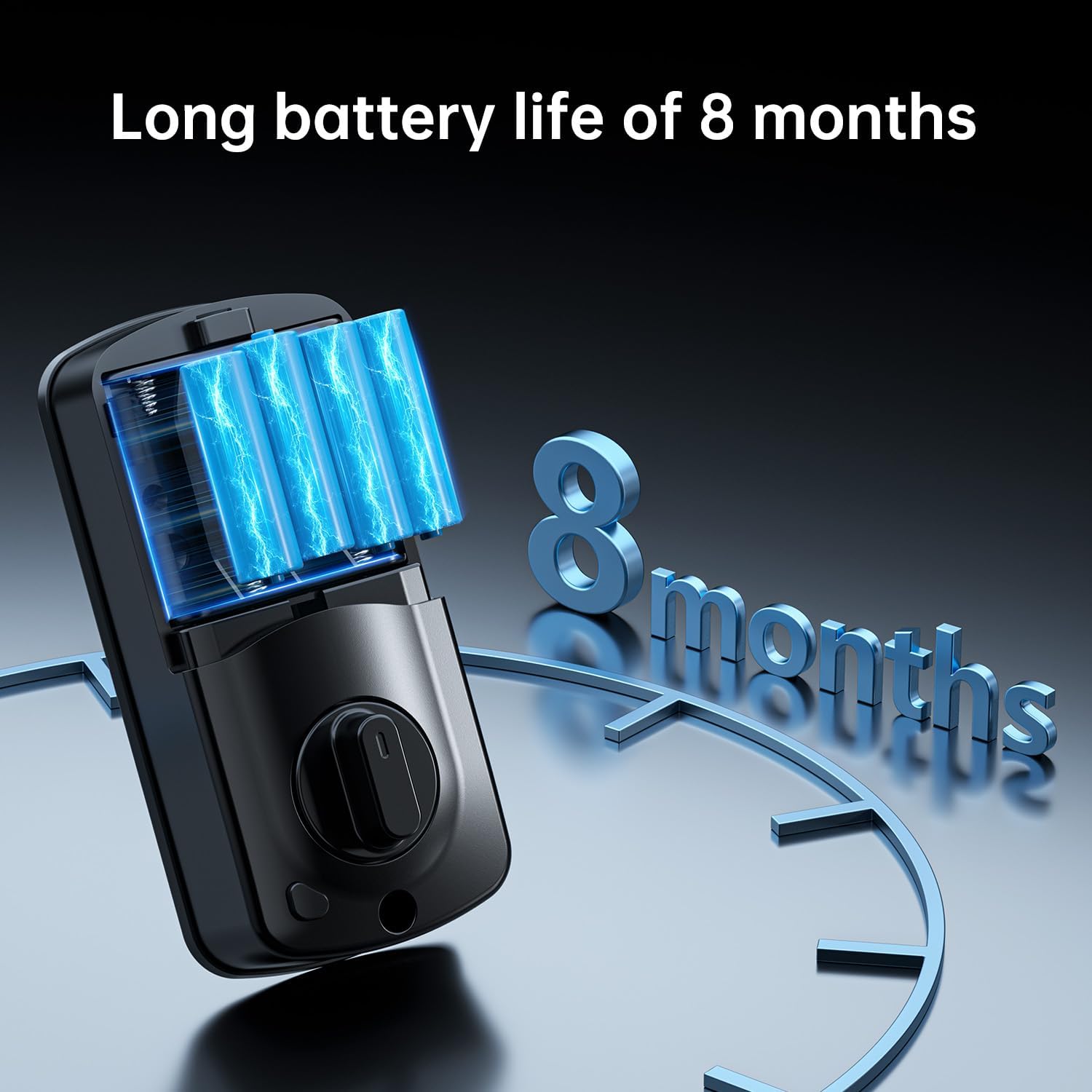
Image 5.1: Illustration of the smart lock's battery compartment, emphasizing its long battery life of up to 8 months with 4 AA batteries.
5.2. 청소
자물쇠의 외부 표면을 부드러운 천으로 닦으세요.amp cloth. Avoid using abrasive cleaners, solvents, or harsh chemicals, as these can damage the finish and electronic components. Regularly wipe the fingerprint sensor to ensure accurate readings.
6. 문제 해결
If you encounter issues with your NUTOMO Smart Lock, refer to the common problems and solutions below.
6.1. 지문 인식 불가
- 손가락이 깨끗하고 건조한지 확인하세요.
- Cover the entire fingerprint sensor area.
- Try re-enrolling your fingerprint if the issue persists.
6.2. Keypad Unresponsive
- 배터리 잔량을 확인하고 필요한 경우 교체하십시오.
- 키패드가 깨끗하고 이물질이 없는지 확인하십시오.
- If completely unresponsive, use the physical key or emergency Type-C power.
6.3. Lock Not Engaging/Disengaging
- Verify that the door frame and strike plate are properly aligned.
- Check for any obstructions preventing the deadbolt from extending fully.
- Ensure the interior thumb turn operates smoothly.
6.4. Anti-Theft Lockout
If incorrect passcodes, fingerprints, or IC cards are used consecutively for 5 times, the system will lock down for 2 minutes. To reset, power off the lock for more than 3 seconds and then power it back on.

Image 6.1: Depiction of the anti-theft locking mechanism, which activates after multiple failed entry attempts, temporarily disabling the lock to deter unauthorized access.
7. 사양
| 특징 | 세부 사항 |
|---|---|
| 상표 | 누토모 |
| 모델명 | Smart door lock |
| 품목 모델 번호 | US-Y2-BSHS-NUT |
| 잠금 유형 | 데드볼트, 키패드 |
| 특별 기능 | Anti-Peeping Password, Auto-Lock, Electronic Keypad Deadbolt, Fingerprint, One-Touch Lock |
| 색상 | 매트블랙 |
| 재료 | 고품질 알루미늄 합금 |
| 품목 치수(L x W x H) | 14 x 10 x 3 인치 |
| 품목 무게 | 4.5파운드 |
| 전원 | AA 배터리 4개(포함되지 않음) |
| 배터리 수명 | 최대 8개월 |
| 지문 용량 | 최대 100개 |
| 비밀번호 용량 | 최대 150개 |
| 도어 두께 호환성 | 1-3/8인치(35mm) ~ 2.17인치(55mm) |
| 작동 온도 | -4°F ~ +158°F(-20°C ~ +70°C) |
| 방수 등급 | IP54 |

Image 7.1: The NUTOMO Smart Lock demonstrating its IP54 waterproof rating and ability to withstand extreme temperatures, from -4°F to +158°F.
8. 보증 및 지원
NUTOMO is committed to providing reliable products and excellent customer service.
8.1. 보증 정보
Your NUTOMO Smart Lock comes with a 1년 무료 교체 보증 구매일로부터 적용됩니다. 이 보증은 제조상의 결함을 보장하며, 정상적인 사용 환경에서 제품이 의도한 대로 작동함을 보장합니다.
8.2. 고객 지원
For any questions, technical assistance, or warranty claims, please contact NUTOMO customer service:
- Online Email Support: Available for detailed inquiries and troubleshooting.
- Phone Call Assistance: For immediate support.
- Lifetime Troubleshooting Support: NUTOMO provides ongoing technical support for the lifetime of the product.
또한, 30-day Free Return & Exchange policy is available for your convenience.


