
소개
The ATK VXE Dragonfly R1 Wireless Gaming Mouse is engineered for high-performance gaming, offering a lightweight design, advanced sensor technology, and versatile connectivity. This manual provides detailed instructions for setting up, operating, and maintaining your R1 gaming mouse to ensure optimal performance.

이미지: 상단 view of the ATK VXE Dragonfly R1 Wireless Gaming Mouse in black, showcasin인체공학적인 모양과 버튼 배치 때문입니다.
패키지 내용
패키지에 모든 품목이 들어 있는지 확인하세요.
- ATK VXE Dragonfly R1 Wireless Gaming Mouse
- USB-C 충전/데이터 케이블
- 2.4GHz 무선 수신기(USB 동글)
- 사용 설명서 (본 문서)
- Nonstandard Battery (pre-installed)
설정
1. 마우스 충전
Before first use, it is recommended to fully charge the mouse. Connect the supplied USB-C cable to the mouse's charging port and the other end to a USB power source (e.g., computer USB port, USB wall adapter).
2. 연결 옵션
The ATK VXE Dragonfly R1 supports multiple connection modes:
- 2.4GHz 무선: For optimal gaming performance. Insert the 2.4GHz USB receiver into an available USB port on your computer. The mouse should automatically connect.
- 블루투스: For general use and compatibility with various devices. Activate Bluetooth pairing mode on the mouse (refer to operating instructions for specific button combinations) and select "ATK VXE R1" from your device's Bluetooth settings.
- 유선(USB-C): USB-C 케이블을 사용하여 마우스를 컴퓨터에 직접 연결하세요. 이 모드에서는 마우스도 충전됩니다.

Image: Diagram illustrating the Tri-Mode connectivity options: Bluetooth, 2.4GHz wireless, and wired USB-C connection for the ATK VXE Dragonfly R1 mouse.
작동 지침
1. 전원 켜기/끄기
Locate the power switch on the underside of the mouse. Slide it to the "ON" position to power on and "OFF" to power off.
2. DPI 조정
The mouse features adjustable DPI settings. Press the DPI button (usually located on the underside or top of the mouse, depending on the model) to cycle through preset DPI levels. An indicator light may change color to show the current DPI setting.
3. Programmable Macro Keys
The ATK VXE Dragonfly R1 includes programmable macro keys. To customize these keys, download and install the official ATKGEAR software from the manufacturer's website. The software allows you to assign functions, macros, and adjust other mouse settings.
주요 특징
- Lightweight Design (48g): The R1 mouse is designed for agility and comfort during extended gaming sessions.
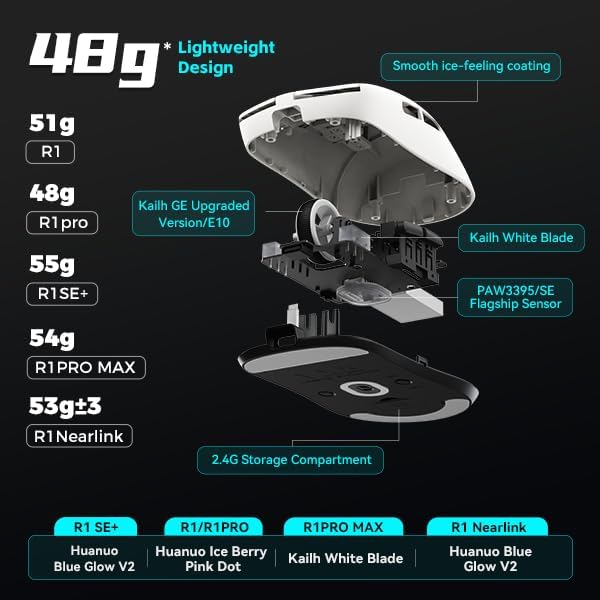
이미지: 폭발 view of the ATK VXE Dragonfly R1 mouse highlighting its lightweight internal components and showing weight comparisons for different R1 series models.
- PAW3395/SE Flagship Sensor: Equipped with a high-end optical sensor for precise tracking and accuracy, essential for competitive gaming.
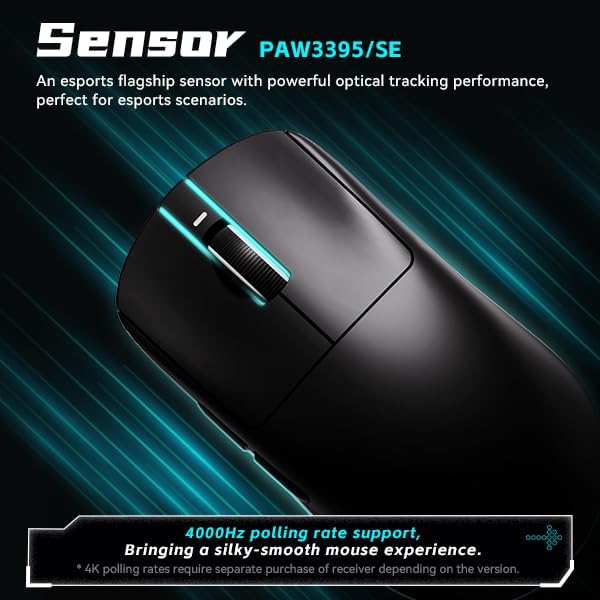
Image: Close-up of the ATK VXE Dragonfly R1 mouse, emphasizing the PAW3395/SE sensor and indicating 4000Hz polling rate support.
- Smart Speed X Transmission Technology: VXE's proprietary wireless technology ensures ultra-low latency and enhanced signal stability, even in environments with interference.

Image: Depiction of the ATK VXE Dragonfly R1 mouse with text highlighting "Smart Speed X" wireless transmission technology for low latency.
- Nordic/BEKEN(compx)/Hisilicon Nearlink MCU: Features a flagship-level chip for powerful performance, low power consumption, and improved interference resistance.

Image: Graphic showing the ATK VXE Dragonfly R1 mouse and its MCU, emphasizing 4K polling rate capability for both office and gaming.
- ATK Micro Switches (Kailh White Blade / Ice Berry Pink Dot): Designed for a consistent click feel and long lifespan.
- Kailh White Blade: 100 Million Click Lifespan, balanced feel.
- Ice Berry Pink Dot: 90 Million Click Lifespan, soft bounce feel.

Image: Detailed illustration comparing Kailh White Blade and Ice Berry Pink Dot micro switches, showing their click lifespan and feel characteristics.
- 매끄럽고 시원한 느낌의 코팅: A dirt-resistant and easy-to-clean surface that provides a comfortable and grippy feel.

Image: Visual representation of the smooth ice-feeling coating on the ATK VXE Dragonfly R1 mouse, contrasting smooth and matte textures available on different R1 series models.
유지
- 청소: 부드럽고 마른 천을 사용하여 마우스 표면을 닦으세요. 잘 지워지지 않는 오염의 경우, 약간amp cloth with mild soap can be used, ensuring no liquid enters the mouse. The "Ice-Feel" coating is designed to be dirt-resistant and easy to clean.
- 배터리 관리 : 배터리 수명을 연장하려면 마우스를 자주 완전히 방전시키지 마십시오. 배터리 잔량 표시등이 낮아지면 마우스를 충전하십시오. 장기간 사용하지 않을 때는 마우스를 서늘하고 건조한 곳에 보관하십시오.
- 센서 유지 보수: 정확한 트래킹을 위해 마우스 아랫면의 광학 센서를 깨끗하게 유지하고 먼지나 이물질이 끼지 않도록 하십시오.
문제 해결
- 마우스가 응답하지 않습니다.
- 마우스의 전원이 켜져 있는지 확인하세요.
- 배터리 수준을 확인하고 필요한 경우 충전하세요.
- For 2.4GHz wireless, ensure the USB receiver is securely plugged in and within range.
- Bluetooth의 경우, 장치에서 Bluetooth가 활성화되어 있고 마우스가 페어링되어 있는지 확인하세요.
- 무선 문제를 배제하려면 USB-C 케이블을 통해 연결해보세요.
- 일관되지 않은 추적:
- 마우스 밑면의 광학 센서를 청소하세요.
- 마우스를 적합한 표면(예: 마우스 패드)에서 사용하고 있는지 확인하세요.
- Check for software updates for the mouse driver or ATKGEAR software.
- 연결 문제:
- Move the mouse closer to the 2.4GHz receiver or Bluetooth device.
- Avoid sources of strong electromagnetic interference (e.g., Wi-Fi routers, other wireless devices).
- Re-pair the Bluetooth connection or re-insert the 2.4GHz receiver.
명세서
| 특징 | 세부 사항 |
|---|---|
| 모델 | R1 |
| 치수 | 6.3 x 4.72 x 2.36인치(패키지) |
| 품목 무게 | 7 ounces (approx. 48g for mouse only) |
| 감지기 | PAW3395/SE 광학 |
| 연결성 | 블루투스, 2.4GHz 무선, USB-C 유선 |
| 폴링 속도 | Up to 4000Hz (requires separate receiver for some versions) |
| 마이크로 스위치 | Kailh White Blade (100M clicks) / Ice Berry Pink Dot (90M clicks) |
| 코팅 | 부드럽고 시원한 느낌 |
| 배터리 | 비표준 배터리(포함) |
| 제조업체 | ATKGEAR |

Image: Detailed table outlining specifications for various models within the VXE Dragonfly R1 series, including dimensions, coating, sensor, chip, polling rate, battery life, weight, microswitches, scroll wheel, mouse feet, and connection methods.
보증 및 지원
For warranty information and technical support, please refer to the official ATKGEAR website or contact their customer service. Specific warranty terms may vary by region and retailer. Keep your proof of purchase for warranty claims.
Manufacturer: ATKGEAR