
1. 서론
Thank you for choosing the ATKGEAR VXE MAD R Ultra-Lightweight Wireless Gaming Mouse. This manual provides detailed instructions for setting up, operating, maintaining, and troubleshooting your device. The VXE MAD R is engineered for high-performance gaming, featuring an ultra-lightweight design, advanced optical sensors, and flexible connectivity options to enhance your gaming experience.

이미지 1.1: 상단 view of the ATKGEAR VXE MAD R Wireless Gaming Mouse. This image displays the mouse's ergonomic shape, scroll wheel, and primary buttons.
2. 패키지 내용
패키지에 모든 품목이 들어 있는지 확인하세요.
- ATKGEAR VXE MAD R Wireless Gaming Mouse
- USB-C-USB-A 충전/데이터 케이블
- 2.4 GHz Wireless Dongle (8K Polling Rate compatible)
- 사용자 설명서

Image 2.1: The 8K wireless dongle included with the VXE MAD R mouse. This dongle enables high-speed wireless connectivity.
3. 설정 가이드
3.1 마우스 충전
Before initial use, it is recommended to fully charge the mouse. Connect the supplied USB-C cable to the mouse's front port and the USB-A end to an available USB port on your computer or a USB wall adapter. The mouse's indicator light will show charging status.
3.2 유선 모드 연결
To use the mouse in wired mode, simply connect the USB-C cable from the mouse to your computer's USB-A port. The mouse will automatically switch to wired mode and begin charging.
3.3GHz 및 2.4GHz 무선 모드 연결
- 2.4GHz 무선 동글을 컴퓨터의 사용 가능한 USB-A 포트에 삽입하십시오.
- 장치 하단에 있는 전원 스위치를 사용하여 마우스를 켜십시오.
- 마우스는 동글에 자동으로 연결되어야 합니다. 연결이 설정되지 않으면 문제 해결 섹션을 참조하십시오.
3.4 Software Installation (ATK V-Hub)
For full customization and advanced features, download and install the ATK V-Hub software. This software is available as a desktop application and a web-based interface. Visit the official ATKGEAR website for download links and instructions.

Image 3.1: Screenshot of the ATK V-Hub software interface, demonstrating options for customizing mouse settings.
4. 사용 설명서
4.1 기본 기능
- 좌 클릭: 기본 작업 버튼.
- 마우스 오른쪽 버튼으로 클릭: 일반적으로 상황에 맞는 메뉴에 사용되는 보조 작업 버튼입니다.
- 스크롤 휠: For vertical scrolling. Can also be pressed for a middle-click function.
- 측면 버튼: Programmable buttons, typically used for forward/back navigation by default.
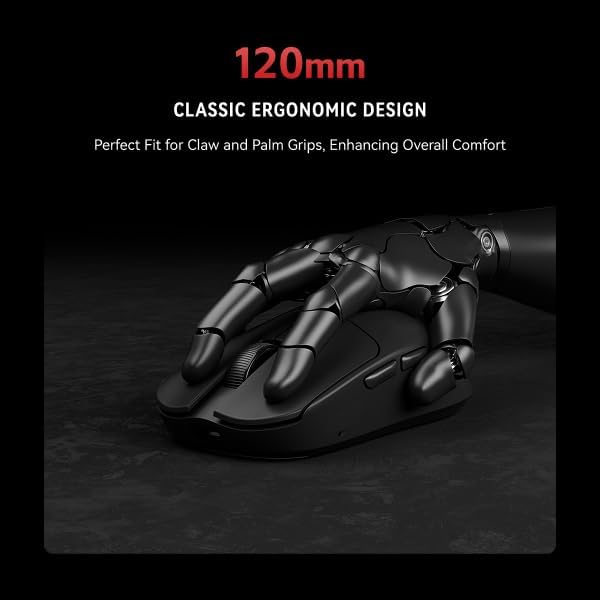
Image 4.1: The ATKGEAR VXE MAD R mouse held in a hand, illustrating its ergonomic design suitable for various grip styles.
4.2 DPI 조정
The mouse features a high-precision optical sensor (PAW3395/PAW3950) with adjustable DPI settings up to 26,000. DPI settings can be customized and switched via the ATK V-Hub software. The mouse may have a dedicated DPI cycle button, which can also be configured in the software.

이미지 4.2: 클로즈업 view of the Pixart PAW3395/3950 optical sensor, highlighting its precision tracking capabilities.
4.3 폴링 속도 조정
The VXE MAD R supports a 1KHz polling rate in wired mode and up to an 8KHz polling rate in 2.4 GHz wireless mode. The polling rate can be adjusted through the ATK V-Hub software to suit your preferences and system capabilities.
4.4 배터리 표시등
The mouse features an LED indicator that displays battery status. Refer to the ATK V-Hub software for detailed battery percentage 및 배터리 부족 경고.
5. Customization with ATK V-Hub Software
The ATK V-Hub software provides comprehensive control over your VXE MAD R mouse. With this software, you can:
- Remap up to six buttons to custom functions or macros.
- Adjust DPI levels and create multiple DPI profiles.
- Configure polling rates for both wired and wireless modes.
- Customize RGB lighting effects (if applicable to your model).
- Adjust scroll wheel behavior.
- 복잡한 매크로를 생성하고 관리합니다.
The software is designed with a clean user interface, avoiding unnecessary bloat, and is available for both desktop and web 입장.
6. 유지관리
6.1 청소
최적의 성능과 외관을 유지하려면 마우스를 정기적으로 청소하십시오. 부드럽고 마른 보풀 없는 천으로 표면을 닦아주세요. 잘 지워지지 않는 얼룩은 약간 건조된 천으로 닦아내십시오.ampen the cloth with water. Avoid using harsh chemicals, abrasive cleaners, or solvents. Ensure no liquid enters the mouse's openings.
The mouse features an "ice-feel" matte coating, which is designed to be stain-resistant and easy to clean.
6.2 배터리 관리
To prolong battery life, avoid fully discharging the mouse frequently. Store the mouse at room temperature and avoid extreme heat or cold. If storing for an extended period, charge the battery to approximately 50%.
7. 문제 해결
7.1 마우스가 응답하지 않음
- 전원 확인: 마우스 전원이 켜져 있고 배터리 충전량이 충분한지 확인하십시오.
- 유선 연결: If using wired mode, ensure the USB-C cable is securely connected to both the mouse and the computer. Try a different USB port.
- 무선 연결: If using wireless mode, ensure the 2.4 GHz dongle is securely inserted into a USB port. Try a different USB port. Ensure the dongle is within range (up to 10m).
- 다시 페어링: If the wireless connection is lost, try re-pairing the mouse with the dongle. Refer to the ATKGEAR website for specific re-pairing instructions if automatic connection fails.
7.2 Sensor Tracking Issues
- 센서 청소: 마우스 하단에 있는 광학 센서가 깨끗하고 먼지나 이물질이 없는지 확인하십시오.
- 마우스 패드: Use the mouse on a clean, uniform surface or a high-quality mouse pad. Avoid highly reflective or transparent surfaces.
- DPI 설정: Adjust DPI settings in the ATK V-Hub software to a level suitable for your usage.
7.3 소프트웨어가 마우스를 감지하지 못함
- 다시 시작: Restart your computer and the ATK V-Hub software.
- 소프트웨어 재설치: Uninstall and reinstall the ATK V-Hub software.
- 펌웨어 업데이트 : Check the ATKGEAR web해당 사이트에서 마우스 펌웨어 업데이트가 있는지 확인하십시오.
8. 사양
| 특징 | 사양 |
|---|---|
| 모델 | 매드 알 |
| 치수 | 120.1 × 63.2 × 38.1mm |
| 무게 | 36g (±3g); '+' models 42g |
| 코팅 | "Ice-feel" Matte |
| 감지기 | PAW3395 / PAW3950 (up to 26,000 DPI, 650 IPS, 50G acceleration) |
| MCU & Chipset | Nordic nRF52840, Smart Speed X |
| 연결성 | USB-C Wired, 2.4 GHz Wireless |
| 폴링 속도 | 125–1 kHz Wired, 125–8 kHz Wireless |
| 스위치 | ATK Optical Switches (70 million clicks) |
| 배터리 | 200 mAh (standard), 500 mAh ('+' models); 60+ hours play |
| 소프트웨어 | ATK V-Hub (Web & Desktop) |

Image 8.1: A comprehensive table detailing the specifications of the ATKGEAR VXE MAD R and MAD R+ models.
8.1 Minimum Recommended PC Hardware Requirements for 8K Polling
- Intel System: CPU: Intel i7-9700K or higher; Graphics Card: NVIDIA RTX 2060 or higher; Memory: 16GB or more; Monitor: Screen refresh rate of 240Hz or higher.
- AMD System: CPU: AMD Ryzen 5 3600X or higher; Graphics Card: AMD RX 5700 XT or higher; Memory: 16GB or more; Monitor: Screen refresh rate of 240Hz or higher.
9. 보증 및 지원
The ATKGEAR VXE MAD R Wireless Gaming Mouse comes with a standard manufacturer's warranty. For detailed warranty terms and conditions, please refer to the warranty card included in your product packaging or visit the official ATKGEAR web대지.
For technical support, troubleshooting assistance, or to inquire about replacement parts, please contact ATKGEAR customer service through their official web사이트 또는 제품 설명서에 제공된 연락처 정보를 참조하세요.