
소개
This manual provides essential information for setting up, operating, maintaining, and troubleshooting your Acer AL15-33P laptop. Please read this guide thoroughly to ensure proper use and to maximize the lifespan of your device.
설정
1. 언박싱 및 초기 검사
Carefully remove the laptop and all accessories from the packaging. Check for any visible damage. The package should include the laptop, power adapter, and this user manual.

앞쪽 view of the Acer AL15-33P laptop with the screen displaying the Windows desktop.
2. 전원 연결하기
- Connect the AC adapter cable to the power adapter.
- Plug the DC output connector of the power adapter into the power input port on the side of your laptop.
- AC 전원 코드를 전기 콘센트에 꽂습니다.
배터리가 자동으로 충전되기 시작합니다. 처음 사용하기 전에 배터리를 완전히 충전하는 것이 좋습니다.
3. 초기 부팅 및 Windows 설정
- 노트북 덮개를 엽니다.
- Press the power button, typically located on the keyboard deck or side, to turn on the laptop.
- Follow the on-screen instructions to complete the Windows 11 setup process. This includes selecting your region, language, accepting terms, and setting up a user account.
노트북 작동하기
1. 키보드 및 터치패드 사용
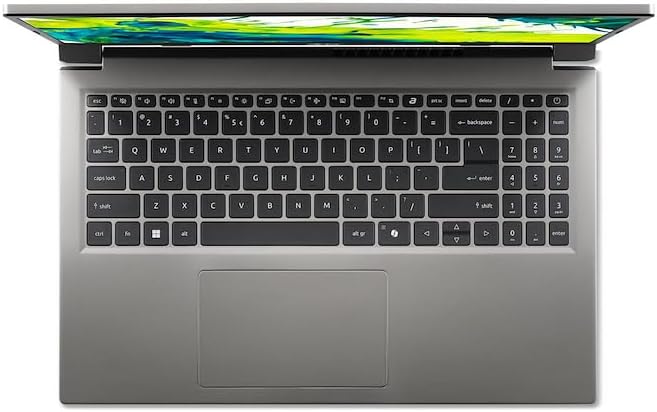
위에서 아래로 view 노트북 키보드와 터치패드.
- 건반: The laptop features a full-size keyboard. Use the function (Fn) key in combination with F-keys for special functions like adjusting brightness, volume, or enabling/disabling Wi-Fi.
- 터치패드: The integrated touchpad supports multi-touch gestures. Tap to click, use two fingers to scroll, and pinch to zoom.
2. 주변기기 연결하기
Your Acer AL15-33P laptop is equipped with various ports for connecting external devices.

Right side of the laptop showing ports including USB and audio jack.

Left side of the laptop showing ports including power, USB-C, HDMI, and USB-A.
- USB 포트: 외장 하드 드라이브, 마우스, 키보드 등의 USB 장치를 연결하세요.
- HDMI 포트 : 더 큰 화면을 원하시면 외부 모니터나 TV를 연결하세요.
- 오디오 잭 : 헤드폰 또는 외부 스피커를 연결합니다.
- USB-C 포트: For data transfer and potentially display output or charging, depending on the specific model configuration.
3. 무선 연결
- 와이파이: 무선 네트워크에 연결하려면 작업 표시줄의 Wi-Fi 아이콘을 클릭하고 네트워크를 선택한 다음 필요한 경우 암호를 입력하십시오.
- 블루투스: 블루투스 장치를 페어링하려면 Windows 설정 > 블루투스 및 장치로 이동하여 블루투스를 켜세요.
4. 전원 관리
- 수면 모드 : 노트북을 저전력 상태로 전환하려면 덮개를 닫거나 시작 메뉴에서 '절전'을 선택하세요.
- 일시 휴업: To turn off the laptop completely, go to the Start menu, click the Power icon, and select 'Shut down'.
- 다시 시작: To restart the laptop, go to the Start menu, click the Power icon, and select 'Restart'.
유지
1. 노트북 청소
- 부드럽고 털이 없는 천을 살짝 사용하세요.amp물이나 화면 세척제를 사용하여 디스플레이를 청소합니다.
- 키보드와 케이스에는 부드러운 천을 사용하세요. 강한 화학 물질이나 연마재는 사용하지 마세요.
- 냉각 통풍구의 먼지를 주기적으로 압축 공기로 제거하여 과열을 방지하십시오.
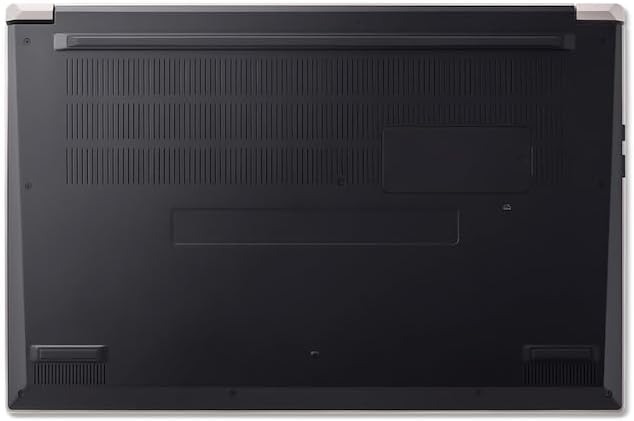
맨 아래 view of the laptop, highlighting the ventilation grilles.
2. 배터리 관리
- 배터리를 자주 완전히 방전시키지 마세요.
- 노트북을 장기간 보관할 경우 배터리가 약 50~70% 정도 충전되어 있는지 확인하세요.
- Operate the laptop in a moderate temperature environment.
3. 소프트웨어 업데이트
최적의 성능과 보안을 유지하려면 운영 체제와 드라이버를 정기적으로 업데이트하십시오. Windows 업데이트는 설정 > Windows 업데이트에서 이용할 수 있습니다.
4. 스토리지 관리
주기적으로 다시view 그리고 불필요한 것을 삭제하세요 files to free up storage space. Utilize cloud storage or external drives for backups of important data.
문제 해결
This section addresses common issues you might encounter with your Acer AL15-33P laptop.
| 문제 | 가능한 해결책 |
|---|---|
| 노트북 전원이 켜지지 않습니다. | Ensure the power adapter is securely connected and the outlet is working. Try a different outlet. If the battery is completely drained, it may take a few minutes to show signs of life after plugging in. |
| 화면이 비어 있거나 검은색입니다. | Check if the laptop is powered on. Try pressing Fn + F6 (or the corresponding display toggle key) to cycle through display modes. Connect an external monitor to check if the issue is with the laptop's screen. |
| Wi-Fi 연결 문제. | Ensure Wi-Fi is enabled (Fn + F3 or check Windows settings). Restart your router and modem. Check if other devices can connect to the Wi-Fi network. Update Wi-Fi drivers. |
| 노트북이 느리게 작동합니다. | Close unnecessary applications. Check Task Manager for processes consuming high CPU or memory. Run a disk cleanup. Ensure Windows and drivers are up to date. |
명세서
The following are key specifications for the Acer AL15-33P model. Note that specific configurations may vary.
- 모델: Acer AL15-33P
- 프로세서: Intel Core i3-N355
- 숫양: 8GB
- 저장: 512GB SSD
- 표시하다: 15.6인치
- 운영 체제: 윈도우 11
- 상표: 에이서
보증 및 지원
Your Acer AL15-33P laptop comes with a standard manufacturer's warranty. Please refer to the warranty card included with your product for specific terms and conditions, including the warranty period and coverage details.
기술 지원, 드라이버 다운로드 또는 서비스 문의 사항은 공식 Acer 지원을 방문하세요. website or contact Acer customer service directly. Have your laptop's serial number ready when contacting support.
Acer 지원 Web대지: www.acer.com/support