
1. 서론
Thank you for choosing the GROWNEER 40W 14-inch Solar Attic Fan. This manual provides essential information for the safe and efficient installation, operation, and maintenance of your new solar attic fan. Please read this manual thoroughly before installation and keep it for future reference.
2. 제품 특징
- 태양열 구동 작동: Equipped with high-efficiency solar panels, the fan converts solar energy into electricity, offering an eco-friendly and energy-saving ventilation solution.
- Low-Light Activation: The fan is designed to activate and operate even in dim light conditions, such as dawn, sunset, or under moonlight, ensuring continuous ventilation.
- 24/7 Operation Capability: Includes a 6.56ft extension adapter for continuous operation, allowing the fan to function throughout the night or during periods of insufficient sunlight.
- 원격 제어: A remote control allows adjustment of settings within a 30-meter range, providing convenient function switching without requiring attic access.
- Smart Temperature and Humidity Control: Features a smart thermostat that automatically activates the fan when indoor humidity exceeds 60% or temperature rises above 26°C (78.8°F), and stops when both conditions are below thresholds for 10 minutes.
- High Performance Ventilation: Powered by a 40W brushless DC motor, offering 4-speed settings (660CFM/1000CFM/1500CFM/2000CFM) suitable for spaces up to 2000 square feet.
- 내구성과 방수성이 뛰어난 디자인: Constructed from high-quality aluminum alloy with an IP68 waterproof rating, designed to withstand harsh weather conditions.
- Critter-Proof Net: Features a built-in protective grille to prevent animal intrusion, ensuring safe and uninterrupted operation.
- 조정 가능한 태양 전지 패널: The solar panel can be adjusted for optimal solar gain, with 360-degree horizontal rotation and 0-75 degree vertical adjustment.
- 다양한 용도: Suitable for attics, sunrooms, warehouses, factories, and farm sheds.
3. 패키지 내용
설치를 진행하기 전에 모든 구성 요소가 있고 손상되지 않았는지 확인하세요.
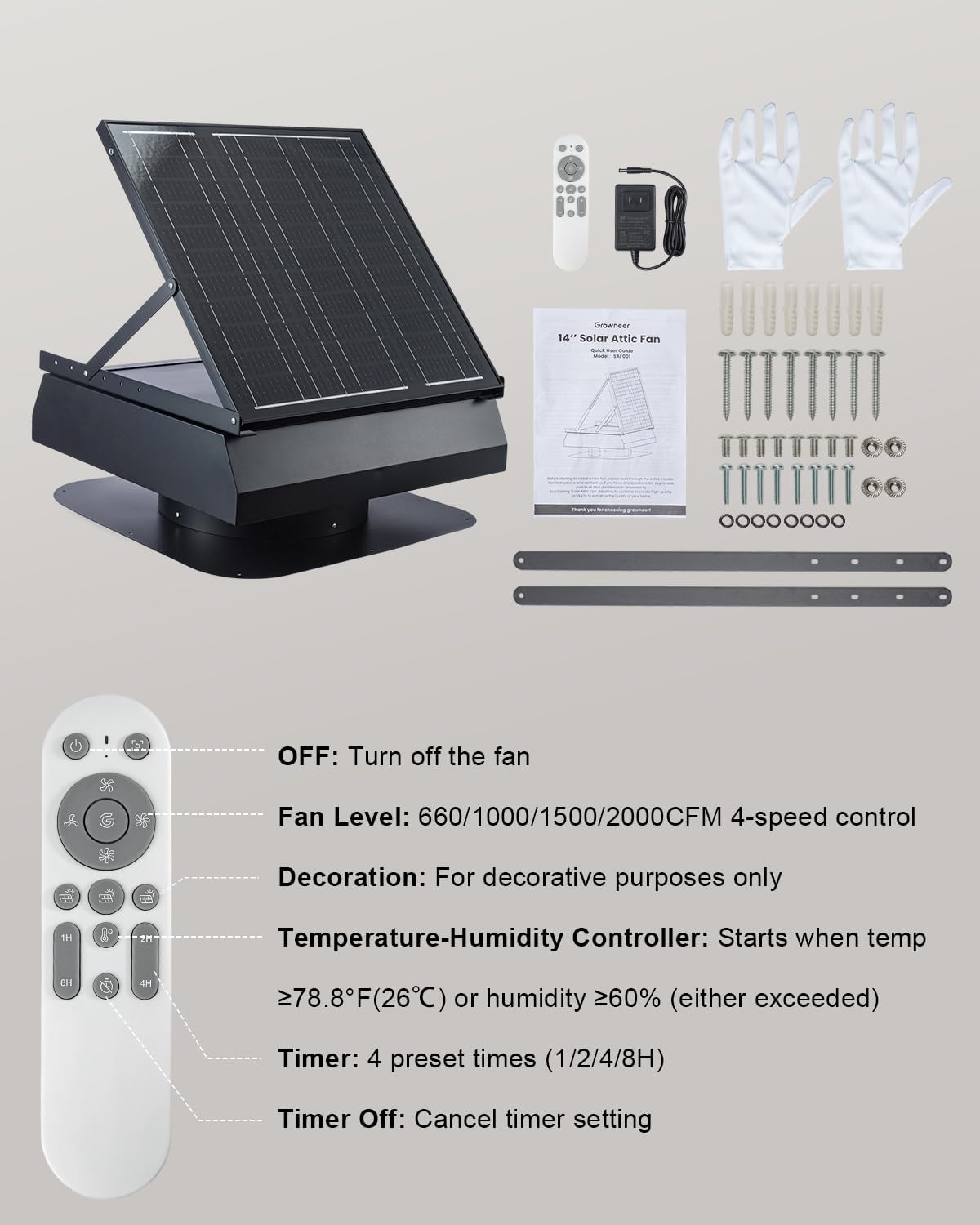
Image: GROWNEER 40W 14-inch Solar Attic Fan, remote control, AC adapter, gloves, user manual, mounting screws, and support brackets.
- Solar Attic Fan Unit
- 원격 제어
- AC Extension Adapter (6.56ft)
- 장갑 한 켤레
- 사용자 설명서
- 장착 나사 및 앵커
- 지지 브래킷
4. 안전 정보
설치 및 작동 중에는 다음 안전 예방 조치를 준수하세요.
- 설치 작업 중에는 항상 장갑과 보안경을 포함한 적절한 개인 보호 장비(PPE)를 착용하십시오.
- Exercise extreme caution when working on roofs. Ensure stable footing and use fall protection if necessary.
- Disconnect any power sources before performing maintenance or adjustments.
- 단락이나 손상을 방지하기 위해 모든 전기 연결부가 단단히 고정되고 방수 처리되었는지 확인하십시오.
- Do not attempt to modify the fan or its components. Unauthorized modifications may void the warranty and pose safety risks.
- 어린이와 애완동물이 설치 장소에 접근하지 못하도록 하세요.
5. 설정 및 설치
Proper installation is crucial for the optimal performance and longevity of your solar attic fan. If you are not familiar with roofing work, it is recommended to consult a professional.
5.1 사이트 선택
- Choose a location on your roof that receives maximum direct sunlight throughout the day.
- Ensure the chosen spot is free from obstructions like trees or chimneys that could cast shadows on the solar panel.
5.2 설치 단계
- 오프닝을 준비하세요: Measure the size of the ventilation opening inside the fan unit. Carefully cut an appropriate-sized circular hole in the roof at the selected location. Ensure the hole is large enough for the fan's base but small enough for the flashing to cover.
- 기지를 확보하세요: Position the fan base over the cut-out hole. Ensure it sits flush with the roof surface. Secure the base using the provided mounting screws, driving them through the pre-drilled holes in the flashing into the roof decking.
- 가장자리 밀봉: Apply a waterproof sealant (e.g., roofing cement or silicone caulk) around the edges of the fan base and over the screw heads to prevent water intrusion.
- 배선 연결: Connect the solar panel cable to the fan unit. Ensure the red wire connects to the red terminal and the blue wire to the blue terminal.
- 태양광 패널 각도 조정: The solar panel can be adjusted for optimal sun exposure. Loosen the adjustment rod, set the panel to the desired angle (0-75 degrees vertical adjustment, 360-degree horizontal rotation), and then tighten the rod to secure it.

Image: Adjustable solar panel for optimal solar gain.
5.3 AC Backup Power (Optional)
For continuous operation during periods of low sunlight or at night, connect the provided AC extension adapter to the fan unit and plug it into a standard wall outlet. The fan will automatically switch between solar and AC power as needed.

Image: Fan operating in solar mode during the day and backup power mode at night or during rain.
6. 사용 설명서
The GROWNEER Solar Attic Fan can be operated manually or automatically using the remote control.
6.1 리모콘 기능

Image: Remote control layout and function descriptions.
- 전원 버튼(켜짐/꺼짐): 팬을 켜거나 끕니다.
- Fan Level (Speed Control): Adjusts the fan speed through 4 levels: 660CFM, 1000CFM, 1500CFM, and 2000CFM.
- Temperature-Humidity Controller: Activates the smart thermostat function. The fan will start when the indoor temperature is ≥ 26°C (78.8°F) or humidity is ≥ 60%. It will stop when both conditions fall below these thresholds for 10 minutes.
- 시간제 노동자: Sets the fan to operate for preset durations (1, 2, 4, or 8 hours).
- 타이머 끄기 : 활성화된 타이머 설정을 모두 취소합니다.

Image: Smart temperature and humidity control in action, indicating activation conditions.
6.2 Solar Mode
When sufficient sunlight is available, the fan will operate using solar power. The fan speed may vary based on the intensity of sunlight.
6.3 Backup Power Mode
If the AC adapter is connected, the fan will automatically switch to AC power when solar power is insufficient (e.g., at night, on cloudy days). In this mode, the fan speed can be manually adjusted via the remote control.

Image: Low-light activation feature, showing fan operation during various dim light scenarios.
7. 유지관리
Regular maintenance ensures optimal performance and extends the lifespan of your GROWNEER Solar Attic Fan.
- 깨끗한 태양광 패널: 태양광 패널 표면을 주기적으로 부드러운 천으로 닦아주세요.amp cloth to remove dust, dirt, or debris that may reduce its efficiency.
- 팬 블레이드 검사: Annually inspect the fan blades for any accumulation of dust or debris. Clean gently if necessary.
- 장애물 확인: Ensure the fan's intake and exhaust areas are free from obstructions (e.g., leaves, bird nests). The built-in critter-proof net helps, but occasional checks are recommended.
- Verify Sealant: Periodically check the sealant around the fan base on the roof for cracks or deterioration. Reapply sealant as needed to maintain a waterproof seal.
- 브러시리스 모터 : The fan features a brushless motor, which requires minimal maintenance and offers a longer product life compared to brushed motors.

Image: Critter-proof net design to prevent animal intrusion.
8. 문제 해결
If you encounter issues with your GROWNEER Solar Attic Fan, refer to the following troubleshooting guide:
| 문제 | 가능한 원인 | 해결책 |
|---|---|---|
| Fan not operating in solar mode. | Insufficient sunlight; solar panel is dirty or obstructed; wiring issue. | Ensure direct sunlight on the panel. Clean the solar panel. Check solar panel cable connections. |
| Fan not operating with AC adapter. | AC adapter not properly plugged in; power outlet issue; adapter malfunction. | Verify AC adapter is securely plugged into both the fan and a working outlet. Test the outlet with another device. |
| 낮은 기류. | Fan speed set too low; obstructions in fan or vents; dirty fan blades. | Increase fan speed using the remote. Clear any obstructions. Clean fan blades. |
| 선풍기가 간헐적으로 작동합니다. | Fluctuating sunlight; smart thermostat activating/deactivating. | This may be normal behavior due to changing light conditions or smart thermostat settings. If persistent, check wiring. |
| 작동 중 비정상적인 소음이 발생합니다. | Debris in fan blades; loose mounting. | Turn off the fan and inspect blades for debris. Ensure the fan is securely mounted. |
이러한 해결 방법을 시도한 후에도 문제가 지속되면 고객 지원팀에 문의하세요.
9. 사양
| 특징 | 세부 사항 |
|---|---|
| 상표 | 재배자 |
| 모델 번호 | AX253601001 |
| 최대 전력 | 40 와트 |
| 공기 흐름 (CFM) | 660 / 1000 / 1500 / 2000 (4 speeds) |
| 적용 범위 | 최대 2000제곱피트 |
| 재료 | Aluminum Alloy, Tempered Glass, Monocrystalline Silicon or Polycrystalline Silicon |
| 방수 등급 | IP68 |
| 특별 기능 | Smart Thermostat, Humidity Control, Low-Light Activation, Remote Control, Adjustable Solar Panel |
| 포함된 구성 요소 | Remote, AC Adapter |
| 커넥터 유형 | MC4 |
10. 보증 및 지원
GROWNEER offers a 12-month warranty for this product. We are committed to ensuring your satisfaction.
For any questions, technical assistance, or warranty claims, please do not hesitate to reach out to our customer support team. We provide 24-hour customer support to assist you.
You can visit the official GROWNEER store for more information: GROWNEER Store