
1. 서론
Thank you for choosing the SYNLETT Wireless Calling System. This system is designed to provide efficient and reliable communication for various environments such as restaurants, cafes, retirement homes, long-term care facilities, hospitals, and small care facilities. It enables caregivers or service staff to monitor calls and alerts effectively.
이 패키지에는 다음이 포함됩니다.
- 1 x Monitoring Unit
- 1 x LCD Pager
- 10개의 호출 버튼
- 1 x Clear Call Button
2. 제품 오버view
The SYNLETT Wireless Calling System consists of a central Monitoring Unit, a portable LCD Pager, and multiple Call Buttons, including a dedicated Clear Call Button. These components work together to ensure prompt communication.
2.1 시스템 구성 요소

영상: 오버view diagram illustrating the SYNLETT Wireless Calling System, showing the Monitoring Unit, LCD Pager, and Call Buttons within a facility layout, highlighting the 660ft range and multi-number display.
감시 부
The central receiver for all call signals. It displays call numbers, provides voice alerts, and allows for system configuration.

영상: 자세한 view of the Monitoring Unit's front panel, showing the digital display for call numbers and control buttons for Call Review, Volume, Language, Replace/Add, Record, and Clear.
LCD Pager
A portable device that receives call alerts from the Monitoring Unit, providing mobility for caregivers.

영상: A close-up of the LCD Portable Pager, displaying its digital screen, Volume, Clear, and Review buttons, and a side view showing the Ring Mode switch (Ring, Vib, Off).
통화 버튼
Small, wireless buttons used by individuals to request service or assistance.

영상: A visual representation of the Call Button, showing its components (button, mounting bracket, lanyard, batteries) and three mounting methods: screw mounting, adhesive patch mounting, and hanging with a strap clip.
통화 버튼 지우기
A dedicated button to remotely clear calls from the system.

영상: A caregiver using the Clear Call Button, demonstrating its function to remotely clear calls, with an inset showing the button itself.
3. 설정 지침
3.1 Monitoring Unit Setup
- 전원 연결: Plug the provided AC adapter into the Monitoring Unit and a power socket. For backup power, insert 4 C-type batteries (not included) into the battery compartment.
- 안테나: Fully extend the antenna on the Monitoring Unit for optimal signal range.
- 놓기: Place the Monitoring Unit on a desk or mount it on a wall. Avoid installing the system on or near metal walls or surfaces, as this can significantly shorten the signal range.
3.2 Call Button Setup
Call buttons offer flexible attachment methods:
- 나사 장착: Use the provided screws to fix the call button's bracket to a wall or desired surface.
- Adhesive Patch Mounting: Apply the adhesive tape to the back of the call button's bracket and attach it to a clean, dry surface.
- 매는 밧줄: Use the provided lanyard to hang the call button around the neck or in an accessible location.

영상: A visual guide showing various mounting and carrying options for the SYNLETT devices, including clip-on belt, desk placement, wall attachment, screw mounting, adhesive mounting, and hanging with a lanyard.
3.3 LCD Pager Setup
- 힘: Ensure the LCD Pager has working batteries installed.
- 링 모드: Use the switch on the side of the pager to select your preferred alert mode: 링 모드 (audible alert), Silent with Vibration, 또는 끄다.
4. 사용 설명서
4.1 Pairing Call Buttons (Initial Programming)
To add new call buttons or replace existing ones:
- On the Monitoring Unit, press the REPLACE/ADD 단추.
- Follow the on-screen prompts to pair the call button. Typically, this involves pressing the call button you wish to pair.
- The Monitoring Unit will confirm successful pairing.
4.2 전화 걸기
To request service or assistance:
- 를 누르세요 부르다 button on any of the Call Buttons.
- The Monitoring Unit will receive the signal, display the call number, and emit a voice alert or chosen tone.
- The LCD Pager will also receive the alert, displaying the call number and vibrating or ringing according to its settings.
4.3 Clearing Calls
Calls can be cleared from the system in several ways:
- Monitoring Unit: 를 누르세요 분명한 button on the front panel of the Monitoring Unit.
- Clear Call Button: 전용 버튼을 누르세요 분명한 Call Button to remotely clear active calls.
- LCD Pager: 를 누르세요 분명한 button on the LCD Pager to acknowledge and clear the alert on the pager itself.
4.4 재view전화 걸기
다시view recent calls:
- Monitoring Unit: 를 누르세요 다시 전화해VIEW button to cycle through the latest 6 calls received.
- LCD Pager: 를 누르세요 REVIEW button on the pager to see recent call alerts.
4.5 Adjusting Settings (Monitoring Unit)
- 용량: 사용하세요 용량 buttons to adjust the alert volume (3 levels available).
- 언어: 를 누르세요 언어 button to select from 7 available languages for voice alerts (English, Spanish, French, Japanese, Korean, Mandarin, Cantonese).
- 경고음: The system offers 8 different alert tones/chimes. Select one that suits your environment.

영상: A visual display of the Monitoring Unit's multi-lingual voice alert feature, listing 7 languages (English, Spanish, French, Japanese, Korean, Mandarin, Cantonese) and 8 chimes/alarm modes.
5. 주요 특징
- Portable Paging System: The system includes a portable LCD Pager, allowing caregivers freedom of movement while remaining responsive. Ideal for various settings including nurses' stations, emergency rooms, clinics, hospitals, and care facilities.
- Multiple Languages with Number Call Out: Features 7 languages and 8 distinct alert tones across 3 volume levels, enabling customization to suit different environments and preferences.
- 긴 작동 범위: Offers an impressive operating range of up to 660 feet in open areas, covering the functional requirements of most facilities. The signal can reliably transmit through multiple floors and walls. Note: Fully extend the antenna for optimal range. Metal walls or surfaces can significantly reduce signal range.
- Durable, Expandable, and Flexible: Capable of pairing with up to 255 call buttons. Call buttons offer flexible attachment methods including lanyards, adhesive tape, or screws. Functions effectively as a medical alert system for elderly care or a paging system in hospitality.
- Easy Setup and Simple to Use: All functional buttons are conveniently located on the front of the Monitoring Unit, simplifying setup whether mounted on a wall or placed on a desk.
6. 유지관리
- 청소: 부드럽고 마른 천으로 제품을 닦으십시오. 연마성 세척제나 용제를 사용하지 마십시오.
- 배터리 교체: Replace batteries in call buttons and the LCD Pager as needed. Refer to the specific component for battery type.
- 일반 관리 : Keep the system away from extreme temperatures, direct sunlight, and moisture.
7. 문제 해결
- No Signal / Short Range:
- Ensure the Monitoring Unit's antenna is fully extended.
- Relocate the Monitoring Unit away from metal obstructions or walls.
- Check batteries in call buttons and the LCD Pager.
- No Sound / Incorrect Alert:
- Adjust the volume on the Monitoring Unit and LCD Pager.
- Verify language and alert tone settings on the Monitoring Unit.
- Check the ring mode switch on the LCD Pager.
- Call Not Clearing:
- Ensure the CLEAR button on the Monitoring Unit or the dedicated Clear Call Button is pressed firmly.
- Confirm the Clear Call Button is paired correctly.
8. 사양
| 특징 | 사양 |
|---|---|
| Operating Range (Open Area) | 최대 660피트(약 200미터) |
| LCD Pager Range | Up to 300 feet (approx. 91 meters) from CMU |
| 확장성 | Supports up to 255 Call Buttons |
| Voice Alert Languages | 7 (English, Spanish, French, Japanese, Korean, Mandarin, Cantonese) |
| Alert Tones/Chimes | 8가지의 다양한 톤 |
| Monitoring Unit Dimensions (W x H x D) | 8.07 in x 6.70 in (25.20 in with extended antenna) x 2.16 in |
| LCD Pager Dimensions (W x H x D) | 3.3인치 x 2.63인치 x 1.03인치 |
| Call Button Dimensions (Diameter x Depth) | 2.17인치 x 0.79인치 |
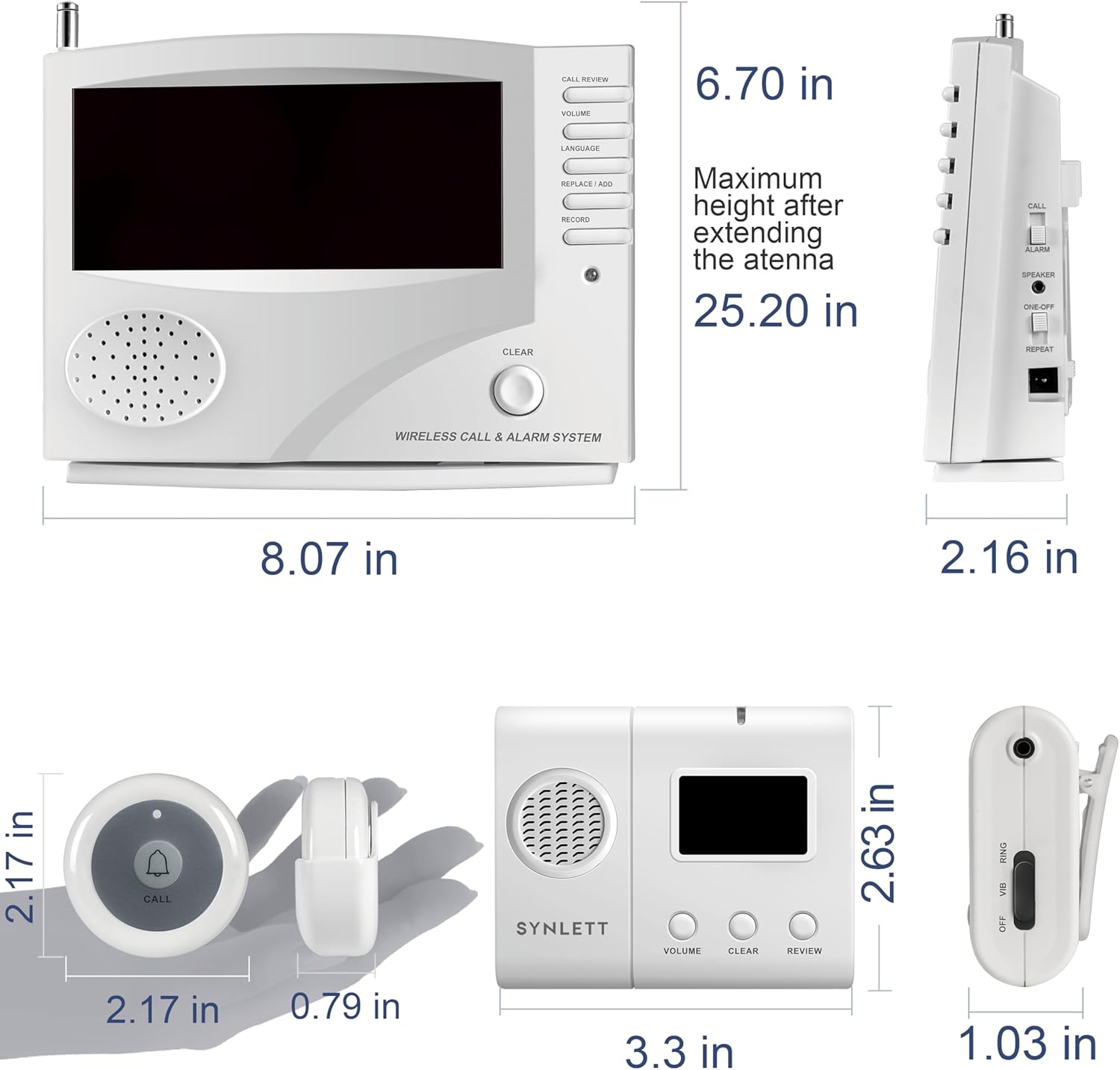
영상: A diagram showing the precise dimensions of the Monitoring Unit, LCD Pager, and Call Button in inches.
9. 보증 및 지원
For warranty information and technical support, please refer to the contact details provided with your purchase or visit the official SYNLETT web사이트. 구매 증빙 자료로 구매 영수증을 보관하세요.