
1. 서론
Welcome to the user manual for your new Nubia Flip 5G smartphone. This guide provides essential information to help you set up, operate, and maintain your device. The Nubia Flip 5G combines a compact, foldable design with advanced features, including a dual AMOLED display, a versatile external screen, and AI-powered functionalities.
Key features of your Nubia Flip 5G include:
- Dual AMOLED Displays: Enjoy a fluid 120 Hz refresh rate on both the 6.9-inch internal display and the 3-inch external display.
- Fully Functional External Display: Access 100% of your applications directly from the external screen without unfolding the phone.
- 고급 카메라 시스템: Capture high-quality photos with the 50 MP main camera, supported by AI features and 4K stabilized video recording. Utilize the external screen for high-resolution selfies.
- AI-Powered Enhancements: Benefit from features like AI Magic Photos for editing and live translation for voice calls.
- 오래 지속되는 배터리: Equipped with a 4325 mAh battery and 33W fast charging, allowing 50% charge in under 20 minutes.
2. 설정
2.1. 언박싱 및 초기 검사
모든 품목을 포장에서 조심스럽게 꺼내세요. 다음 구성품이 있는지 확인하세요.
- Nubia Flip 5G Smartphone
- USB 케이블
- 전화 케이스
- 보호 필름
기기에 눈에 띄는 손상이 있는지 검사하십시오. 구성품이 누락되었거나 손상된 경우 고객 지원팀에 문의하십시오.
2.2. SIM 카드 삽입
- 장치의 전원을 끕니다.
- 휴대폰 측면에서 SIM 카드 트레이를 찾으세요.
- Use the SIM ejector tool (not included, typically found with your SIM card) to open the tray.
- 나노 SIM 카드를 금색 접촉면이 아래쪽을 향하도록 트레이에 넣어주세요. 이 기기는 듀얼 SIM을 지원합니다.
- 트레이를 조심스럽게 전화기에 다시 삽입하세요.
2.3. 전원 켜기 및 초기 구성
- Press and hold the Power button until the Nubia logo appears.
- 화면의 지시에 따라 언어를 선택하고, Wi-Fi 네트워크에 연결하고, Google 계정을 설정하세요.
- 지문 잠금 해제 및 얼굴 인식과 같은 보안 기능을 설정하는 방법에 대한 안내를 받게 됩니다.
3. 장치 작동
3.1. Understanding the Dual Display

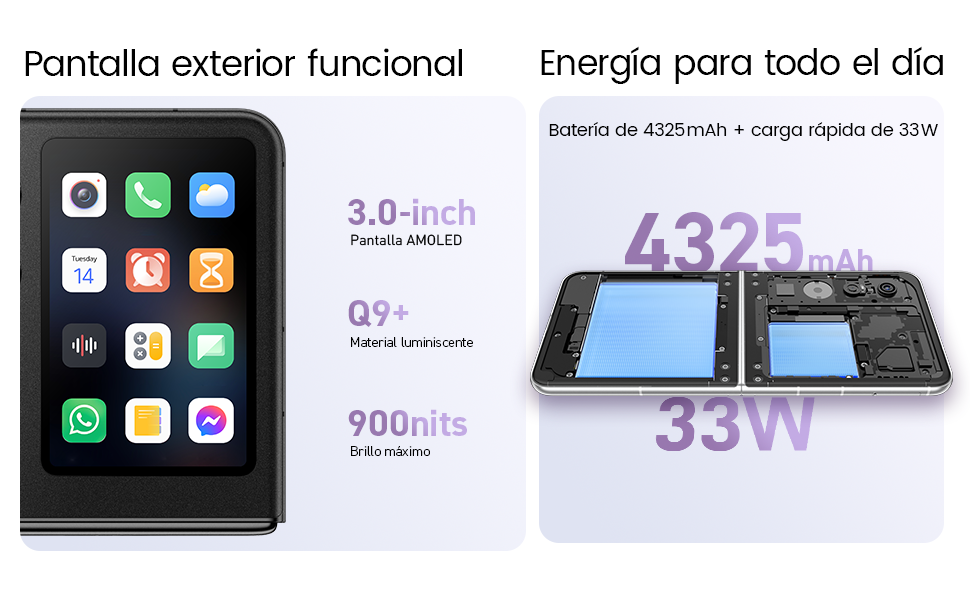
Your Nubia Flip 5G features two displays: a large 6.9-inch internal foldable AMOLED screen and a compact 3-inch external AMOLED screen. Both screens offer a smooth 120 Hz refresh rate for an enhanced visual experience.
- 내부 디스플레이: Ideal for immersive content consumption, gaming, and detailed tasks.
- 외부 디스플레이: Provides quick access to notifications, widgets, music controls, and even full applications without needing to unfold the phone. Swipe left or right to navigate through different functions.
3.2. 카메라 기능

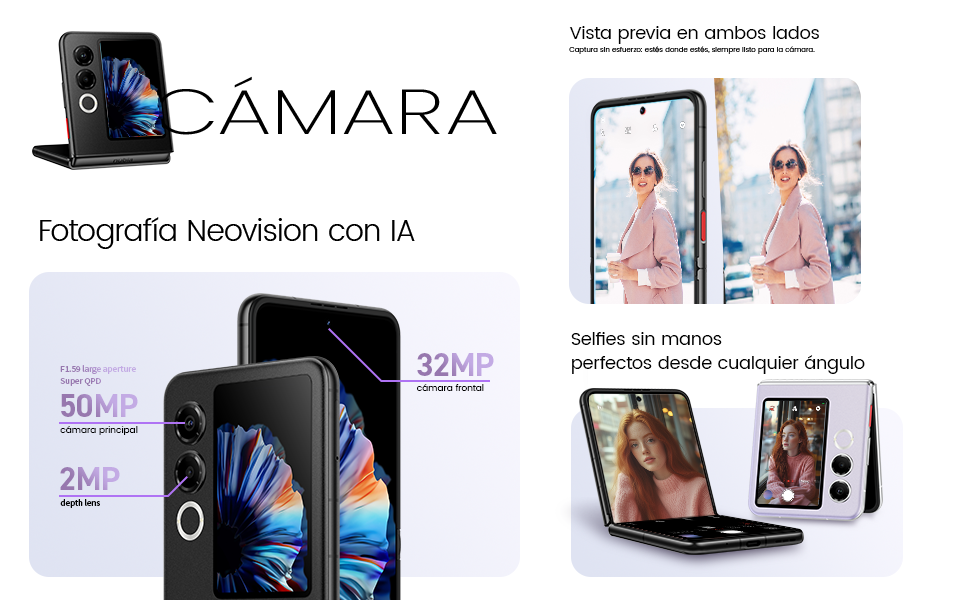
The Nubia Flip 5G is equipped with a powerful 50 MP main camera and a secondary portrait camera, enhanced with AI for superior image quality. The 32 MP front camera ensures clear video calls and selfies.
- High-Resolution Selfies: Use the external screen as a viewfinder to take selfies with the high-quality rear cameras.
- 핸즈프리 사진 촬영: Partially fold the phone and place it on a flat surface to capture photos and videos without needing a tripod.
- 4K Stabilized Video: Record smooth, high-definition videos with advanced stabilization.
3.3. AI 기능
The device integrates several AI functions to enhance user experience:
- AI Magic Photos: Utilize AI for intelligent photo editing and enhancement.
- Live Call Translation: Experience real-time translation during voice calls, breaking down language barriers.
3.4. 비디오 오버view
공식 제품 영상 쇼asing the Nubia Flip 5G's design, versatile external display, hands-free selfie capabilities, and long-lasting battery.
4. 배터리 및 충전

The Nubia Flip 5G is equipped with a 4325 mAh battery, designed to provide extended usage. It supports 33W fast charging, allowing you to quickly replenish the battery. A 50% charge can be achieved in less than 20 minutes.
- Use the provided USB cable and a compatible 33W charger for optimal fast charging.
- Avoid using non-certified chargers or cables to prevent damage to the device.
5. 유지관리
Proper care ensures the longevity and optimal performance of your Nubia Flip 5G.
- 스크린 관리: The foldable screen is delicate. Avoid pressing hard on the screen, especially near the crease. Keep sharp objects away from the display.
- 청소: 부드럽고 보풀이 없는 천을 사용하여 화면과 본체를 닦으세요. 강한 화학 물질이나 연마재는 사용하지 마세요.
- 방수 기능: While the device may have some level of splash resistance, it is not fully waterproof. Avoid submerging the phone in water or exposing it to excessive moisture.
- 온도: 권장 작동 온도 범위 내에서 기기를 사용하십시오. 극심한 고온 또는 저온은 배터리 수명과 성능에 영향을 미칠 수 있습니다.
- 소프트웨어 업데이트: Regularly update your device's software to ensure you have the latest features, security patches, and performance improvements.
6. 문제 해결
If you encounter issues with your Nubia Flip 5G, try the following common troubleshooting steps:
- 장치가 켜지지 않음: 배터리가 충전되었는지 확인하세요. 충전기를 연결하고 몇 분 정도 기다린 후 다시 전원을 켜보세요.
- 화면 응답 없음: Restart the device by pressing and holding the Power button. If unresponsive, perform a forced restart (refer to device-specific instructions if standard restart fails).
- 앱 충돌: 문제가 있는 앱의 캐시를 삭제하거나 앱을 다시 설치하세요. 기기의 소프트웨어가 최신 버전인지 확인하세요.
- 불쌍한 배터리 수명: Adjust screen brightness, disable unnecessary background apps, and turn off features like GPS or Bluetooth when not in use.
- 연결 문제(Wi-Fi/Bluetooth): Wi-Fi 또는 Bluetooth를 껐다가 켜세요. 라우터나 연결된 기기를 다시 시작하세요.
- 과열: Close demanding applications, reduce screen brightness, and avoid direct sunlight. If overheating persists, contact support.
For more complex issues, refer to the official Nubia support web사이트를 방문하거나 고객 서비스에 문의하세요.
7. 사양
Below are the detailed technical specifications for the Nubia Flip 5G (Model: 123447101014):
| 특징 | 사양 |
|---|---|
| 운영 체제 | 안드로이드 14 |
| 품목 무게 | 193g |
| 패키지 크기 | 21.1 x 9 x 3.2cm; 193그램 |
| 배터리 | 1C 배터리가 필요합니다. (포함) |
| 모델 번호 | 123447101014 |
| 연결 기술 | 블루투스, NFC, USB, Wi-Fi |
| GPS | 진실 |
| 특별 기능 | Stereo speakers, Mobile Hotspot capability, Dual SIM, Built-in GPS |
| 기타 디스플레이 기능 | 무선 전화 |
| 휴먼 인터페이스 입력 | 터치스크린 |
| 스캐너 해상도 | 2790 x 1188 |
| 기타 카메라 기능 | 전면, 후면 |
| 오디오 잭 | 알려지지 않은 |
| 폼 팩터 | 접이식 화면 |
| 색상 | 검은색 |
| 배터리 전력 정격 | 4325mAh |
| 전화 통화 시간 | 24시간 |
| RAM 크기 | 8GB (XNUMX기가바이트) |
| CPU 모델 | 미디어텍 디멘시티 9000 |
| CPU 속도 | 2GHz |
| 메모리 용량 | 8GB (XNUMX기가바이트) |
| 화면 크기 | 6.9 인치 |
| 새로 고침 빈도 | 120Hz |
| 모델명 | ZTE Nubia Flip |
8. 보증 및 지원
Your Nubia Flip 5G smartphone comes with a standard manufacturer's warranty. Please refer to the warranty card included in your product packaging for specific terms and conditions, including coverage duration and claim procedures.
For technical support, service, or additional information, please visit the official Nubia website or contact their authorized customer service channels. Keep your purchase receipt and device serial number handy when seeking support.